
 stm32cube-ai-studio

STM32Cube AI Studio Installation 
Required Software 
Supported OS: Windows (10, 11), Linux (Ubuntu 22.04 LTS and later), macOS (Ventura and later).
1. Download STM32Cube AI Studio and install its dependencies:
Component
Minimum version
Purpose
6.16.0
Project configuration and code generation
2.2.0
AI model conversion, core technology
2.19.0
Device programming and validation
Note
From STM32Cube AI Studio v1.2.0 onwards, the ST Edge AI Core installer is included in the STM32Cube AI Studio installer; no need to download it separately.
IDE / Toolchain — choose one:
IDE / Toolchain
Minimum version
Notes
2.0.0
Recommended, free
Arm v9.2x
License required
uV4
License required
Dependency verification 
After installation, STM32Cube AI Studio auto-detects the dependency paths. Open Settings to verify they are correct, and fix any that were not detected:
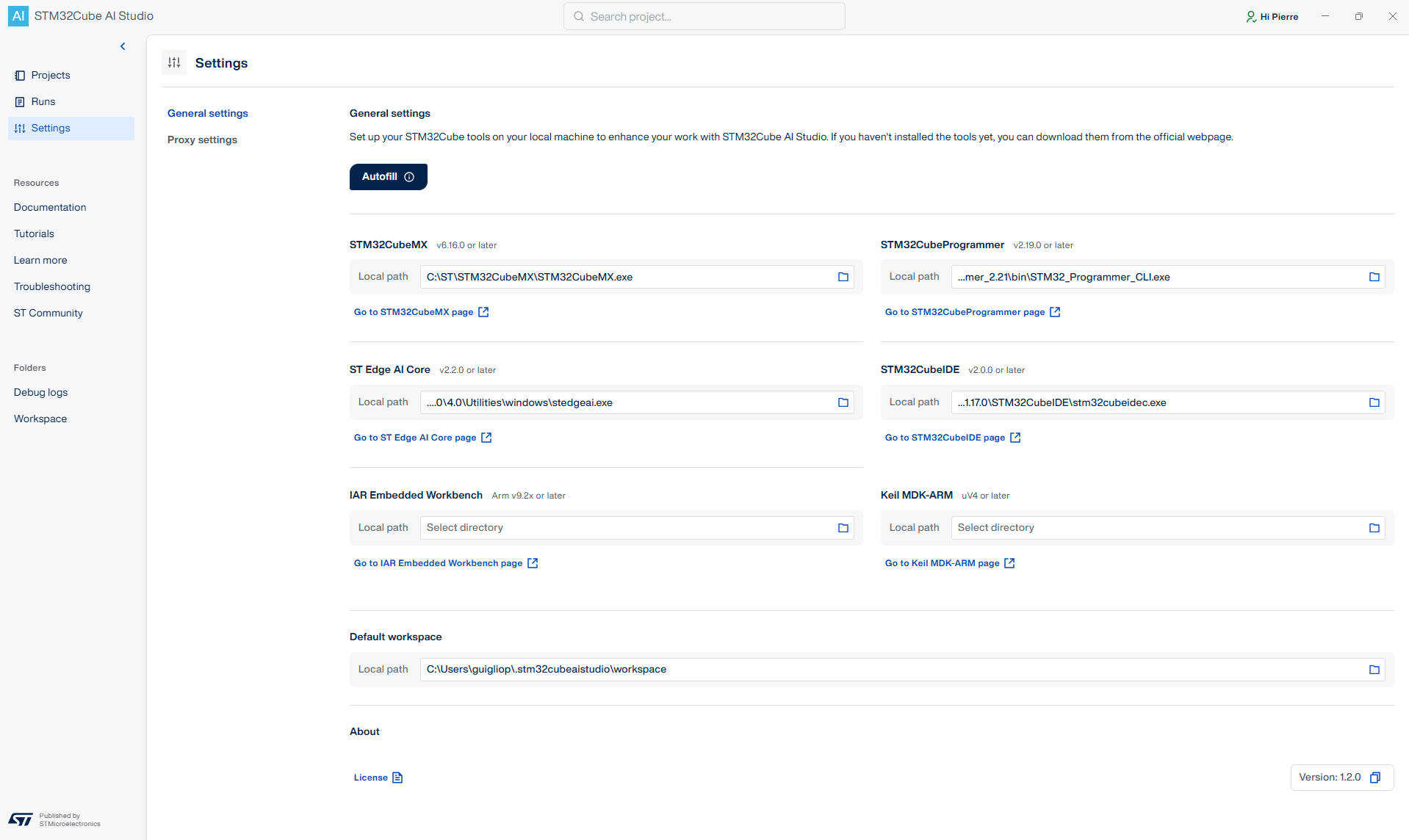
|
Dependency |
Expected executable |
|---|---|
|
STM32CubeMX |
|
|
STM32CubeProgrammer |
|
|
STM32CubeIDE |
|
|
ST Edge AI Core |
|