
 Open Bootloader

How to use? 
This page explains how to configure, initialize, and use open bootloader in two integration models:
manual integration, without STM32CubeMX2
generated integration, with STM32CubeMX2
How to configure OpenBootloader without STM32CubeMX2? 
To configure and run OpenBootloader without STM32CubeMX2:
Copy OpenBootloader sources into your project (or use as submodule).
A clean, manual layout can look like this:
ProjectRoot/
├─ OpenBootloader/
│  ├─ Core/
│  │  ├─ openbl_core.c
│  │  ├─ openbl_commands.h
│  │  ├─ openbl_core.h
│  │  └─ openbl_types.h
│  ├─ Interfaces/
│  │  ├─ stm32xyxx/
│  │  │  ├─ openbl_common.c
│  │  │  ├─ openbl_fdcan.h
│  │  │  ├─ openbl_hw_defs.h  #  HW configuration
│  │  │  ├─ openbl_itf_engibytes.c
│  │  │  ├─ openbl_itf_engibytes.h
│  │  │  ├─ openbl_itf_flash.c
│  │  │  ├─ openbl_itf_flash.h
│  │  │  ├─ openbl_itf_optionbytes.c
│  │  │  ├─ openbl_itf_optionbytes.h
│  │  │  ├─ openbl_itf_otp.c
│  │  │  ├─ openbl_itf_otp.h
│  │  │  ├─ openbl_itf_ram.c
│  │  │  ├─ openbl_itf_ram.h
│  │  │  ├─ openbl_itf_read_only.c
│  │  │  ├─ openbl_itf_read_only.h
│  │  │  ├─ openbl_itf_systemmemory.c
│  │  │  ├─ openbl_itf_systemmemory.h
│  │  │  ├─ openbl_iwdg.h
│  │  │  ├─ openbl_itf_iwdg.c
│  │  │  ├─ openbl_itf_iwdg.h
│  │  │  ├─ openbl_itf_spi.c
│  │  │  ├─ openbl_itf_spi.h
│  │  │  ├─ openbl_itf_usart.c
│  │  │  ├─ openbl_itf_usart.h
│  │  │  ├─ openbl_itf_usb.c
│  │  │  └─ openbl_itf_usb.h
│  │  │
│  │  ├─ openbl_itf_common.c
│  │  ├─ openbl_itf_common.h
│  │  ├─ openbl_itf_fdcan.c
│  │  ├─ openbl_itf_fdcan.h
│  │  ├─ openbl_itf_i2c.c
│  │  ├─ openbl_itf_i2c.h
│  │  ├─ openbl_itf_iwdg.c
│  │  ├─ openbl_itf_iwdg.h
│  │  ├─ openbl_itf_spi.c
│  │  ├─ openbl_itf_spi.h
│  │  ├─ openbl_itf_usart.c
│  │  ├─ openbl_itf_usart.h
│  │  ├─ openbl_itf_usb.c
│  │  └─ openbl_itf_usb.h
│  │
│  └─ Modules/
│     ├─ fdcan/
│     │  ├─ openbl_fdcan_cmd.c
│     │  └─ openbl_fdcan_cmd.h
│     ├─ i2c/
│     │  ├─ openbl_i2c_cmd.c
│     │  └─ openbl_i2c_cmd.h
│     ├─ mem/
│     │  ├─ openbl_mem.c
│     │  └─ openbl_mem.h
│     ├─ spi/
│     │  ├─ openbl_spi_cmd.c
│     │  └─ openbl_spi_cmd.h
│     ├─ usart/
│     │  ├─ openbl_usart_cmd.c
│     │  └─ openbl_usart_cmd.h
│     └─ usb/
│        ├─ openbl_usb_cmd.c
│        └─ openbl_usb_cmd.h
│
├─ usbx/              # USBX middleware
│
├─ generated/         # user files templates
│
└─ Src/ / Inc/
   ├─ main.c
   └─ example.c       # your example body
Key points:
Compile All core OpenBootloader sources.
Adapt openbl_hw_defs.h and define all required macros manually.
add USBX middleware in case USB DFU is used by open bootloader.
Example:
#ifndef OPENBL_HW_CONF_H
#define OPENBL_HW_CONF_H

/* Includes ------------------------------------------------------------------*/
/* Exported types ------------------------------------------------------------*/
/* Exported constants --------------------------------------------------------*/


/* -------------------------------- Device ID ------------------------------- */
#define OPENBL_DEVICE_ID_MSB              0x04U                       /* MSB byte of device ID */
#define OPENBL_DEVICE_ID_LSB              0x4FU                       /* LSB byte of device ID */


/* -------------------------- Definitions for Memories ---------------------- */
#define OPENBL_FLASH_MEM_SIZE             FLASH_SIZE                  /* Size of user Flash in bytes */
#define OPENBL_FLASH_START_ADDRESS        FLASH_BASE
#define OPENBL_FLASH_END_ADDRESS          (FLASH_BASE + OPENBL_FLASH_MEM_SIZE)

#define OPENBL_OTP_SIZE                   FLASH_OTP_SIZE              /* Size of OTP area in bytes */
#define OPENBL_OTP_START_ADDRESS          FLASH_OTP_BASE
#define OPENBL_OTP_END_ADDRESS            (OPENBL_OTP_START_ADDRESS + OPENBL_OTP_SIZE)

#define OPENBL_ICP_SIZE                   FLASH_SYSTEM_SIZE           /* Size of ICP area in bytes */
#define OPENBL_ICP_START_ADDRESS          FLASH_SYSTEM_BASE
#define OPENBL_ICP_END_ADDRESS            (OPENBL_ICP_START_ADDRESS + OPENBL_ICP_SIZE)

#define OPENBL_DEFAULT_MEM                OPENBL_FLASH_START_ADDRESS  /* Used for Erase and Write protect CMDs */

#define OPENBL_RAM_SIZE                   (SRAM1_SIZE + SRAM2_SIZE)   /* Size of SRAM in bytes */
#define OPENBL_RAM_START_ADDRESS          SRAM1_BASE
#define OPENBL_RAM_END_ADDRESS            (OPENBL_RAM_START_ADDRESS + OPENBL_RAM_SIZE)

#define OPENBL_OB_START_ADDRESS           0x40022050U                 /* Option bytes (OB) registers start address */

#define OPENBL_OB1_SIZE                   120U                        /* Size of OB1 area in bytes */
#define OPENBL_OB1_START_ADDRESS          OPENBL_OB_START_ADDRESS
#define OPENBL_OB1_END_ADDRESS            (OPENBL_OB1_START_ADDRESS + OPENBL_OB1_SIZE)

#define OPENBL_OB2_SIZE                   36U                         /* Size of OB2 area in bytes */
#define OPENBL_OB2_START_ADDRESS          (OPENBL_OB_START_ADDRESS + 0x54U)
#define OPENBL_OB2_END_ADDRESS            (OPENBL_OB2_START_ADDRESS + OPENBL_OB2_SIZE)

#define OPENBL_OB3_SIZE                   24U                         /* Size of OB3 area in bytes */
#define OPENBL_OB3_START_ADDRESS          (OPENBL_OB_START_ADDRESS + 0x98U)
#define OPENBL_OB3_END_ADDRESS            (OPENBL_OB3_START_ADDRESS + OPENBL_OB3_SIZE)

#define OPENBL_OB4_SIZE                   24U                         /* Size of OB4 area in bytes */
#define OPENBL_OB4_START_ADDRESS          (OPENBL_OB_START_ADDRESS + 0x198U)
#define OPENBL_OB4_END_ADDRESS            (OPENBL_OB4_START_ADDRESS + OPENBL_OB4_SIZE)

#define OPENBL_RO_SIZE                    1536U                       /* Size of RO area in bytes */
#define OPENBL_RO_START_ADDRESS           UID_BASE
#define OPENBL_RO_END_ADDRESS             (OPENBL_RO_START_ADDRESS + OPENBL_RO_SIZE)

#define OPENBL_EB_SIZE                    (1U * 1024U)                /* Size of Engi bytes area in bytes */
#define OPENBL_EB_START_ADDRESS           0x40022400U
#define OPENBL_EB_END_ADDRESS             (OPENBL_EB_START_ADDRESS + OPENBL_EB_SIZE)
#endif

#endif /* OPENBL_HW_CONF_H */
This file completely replaces any STM32CubeMX2-generated configuration.
Add include paths for:
open_bootloader\coreopen_bootloader\interfacesopen_bootloader\modules
Set preprocessor flags in your build system or IDE:
Options:
UX_INCLUDE_USER_DEFINE_FILE,USBD_INCLUDE_USER_DESC_CONFIG_FILE, etc.
In your source files, include OpenBootloader headers:
#include "openbl_conf.h"Use the files under templates as references when creating a manual integration: * for example:
Interfaces/Templates/flashInterfaces/Templates/usarttemplates/mx_openbl_user.htemplates/mx_openbl_app.ctemplates/mx_openbl_app.h
In
main(),include mx_system.h to initialize the ressources FLASH, USART…, then start by callingapp_init(); app_process(); This function is used to select which protocol will be used when communicating with the host.
Important
The STM32Cubeprogrammer is the host used to communicate with open bootlodaer using USART, I2C, SPI, Usb.
How to configure OpenBootloader with STM32CubeMX2? 
This section explains how to configure OpenBootloader using STM32CubeMX2 and the OpenBootloader pack.
The generated setup maps the configuration panels to:
a generated
mx_openbl_user.hfilegenerated open bootloader application code
This approach is generally preferred when the project already uses STM32CubeMX2 for board configuration, middleware selection, and code generation.
Prerequisites and Project Creation
Install ** STM32CubeMX2 tool**
Create a new STM32 project:
Select your MCU or Discovery/Nucleo board.
Configure system clock (RCC) as usual.
enable the hardware resources required by the target flash, Ips
enable USBX if the project will use USB DFU interface
Add OpenBootloader pack in STM32CubeMX2
In the configuration tree, go to Middleware:
Select the OpenBootloader pack from Middleware list, see following figures
Activate OpenBootloader from the OpenBootloader pack.
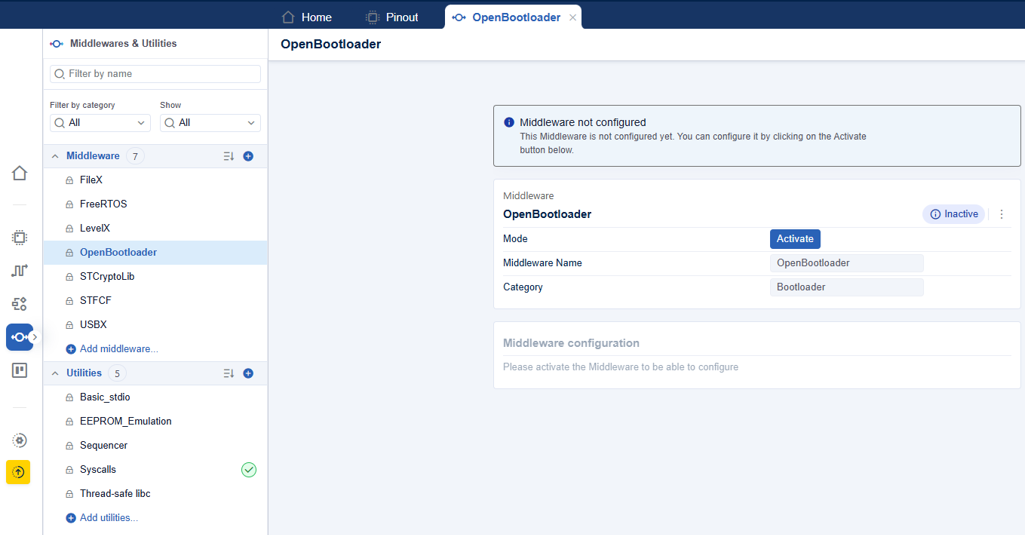
OpenBootloader middleware selection 
Once activated, you see a OpenBootloader interface with the following configuration layout:
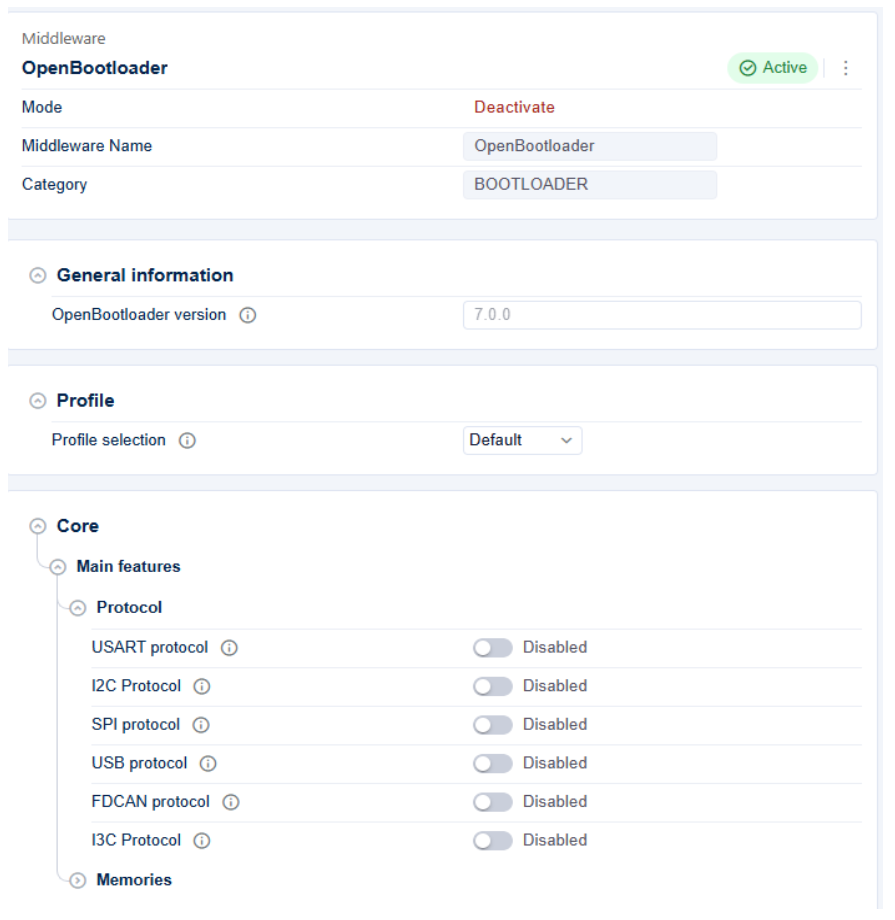
OpenBootloader interface 
OpenBootloader Core Configuration in STM32CubeMX2
Most options that are normally defined in OpenBootloaderConfig.h are instead configured through the STM32CubeMX2 GUI.
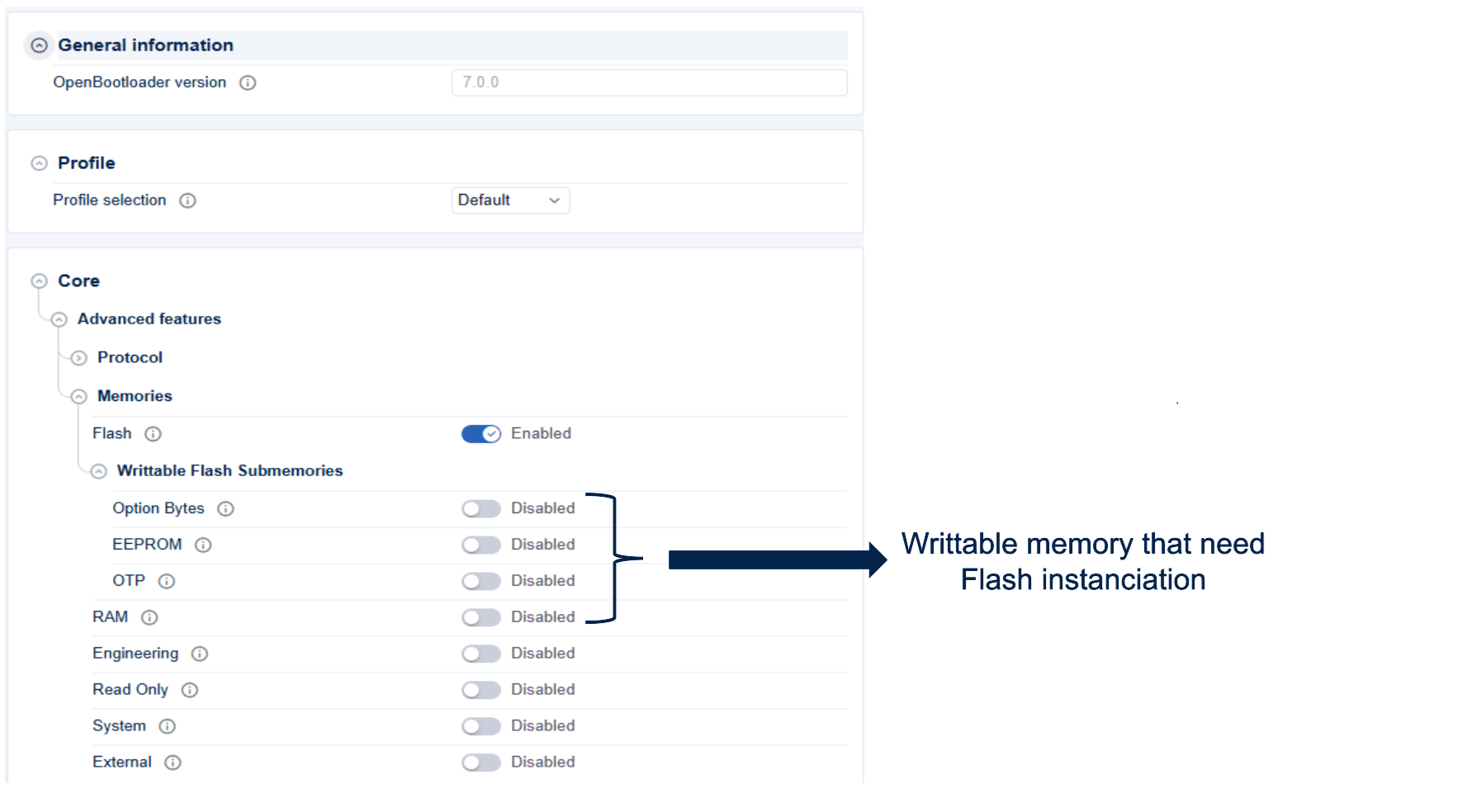
OpenBootloader Core menu interface 
Protocol choice
The OpenBootloader Protocol menu is as shown in the following figure:
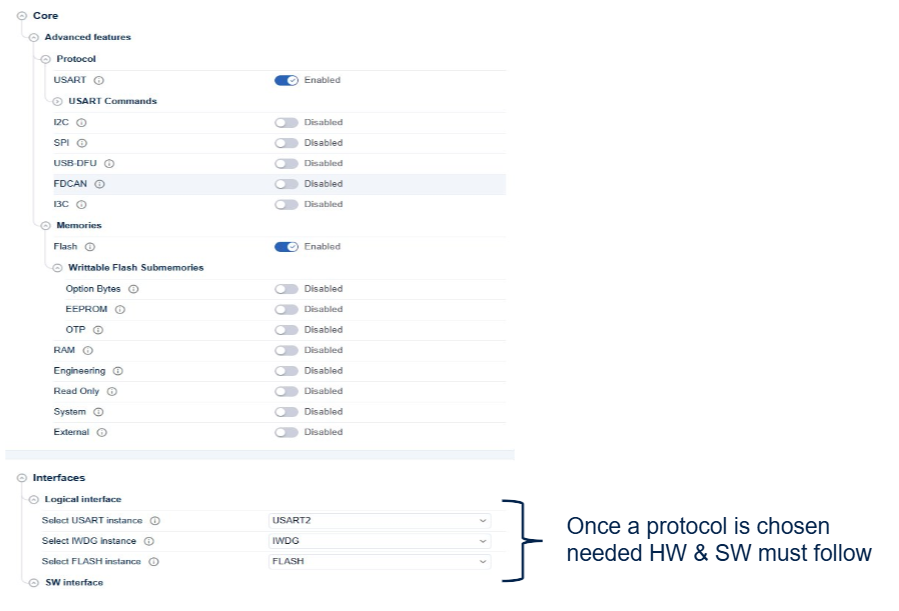
OpenBootloader Protocol menu interface 
In the OpenBootloader / Core/Protocol panel, configure:
Protocol command selection:
Enable or disable thelist of the protocol commands.
The commands are aligned with last protocol version as described in protocols application note.
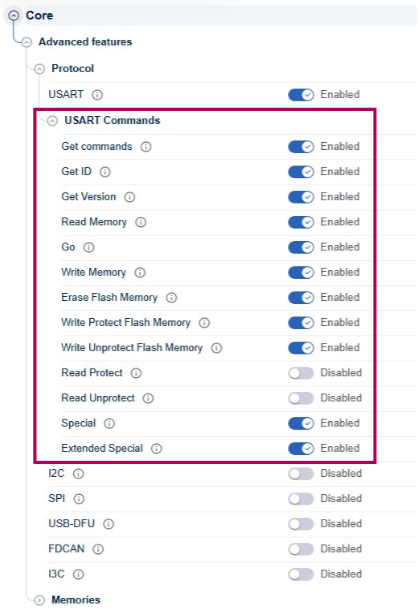
OpenBootloader command menu for selected interface 
Advanced Features:
Enable or disable the list of the memories to use on OpenBootloader.
Once a memory activaed, all hardware specifications are inherited like size/start adress…
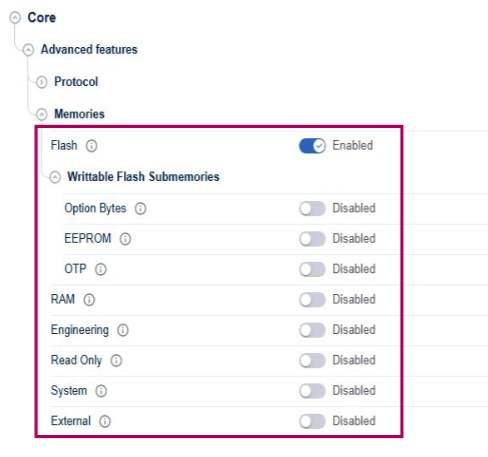
OpenBootloader memories menu for selected interface 
Hardware Interfaces:
Select instance of the seleted protocol such as USART2/I23.
Select IWDG as needed by open bootloader for any selected protocol.
Select FLASH including Options bytes, EEPROM, OTP
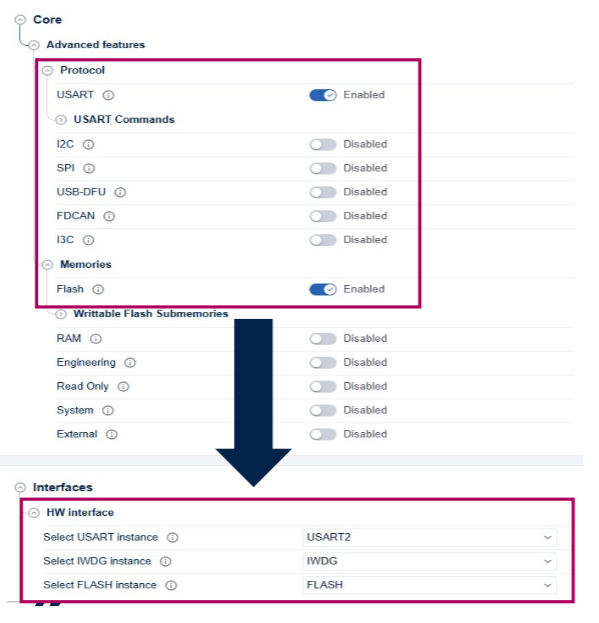
OpenBootloader software menu 
Software Interfaces:
In case USB-DFU is enabled as protocol required for open Bootloader, USBX MW is required.
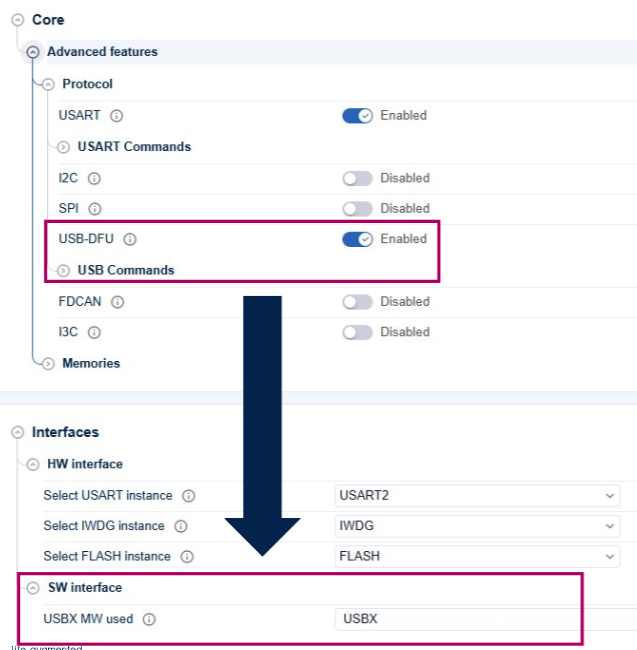
OpenBootloader Software interface menu 
- Open bootloader configuration alignement with bootloader
The OpenBootloader configuration is aligned with bootloader needs and an error can be generated to guide the user. Example: USART protocol is implemented using autobaudrate detection.
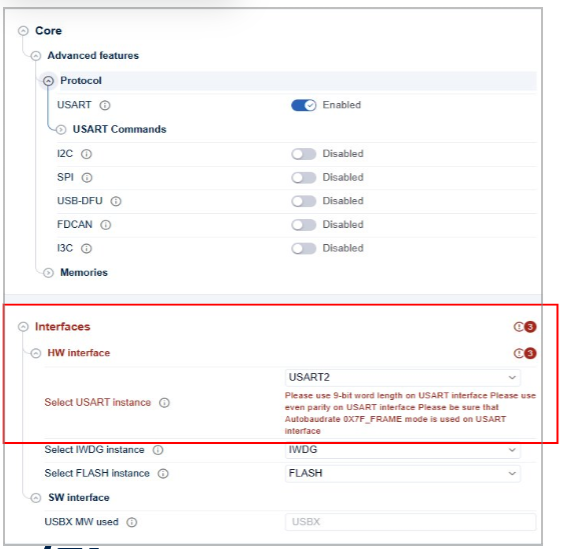
OpenBootloader Error menu interface 
How to initialize OpenBootloader without STM32CubeMX2? 
Without STM32CubeMX2, the application is responsible for calling the open bootloader entry functions in the correct order and with the correct parameters.
After configuration, verify:
Include paths
Your compiler must see:
The generated configuration and application files:
OpenBootloader core:
OpenBootloader/core.
OpenBootloader modules:
OpenBootloader/modules(e.g. ``, ``).
OpenBootloader interfaces:
OpenBootloader/Interfaces(e.g. ``, ``).
Source files to compile
Ensure your build includes:
OpenBootloader ressorsseces sources:
flash.c
Application glue:
mx_openbl.c(from the projectSrc/folder).
OpenBootloader usage
In user code, include OpenBootloader headers normally:
#include "OpenBootloader.h"
Then:
Initialize hardware (HAL, clocks, peripherals).
Create application using OpenBootloader APIs (in
mx_openbl.cor your own files).Once the OpenBootloader interface, system, and memory are configured, the next step is to set up OpenBootloader objects according to the final application.
How to initialize OpenBootloader with STM32CubeMX2? 
With STM32CubeMX2, Open bootloader initialization is driven by the
Applicative
settings in the core configuration and by the per-interface applicative
settings available in the
Interfaces
panel.
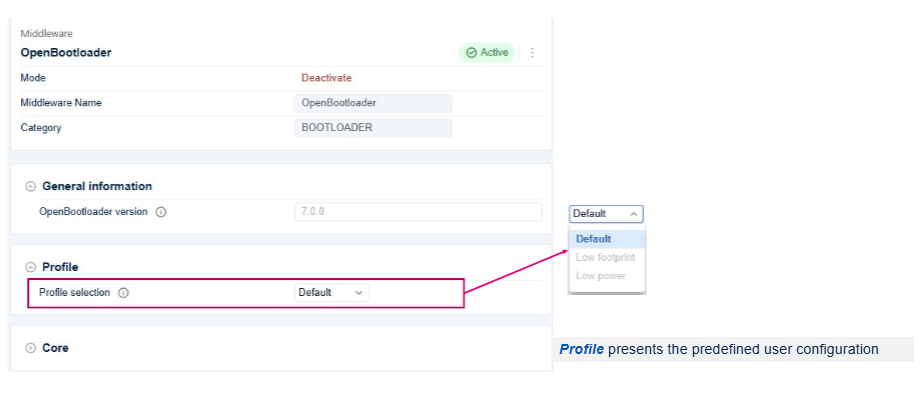
OpenBootloader application layout 
Typical OpenBootloader objects to plan and configure are:
core
Core defines the main configuration of open bootloader
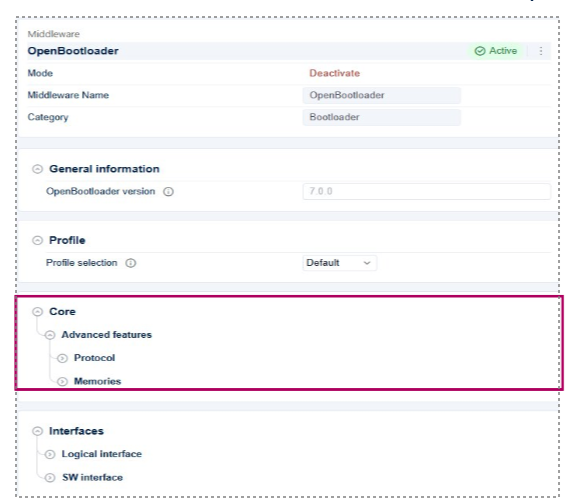
OpenBootloader core layout 
Protocol
After project generation, the mx_openbl_app.c file should be updated to add the user application code for each entry_function and/or callback functions. The user should also add the following API in main.c file:
int32_t mx_system_init(void)to call the OpenBootloader initialisation codeapp_process()to start the OpenBootloader