Basic STDIO

Overview 
Purpose 
Basic STDIO is a minimal stdout redirection layer for STM32. It provides quick printf output through UART, ITM (SWO), or a custom input/output interface with minimal setup and without a heavyweight logging framework. It excludes advanced logging features (no log levels, filtering mechanisms, buffering queues, or timestamp insertion) to keep the footprint small and the integration effort low, making the component easy to integrate, remove, or replace. Designed for early board startup, firmware prototyping, and quick diagnostic tracing, it also serves as a simple base that can be extended later.
Key Features 
The main features of Basic STDIO are:
Single initialization entry point.
Multiple input/output interfaces: UART (HAL based), ITM (CMSIS-Core only), or a custom interface from the provided template.
Minimal footprint by excluding log levels, filtering, buffering, and timestamps.
Deterministic blocking path (each character is sent immediately).
Abstracts toolchain libc hook differences (
_write,__write,fputcvariations).
Limitations 
Not threadsafe: Concurrent writes from multiple contexts may be interleaved unpredictably.
No stdin support: Only stdout redirection is provided; input via
stdinis not supported.UART HAL-only: The UART interface supports the STM32 HAL only.
Architecture 
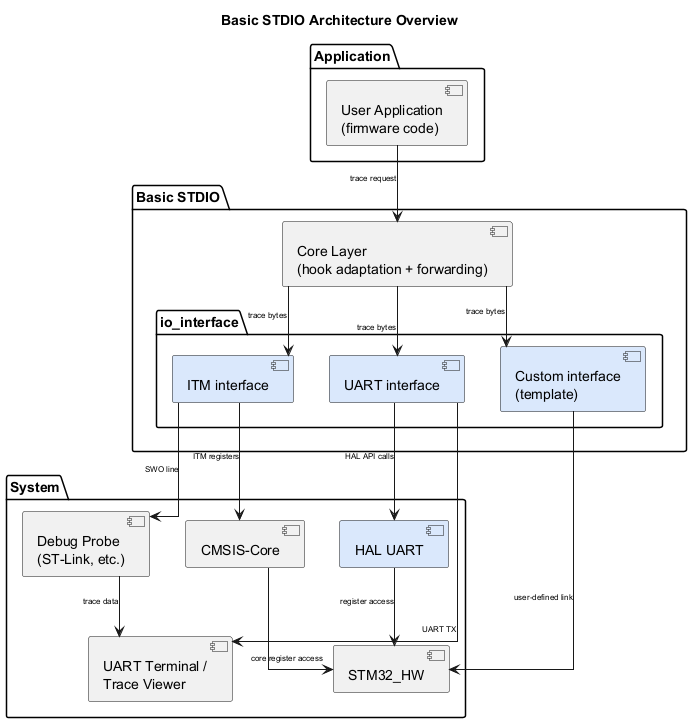
The following diagram illustrates the software components of the Basic STDIO module. It shows the interactions between the user application, the core layer, the input/output interfaces (ITM, UART, custom), the supporting system libraries (CMSIS-Core, HAL), and the hardware components.
Component Structure 
Core
(
basic_stdio_core.c
/
basic_stdio_core.h): Handles stdout redirection by selecting the appropriate libc hook and then forwarding each character or small buffer to a neutral forwarding layer that is independent of the physical input/output interface.
Interfaces : Software layer that connects Basic STDIO to the hardware component. Three interfaces are available:
UART and ITM: Ready-to-use implementations that only require enabling and initialization, with no code changes.
Template: Empty interface that allows users to develop their own interface. Copy the file into the user space; it contains empty functions with the prototypes required by the core.
Modules and Files 
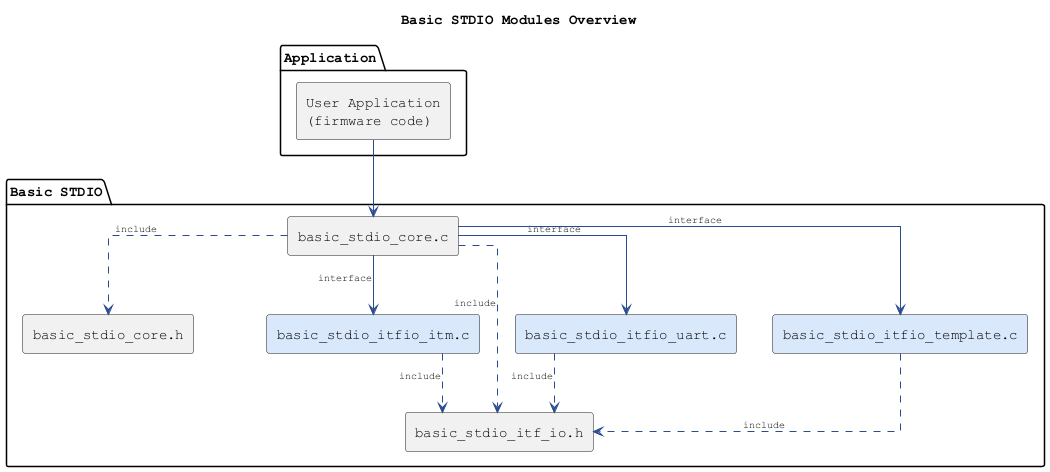
The following diagram shows the Basic STDIO module and its associated files: