
 FreeRTOS

How to use? 
How to configure FreeRTOS without STM32CubeMX2? 
To configure and run FreeRTOS without STM32CubeMX2:
Copy FreeRTOS kernel sources into your project (or use as submodule).
Choose one heap implementation (e.g.
heap_4.c) and add it to the build.
A clean, manual layout can look like this:
ProjectRoot/
├─ FreeRTOS/
│  ├─ Source/
│  │  ├─ include/
│  │  ├─ portable/
│  │  │  └─ [compiler]/[arch]/
│  │  ├─ tasks.c
│  │  ├─ queue.c
│  │  ├─ timers.c
│  │  ├─ event_groups.c
│  │  ├─ stream_buffer.c
│  │  └─ message_buffer.c
│  └─ portable/
│     └─ MemMang/
│        └─ heap_4.c          # or another heap_x.c
│
├─ Config/
│  └─ FreeRTOSConfig.h        # your configuration file
│
└─ Src/ / Inc/
   ├─ main.c
   └─ mx_freertos_app.c       # your tasks, queues, etc.
Key points:
All core FreeRTOS sources (
tasks.c,queue.c, etc.) are compiled.There is a single
FreeRTOSConfig.hreachable via the include path.One heap implementation (
heap_x.c) is selected and compiled.
Create
Config/FreeRTOSConfig.hand define all required macros manually.
You create and maintain
Config/FreeRTOSConfig.h
yourself. Start from a
known example (e.g. FreeRTOS demo or a previous Cube project) and adapt.
Example (shortened, typical STM32/Cortex-M configuration):
/* Config/FreeRTOSConfig.h */

#ifndef FREERTOS_CONFIG_H
#define FREERTOS_CONFIG_H

#include <stdint.h>

/*-----------------------------------------------------------
 * Scheduler settings
 *----------------------------------------------------------*/
#define configUSE_PREEMPTION                    1
#define configUSE_TIME_SLICING                  1
#define configUSE_TICKLESS_IDLE                 0

#define configTICK_RATE_HZ                      ( ( uint32_t ) 1000 )
#define configMAX_PRIORITIES                    5
#define configMINIMAL_STACK_SIZE                ( ( uint16_t ) 128 )
#define configMAX_TASK_NAME_LEN                 16
#define configUSE_16_BIT_TICKS                  0

/*-----------------------------------------------------------
 * Memory allocation
 *----------------------------------------------------------*/
#define configSUPPORT_STATIC_ALLOCATION         1
#define configSUPPORT_DYNAMIC_ALLOCATION        1
#define configTOTAL_HEAP_SIZE                   ( ( size_t ) ( 10 * 1024 ) )

/*-----------------------------------------------------------
 * Feature inclusion
 *----------------------------------------------------------*/
#define configUSE_MUTEXES                       1
#define configUSE_RECURSIVE_MUTEXES             1
#define configUSE_COUNTING_SEMAPHORES           1
#define configUSE_QUEUE_SETS                    0
#define configUSE_TASK_NOTIFICATIONS            1

#define configUSE_TIMERS                        1
#define configTIMER_TASK_PRIORITY               ( 2 )
#define configTIMER_QUEUE_LENGTH                10
#define configTIMER_TASK_STACK_DEPTH            256

#define configUSE_EVENT_GROUPS                  1

/*-----------------------------------------------------------
 * Hook functions
 *----------------------------------------------------------*/
#define configUSE_IDLE_HOOK                     0
#define configUSE_TICK_HOOK                     0
#define configCHECK_FOR_STACK_OVERFLOW          0
#define configUSE_MALLOC_FAILED_HOOK            1

/*-----------------------------------------------------------
 * Run-time stats / trace
 *----------------------------------------------------------*/
#define configUSE_TRACE_FACILITY                0
#define configGENERATE_RUN_TIME_STATS           0

/*-----------------------------------------------------------
 * Cortex-M specific: interrupt priorities
 * Adjust for your NVIC / library
 *----------------------------------------------------------*/
#define configPRIO_BITS                         4  /* e.g. STM32F4: 4 bits */

#define configLIBRARY_LOWEST_INTERRUPT_PRIORITY      0x0F
#define configLIBRARY_MAX_SYSCALL_INTERRUPT_PRIORITY 5

#define configKERNEL_INTERRUPT_PRIORITY \
  ( configLIBRARY_LOWEST_INTERRUPT_PRIORITY << (8 - configPRIO_BITS) )

#define configMAX_SYSCALL_INTERRUPT_PRIORITY \
  ( configLIBRARY_MAX_SYSCALL_INTERRUPT_PRIORITY << (8 - configPRIO_BITS) )

/*-----------------------------------------------------------
 * API functions inclusion
 *----------------------------------------------------------*/
#define INCLUDE_vTaskDelay                      1
#define INCLUDE_vTaskDelete                     1
#define INCLUDE_vTaskSuspend                    1
#define INCLUDE_xTaskGetIdleTaskHandle          1

#endif /* FREERTOS_CONFIG_H */
This file completely replaces any STM32CubeMX2-generated configuration.
Add include paths for:
FreeRTOS/Source/includeFreeRTOS/Source/portable/[compiler]/[arch]Config(forFreeRTOSConfig.h)
Set preprocessor flags in your build system or IDE:
Options:
FREERTOS_ENABLE_TRACE,FREERTOS_ENABLE_STACK_CHECK, etc.
In your source files, include FreeRTOS headers:
#include "FreeRTOS.h"
#include "task.h"
#include "queue.h"
In
main(), initialize the MCU, create at least one task, then start the scheduler:vTaskStartScheduler();
This setup completely avoids STM32CubeMX2 and still provides a flexible configuration mechanism using ``FreeRTOSConfig.h`` + preprocessor flags .
Important
Configuration of TIM6 as HAL Time Base:
When using FreeRTOS, the SysTick timer is typically used by the FreeRTOS kernel to generate the RTOS tick. In this case, SysTick should not be used by the STM32 HAL as its time base.
To avoid conflicts, the
HAL time base
(used by functions such as
HAL_Delay()
and internal timeout handling) is moved from SysTick to
a general-purpose timer, for example
TIM6
.
How to configure FreeRTOS with STM32CubeMX2? 
This section explains how to configure FreeRTOS using STM32CubeMX2 and the FreeRTOS pack.
It covers:
Project setup with STM32CubeMX2 and FreeRTOS pack
FreeRTOS configuration (
FreeRTOSConfig.h) through STM32CubeMX2Time base configuration (SysTick vs TIM6)
Prerequisites and Project Creation
Install ** STM32CubeMX2 tool**
Create a new STM32 project:
Select your MCU or Discovery/Nucleo board.
Configure system clock (RCC) as usual.
Add FreeRTOS pack in STM32CubeMX2
In the configuration tree, go to Middleware:
Select the FreeRTOS pack from Middlewware list, see following figures
Activate FreeRTOS from the FreeRTOS pack.
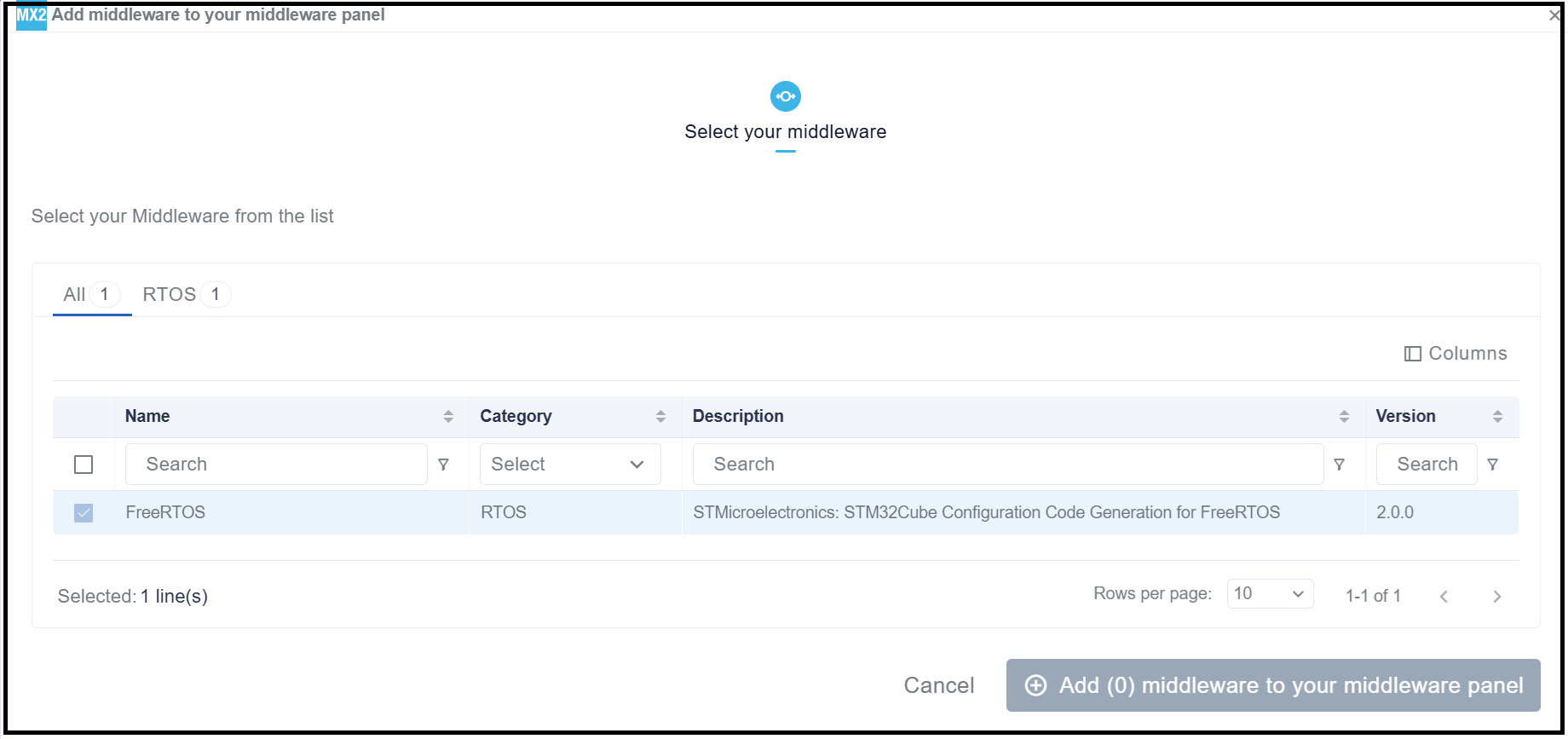
FreeRTOS middleware selection 
Once activated, you should see a FreeRTOS interface with the following configuration layout:
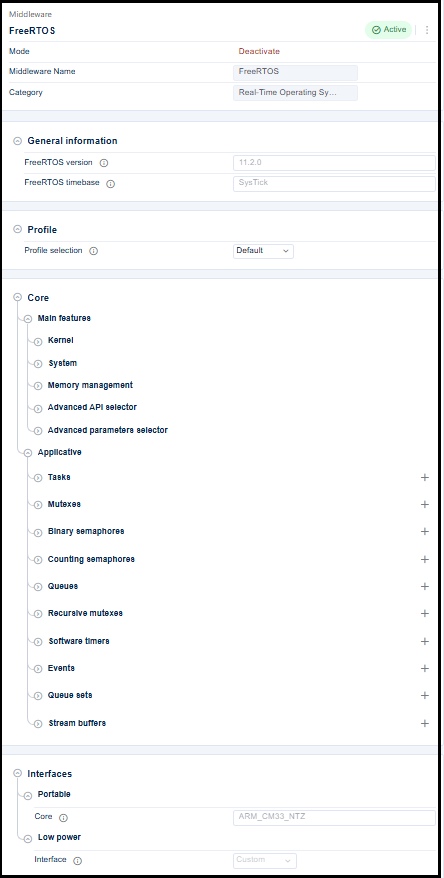
FreeRTOS interface 
FreeRTOS Kernel Configuration in STM32CubeMX2
Most options that are normally defined in FreeRTOSConfig.h are instead configured through the STM32CubeMX2 GUI.
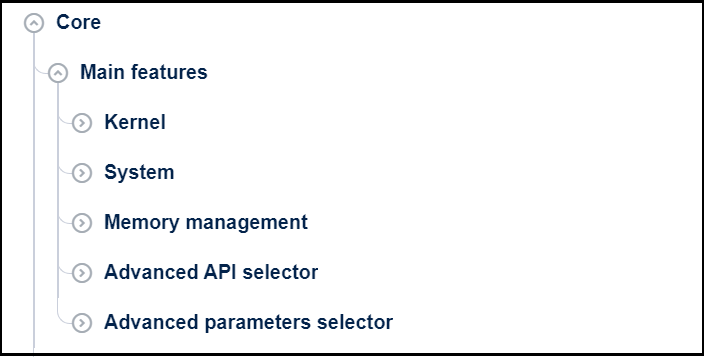
FreeRTOS Core menu interface 
Scheduler and priorities
The FreeRTOS Kernel menu is as shown in the following figure:
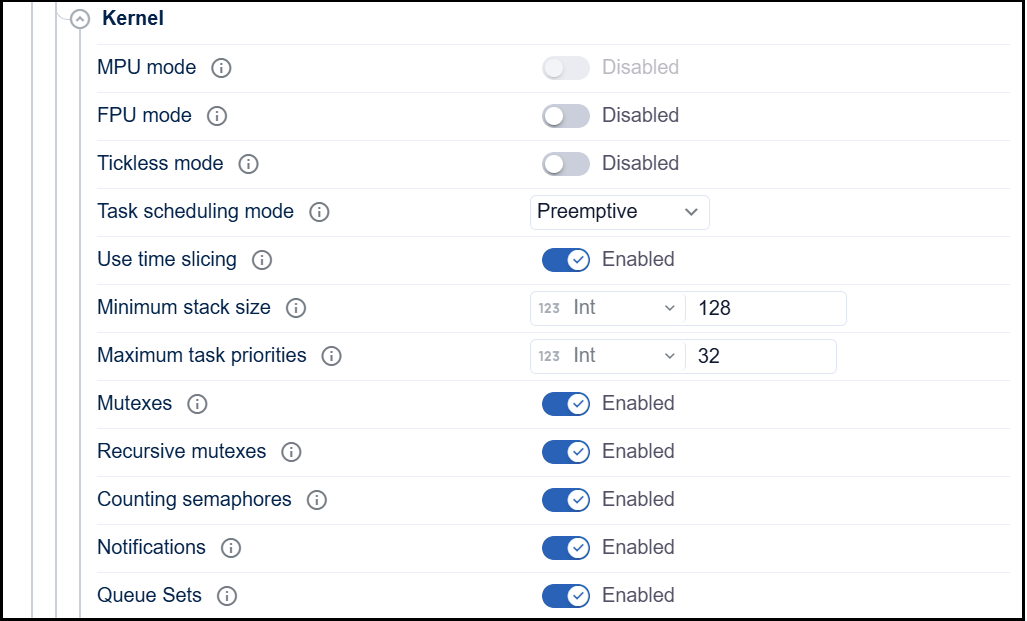
FreeRTOS kernel menu interface 
In the FreeRTOS / Core/Kernel panel, configure:
Task scheduling mode:
Enable preemptive scheduling (typical RTOS usage).
Maps to
configUSE_PREEMPTION.Maximum priorities:
Set the number of task priority levels (for example
5).Maps to
configMAX_PRIORITIES.Time slicing:
Enable/disable round-robin among tasks with the same priority.
Maps to
configUSE_TIME_SLICING.
- System configuration
The FreeRTOS system menu is as shown in the following figure:
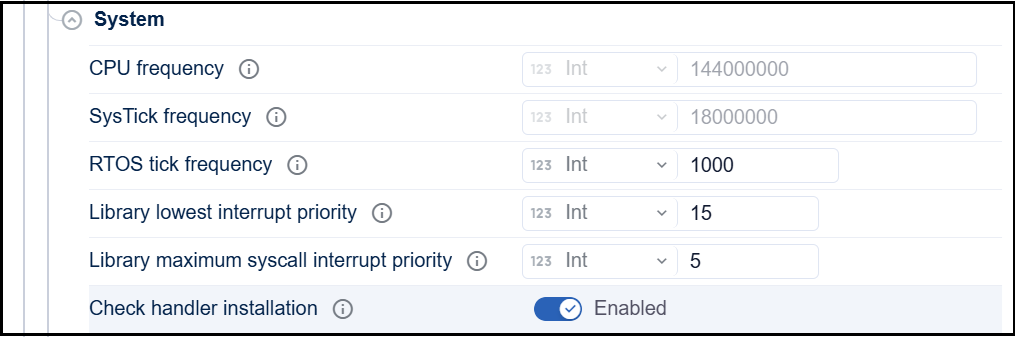
FreeRTOS System menu interface 
Library maximum syscall interrupt priority:
Any interrupt that calls FreeRTOS
FromISRAPIs has a priority numerically equal to or lower thanconfigMAX_SYSCALL_INTERRUPT_PRIORITY.
RTOS tick frequency:
Common values:
1000 Hz(1 ms).Maps to
configTICK_RATE_HZ.
Memory allocation
As shown in the following figure, the memory management menu:
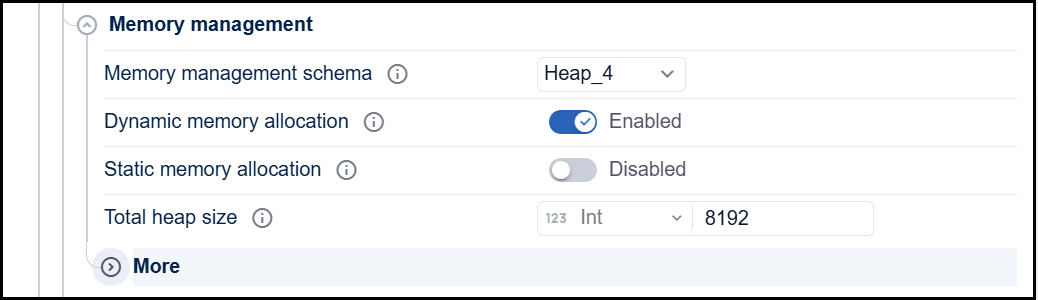
FreeRTOS memory management menu interface 
Memory management menu
Choose allocation model:
Dynamic allocation only, or * Static + dynamic (recommended for more flexibility).
STM32CubeMX2 should set
configSUPPORT_DYNAMIC_ALLOCATIONand optionally``configSUPPORT_STATIC_ALLOCATION``.
Select one of the
heap_x.cimplementations (oftenheap_4.c).Configure Total heap size:
Maps to
configTOTAL_HEAP_SIZEin the generated configuration.
Optional kernel features
Enable/disable according to your needs:
Mutexes: maps to
configUSE_MUTEXES.Recursive mutexes: maps to
configUSE_RECURSIVE_MUTEXES.Counting semaphores: maps to
configUSE_COUNTING_SEMAPHORES.Event groups: maps to
configUSE_EVENT_GROUPS.Software timers:
Enabled/disabled via
configUSE_TIMERS.Timer service task settings:
configTIMER_TASK_PRIORITYconfigTIMER_QUEUE_LENGTHconfigTIMER_TASK_STACK_DEPTH
Time Base: SysTick vs TIM6
By default, the STM32 HAL uses the SysTick timer as its time base (for
HAL_Delay()and internal timeouts). FreeRTOS also uses SysTick for the kernel tick. To avoid conflicts:Reserve SysTick for FreeRTOS kernel tick.
Configure a general-purpose timer (for example TIM6) as the HAL time base.
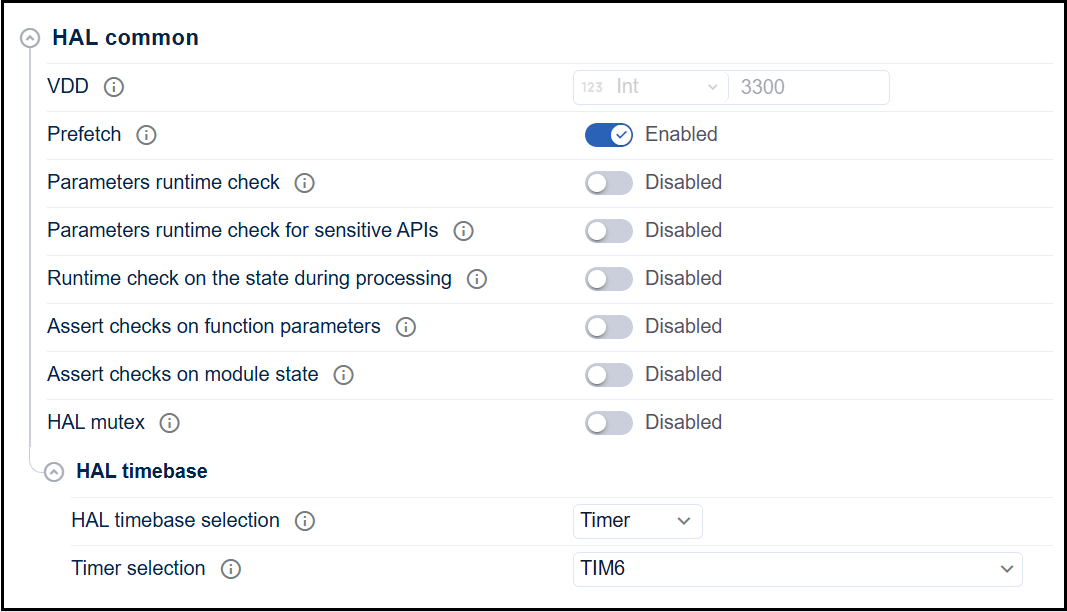
HAL timebase selection interface 
In STM32CubeMX2:
Open Project Settings → HAL common definitions → HAL timebase.
Look for Timebase Source:
Change from SysTick to TIM6 (or another appropriate timer).
Activalte TIM6:
Note
With this setup, SysTick is used exclusively by the FreeRTOS kernel,
while TIM6 provides the time base for HAL functions such as
HAL_Delay().
How to initialize FreeRTOS without STM32CubeMX2? 
After configuration, verify:
Include paths
Your compiler must see:
The generated configuration and application files:
FreeRTOS kernel headers:
FreeRTOS/Source/include.
FreeRTOS port headers:
FreeRTOS/Source/portable/[compiler]/[arch](e.g.GCC/ARM_CM33_NTZ,IAR/ARM_CM33_NTZ).
Source files to compile
Ensure your build includes:
FreeRTOS kernel sources:
tasks.cqueue.ctimers.cevent_groups.cstream_buffer.cmessage_buffer.c
Port layer:
port.c(specific to CPU/toolchain, e.g.portable/GCC/ARM_CM33_NTZ/port.c).Memory management: One
heap_x.c(oftenheap_4.c) fromportable/MemMang/.Application glue:
mx_freertos_app.c(from the projectSrc/folder).
FreeRTOS usage
In user code, include FreeRTOS headers normally:
#include "FreeRTOS.h"
#include "task.h"
#include "queue.h"
Then:
Initialize hardware (HAL, clocks, peripherals).
Create tasks using FreeRTOS APIs (in
mx_freertos_app.cor your own files).Once the FreeRTOS kernel, system, and memory management are configured, the next step is to set up FreeRTOS objects according to the final application:
Tasks
Define each task’s role, priority, stack size, and whether it is created statically or dynamically.
Queues
Used for data exchange between tasks (producer/consumer).
Configure queue length and item size.
Semaphores / Mutexes
Binary semaphores: task/ISR synchronization.
Counting semaphores: multiple identical resources or event counting.
Mutexes: protect shared resources, with priority inheritance.
Event Groups
Manage multiple status flags and more complex synchronization (one task waiting on several events).
Software Timers
Periodic or one-shot actions without a dedicated task (timeouts, housekeeping, etc.).
Stream Buffers
For continuous data streams or variable-length messages.
Call
vTaskStartScheduler()to start the RTOS.
How to initialize FreeRTOS with STM32CubeMX2? 
Once the FreeRTOS kernel, system, and memory management are configured, the next step is to configure the FreeRTOS objects according to the final application’s needs.
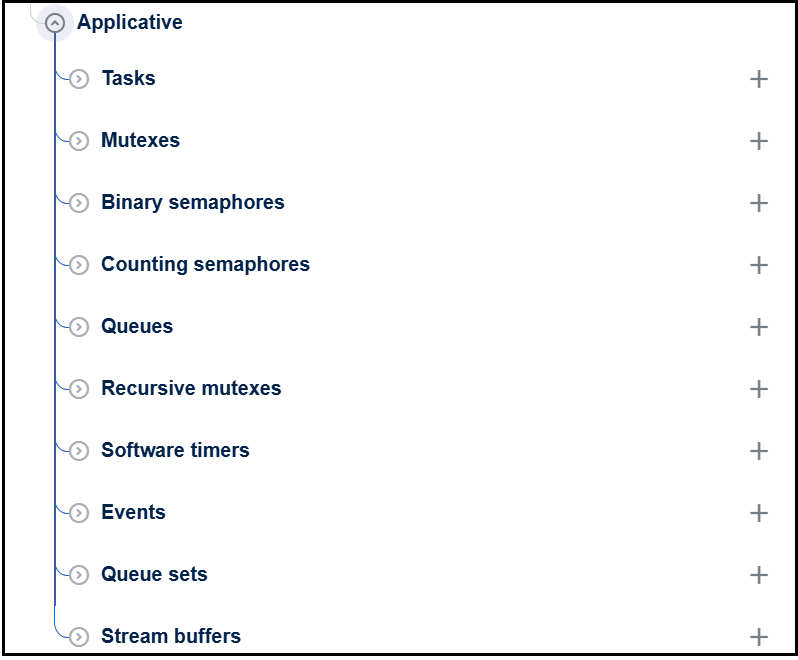
FreeRTOS application layout 
Typical FreeRTOS objects to plan and configure are:
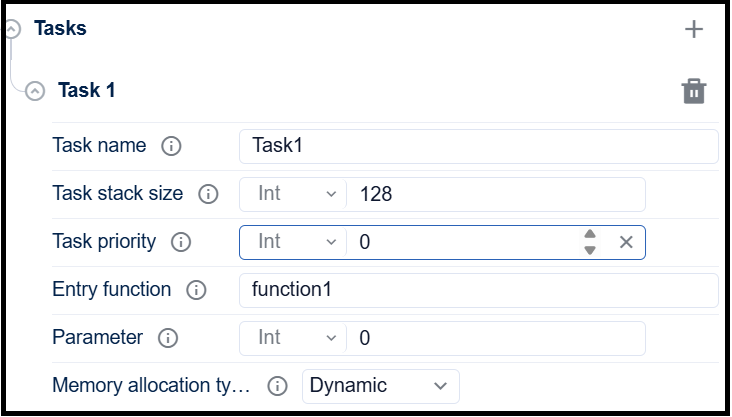
Tasks
Define application tasks and their responsibilities (e.g., communication, control loop, UI, logging).
Set priorities based on timing and criticality.
Assign appropriate stack sizes.
Decide creation time: at startup (static/dynamic) or created on demand.
FreeRTOS tasks layout 
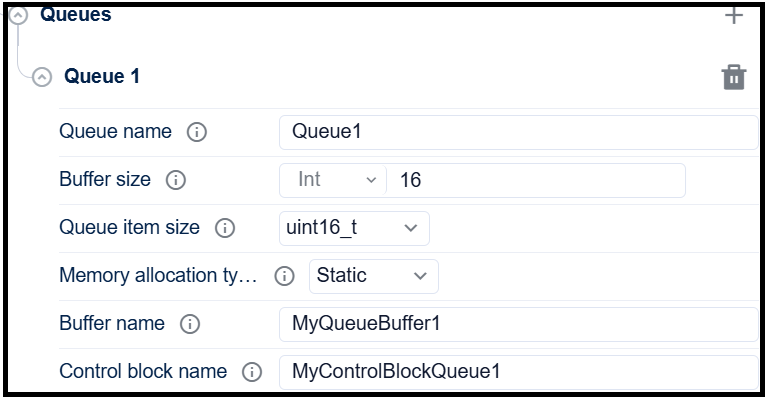
Queues
Identify data flows between tasks (e.g., sensor → processing → communication).
For each flow, define:
Queue length.
Item size (structure vs. primitive).
Producer/consumer priorities and expected throughput.
Decide if queues are used for: - Command passing - Event notification - Data buffering
FreeRTOS queue layout 
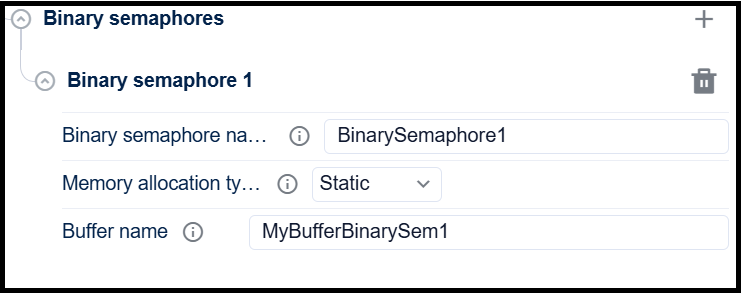
Semaphores and Mutexes
Binary semaphores: For task synchronization with ISRs (e.g., “data ready” from an interrupt).
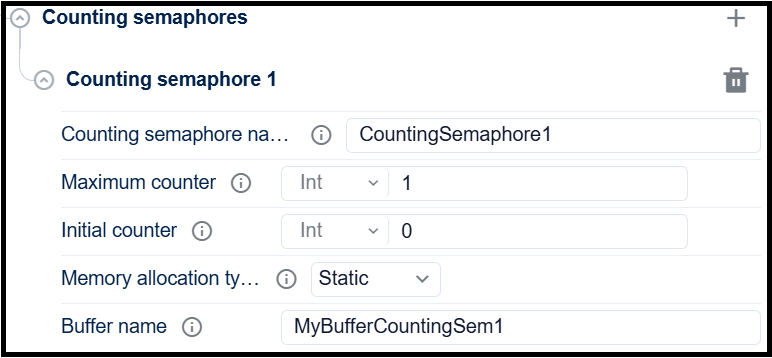
Counting semaphores: For resource pools or counting events.
Mutexes: For protecting shared resources (peripherals, global variables, drivers). Use priority inheritance to limit priority inversion.
FreeRTOS semaphore layout 
FreeRTOS counting semaphore layout 
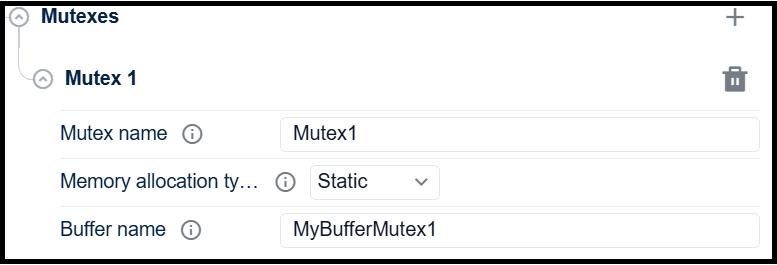
FreeRTOS mutex layout 
Event Groups
For managing multiple event flags and complex synchronization cases:
One task waiting on several conditions.
System state flags (e.g., “network up”, “storage ready”, “config loaded”).
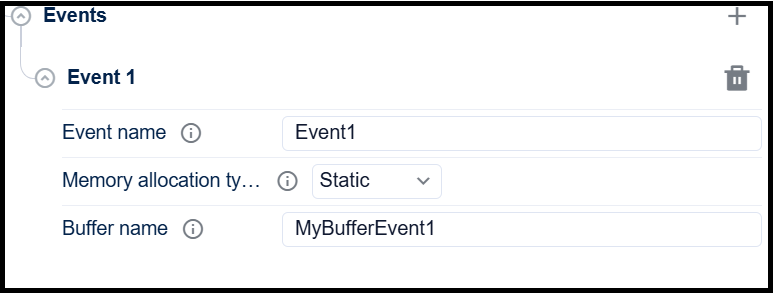
FreeRTOS events layout 
Timers (Software Timers)
For periodic or one-shot actions that don’t need a full task:
Housekeeping, timeouts, watchdog kicks, statistics.
Choose:
Period
Auto-reload vs one-shot
Callback function context (fast, non-blocking).
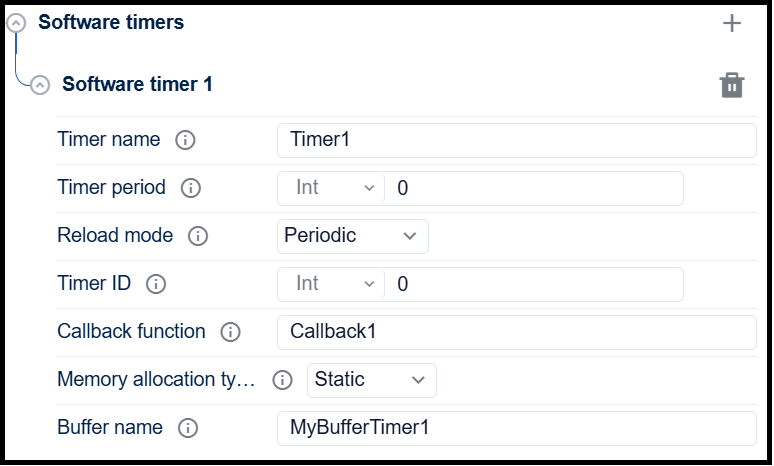
FreeRTOS software timer layout 
Stream Buffers / Message Buffers
For variable-sized or continuous data:
UART streams, audio samples, logging.
Decide:
Buffer size in bytes.
Whether to use stream buffer (unstructured stream) or message buffer (framed messages).
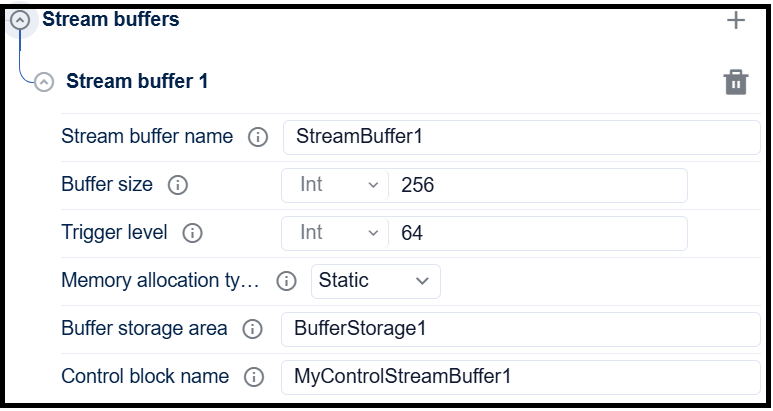
FreeRTOS stream buffer layout 
In Project Settings menu, configure the IDE, folders and then generate the project.
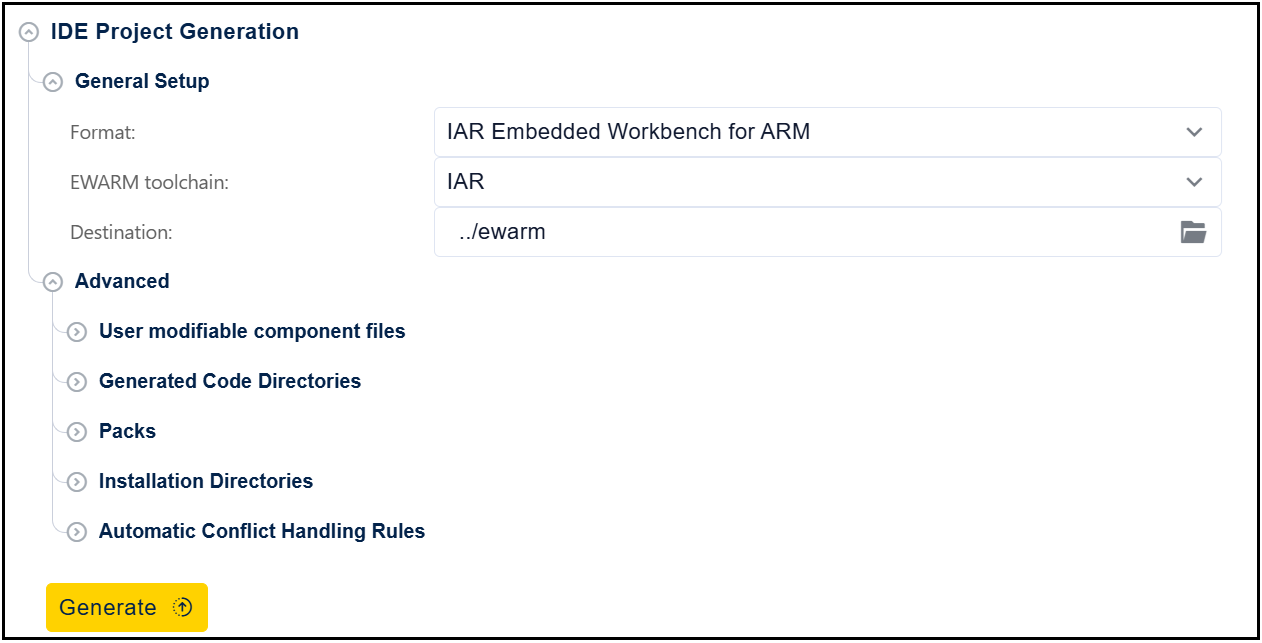
FreeRTOS Project generation 
After project generation, the mx_freertos_app.c file should be updated to add the user application code for each entry_function and/or callback functions. The user should also add the following API in main.c file:
int32_t app_synctasks_init(void)to call the FreeRTOS initialisation codevTaskStartScheduler()to start the FreeRTOS scheduleradd
#include "mx_freertos_app.h"