Package content

The folder structure of the STM32Cube MCU Package is designed to organize the various software components, examples, and resources in a way that is intuitive and easy to navigate for developers. This facilitates the discovery of all the features and possibilities of the STM32 microcontrollers.

Important

To start application development, use STM32CubeMX2 to generate a project for the selected hardware and toolchain.

Top level structure

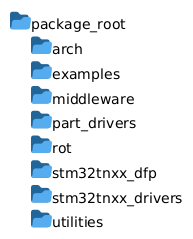
The STM32Cube MCU Package for STM32C5 series contains the following main folders:

Contents of the STM32Cube MCU Package

Folders

Content

Folder diagram showing the structure of the STM32Cube package

STM32Cube package structure

  • arch: architecture-specific files and configurations, typically arm CMSIS files for cortex-M processors.

  • examples: example projects for various development environments and boards.

  • middleware: additional libraries and middleware such as USB, TCP/IP stack, file systems.

  • part_drivers: drivers for controlling hardware components or parts available on STM32 boards, like LEDs, buttons, sensors and more.

  • utilities: additional embedded software libraries running on STM32 offering various functionalities.

  • stm32c5xx_dfp: Device Family Pack files for integration with STM32CubeMX2 as well as IDEs like STM32CubeIDE for Visual Studio Code, Keil® MDK for Arm® and IAR Embedded Workbench® for Arm®.

  • stm32c5xx_drivers: the hardware abstraction layer (HAL), low-layer (LL) drivers.

Examples folder

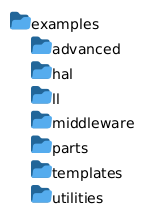
The examples folder is organized to provide a variety of projects demonstrating the capabilities of the STM32Cube MCU Package across different development environments and boards. It is structured by software layers, then boards and IDEs.

Typical contents of the examples folder include:

Contents of the examples folder

Folders

Content

Folder diagram showing the structure of the STM32Cube examples folder

STM32Cube package - examples folder structure

  • HAL: Projects demonstrating the use of the Hardware Abstraction Layer (HAL) drivers for various peripherals and functionalities.

  • LL: Projects showcasing the Low-Layer (LL) drivers for more direct hardware access and control.

  • middleware: Projects that utilize middleware components such as USB, TCP/IP stack, and file systems.

  • part_drivers: Projects that illustrate how to use the part drivers for controlling specific hardware components available on STM32 boards.

  • advanced: More complex projects that combine multiple software layers and functionalities to demonstrate advanced use cases.

  • templates: Basic project templates that can be used as a starting point for new applications.

Each example folder contains a README.md file and an application/ folder containing the main source code.

In a same example folder, the example projects are organized by board and IDE as described in the next section. This way, the same application use-case can be experimented on different hardware and development environments, while keeping the project structure consistent across all examples.

Board folder within an example

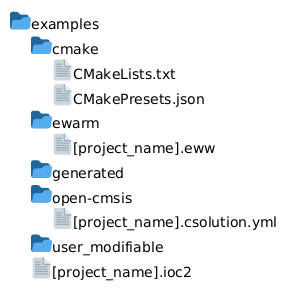
The project is further organized by board. Each board folder contains subfolders.

Contents of the board folder

Folders

Content

Folder diagram showing the structure of the STM32Cube board folder

STM32Cube package - board folder structure

  • cmake: cmake projects to be used with STM32CubeIDE for Visual Studio Code

  • ewarm: eww projects for IAR Embedded Workbench® for Arm®

  • open-cmsis: csolution projects to use with Keil tools like Keil® MDK for Arm®.

  • generated and user_modifiable: containing target or board dependant code.

  • When available the .ioc2 file for STM32CubeMX2 is located in the board folder.

Refer to the STM32Cube Software Examples documentation for detailed information about the STM32Cube Software Examples.