
 Sequencer

Overview 
Purpose 
The Sequencer utility is a simple alternative to a real-time operating system for less complex application cases. However, it does not provide all the services of a full operating system.
Key Features 
The main features of Sequencer are:
Task creation: Initializes a task and makes it callable by the Sequencer’s internal scheduler.
Task enable: Enables a task from another task or an interrupt so that the scheduler can run it.
Task pause/resume: Pauses or resumes a task execution from the scheduler’s viewpoint, independently of whether the task is enabled or not.
Idle task: Calls an optional hook when no task is runnable to manage idle entry.
Architecture 
The following diagram illustrates the software components of the Sequencer module. It shows the interactions between the user application, the core layer, the optional configuration layer, the system support (CMSIS), and the hardware components.
![@startuml
top to bottom direction
skinparam linetype ortho
<style>
componentDiagram {
arrow {
FontSize 8
}
}
</style>
title Sequencer Architecture Overview
package "Application" {
component APP as "User Application\n(tasks + main loop)"
}
package "Sequencer" {
component CORE as "Core Layer\n(cooperative scheduler + APIs)"
component CONF as "Optional Configuration\n(seq_user_conf.h)" #DAE8FC
}
package "System" {
component CMSIS as "CMSIS-Core"
[STM32_HW]
}
APP --> CORE : run / task control
CORE --> CONF : user configuration
CORE --> CMSIS : core services
CMSIS --> STM32_HW : core register access
@enduml](../../_images/plantuml-980b3b1907ed3bc9dcf8556f0fa78108595597d0.png)
Component Structure 
Core
(
sequencer.c
/
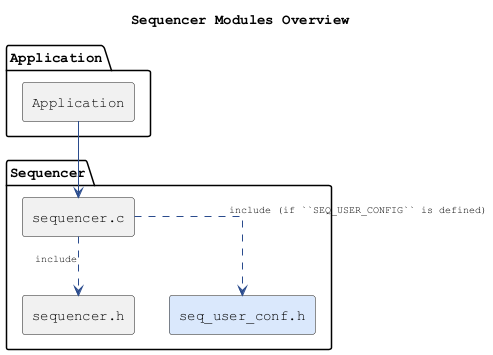
sequencer.h): Replaces heavier scheduling solutions with a lean cooperative engine. It simplifies task management by running each task until it finishes. It reduces the risk of lockups by encouraging short task bodies, enables controlled waiting through a single event pause mechanism, and offers optional idle and task hooks for power management and monitoring.
Optional Configuration
(
seq_user_conf.h): Adjusts the scheduler at build time through a small configuration layer. It sets limits such as the number of tasks and priority levels, defines how critical sections and idle handling work to match the target platform, and allows small utility macros (memory fill, etc.) to be replaced when needed. All platform-specific tweaks stay outside the core so that the main logic remains clean and portable. Safe defaults are applied automatically when no custom settings are provided.
Modules and Files 
The following diagram shows the Sequencer module and its associated files:
Configuration Table 
The following table lists the configuration defines for the Sequencer module:
|
Config Defines |
Where |
Description |
|---|---|---|
|
SEQ_USER_CONFIG |
Preprocessor environment |
Enable custom user configuration (
|