
 Cube Ecosystem Getting Started

Getting started with STM32Cube ecosystem
What is the STM32Cube ecosystem 
STM32Cube enables developers to achieve design success. With a comprehensive suite of professional development tools and embedded software components, STM32Cube allows developers to differentiate products, streamline design cycles, and reduce costs.
STM32Cube ecosystem supports all design steps, including selection, configuration, development, debugging, programming, and monitoring
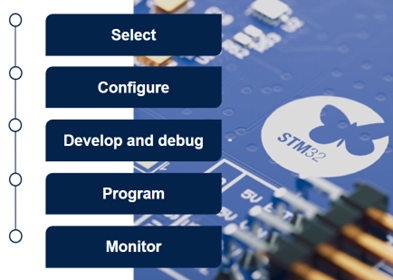
Select 
The first step is to select the STM32 microcontroller and, if needed, the evaluation board. The STMicroelectronics website provides selectors with multiple filters that help you browse the wide portfolio of STM32 microcontrollers and associated evaluation boards. After making a selection, additional information and resources are directly accessed.
Evaluation boards, such as Nucleo boards or Discovery kits, enable users to quickly evaluate a specific STM32 microcontroller and transition to the prototyping phase. They include an in-circuit debugger and programmer, STLINK, which allows direct connection to a PC through USB.
Configure 
STM32 microcontrollers (MCUs) integrate many configurable peripherals and provide connections between them to implement real-time applications. STM32CubeMX is a configuration tool for Windows, Linux, or macOS that offers an intuitive graphical user interface to help configure the STM32 MCUs. The tool enables configuration of the pinout, clock, peripherals, and software packs. After configuration, generate a ready-to-use C code project in several standard project formats.
Develop and debug 
STM32CubeIDE is an integrated development environment for Windows, Linux, or macOS. It is now available in two versions:
STM32CubeIDE, based on Eclipse® CDT™ framework, is designed for developers who require a graphical user interface for guided development and debugging.
STM32CubeIDE for Visual Studio Code, based on Visual Studio Code, is intended for developers who prioritize modern C/C++ code editing, Copilot integration, streamlined continuous integration and continuous delivery workflows, extensibility, and flexibility.
The STM32Cube embedded software offer provides ready-to-use software components that can be added to a project. It includes STM32 peripheral driver APIs with two levels of abstraction, middleware, board drivers, and examples. There are several distribution channels, including the STM32CubeMX tool, the ST website, and GitHub.
Program 
STM32CubeProgrammer is a software tool for Windows, Linux, or macOS that programs binaries into STM32 microcontrollers and sets hardware option bytes. It allows the programming of STM32 flash memory, RAM, and external memories connected to STM32 microcontrollers. The tool supports secure programming.
Monitor 
STM32CubeMonitor enables users to monitor variables inside STM32 devices in real time. The tool provides a flow-based graphical editor that allows users to build custom dashboards and quickly add widgets such as gauges, bar graphs, and plots.
All these tools and software components are free of charge and have business-friendly license terms.
Visit the STM32 MCU Developer Zone to access STM32Cube software, tools, and related resources.

Use online microcontroller and board selectors to browse the portfolio

Learn how to obtain a board and install the required tools

Review methods to reuse STM32Cube in application development environments

Explore programming solutions for application development and production
Note
To get started with STM32MPx microprocessors, look at the STM32 MPU Developer Zone.