
 Cube Ecosystem Getting Started

How to program your STM32 microcontrollers 
After building the application in the preferred development environment, the next step is to program the STM32 device. This section provides an overview of the following topics:
The distinction between development programming and production programming
The available programming options with STM32CubeProgrammer
The basics of secure provisioning and sources for additional information
Development programming and production programming 
Development programming refers to frequent loading and reloading of firmware on a small number of boards (one to several) during the design, code development, and debugging phases of a project. This process is typically performed from an integrated development environment (IDE), such as STM32CubeIDE or STM32CubeIDE for Visual Studio Code, through an on-board ST-LINK. The focus is on flexibility, breakpoints, and fast iteration. ST IDEs use the command-line interface (CLI) of STM32CubeProgrammer, the dedicated programming tool for STM32 microcontrollers.
Production programming , by contrast, targets large volumes of devices in a factory environment. It is the logical next step after development, when the prototype is ready for industrialization. Production programming requires robust, production-grade programmers and often includes additional steps such as serialization, option byte configuration, security provisioning, and integration with manufacturing test and quality systems.
In the STM32Cube ecosystem, STM32CubeProgrammer is the tool to use to program any STM32 board during development, together with other STM32Cube tools. For production programming, STMicroelectronics recommends using ST Partners, such as SEGGER Microcontroller, PEmicro, Elprotronic, or SMH Technologies.
Getting started with STM32CubeProgrammer 
STM32CubeProgrammer is the programming tool for STM32 microcontrollers. Use it to load and program application software onto STM32 boards.
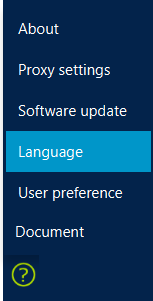
The tool is available for Windows, macOS, and Linux operating systems. It supports English, Chinese, and Japanese languages.
If not already done, download and install the tool.
Note
For more information, see the STM32CubeProgrammer User Manual. For tutorials, visit STMicroelectronics YouTube channel. If assistance is needed, contact the ST Community Forum.
With STM32CubeProgrammer, the following actions are available:
Program all memory areas of the STM32 device, including internal and external Flash memory, option bytes, and one-time programmable (OTP) memory.
Connect using one amongst multiple interfaces, such as SWD, JTAG, USB, UART, SPI, I²C, or CAN, depending on the device.
Perform mass erase, memory verification, readout protection control, and other operations.
Use a graphical user interface for manual operations, or a command-line interface for automation.
After launching the tool, select and connect to the STM32 by clicking
the
Connect
button in the top-right corner.

On the left, a vertical menu bar lists the operations that are available.
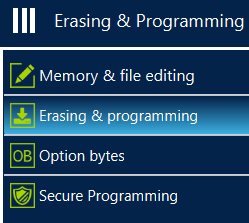
The Memory and File editing panel allows:
The viewing and editing of the content stored in microcontroller unit (MCU) memory.
Read part of or all the memory to display the content in hexadecimal and ASCII formats.
Change values before writing them to the device.
Load a file, such as a memory dump, compare it with the current device content, and save snapshots to a file for later analysis.
The Erasing & Programming panel is the main workspace for loading an application into the target device. From this panel:
Connect to the microcontroller.
Select the memory areas to erase (full chip erase or sector-based erase).
Program binaries in formats such as .elf, .hex, or .bin.
This menu allows the board programming by selecting the application file
with the
Browse
button. After choosing the binary file, click
Start


            Programming
to load it onto the device.
When beginning, no need to use the
Automatic


            Mode
, which is
designed for programming multiple STM32 boards with the same software.
For now, use the upper part of this panel: select the project binary
file, then click
Start


            Programming
.
The Option Bytes panel provides a graphical view of the device configuration bits that control essential behaviors of the microcontroller unit (MCU). From this panel, configure settings such as:
Boot mode selection,
Readout protection (RDP) level,
Write protection and erase protection on specific Flash memory sectors,
Watchdog modes,
Brownout reset levels,
Other device-specific features.
STM32CubeProgrammer reads the current option bytes from the target, allows modification through intuitive drop-down lists and checkboxes, and then programs and verifies the new configuration. As option bytes directly affect security, boot, and debug access, this panel is a key entry point for initial device configuration and secure provisioning.
The Factory reset button restores all option bytes in one step in case of a mistake or when the default state needs to be restored.
The Secure Programming panel in STM32CubeProgrammer, when available for a given STM32 series, centralizes operations related to security and secure provisioning. The panel provides guided access to features such as:
Secure boot configuration,
Readout protection (RDP) regression with password,
Debug authentication,
Life cycle state transitions,
Secure key or credential programming depending on device capabilities.
Through the panel, users can apply recommended security profiles, load and program signed or encrypted images, and trigger device-specific secure services without managing low-level commands. The panel simplifies the transition from an open development configuration to a robust, production-ready state, while maintaining control of protections, update mechanisms, and long-term maintainability.
Note
For more details, refer to application note AN5054 “How to perform secure programming using STM32CubeProgrammer” .
What is the secure provisioning of an STM32 
Secure provisioning of an STM32 is the process of converting a generic, blank microcontroller into a device that is uniquely identified, protected, and prepared for secure operation in the field. The process typically includes injecting secrets, such as cryptographic keys, certificates, or credentials, that must be protected by secure handling or cryptographic mechanisms. It also involves configuring protection mechanisms, including readout protection, write protection, secure debug, and secure boot. Finally, the device is locked according to the project security policy and life cycle. Secure provisioning is usually performed at the end of the development phase or during manufacturing, using tools such as STM32CubeProgrammer or partner production programmers. The process is closely tied to the overall security architecture, including secure boot, secure firmware update, over‑the‑air updates, and key management.
Note
Refer to the Security Wiki for information about security and the functions available on STM32 devices. The Security Wiki also provides details about regulations, including the Cyber Resilience Act.
Further steps 
After becoming familiar with manual programming using the STM32CubeProgrammer graphical user interface, the operations can then be automated.
The STM32CubeProgrammer command-line interface enables scripting of connect, erase, program, and verify sequences, allowing their integration into batch files or continuous integration pipelines.
For closer integration, develop a custom programming application using the public STM32CubeProgrammer C application programming interface (API), embedding STM32 programming capabilities directly into the tools.