
 USBX
USBX
How to configure USBX 
This page explains how to configure USBX in two integration models:
-
Without STM32CubeMX2
-
With STM32CubeMX2
USBX configuration 
How to configure USBX without STM32CubeMX2 
To configure USBX without STM32CubeMX2:
-
Copy the USBX middleware sources into the project, or add them from a local middleware repository.
-
Select the execution mode,
No OSorFreeRTOS, and add the matching port layer fromports/genericorports/freertos. -
Select the active role, device, host, or both, and add only the USBX core and class folders required by that role.
-
Add the STM32 USB interface layer from
interfacesto link the middleware with the HAL drivers:-
usbx_stm32_device_controllersfor device mode -
usbx_stm32_host_controllersfor host mode
-
-
Add descriptor files from the STM32 USB interface layer in
interfaces-
usbx_stm32_device_descriptorswhen the project uses the reference STM32 device-descriptor generator
-
-
Create the local USBX configuration header, usually
ux_user.h, and map the selected options to compile-time settings. -
Add the USBX include paths and source files to the build system.
-
Provide the application glue layer around
ux_system_initialize()and the selected device-side or host-side startup sequence.
A clean manual layout can look like this:
ProjectRoot/
|- USBX/
|  |- common/
|  |  |- core/
|  |  |- usbx_device_classes/
|  |  |- usbx_host_classes/
|  |- ports/
|  |  |- generic/
|  |  |- freertos/
|  |- interfaces/
|     |- usbx_stm32_device_controllers/
|     |- usbx_stm32_device_descriptors/
|     |- usbx_stm32_host_controllers/
|- USBX_Applicative/
|  |- main.c
|  |- ux_user.h
|  |- app_usbx.c/h
|  |- app_usbx_device.c/h
|  |- app_usbx_host.c/h
|  |- class-specific application files
Manual integration rules 
-
Always compile the USBX core sources from
common/core. -
Add only one port layer for the selected execution model.
-
Add only the class folders required by the application.
-
Add the STM32 controller adapters only from
interfaces; they are not part ofcommon. -
For device mode, include one descriptor source strategy and keep endpoint addresses unique across all enabled classes.
-
For host mode, include the STM32 HCD adapter and size the host resources for the number of devices, endpoints, and transfers expected in the use case.
-
Use the
templatescontent as a reference when manually integrating themx_usbx_*application entry points.
Manual configuration areas 
When you configure USBX manually, the same decision areas exposed in STM32CubeMX2 still apply.
Core system options typically cover:
-
execution mode:
No OSorFreeRTOS -
enumeration thread priority
-
class thread priority
-
thread stack size
-
error checking and parameter checking
-
time slice, alignment, debug log size, periodic rate, and transfer timeouts
Device-side options typically cover:
-
HID device, with mouse, keyboard, or custom HID variants
-
CDC ACM device
-
MSC device
-
DFU device
-
Audio device
-
Video device
-
Printer device
-
CCID device
-
PIMA / MTP device
-
device-core limits and descriptor behavior
Host-side options typically cover:
-
HID host, plus mouse, keyboard, and RCU support
-
CDC ACM host
-
MSC host
-
HUB host
-
Printer host
-
PIMA / MTP host
-
Audio host
-
Video host
-
GSER host
-
Prolific host
-
SWAR host
-
host-core limits and HCD sizing
Create and maintain
ux_user.h
at the application level. Start from a known
USBX example, a generated template, or the
ux_user
template content, then
adapt it to the selected STM32 project.
Typical compile-time options selected from the configuration map to USBX options such as:
-
UX_STANDALONE -
UX_ENABLE_ERROR_CHECKING -
UX_ENABLE_PARAM_CHECKING -
UX_NAME_REFERENCED_BY_POINTER -
UX_ENFORCE_SAFE_ALIGNMENT -
UX_ALIGN_MIN -
UX_DEBUG_LOG_SIZE -
UX_PERIODIC_RATE -
UX_CONTROL_TRANSFER_TIMEOUT -
UX_NON_CONTROL_TRANSFER_TIMEOUT -
role-specific or class-specific options selected for the chosen device and host classes
For options whose compile-time symbol differs from the UI label, use the generated STM32CubeMX2 output or the middleware headers as the reference.
Add include paths for:
-
USBX/common/core/inc -
the selected class include folders
-
USBX/ports/genericorUSBX/ports/freertos -
USBX/interfaces/usbx_stm32_device_controllerswhen device mode is enabled -
USBX/interfaces/usbx_stm32_host_controllerswhen host mode is enabled -
the local configuration folder that contains
ux_user.hand application glue headers
How to configure USBX with STM32CubeMX2 
STM32CubeMX2 provides a guided configuration flow for USBX. The generated setup maps the configuration panels to:
-
generated
mx_usbx_app.candmx_usbx_app.hfiles -
generated role-specific device and host startup files when the matching role-specific init-code conditions are satisfied
-
generated descriptor content for device mode when that path is selected
-
class-specific source files for the enabled device and host classes
STM32CubeMX2 panel 
The STM32CubeMX2 USBX user interface follows a stable hierarchy. In practice, the panels appear in this order:
-
middleware activation and pack selection
-
general information and profile
-
core, split into USB core system, device class, host class, and applicative
-
interfaces, split into logical interface and hardware resource allocation
The UI is strongly conditional. A panel or option becomes visible only when the the panel rules allow it. This means the CubeMX experience is driven by:
-
includeactions that reveal dependent sections -
enableactions that unlock editable fields -
warningactions that keep the field visible but call out a constraint -
erroractions that mark an invalid configuration that must be corrected
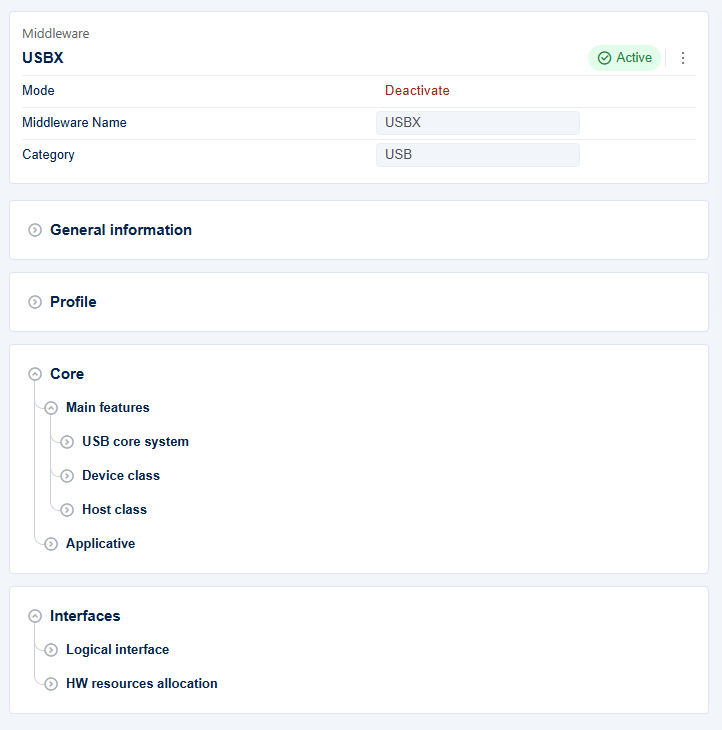
USBX configuration flow from CubeMX panels to generated middleware content. 
General information and profile 
The configuration starts with the middleware version and the profile selector.
Keep the middleware version on the delivered value and keep the profile on
Default
. The low-footprint and high-performance profile entries are present
in the UI but currently disabled.
What this panel means in the UI:
-
the version field is informational and reflects the delivered middleware pack
-
the profile selector is currently a single effective choice,
Default -
the other profile entries remain visible in the UI but are blocked by availability rules
What to review in CubeMX:
-
confirm the middleware version matches the delivered pack baseline
-
leave the profile on
Defaultunless a future pack changes the available profile choices -
do not document low-footprint or high-performance flows as available because the current pack currently disables them
What the STM32CubeMX2 USBX configuration generates 
The USBX configuration pages do more than store values. They also decide which generated files and helper sections appear in the project:
-
the common application layer is generated in
mx_usbx_app.candmx_usbx_app.h -
enabling device mode adds the device startup layer and the selected device-class support files
-
enabling host mode adds the host startup layer and the selected host-class support files
-
enabling descriptor options updates the generated device-descriptor content used by the device stack
Template origin and generated output placement 
The USBX pack separates the generator source files from the generated project files.
Generator source files stored in the pack:
-
STMicroelectronics.usbx.pdscdeclares the pack components and theSTM32CubeMX2 Config:USBXconfiguration component. -
.config/usbx_config_parameters.jsondefines the STM32CubeMX2 parameter tree and option schema. -
.config/template/helpers/usbx_helpers.jsprovides helper logic used by the templates. -
.config/gen_code.batand.config/gen_code.shlaunchcube codegen generatefromlockfileandcube codegen generategpdsc. -
.config/STMicroelectronics.usbx.gpdsc.hbsgenerates the GPDSC content. -
.config/template/*.hbsfiles define the generated USBX source and header files.
Generated output written to the user project:
-
common files:
mx_usbx_app.candmx_usbx_app.h; -
device-role files:
mx_usbx_device.candmx_usbx_device.h; -
host-role files:
mx_usbx_host.candmx_usbx_host.h; -
device-class files such as
mx_usbx_device_audio.c/.h,mx_usbx_device_ccid.c/.h,mx_usbx_device_cdc_acm.c/.h,mx_usbx_device_dfu.c/.h,mx_usbx_device_hid_custom.c/.h,mx_usbx_device_hid_keyboard.c/.h,mx_usbx_device_hid_mouse.c/.h,mx_usbx_device_msc.c/.h,mx_usbx_device_pima_mtp.c/.h,mx_usbx_device_printer.c/.h, andmx_usbx_device_video.c/.hwhen the corresponding class is enabled; -
host-class files such as
mx_usbx_host_audio.c/.h,mx_usbx_host_cdc_acm.c/.h,mx_usbx_host_gser.c/.h,mx_usbx_host_hid_keyboard.c/.h,mx_usbx_host_hid_mouse.c/.h,mx_usbx_host_hid_rcu.c/.h,mx_usbx_host_msc.c/.h,mx_usbx_host_pima_mtp.c/.h,mx_usbx_host_printer.c/.h,mx_usbx_host_prolific.c/.h,mx_usbx_host_swar.c/.h, andmx_usbx_host_video.c/.hwhen the corresponding class is enabled; -
configuration headers such as
ux_user.hand, for device mode,ux_stm32_device_descriptors_config.h.
- Practical rules:
-
the
.hbstemplates stay inside the middleware pack under.config. STM32CubeMX2 uses them to generate concrete.cand.hfiles into the application project. The pack is the template source; the user project is the generated-code destination.configure only the roles and classes the product really needs. Every extra class increases code size, memory use, and validation effort.
USB core system configuration 
In the
USB
core
system
panel, configure:
-
ux_standaloneto selectNo OSorFreeRTOS -
ux_thread_priority_enum -
ux_thread_priority_class -
ux_thread_stack_size
The
More
subgroup also exposes options such as:
-
ux_enable_error_checking -
ux_enable_param_checking -
ux_no_time_slice -
ux_name_referenced_by_pointer -
ux_enforce_safe_alignment -
ux_align_min -
ux_debug_log_size -
ux_periodic_rate -
ux_control_transfer_timeout -
ux_non_control_transfer_timeout
When
FreeRTOS
is selected, the UI also checks that the RTOS middleware
is present. It warns when the required FreeRTOS advanced APIs are not enabled.

USBX core-system panel when
               No


               OS
is selected.

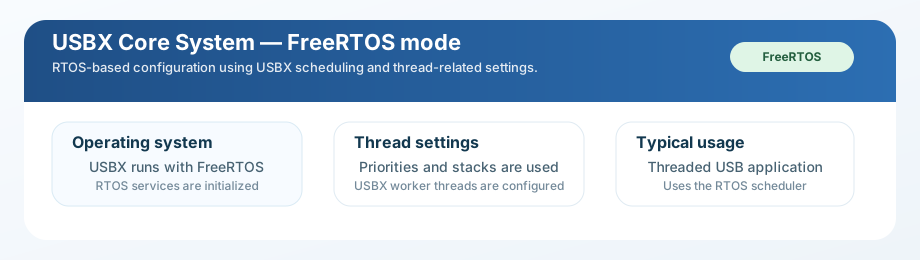
USBX core-system panel when
FreeRTOS
is selected.

Quick reading guide 
Start with
                No


                OS
or
FreeRTOS
.
                   No


                   OS
means standalone USBX.
FreeRTOS
means thread-based USBX.
Priority and stack fields matter only in
FreeRTOS
mode.
Keep worker priorities below the controller priorities configured later.
Review timeouts, debug, and alignment last.
Keep defaults unless the target hardware really needs a change.
How the panel behaves in CubeMX:
-
Select operating systemis the first controlling field in the panel -
when
No OSis selected, RTOS-only fields such as thread priorities and thread stack size remain unavailable -
when
FreeRTOSis selected, the UI enables the thread-related controls and starts evaluating RTOS dependency checks -
the maximum values for enumeration and class thread priorities are computed dynamically from the enabled DCD and HCD thread priorities
How to read each part of the panel:
-
Select operating systemmaps toux_standaloneand decides whether the generated project uses standalone USBX or the RTOS-based path -
Enumeration thread priorityandClass thread prioritytune middleware worker priority in RTOS projects -
Thread stack sizedefines the common stack budget used by USBX threads -
the
Moreexpander contains middleware behavior and timing knobs that are usually left at defaults unless a specific target or class mix requires them
What to review in CubeMX:
-
if
FreeRTOSis selected, confirm FreeRTOS is actually enabled in the project -
verify that
xEventGroupSetBitFromISRandxTimerPendFunctionCallare enabled in the FreeRTOS advanced API selector when the warning appears -
keep enumeration and class priorities lower than the controller thread priorities when both are active
-
change timeout and alignment fields only when the target hardware or traffic profile requires it
What this panel generates:
-
the common USBX execution model used by the generated application layer
-
RTOS worker-thread settings when
FreeRTOSmode is selected -
compile-time middleware options such as alignment, checking, and timeout policy
Required dependencies:
-
No OSprojects do not require the RTOS middleware -
FreeRTOSprojects require FreeRTOS to be enabled and the advanced API options checked by the UI
How to configure this panel from the screenshots:
-
In the
No OSscreenshot, start withSelect operating systemand keep it onNo OSonly when the application uses the standalone USBX execution model. In this mode, the thread-priority and stack-size fields stay locked by design because the UI only enables them whenux_standalone != 'No OS'. -
Open the
Morearea even inNo OSmode. These fields still matter for standalone projects because they map to compile-time behavior such as error checking, parameter checking, alignment policy, debug-log size, periodic rate, and transfer timeouts. -
In the
FreeRTOSscreenshot, switch the operating system toFreeRTOSonly after the project already contains the RTOS pack. This is the condition checked by the UI activation and error rules attached toux_standalone. -
After the panel unlocks, set
Enumeration thread priorityandClass thread priorityfirst. The UI computes their allowed maximum values from the DCD and HCD thread priorities, so these fields must remain at a numerically higher urgency than the class workers but not above the controller threads. -
Set
Thread stack sizeaccording to the selected role mix. A simple HID or CDC project can stay near the default value, while composite class projects or host configurations with several callbacks may need a larger stack. -
Use the
Moregroup as the advanced tuning area. KeepError checkingandParameter checkingenabled during bring-up, then reduce them only after the target is stable. ChangeAlignment,Periodic rate, or timeout values only when the MCU, cache policy, or USB traffic pattern requires it.
Device class configuration 
The device-side part of the configuration is handled in the
Device
class
panel.
It currently covers:
-
HID device, including mouse, keyboard, and custom HID
-
CDC ACM device
-
MSC device
-
DFU device
-
Audio device
-
Video device
-
Printer device
-
CCID device
-
PIMA / MTP device
-
device-core settings
-
device-descriptor settings
When you enable a class, STM32CubeMX2 reveals the matching core and interface subsections. These subsections contain class-specific endpoint addresses, maximum packet sizes, queue sizes, buffer sizes, and advanced options.
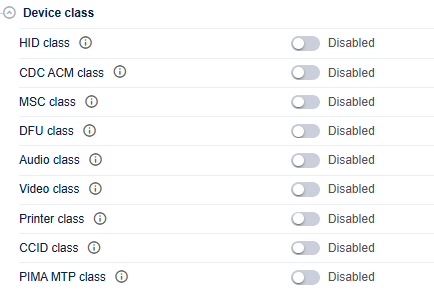
USBX device-class configuration panel in STM32CubeMX2. 
Quick reading guide 
Enable only the device functions the product really exposes.
Size queues, buffers, and class behavior before endpoint tuning.
Set endpoint addresses, packet sizes, and FS/HS values.
Finish with
Device
core
and
Device
descriptor
consistency.
How the device-class area is organized in CubeMX:
-
the top-level toggles decide which device functions are part of the build
-
enabling a class reveals the related
corepanel for behavior options -
enabling a concrete function, such as mouse or keyboard, reveals the matching
interfacepanel for endpoint and packet-size settings -
the
Device coreandDevice descriptorpanels become available only after at least one device class is selected
How to read each device panel in the UI:
-
HID classenables the parent HID feature set -
Device mouse,Device keyboard, andDevice customselect the HID function actually exposed by the device descriptors -
HID
corefields control queue depth, event-buffer sizing, and zero-copy behavior -
HID, CDC ACM, MSC, Audio, Video, Printer, CCID, and PIMA/MTP
interfacefields control endpoint numbers, full-speed and high-speed packet sizes, and polling intervals where applicable -
Device corecontrols global device limits such as interface count, endpoint-buffer ownership, bidirectional endpoint support, and optional connection callbacks -
Device descriptorcontrols descriptor-generation policy such as high-speed support and IAD usage for composite devices
What to review in CubeMX:
-
keep every IN and OUT endpoint number unique across the enabled composite device layout
-
review packet sizes separately for FS and HS operation
-
enable zero-copy only when the application owns stable, aligned buffers
-
verify that optional classes with RTOS dependencies, such as PIMA/MTP, are not enabled in
No OSmode -
size
ux_max_slave_class_driverandux_max_slave_interfacesaccording to the actual composite device layout
What this panel generates:
-
the device-side initialization content used by the USBX device stack
-
class-specific source files for the enabled device classes
-
descriptor-related content that reflects the selected device functions, interfaces, and endpoint plan
Required dependencies:
-
at least one enabled device class is needed before the device role is useful
-
the device role later requires a valid STM32 USB peripheral configured for device mode and HAL
PCDsupport -
some device functions are practical only in
FreeRTOSmode because the UI keeps their RTOS dependency visible
How to configure this panel from the screenshot:
-
Start with the top-level class toggles visible in the screenshot and enable only the USB device functions that the product really exposes to the host. Each toggle controls whether the related core and interface subpanels appear.
-
If the design uses HID, first enable
HID class, then select the concrete function such as mouse, keyboard, or custom HID. The screenshot reflects this two-step structure because the UI separates the parent HID class from the function-specific interface parameters. -
For every enabled class, review the generated
coregroup before theinterfacegroup. The core settings size internal USBX structures such as event queues, report buffers, class instances, or worker behavior, while the interface settings bind the class to USB endpoint numbers and packet sizes. -
Configure endpoint addresses carefully. Composite USB devices fail quickly when two classes reuse the same endpoint direction and number. The screenshot should therefore be read from top to bottom as a descriptor-layout exercise, not only as a list of independent options.
-
Review full-speed and high-speed packet sizes separately whenever the panel shows both values. The UI keeps these as distinct settings because the USB descriptors and FIFO usage differ between FS and HS operation.
-
If the
Device coreorDevice descriptorsubsection is visible in the screenshot, use it to finish the global device layout: interface count, maximum class drivers, bidirectional endpoint behavior, high-speed support, and IAD usage for composite devices all belong there.
Host class configuration 
The host-side part of the configuration is handled in the
Host
class
panel.
It currently covers:
-
HID host, including mouse, keyboard, and RCU support
-
CDC ACM host
-
MSC host
-
HUB host
-
Printer host
-
PIMA / MTP host
-
Audio host
-
Video host
-
GSER host
-
Prolific host
-
SWAR host
-
host-core settings
When host MSC is enabled, the UI also checks the FileX dependency unless
ux_host_class_storage_no_filex
is selected.
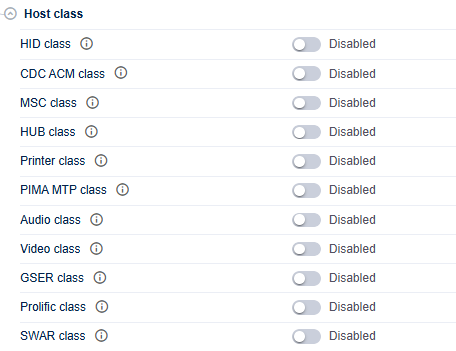
USBX host-class configuration panel in STM32CubeMX2. 
Quick reading guide 
Enable only the host classes needed for real external USB devices.
Check FileX, RTOS, and any class-specific prerequisites first.
Adjust buffers, stacks, and timeouts only when the use case needs it.
Increase global host limits only for the final topology.
How the host-class area is organized in CubeMX:
-
each top-level class toggle enables one host protocol family
-
enabling a class reveals its tuning panel
-
some specialized options, such as keyboard event filtering or MSC storage buffering, appear only after the corresponding host class is enabled
-
the
Host corepanel becomes available only after at least one host class is selected
How to read each host panel in the UI:
-
HID classenables generic host HID parsing support -
Host mouse,Host keyboard, andHost RCUselect convenience class handling for those device categories -
HID
corefields control report parsing, usage tracking, timeout, and optional interrupt OUT support -
Keyboard corecontrols event-reporting mode and keyboard-thread priority -
MSC corecontrols storage buffer size, MSC thread stack, MSC thread priority, and optional FileX integration behavior -
Host corecontrols global host resources such as enumeration-thread stack size and other HCD-related limits from itsMoresubgroup
What to review in CubeMX:
-
for host MSC, either enable FileX or explicitly select the no-FileX storage path
-
keep RTOS-only host classes disabled in
No OSmode when the UI warns that they require RTOS -
adjust HID parser buffers only for complex report descriptors
-
increase host resource limits only when the default topology is too small for the connected device mix
What this panel generates:
-
the host-side initialization content used by the USBX host stack
-
class-specific source files for the enabled host classes
-
host resource settings that size enumeration, storage, parsing, and transfer handling for the selected device families
Required dependencies:
-
at least one enabled host class is needed before the host role is useful
-
the host role later requires a valid STM32 USB peripheral configured for host mode and HAL
HCDsupport -
MSC host requires either FileX integration or the no-FileX storage path
-
several advanced host classes should be kept in
FreeRTOSmode when the UI reports an RTOS dependency
How to configure this panel from the screenshot:
-
Use the top-level host class toggles to describe which external USB devices the MCU must accept. Each enabled class adds code, memory usage, and host stack expectations, so avoid turning on classes that are not part of the intended product scope.
-
If the screenshot shows HID host options, configure them in two passes: first enable the generic HID parser, then enable mouse, keyboard, or RCU support only for the device types the firmware must recognize directly.
-
For MSC host, check whether the application will mount media through FileX. The UI explicitly validates this dependency, so either keep FileX enabled or select the no-FileX storage option when the application reads sectors by a custom path.
-
For class-specific tuning sections, read them as runtime-resource controls. Buffer sizes, thread sizes, timeouts, and parser limits all affect host-side robustness when many devices are attached or when descriptors are complex.
-
Finish by reviewing the
Host corelimits visible in the panel. These fields size the global host engine rather than a single class and should be increased only when the default configuration is too small for the number of devices, endpoints, or transfers expected in the final product.
Applicative configuration 
The applicative group is exposed in the
Applicative
panel.
The common setting is:
-
usbx_system_stack_size
The device-side generated-code controls are:
-
usbx_device_generate_init_code -
usbx_device_application_thread_name -
usbx_device_application_thread_size -
usbx_device_application_thread_priority
The host-side generated-code controls are:
-
usbx_host_generate_init_code -
usbx_host_application_thread_name -
usbx_host_application_thread_size -
usbx_host_application_thread_priority
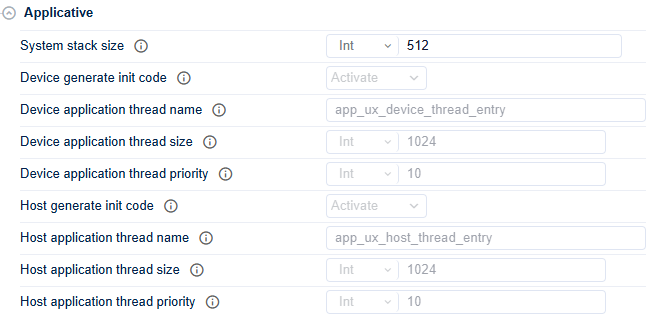
USBX applicative configuration panel in STM32CubeMX2. 
Quick reading guide 
Start from the global USBX memory pool.
Increase it first when classes or resources grow.
Device generated code is valid only with
FreeRTOS
and an enabled device class.
Host generated code is valid only with
FreeRTOS
and an enabled host class.
In dual-role projects, size device and host settings together.
These options control the generated
mx_usbx_app
content and the thread
entry names used by the generated USBX application layer.
How the applicative panel behaves in CubeMX:
-
System stack sizeis always relevant because it sizes the USBX memory pool -
generated init-code fields are conditionally enabled only when their role is active and the project runs in
FreeRTOSmode -
device and host thread-name fields correspond directly to the generated entry names used in the
mx_usbx_applayer
How to read each part of the panel:
-
System stack sizeis the main sizing field for USBX internal memory -
Device generate init codecontrols whether CubeMX emits device-side startup helpers -
Device application thread name, size, and priority configure the device application thread only when device init-code generation is legal -
Host generate init codeand the host thread fields behave the same way for host projects
What to review in CubeMX:
-
do not reduce
System stack sizebelow what the selected class mix needs -
keep generated thread names stable if application code already references them
-
verify that device or host init-code generation is enabled only for the role actually used by the project
What this panel generates:
-
the common USBX application wrapper in
mx_usbx_app.candmx_usbx_app.h -
application entry points such as
app_usbx_init()andapp_usbx_deinit()inmx_usbx_app.c -
in
No OSprojects, the regular processing hook used by the standalone execution path inmx_usbx_app.c -
when the role-specific files are generated,
mx_usbx_device.candmx_usbx_host.ccontain the role-level initialization, deinitialization, processing, and class-registration functions -
in
FreeRTOSprojects, the generated device and host application thread settings for the active roles
Required dependencies:
-
the role-specific thread fields are meaningful only when the corresponding role is enabled
-
RTOS thread fields are relevant only when
FreeRTOSmode is selected
How to configure this panel from the screenshot:
-
Start with
System stack size. This is the global USBX memory pool used by internal objects, class instances, transfers, and generated threads. Increase it first when more classes, endpoints, or host resources are enabled. -
Treat the device-side controls as conditional fields. The UI enables them only when three conditions are true at the same time: the project runs in
FreeRTOSmode, at least one device class is selected, andDevice generate init codeis active. -
When device generated code is enabled, keep the default thread name unless the application architecture requires a project-specific entry point name. The configured name is reused in the generated
mx_usbx_applayer. -
Size the device application thread according to the callback work executed in that thread. If the generated device thread only forwards events, the default value is usually enough. If it performs additional parsing or application logic, raise the stack budget before integration testing.
-
Apply the same reasoning to the host-side fields. The host thread settings in the screenshot are only meaningful when host mode is active, FreeRTOS is selected, and
Host generate init codeis enabled. -
If the project uses both roles, review both halves of the panel together. The system stack, device thread settings, and host thread settings compete for the same RAM budget and should be sized as one integrated configuration.
Interfaces and resource allocation 
The interface configuration is exposed in the
Interfaces
panel.
In
logical_interface
, configure:
-
device_controllers_enablewhen the USB HAL device -
host_controllers_enablewhen the USB HAL host -
ux_thread_priority_dcdfor the device controller thread when RTOS mode is used -
ux_host_hcd_thread_stack_sizeandux_thread_priority_hcdfor host controller processing
In
resources_allocation
, configure:
-
select_the_device_instancefor the selected device USB peripheral -
host_instanceentries for one or more host-controller instances
The UI validates that:
-
device controllers require the STM32CubeMX2
PCDcomponent -
host controllers require the STM32CubeMX2
HCDcomponent -
at least one class is enabled for each active role
-
the selected peripheral instance matches the chosen device or host mode
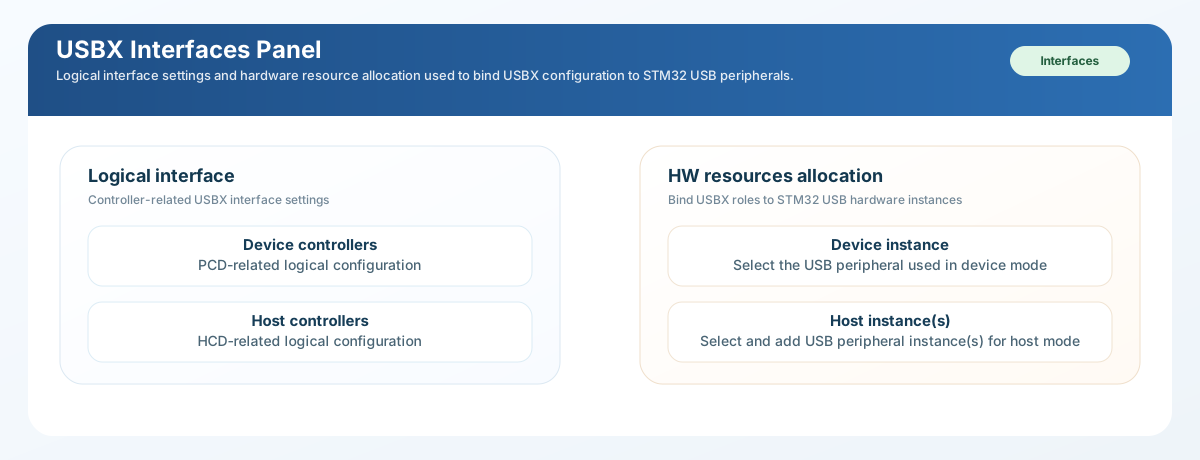
USBX logical-interface and hardware-resource configuration panel. 
Quick reading guide 
Enable
Device
controllers
only for device use.
Enable
Host
controllers
only for host use.
Device mode needs
PCD
.
Host mode needs
HCD
.
In
FreeRTOS
mode, controller threads must stay above upper USBX workers.
Bind device role to DEVICE mode instances and host role to HOST mode instances.
Controller selection schematic 
Use the following in-text decision diagram before enabling the logical-interface options in CubeMX.
Use this when another system sees the STM32 as USB CDC, HID, MSC, DFU, Audio, or Video.
Require
PCD
+ at least one device class + a DEVICE mode USB instance.
Use this when the STM32 enumerates flash drives, keyboards, hubs, printers, or other USB peripherals.
Require
HCD
+ at least one host class + a HOST mode USB instance.
Use this only for a real dual-role design.
The board routing, VBUS strategy, USB instance plan, and RAM budget must all support both paths.
How to use this decision flow:
-
Choose
Device controllerswhen the STM32 behaves as the USB function and another system enumerates it. Typical examples are USB CDC ACM virtual COM, HID device, MSC device, DFU, Audio device, or Video device. -
Choose
Host controllerswhen the STM32 behaves as the USB master and must detect, reset, enumerate, and exchange data with external USB peripherals. Typical examples are USB flash disks, keyboards, mice, printers, hubs, or media devices. -
Choose both only for real dual-role designs. In practice this means the board and software architecture must support both role paths without conflicting on peripheral assignment, power, and RAM budget.
-
If the project is not explicitly dual-role, keep the unused role disabled. This is the safest way to avoid accidental warnings, unused generated code, and over-sized USBX resource settings.
How the interfaces panel behaves in CubeMX:
-
the
Logical interfacepanel is the role-to-controller binding point -
enabling
Device controllersreveals the DCD thread priority field in RTOS mode -
enabling
Host controllersreveals the HCD thread sizing and advanced host controller limits -
the hardware resource allocation panel remains tied to the enabled roles and checks whether the selected USB peripheral instance matches device or host use
How to read each part of the panel:
-
Device controllersmeans the MCU must behave as a USB device and therefore requires PCD support -
Host controllersmeans the MCU must behave as a USB host and therefore requires HCD support -
DCD thread prioritycontrols device-controller servicing in RTOS projects -
HCD thread stack sizeandHCD thread prioritycontrol host-controller servicing in RTOS projects -
the
Moresection under host controllers sizes endpoint descriptors, transfer descriptors, isochronous descriptors, and the number of HCD instances -
Select the device instancebinds the device role to a USB peripheral configured in device mode -
Host instancebinds one or more host roles to USB peripherals configured in host mode
Best practices and how to avoid warnings or errors 
The UI enforces several checks in this panel. Use the following rules to keep the configuration clean:
-
Avoid the
Device controllers are enablederror by enabling the CubeMXPCDcomponent before turning on the device role. -
Avoid the
Host controllers are enablederror by enabling the CubeMXHCDcomponent before turning on the host role. -
Avoid the
select at least one classwarnings by choosing the required device class or host class before leaving the logical-interface page. -
Avoid the
configured in HOST modeandconfigured in DEVICE modeinstance-binding errors by checking the USB peripheral role in CubeMX before assigning it inHW resources allocation. -
In
FreeRTOSmode, keepDCD thread priorityandHCD thread priorityat least as high as the enumeration, class, and keyboard worker priorities. The UI computes these limits because controller threads must not be starved by upper-layer tasks. -
Increase
ux_max_ed,ux_max_td, andux_max_iso_tdonly for real host topologies that need them. Inflating these values too early wastes RAM without improving a simple single-device design. -
For device-only projects, keep host controllers disabled and do not allocate host instances. For host-only projects, keep device controllers disabled and do not bind a device instance. This separation keeps the generated setup easy to review and prevents mixed-role mistakes.
-
For dual-role projects, document which USB instance is reserved for each role and confirm the PCB supports the required connector, VBUS, and OTG behavior before enabling both paths in CubeMX.
What to review in CubeMX:
-
do not enable device controllers without PCD
-
do not enable host controllers without HCD
-
confirm the selected USB instance mode matches the intended role
-
keep DCD and HCD priorities higher than the enumeration and class worker priorities when RTOS mode is active
-
increase ED and TD counts only when the target host topology requires it
What this panel generates:
-
the role-to-controller binding used by the generated USBX startup code
-
the controller-service priority and stack settings used by the STM32 bridge
-
the USB instance assignment that connects the logical role to a real STM32 peripheral
Required dependencies:
-
device controllers require HAL
PCDsupport and a USB instance configured in device mode -
host controllers require HAL
HCDsupport and a USB instance configured in host mode -
each active role must have at least one matching USB class enabled
How to configure this panel from the screenshot:
-
Start in the
Logical interfacepart of the screenshot. EnableDevice controllersonly when the MCU USB peripheral is wired and intended to operate as a USB device. EnableHost controllersonly when the board must power and enumerate external USB devices. -
Read the warnings and errors in this panel literally. The UI attaches hard checks to these toggles: device mode requires the STM32CubeMX2
PCDcomponent, host mode requiresHCD, and each enabled role expects at least one matching class to be selected in the device-class or host-class panel. -
In
FreeRTOSprojects, setDCD thread priorityafter the core-system priorities are known. The UI computes its minimum value from the enumeration and class thread priorities, so the controller thread cannot be configured below them. -
If host controllers are enabled, configure
HCD thread stack sizeandHCD thread priorityusing the same rule: the host controller thread must remain able to service low-level USB events before the upper USBX workers. -
Move next to
HW resources allocation.Select the device instancemust point to a USB peripheral configured by CubeMX in device mode. EachHost instanceentry must point to a USB peripheral configured in host mode. The UI raises an error when a device-mode instance is bound to host configuration or the reverse. -
Finish this panel by checking the board-level reality behind the screenshot: connector routing, VBUS power switching, ID pin strategy for OTG designs, and the actual USB instance exposed on the PCB must all match the instance bound here.
Panel-by-panel mapping summary 
Use the following UI reading order when capturing or reviewing CubeMX screens:
-
pack activation view: confirms middleware activation
-
general information and profile: confirms pack version and profile policy
-
USB core system: confirms execution mode and common middleware behavior
-
device class area: confirms enabled device functions and descriptor-facing endpoint plan
-
host class area: confirms enabled host protocols and host resource sizing
-
applicative: confirms generated init-code policy and application thread names
-
interfaces: confirms controller enablement and USB instance binding
Detailed screenshot walkthrough 
The following screenshots are the detailed working views of the USBX configuration flow. Read each one as a small decision point: first understand why the panel exists, then identify the related settings, then apply only the settings that the product really needs.
Device-side detail screenshots 
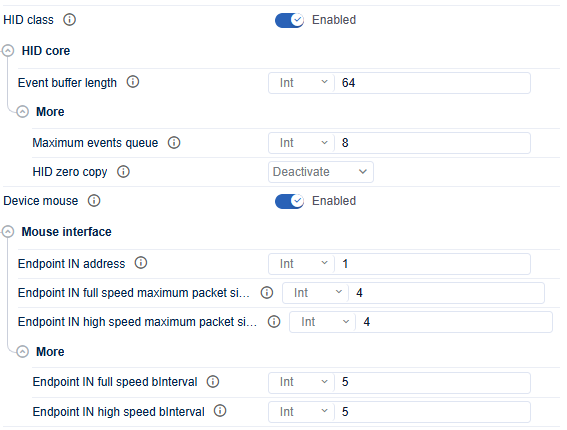
HID mouse device configuration after the class is enabled. 
-
enable
HID classfirst, thenDevice mouse. Keep the IN endpoint unique across the composite device and change the packet size only when the mouse report really needs it.
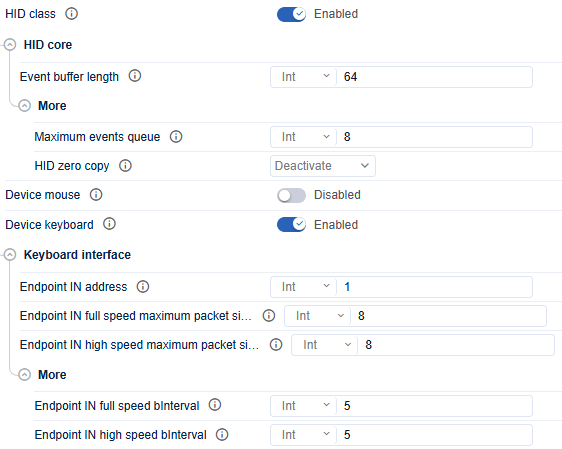
HID keyboard device configuration after the class is enabled. 
-
enable it only after
HID classandDevice keyboardare active. Keep the interrupt IN endpoint unique and size the packet to fit the keyboard report layout.
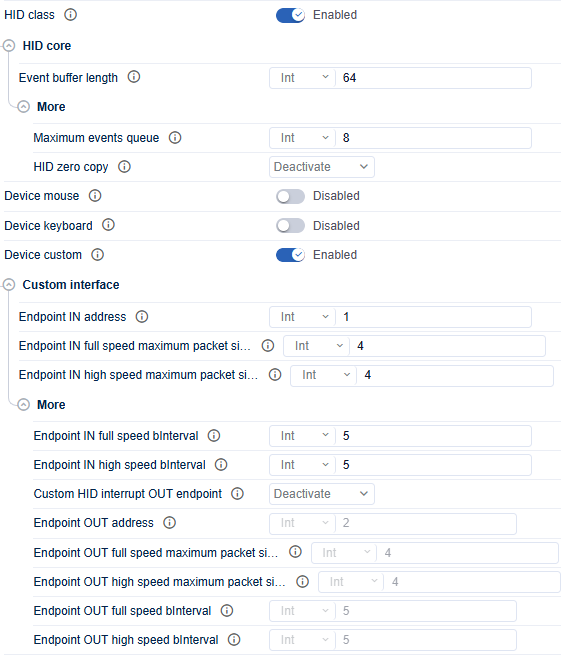
Custom HID device configuration with optional OUT support. 
-
use it only when the application owns the HID report descriptor. Enable OUT support only when the host must send data back, and enable zero-copy only when buffer ownership and alignment are already under control.
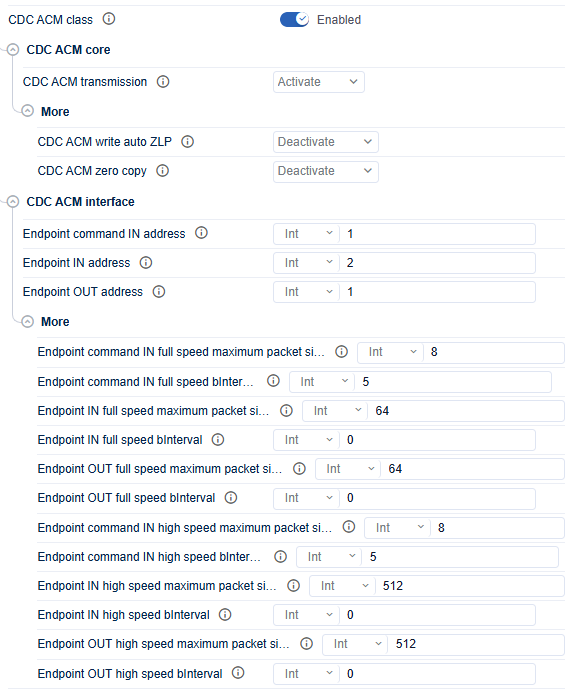
CDC ACM device configuration with command, data IN, and data OUT endpoints. 
-
keep the command endpoint separate from the bulk data endpoints and review the transmission mode only when the application needs a specific blocking or zero-copy behavior.
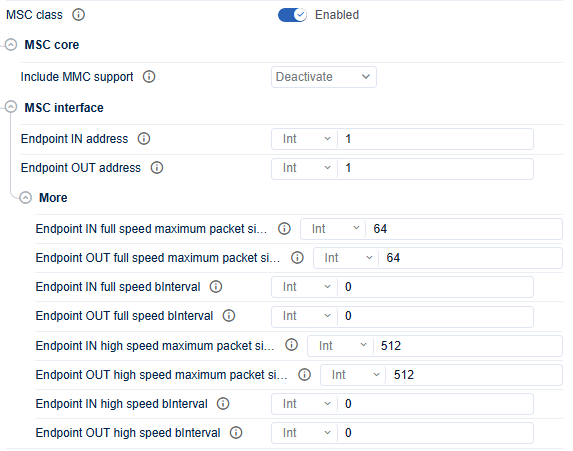
Mass-storage device configuration with bulk IN and bulk OUT endpoints. 
-
keep the default packet sizing unless throughput or media behavior requires something different, and enable MMC support only for real MMC or ATAPI-style storage behavior.
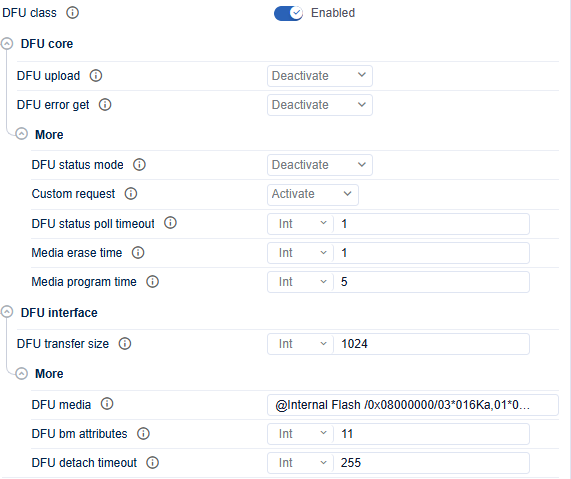
DFU device configuration for USB firmware update behavior. 
-
match the transfer size, media string, and timing values to the real flash layout and erase or program latency of the target.
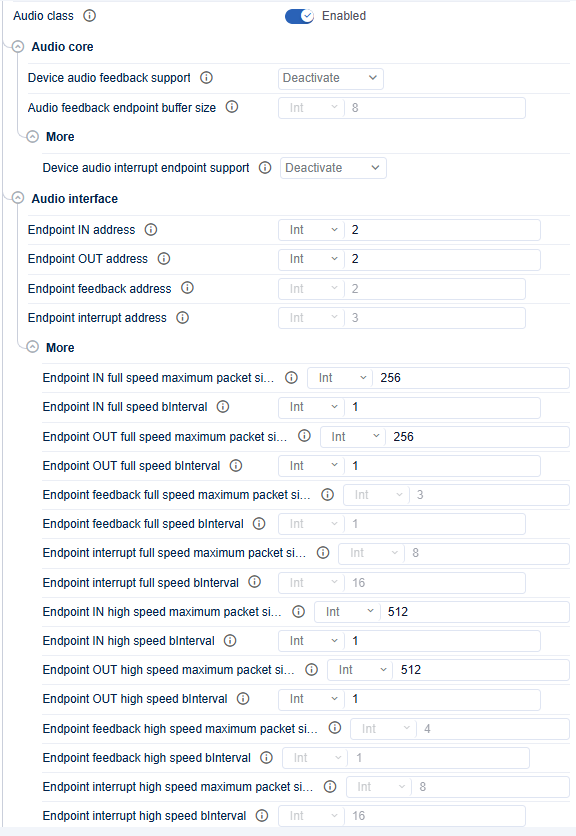
Audio device configuration with streaming, feedback, and interrupt endpoints. 
-
enable only the endpoints that the audio descriptor actually exposes, and keep every IN endpoint unique, especially when feedback and interrupt endpoints are present.
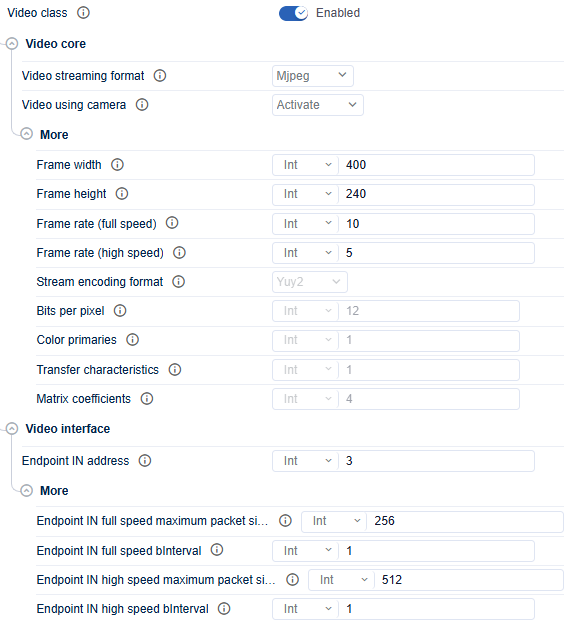
Video device configuration with stream format and endpoint sizing. 
-
choose the stream format first because it drives the bandwidth budget. Increase packet size or frame settings only after checking the real USB throughput available on the target.
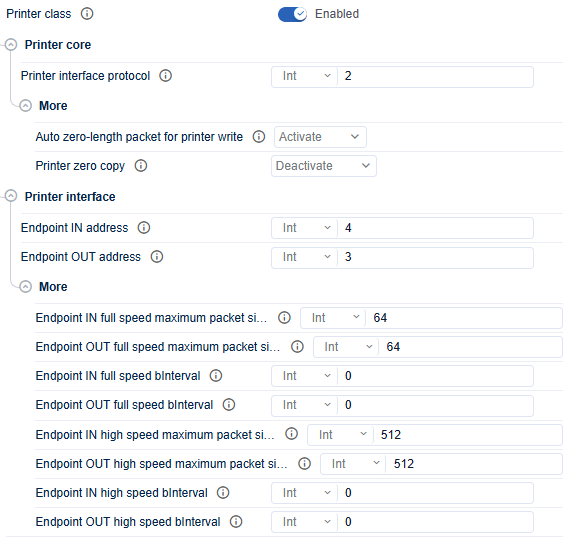
Printer device configuration with protocol and bulk endpoints. 
-
select the protocol expected by the host driver, keep the bulk endpoints unique, and leave advanced write behavior at its default unless the printer data path needs a deliberate change.
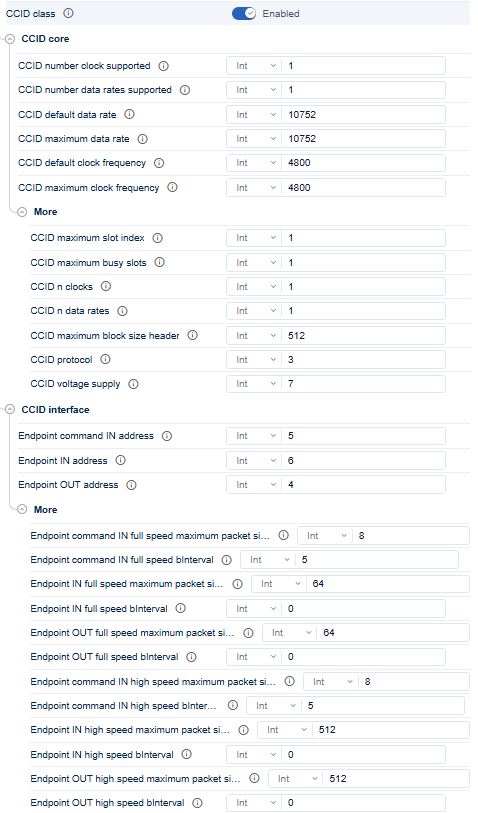
CCID device configuration for smart-card reader behavior. 
-
keep the advertised clock and data-rate capabilities aligned with the real smart-card front-end, and keep the endpoint plan unique across the whole composite device.
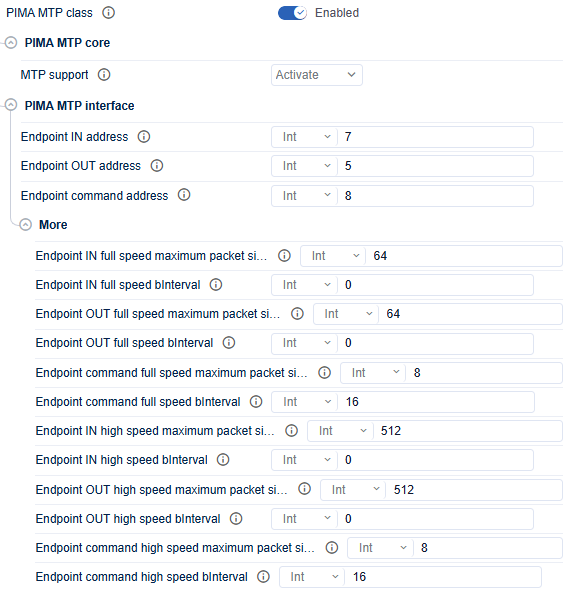
PIMA or MTP device configuration with data and event endpoints. 
-
use this class only in
FreeRTOSmode, keep the three endpoint roles distinct, and enable the event path only when the application really emits asynchronous notifications.
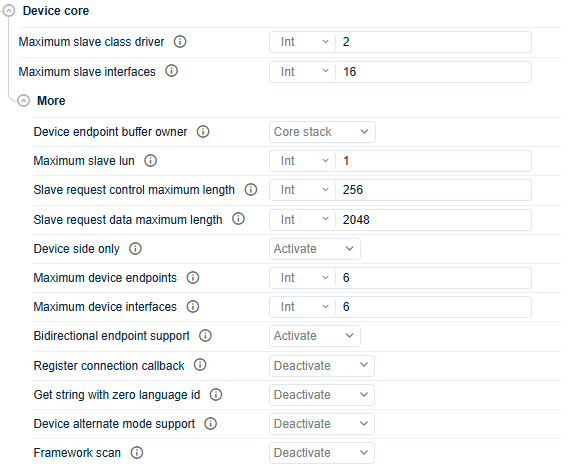
Device-core panel for global device limits and shared behavior. 
-
size these limits from the final composite layout, not from a single class. Increase them only when the real device needs more interfaces or class drivers.
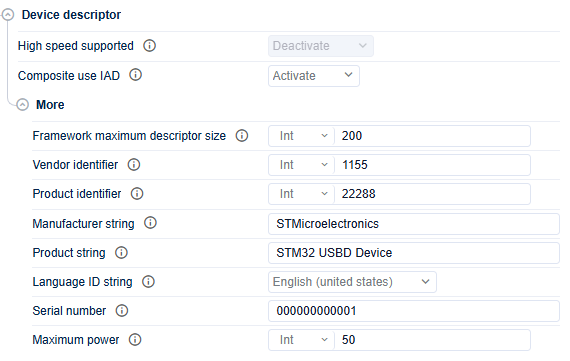
Device-descriptor policy panel for high-speed and composite behavior. 
-
enable high-speed support only when the board and the descriptors must expose HS behavior, and keep IAD enabled for multi-interface composite functions such as CDC ACM.
Host-side detail screenshots 
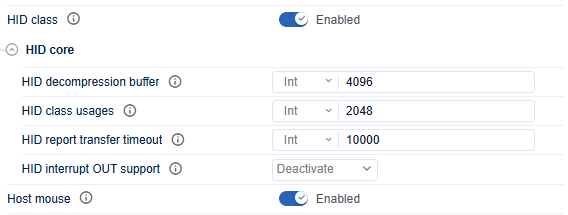
HID host mouse configuration after the host mouse support is enabled. 
-
enable it only when the MCU must interpret USB mouse devices directly. Keep the default HID parser sizing unless the device uses unusually rich reports.
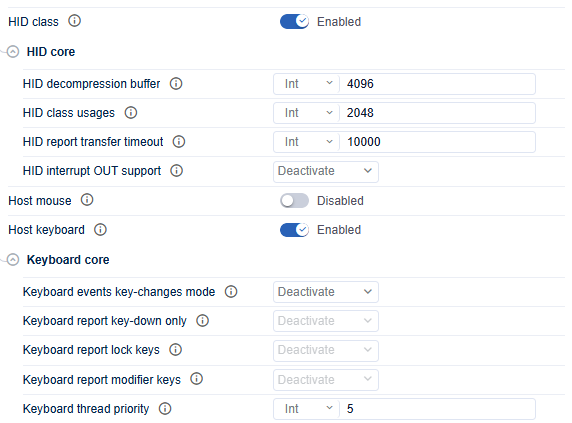
HID host keyboard configuration after keyboard support is enabled. 
-
use key-change mode when the application wants event-driven handling instead of repeated updates, and raise the keyboard thread priority only when the reaction time really needs it.
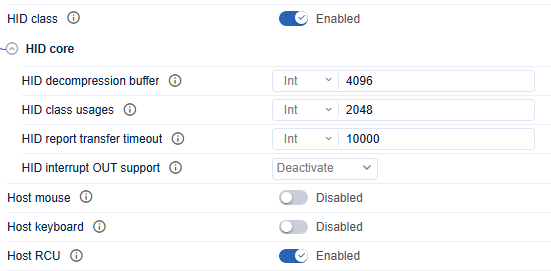
HID host remote-control configuration after RCU support is enabled. 
-
turn it on only when the firmware must decode consumer-control or remote-control devices directly. Leave it off for simple HID host projects.
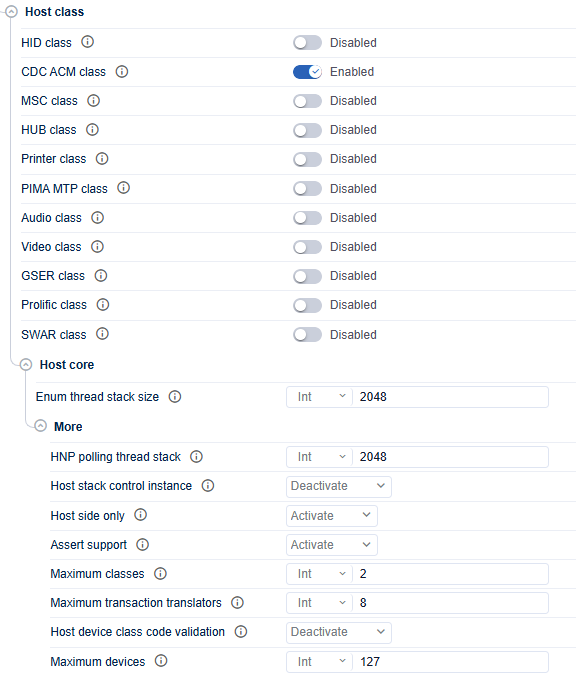
CDC ACM host configuration after virtual COM support is enabled. 
-
enable it only when the STM32 host must talk to external USB serial devices, and leave unrelated host classes disabled to keep the stack smaller and easier to validate.
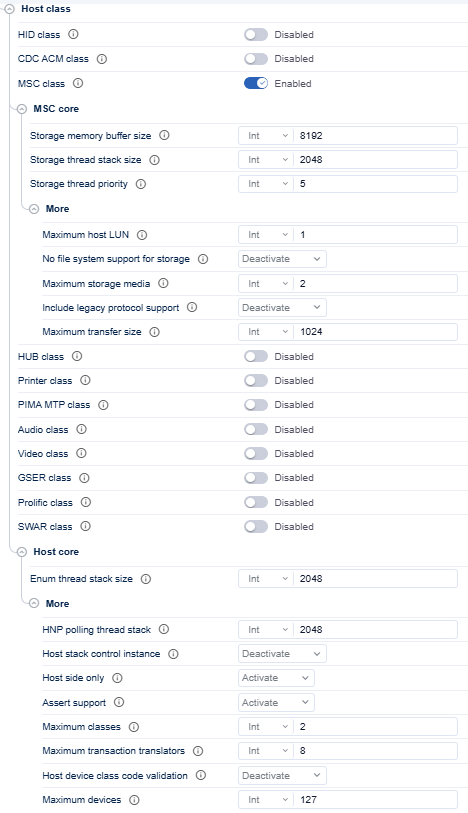
MSC host configuration after storage support is enabled. 
-
decide first whether the application mounts media through FileX, then size the storage buffer and storage thread only as large as the expected transfer load requires.
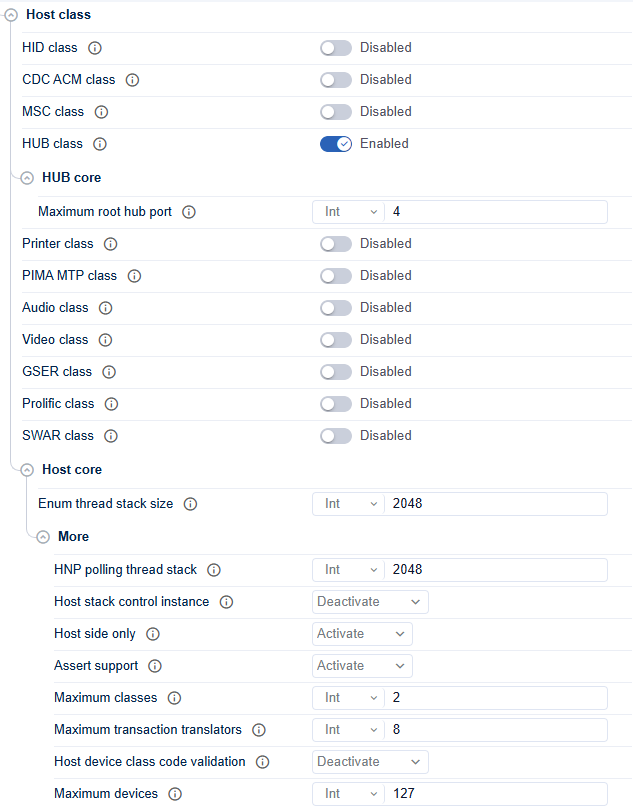
HUB host configuration after hub support is enabled. 
-
match the root-hub port count to the real host topology and do not increase it arbitrarily, because it expands the host-side resource assumptions.
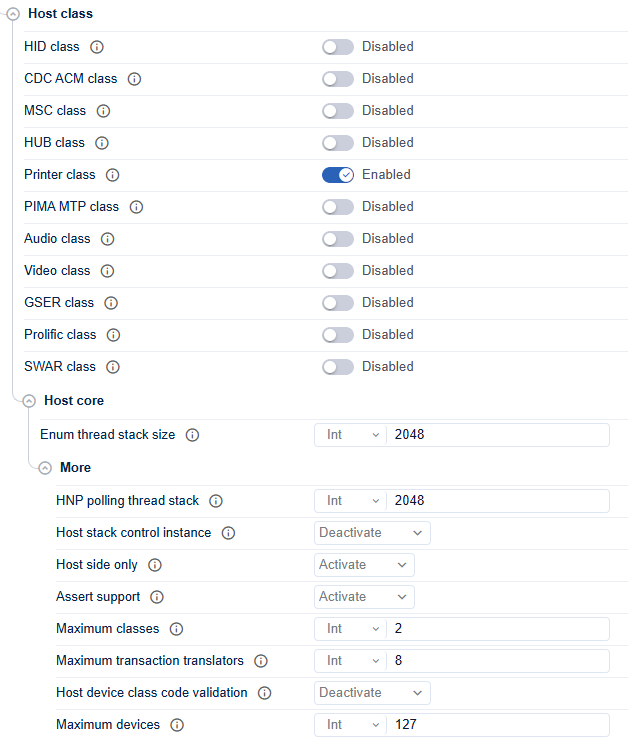
Printer host configuration after printer support is enabled. 
-
enable it only when the application must talk to printers directly, and keep unrelated host classes disabled so the configuration stays aligned with the real product role.
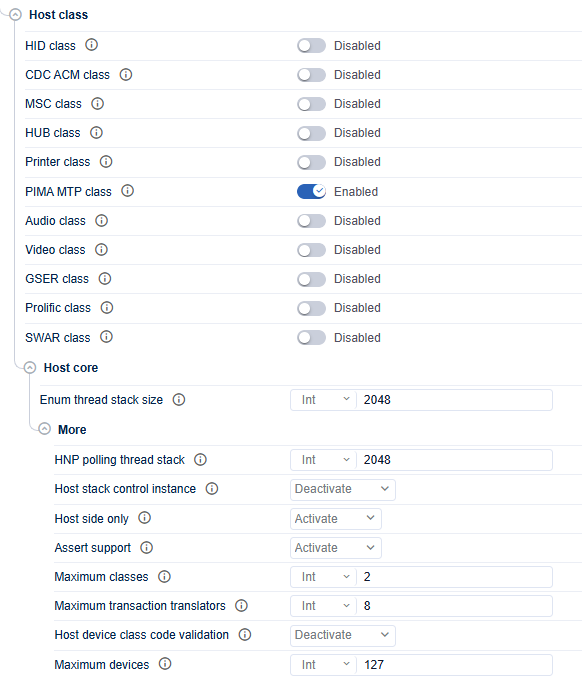
PIMA or MTP host configuration after media-transfer support is enabled. 
-
use this class only in
FreeRTOSmode and only when the product must browse or transfer content from compatible media devices.
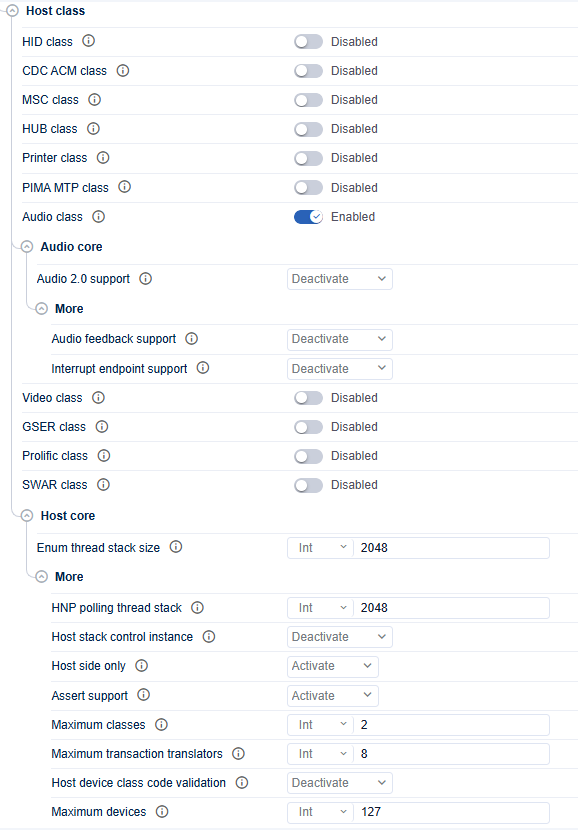
Audio host configuration after USB audio support is enabled. 
-
enable Audio 2.0 only when the attached device class requires it, and leave the whole class disabled in simpler mass-storage or HID host designs.
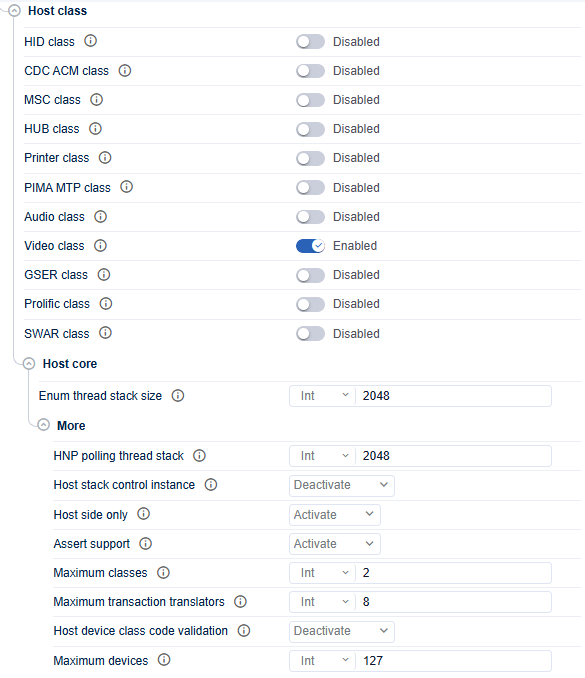
Video host configuration after UVC support is enabled. 
-
enable it only when the product really captures from UVC devices, and review stack or transfer limits if the default host configuration proves too small.
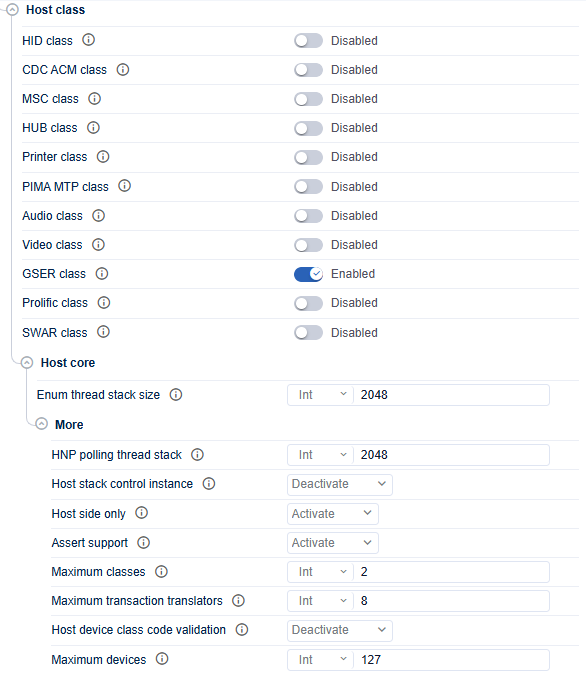
GSER host configuration after generic serial support is enabled. 
-
enable it only for devices that actually use the GSER model, and avoid enabling multiple serial-style classes unless the product really needs them.
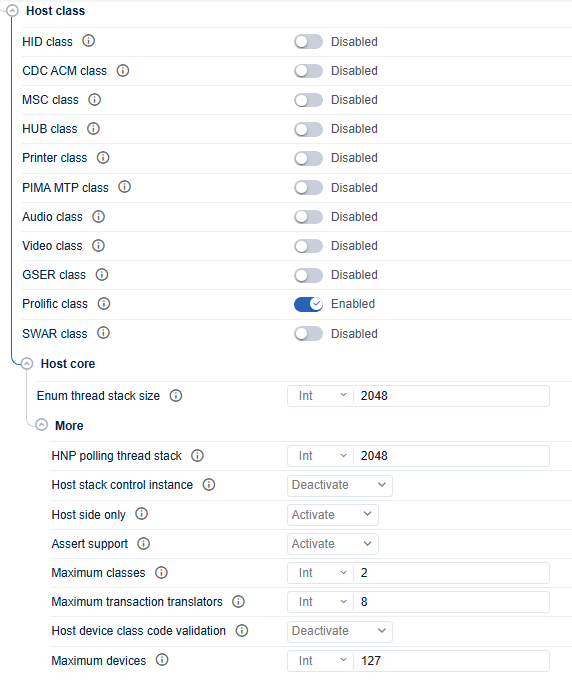
Prolific host configuration after Prolific serial support is enabled. 
-
enable it only when the host must communicate with Prolific bridge devices, and leave it disabled in general-purpose host builds.
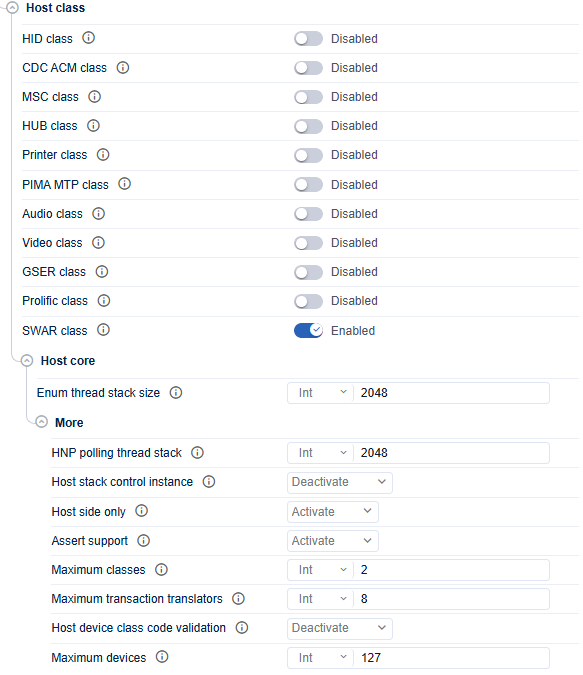
SWAR host configuration after SWAR support is enabled. 
-
enable it only when the supported device family is part of the real product scope. Otherwise leave it disabled to avoid unnecessary code and RAM use.
Controller and binding detail screenshots 
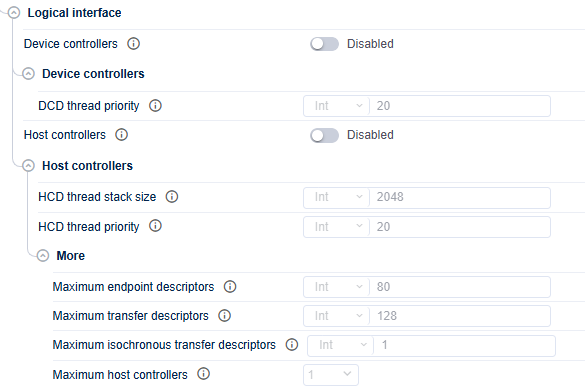
Logical-interface panel used to enable device and host controller roles. 
-
enable only the role the product really uses, and do not enable a role before its matching class family and HAL component are already planned.

Device-controller view after the device role is enabled. 
-
keep the DCD priority at least as urgent as the enumeration and class worker priorities. The default is already computed for safety, so change it only when the controller layer really needs faster service.
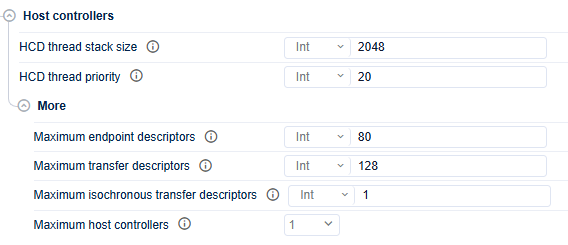
Host-controller view after the host role is enabled. 
-
increase the HCD stack size or the advanced descriptor limits only when the real host topology justifies it. A simple single-device host does not need inflated ED or TD counts.
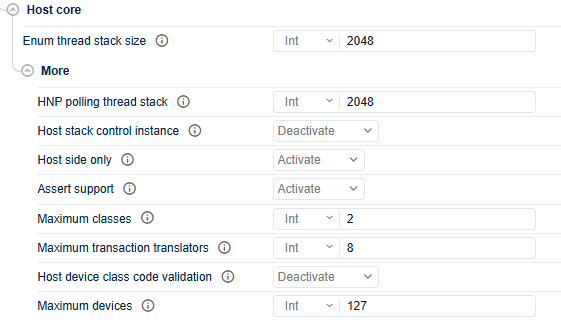
Host-core panel for global host behavior and enumeration resources. 
-
review it after the final host-class mix is known, and increase the enumeration stack or shared limits only when real devices or hubs make the defaults too small.
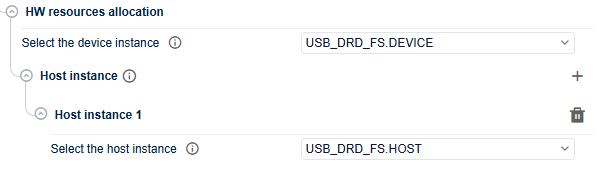
Hardware-resource binding panel after USB instances are selected. 
-
bind a device role only to a USB instance configured in device mode, and bind a host role only to a USB instance configured in host mode. Fix any mismatch here before code generation.
Configuration checklist 
Before moving to initialization, verify the following:
-
USBX is enabled in the middleware view.
-
The execution mode matches the project architecture.
-
No OSandFreeRTOSsettings are not mixed. -
Device mode uses PCD and host mode uses HCD.
-
At least one class is selected for each enabled role.
-
Endpoint addresses and packet sizes are consistent across enabled device classes.
-
The USBX memory pool and thread stacks are sized for the selected topology.
-
Generated init code is enabled only when its activation conditions are satisfied.
Links 
-
What is USBX? OverView
-
Getting started with USBX Getting started with USBX
-
How to initialize USBX How to initialize USBX
-
How to write a USBX low-level interface How to write a USBX low-level interface