
 STM32CubeMX

Miscellaneous 
When a project that was created with a version of STM32CubeMX earlier than 6.18.0 and with PCC enabled is opened, errors can occur.
Workaround : Open the ioc file that an earlier version of STM32CubeMX originally created in Notepad, and add the following two lines :
PCC.SequenceTime=0.01 s

PCC.SequenceTime.Unit=s
Then save the ioc file and open it in STM32CubeMX 6.18.0.
When integrating software packages, please note that the current configuration only allows the selection of one major component at a time. Attempting to select packages like X-CUBE-TOUCHGFX and X-CUBE-TCPP together will be prevented by the package selector.
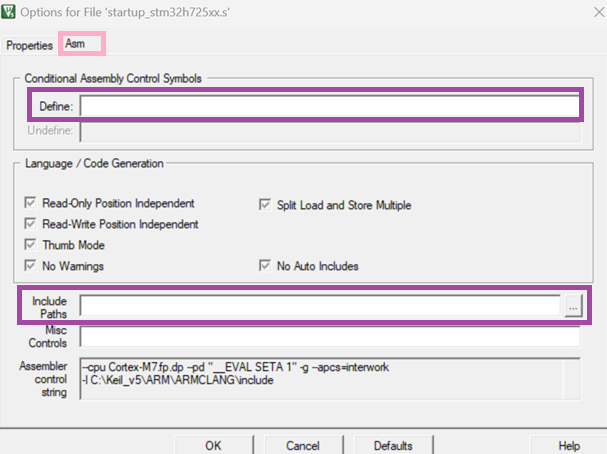
An issue can occur with MDK-ARM when the assembly file settings are modified from the “Option for Target” panel. More precisely, when a user adds include paths or defines from that panel, the settings are removed.
As a temporary workaround, users must manually add include paths or defines for assembly files by following these steps:
Right-click on the assembly file and select “Options for File’startup_stm32XXXxx.s”
Navigate to the Asm tab and add the necessary include paths and/or defines
Generating an STM32 project with a minimum version of the IAR Embedded Workbench® toolchain creates a permanent association. The user cannot change this minimum version later or regenerate the project.
For STM32 projects that use ThreadX with the starm-clang compiler, users may encounter build issues when using Expansion Packages that provide X-CUBE-AZRTOS for the following products: STM32G0, STM32G4, STM32H7, STM32H7RS, STM32L4, STM32L5, STM32WB, and STM32WL.
To ensure ThreadX works correctly with the starm-clang compiler, proceed as follows:
Copy “Middlewares/ST/threadx/ports/cortex_m0/ac6” folder from the STM32Cube firmware to the project
Update the CMakeLists.txt file under “cmake/stm32cubemx/” by replacing “/gnu/” with “/ac6/”
Update the tx_initialize_low_level.S file under “Core/Src/” as illustrated below:
#if defined (__clang__)                            to be replaced by ==> #if defined (__ARMCC_VERSION)

#if (defined(__GNUC__) && !defined(__clang__))      to be replaced by ==> #if (defined(__GNUC__) && !defined(__ARMCC_VERSION))
Only for STM32G0 users, change the following instruction in the tx_initialize_low_level.S:
.text 32 to be replaced by ==> .textFor STM32 products that natively support the ThreadX feature, building projects with ThreadX enabled in low-power support mode by using Makefile or CMake toolchains results in warnings.
The compare Projects tool cannot compare projects that have the direct memory access (DMA) feature enabled.
Starting from Ubuntu version 23.10, when the user selects Tools > MCU commercial part number to configure Tools > MCU selector, the CAD viewer does not function.
If you get a file access error during compilation in a partner IDE (for example, “cannot open source input file”), try moving the project to a shorter path on your disk.
You can either:
Move the entire STM32 package manually, or
Move only the example by using the Example Selector in STM32CubeMX and placing it closer to the disk root (to avoid long path issues).
If the “CAD resources” feature does not work correctly when “Use System Proxy parameters” is selected, try switching to “Manual Configuration of Proxy Server” or “No proxy” instead. You can change this in: [Updater Settings…] > [Connection Parameters].
When unzipping a package on a macOS® system, use an official macOS® application such as the default graphical archive application, or the ditto tool in the command line:
$ditto -x -k setupArchive.zipWhen a Linux®-like application is used (such as unzip), the expanded files lose the signature and are not recognized as signed.
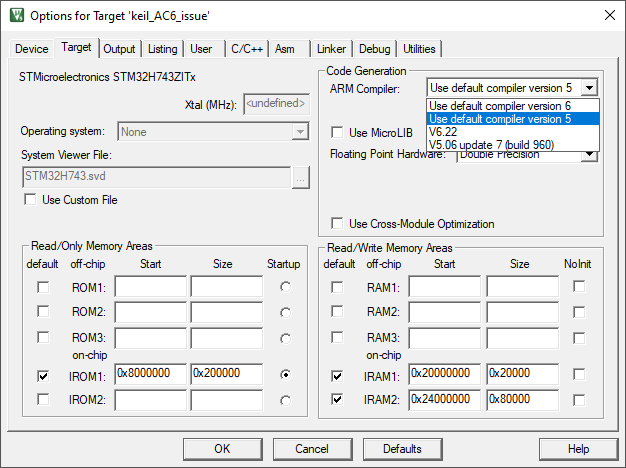
For Keil® MDK users, especially those working with STM32CubeMX-generated projects, note that starting from Keil® MDK v5.37, Arm Compiler 6 (AC6) is now the default toolchain and Arm Compiler 5 (AC5) is deprecated. This change can cause compatibility issues for some STM32 series, including:
STM32F x
STM32L (0x, 1x, 4x)
STM32H7 (2x, 3x, 4x, 5x, Ax, Bx)
STM32G x
STM32WB (1x, 3x, 5x)
STM32MP15x
With these products, you may see compilation errors when using AC6, including messages indicating that the required Arm Compiler is not available. Workaround:
Download Arm Compiler 5 manually from https://developer.arm.com/documentation/ka005198/latest/.
Follow the step-by-step instructions available in this guide [1] to add Arm Compiler 5 to Keil® MDK 5.37 or newer.
Once installed, select AC5 as the Arm Compiler of your project settings.
Note
[1] Arm and TrustZone are registered trademarks of Arm Limited (or its subsidiaries) in the US and/or elsewhere.