
 STM32Cube Software Examples

How to port the example to another board 
Porting an example requires updating the board-specific configuration while keeping the use-case code intact. The steps below provide a consistent approach for HAL, LL, middleware, and utilities examples.
Overview 
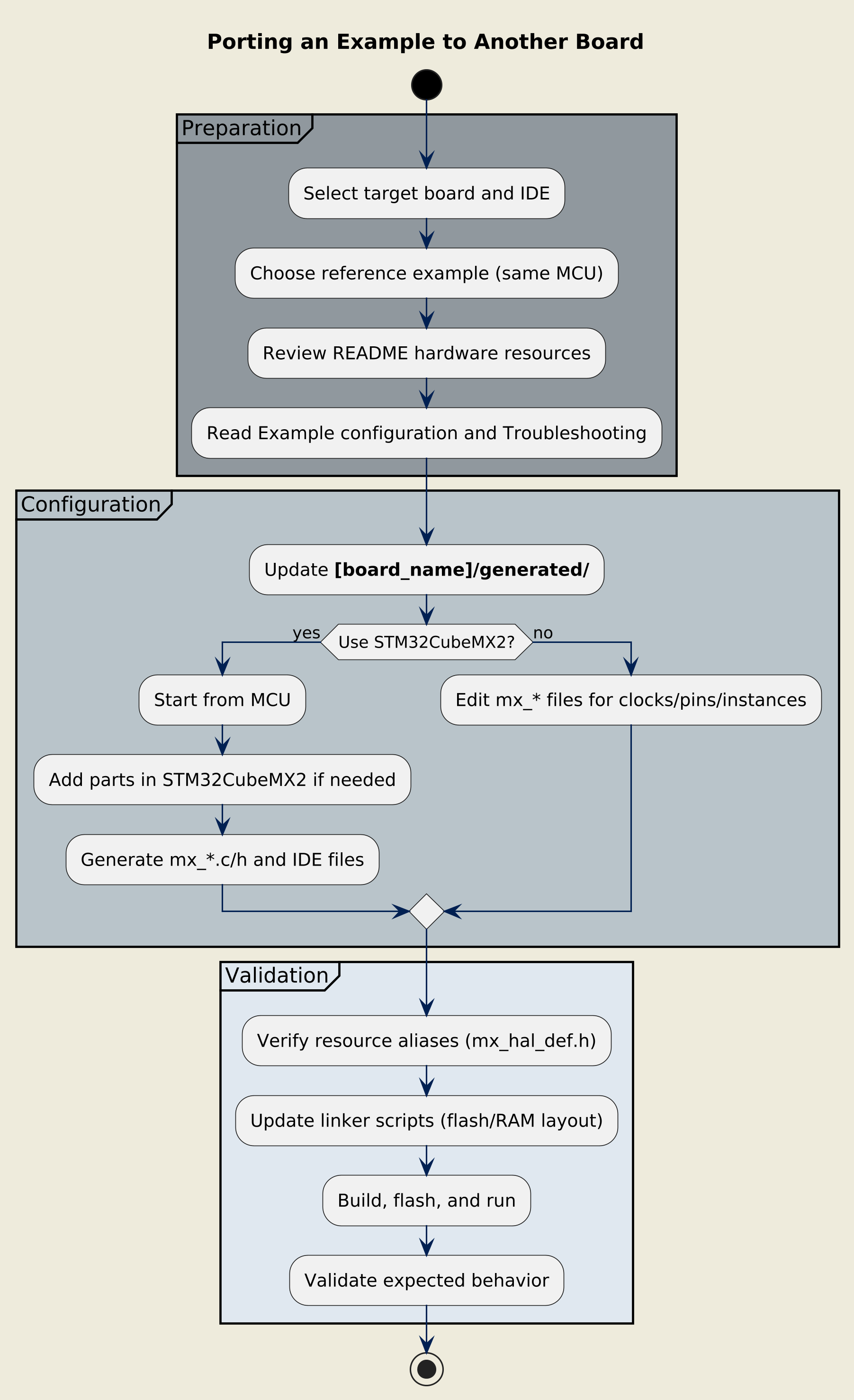
Overview of the porting procedure
Procedure 
Select the target board and IDE and choose the closest reference example to port (same MCU).
In the README file of the reference example:
Check the hardware resources used and the pinout configuration.
Read carefully the major configuration points in the Example configuration section, and the Troubleshooting section to be aware of the common points of attention and issues.
Update the application resources in the
[board_name]/generated/folder:Configure the application by using STM32CubeMX2 with Create project from MCU. However, if the process starts from an existing example used as a reference for the configuration, follow the steps below.
Refer to the Configuring with STM32CubeMX2 chapter for more detailed information about the configuration process, and apply it to the starting project.
Generate all configuration code to update the
[board_name]/generated/folder:All mx_*.c and mx_*.h files are regenerated
IDE project files are updated
See the Configuring without STM32CubeMX2 chapter to understand how to modify the files under
[board_name]/generated/correctly.Update the
mx_configuration files for clocks, pins, and peripheral instances.
If the configuration application is perfomed with STM32CubeMX2, follow these steps:
Use the parts panel of STM32CubeMX2 to add a standalone part(s) to the project.
Browse the available parts library and select the required part.
Click Add to include it in your project. The part appears in the left Parts panel.
Refer to the chapter How to access hardware parts in STM32CubeMX2 documentation for more information about adding a new hardware part in STM32CubeMX2.
Note
Adding a part to the project does not automatically add its software configuration. You must activate the part to include its software configuration in the project.
Verify the resource aliases in
mx_hal_def.hand relatedmx_[part].hheaders.Edit linker scripts to change:
Flash and RAM sizes
Memory region placement (CODE, DATA, BSS, HEAP, STACK)
Special sections (such as DMA buffers, shared memory)
Refer to your toolchain documentation for linker script syntax.
Build, flash, and run the example, then validate the behavior against the expected scenario.