
 STM32Cube Software Examples

Structure of the examples 
This page introduces the main files and folders of an example project. It is a starting point for navigating the example structure.
For a more in-depth understanding of the example code, refer to the Example architecture section.
Note
Folder and file names in brackets (
[


            ]
) are placeholders.
This page describes the
multi-project folder structure.
For standalone projects, omit the
[board_name]/
level or
application/
level.
Folder structure 
Two folder structures are available:
STM32Cube MCU Package folder structure: all examples share the same libraries (DFP, HAL, middleware, part drivers, utilities), so they have links to folders out of themselves.
Standalone project folder structure: self-containing example project, with all dependencies grouped together under the same top-level folder.
See Folder structures for details on the folder structure and deliverables.
Common layout 
Most example categories share the same top-level layout:
application/: Application code for the scenario.main.c: System initialization, application start, main loop, and error handling.example.c(when present): Scenario implementation, typically exposingapp_init(),app_process(), andapp_deinit().
[board_name]/: Board-specific configuration and IDE projects.[ide]/: IDE project files for a given toolchain.generated/: Configuration code for the MCU, peripherals, and board.
The STM32CubeMX2 project files are located under
[board_name]/. The STM32CubeMX2 tool generates the content ofgenerated/and can generate IDE project files.
Category differences 
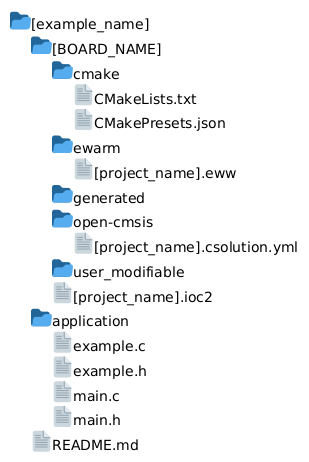
The HAL layout is the reference layout for most example categories.
The
application/
folder adds LL-specific files:
stm32yyxx_ll_example.c: STM32-series-specific LL calls.ll_example.h: API exposed toexample.c.
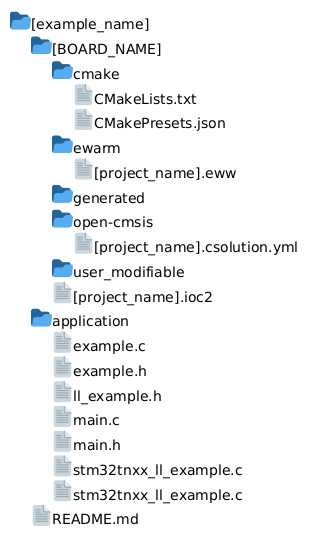
The
[board_name]/generated/
folder includes a
middleware/
subfolder for the selected middleware.
Additional application files may be added to implement the middleware scenario. These files are sometimes grouped in subfolders by topic.
The
[board_name]/generated/
folder includes a
parts/
subfolder for the selected part drivers.
The folder structure follows the common layout.
The application code can be limited to a minimal
main.c
scenario.
The
[board_name]/generated/
folder includes a
utilities/
subfolder for the selected utilities.
Inclusion model 
The application code uses a small set of headers to access system services, peripherals, and optional components. The following diagrams use a representative example for each category.
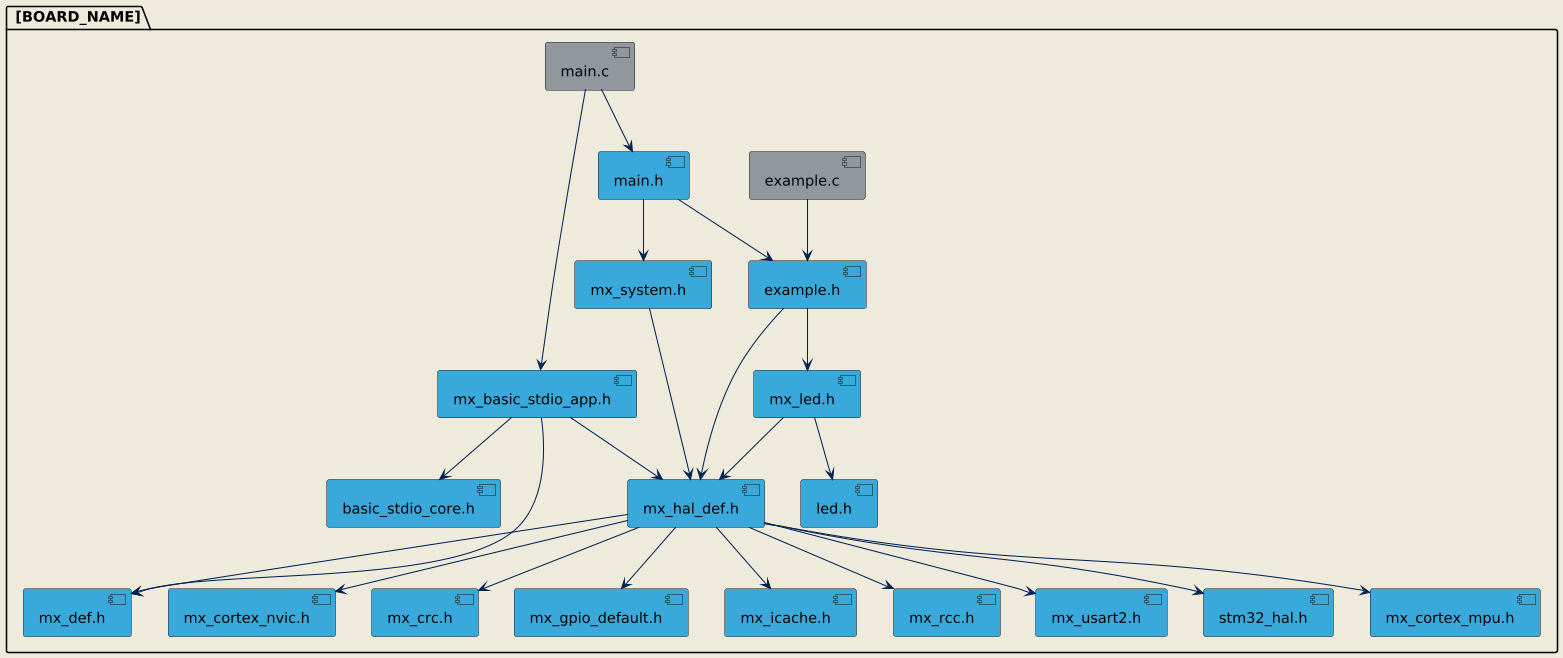
Example: CRC
main.cincludesmx_system.hto access system initialization services.example.cincludesmx_hal_def.hto access STM32 resources and HAL services.Optional components are included through their headers (for example
mx_led.handstm32_basic_stdio.h).mx_hal_def.haggregates the enabled peripherals, for example:mx_crc.h: CRC peripheral demonstrated by the example.mx_usart1.h: UART used for console logs.mx_gpio_default.h: GPIO used by the LED part driver.
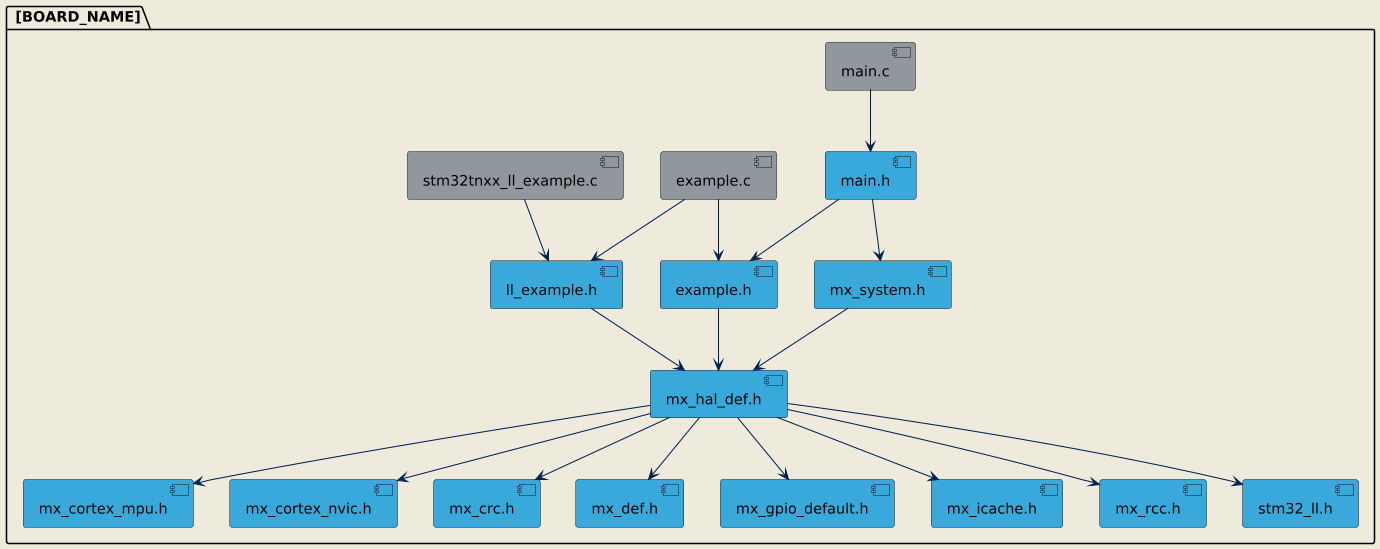
Example: CRC
main.cincludesmx_system.hto access system initialization services.example.cimplements the scenario and calls the LL-specific API.stm32yyxx_ll_example.cincludesmx_hal_def.hand performs the LL calls for the targeted STM32 series.mx_hal_def.haggregates the enabled peripherals, for example:mx_crc.h: CRC peripheral demonstrated by the example.mx_gpio_default.h: GPIO used by the LED part driver.
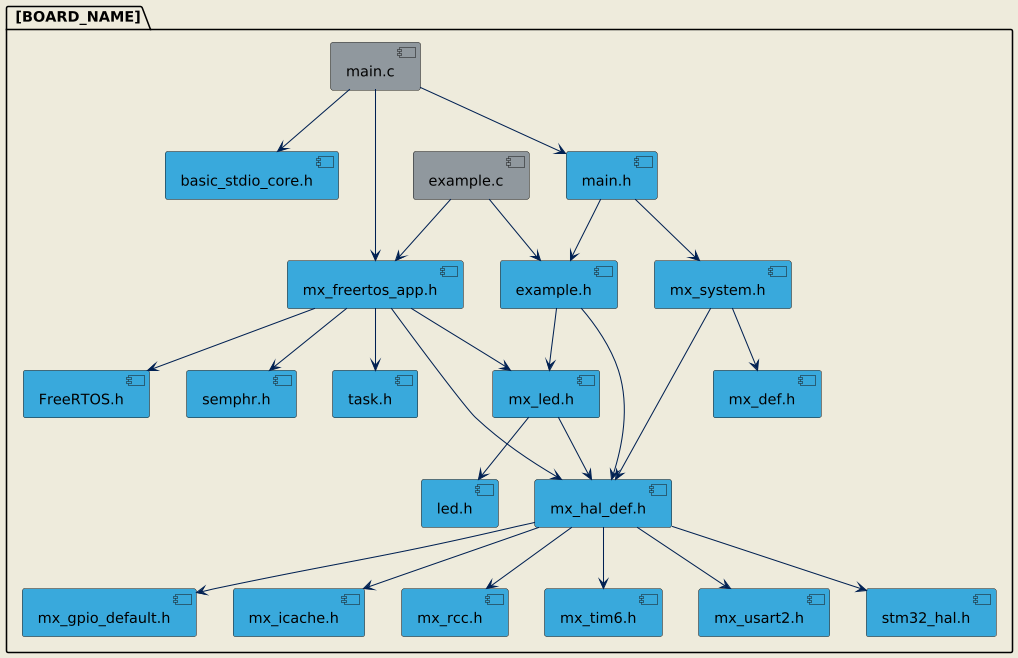
Example: FreeRTOS
main.cincludesmx_system.hto access system initialization services.example.cincludesmx_hal_def.hto access STM32 resources and HAL services.When generated, middleware-specific headers are included (for example
mx_freertos_app.h).Optional components are included through their headers (for example
mx_led.handstm32_basic_stdio.h).mx_hal_def.haggregates the enabled peripherals, for example:mx_crc.h: CRC peripheral used by the example.mx_usart1.h: UART used for console logs.mx_gpio_default.h: GPIO used by the LED part driver.
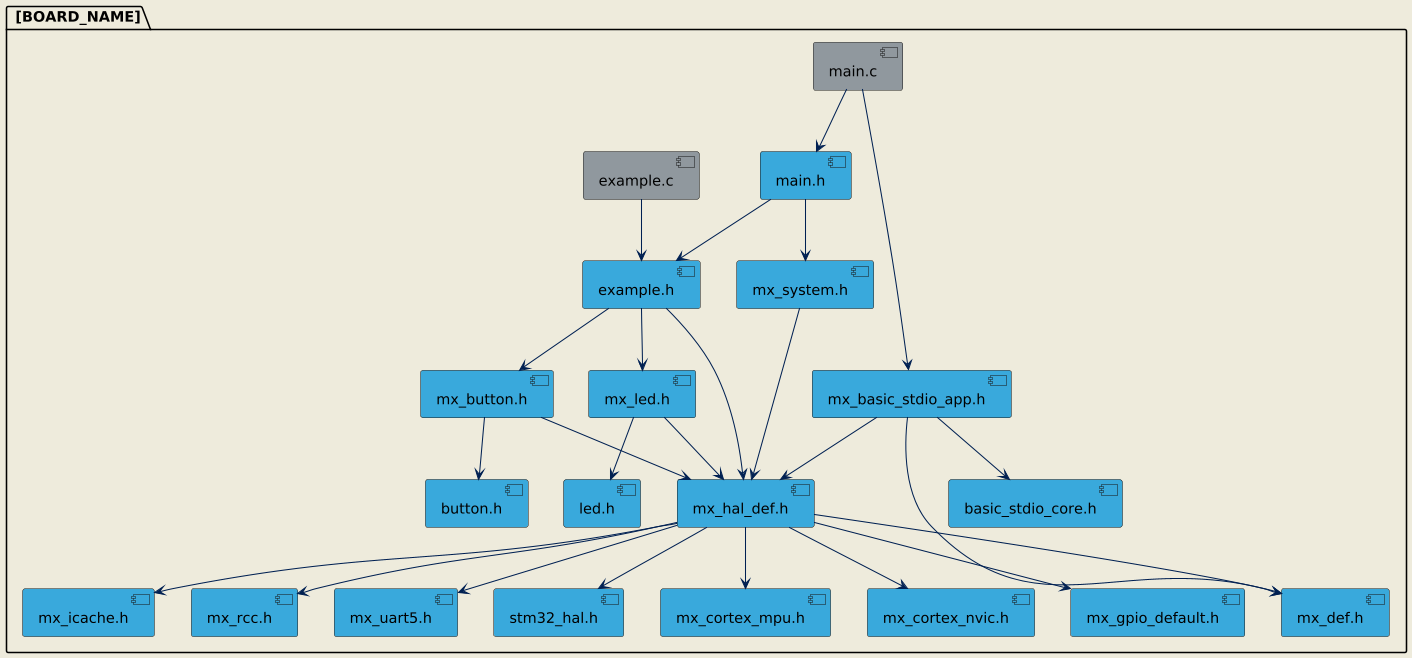
Example: Button
main.cincludesmx_system.hto access system initialization services.example.cincludes the selected part driver header (for examplemx_button.h).Optional utilities are included through their headers (for example
stm32_basic_stdio.h).
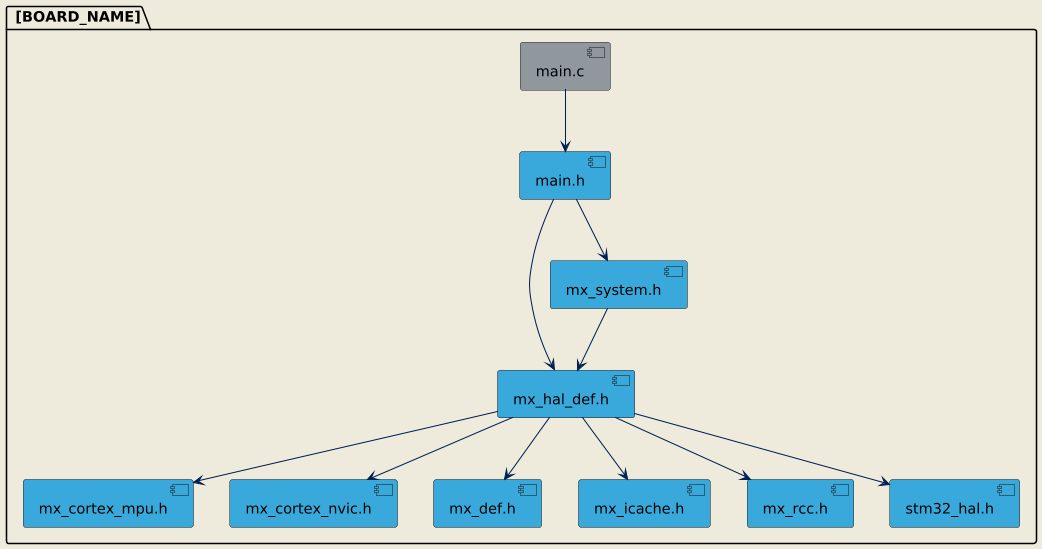
main.cincludesmx_system.hto access system initialization services.main.cincludesmx_hal_def.hto access STM32 resources and HAL services.
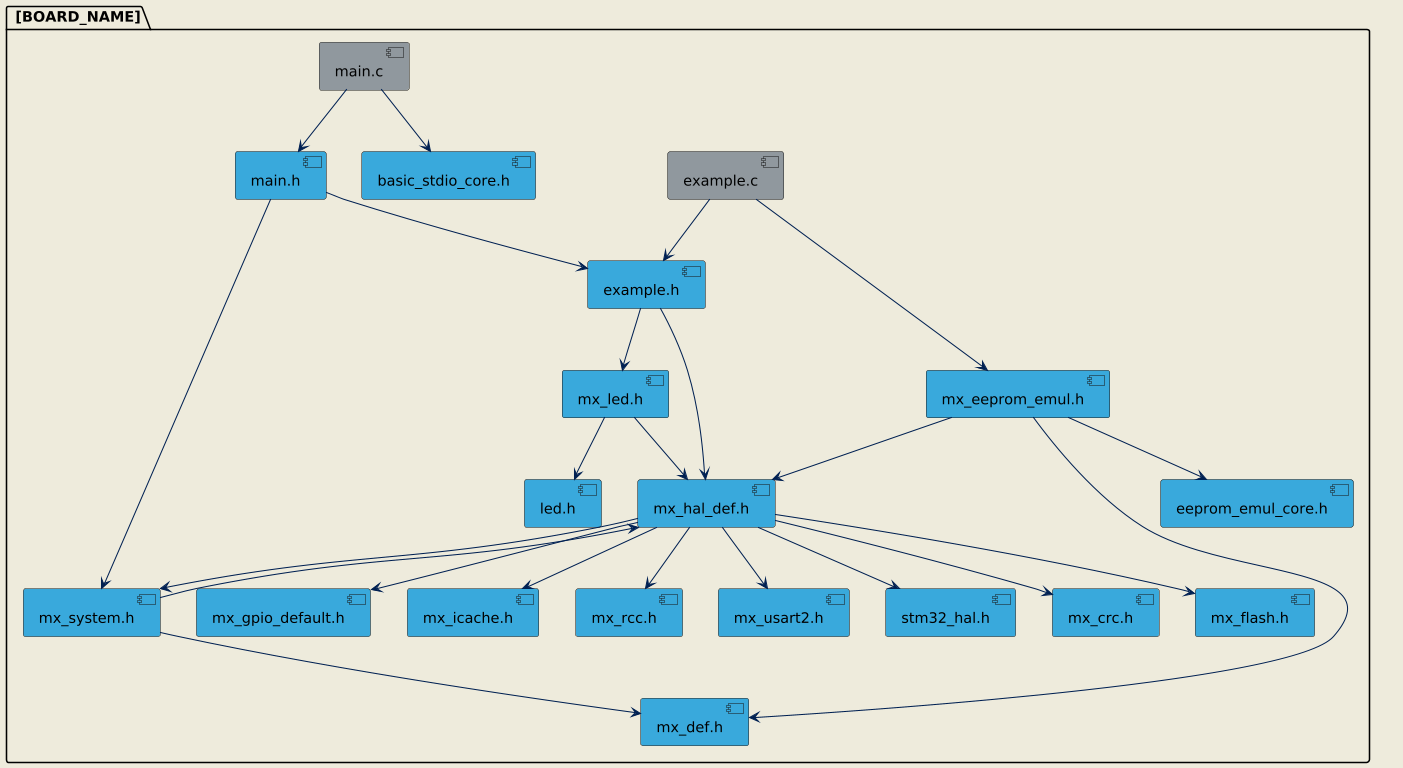
Example: EEPROM emulation
main.cincludesmx_system.hto access system initialization services.example.cincludes the selected utility header (for examplemx_eeprom_emul.h).Optional components are included through their headers (for example
mx_led.handstm32_basic_stdio.h).mx_hal_def.haggregates the enabled peripherals, for example:mx_crc.h: CRC peripheral used by the example.mx_usart1.h: UART used for console logs.mx_gpio_default.h: GPIO used by the LED part driver.
For details, refer to the Example architecture section.
Code structure 
The
application/
folder implements the example scenario as a set of
app_
functions called from
main.c.
The configuration code is provided by
mx_
prefixed files under
[board_name]/generated/.
example.ctypically implements:app_init(): Initializes the scenario and configures required peripherals throughmx_[pppi].cfiles.app_process(): Executes the scenario logic and calls the HAL functional APIs.app_deinit(): Deinitializes the scenario when it completes without error.
The
mx_files are located under[board_name]/generated/hal/and configure each peripheral instance.
The STM32CubeMX2 tool generates the
mx_
files from the STM32CubeMX2 project configuration.
example.cimplements the scenario and calls LL-specific functions.stm32yyxx_ll_example.ccontains the STM32-series-specific LL calls and uses themx_configuration files.The
mx_files are located under[board_name]/generated/hal/and use the LL initialization and configuration APIs.
The STM32CubeMX2 tool generates the
mx_
files from the STM32CubeMX2 project configuration.
example.cimplements the scenario and calls the targeted middleware APIs.The
mx_files are located under[board_name]/generated/middleware/and configure the middleware instances.
The STM32CubeMX2 tool generates the
mx_
files from the STM32CubeMX2 project configuration.
example.cimplements the scenario and calls the selected part driver APIs.The
mx_files are located under[board_name]/generated/parts/and configure each part driver instance.
Note
Special case: the LED GPIO part driver is implemented only in header files for runtime performance.
As a result, there is no
mx_led.c
file.
The STM32CubeMX2 tool generates the
mx_
files from the STM32CubeMX2 project configuration.
The most important file is
main.c. It provides a minimal scenario that can be used as a starting point for an application.The
mx_files are located under[board_name]/generated/hal/and configure the enabled peripherals.
The STM32CubeMX2 tool generates the
mx_
files from the STM32CubeMX2 project configuration.
example.cimplements the scenario and calls the selected utility APIs.The
mx_files are located under[board_name]/generated/utilities/and configure the utility instances.
Note
The
syscalls
and
thread_safe_libc
utilities do not use this structure.
They interface with
libc
and do not provide an application-level API.
The STM32CubeMX2 tool generates the
mx_
files from the STM32CubeMX2 project configuration.