
 STM32Cube Software Examples

README 
The README file is the first file to read when opening an example project. It describes the example scenario and the hardware setup, and presents the example as a step-by-step guide.
How to display the README file? 
The README file is a Markdown file that can be opened with any text editor. For the best user experience, open the README file with a Markdown viewer. A good example is the Markdown preview in Visual Studio Code.
Markdown viewers display badges that redirect to this user manual, as well as hyperlinks to additional documents. Pictures and diagrams are clearly visualized, including:
Signals representation
Pinout diagrams
UML diagrams (Learn more about UML)
What is in this file? 
The README file contains the following sections:
|
Section |
Purpose |
|---|---|
|
Introduction |
Provides an overview of the example project (“How to…” description of what the example demonstrates). |
|
Detailed scenario |
Describes the example scenario step by step. Each step is a functional block that can be found in the code. This section also provides the following when helpful:
|
|
Example configuration |
Describes the software configuration implemented in this example. These are the key elements to ensure that the STM32 microcontroller is properly configured to run the demonstrated use-case. These main items are preconfigured with the STM32CubeMX2 project, and can be modified with the STM32CubeMX2 tool. |
|
Hardware environment and setup |
This section describes the generic hardware setup of the example:
It also provides the hardware constraints to respect, such as pull-up resistors or clocks. Any device specific information is provided in this section. |
|
Troubleshooting |
This section provides the common points of attention, issues, and their solutions. It also provides some useful information to ensure the proper operation of the examples, such as timeout values. |
|
See also |
This section provides links to other documents that can help understand the example and go further with the demonstrated features. It also references other examples dealing with the same topic. |
|
License |
This section provides the license of the example project. |
Some of these sections contain a badge redirecting the reader to the proper section of this user manual to get more general information.
|
Badge |
Purpose |
|---|---|

|
“Read the User Manual” badge, redirecting to the home page of this user manual. |

|
“Configure” badge, redirecting to the configuration page of this user manual. |

|
“Troubleshooting” badge, redirecting to the debug page of this user manual. |

|
“Go further” badge, redirecting to the “Get more” page of this user manual. |
How to find it in the code? 
The README file links the description of the application scenario to the code through the steps of the “Detailed scenario” section.
Writing conventions 
The following writing conventions are applied both in the README and in the code. This clearly identifies what is being referenced:
|
Convention |
Example of use |
Purpose |
|---|---|---|
|
Third-person tense in the README. |
Step 1: Initializes the flash instance and unlocks the access to the flash control register. |
This is the description of the step. It describes what this scenario step covers, not what the user has to do. The third-person tense clarifies we describe a functionality that can require a set of operations. |
|
Third-person tense in the code. |
brief: Checks the correctness of the data when the transfer is completed. |
This is the description of the service that a function provides. The third-person tense clarifies we describe a functionality that can require a set of operations in its implementation. |
|
Imperative form. |
Enable the FPU interrupt in the NVIC |
This is the explanation of what the code is doing for a particular operation. The imperative form clarifies that we describe one precise action, not a service. This is like giving a specific order to the system. |
Detailed explanations 
The README file provides detailed explanations of the example scenario.
Example behavior 
The README file can provide a very precise description of the behavior of the example scenario.
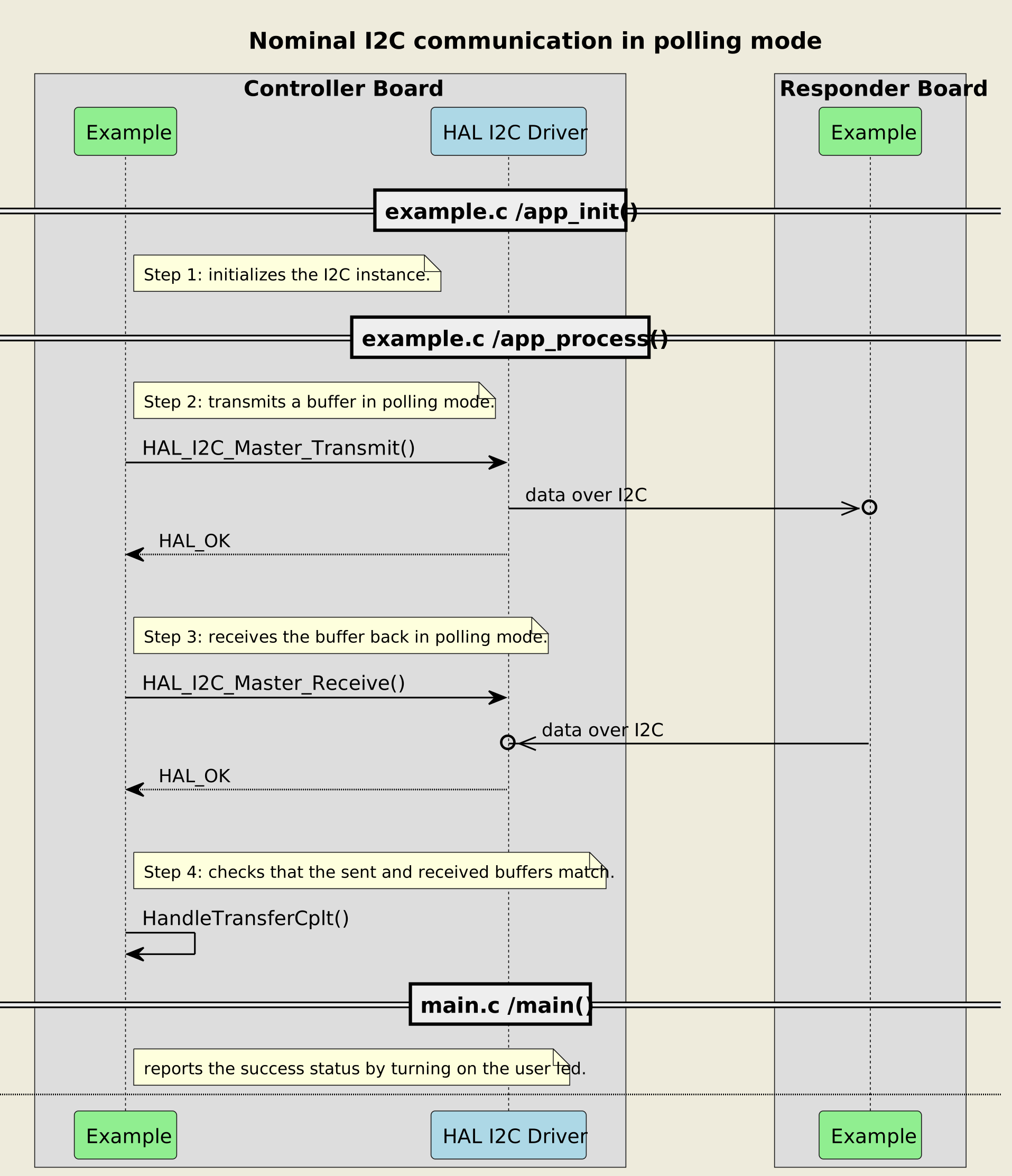
A UML sequence diagram explains the dynamic sequence of the example scenario when required. The steps of the scenario are indicated in the diagram. This creates a clear link between:
the diagram
the textual description in the README
the code in the C files.
For example, the diagram below shows the expected sequence of a board to board communication using the I2C protocol.
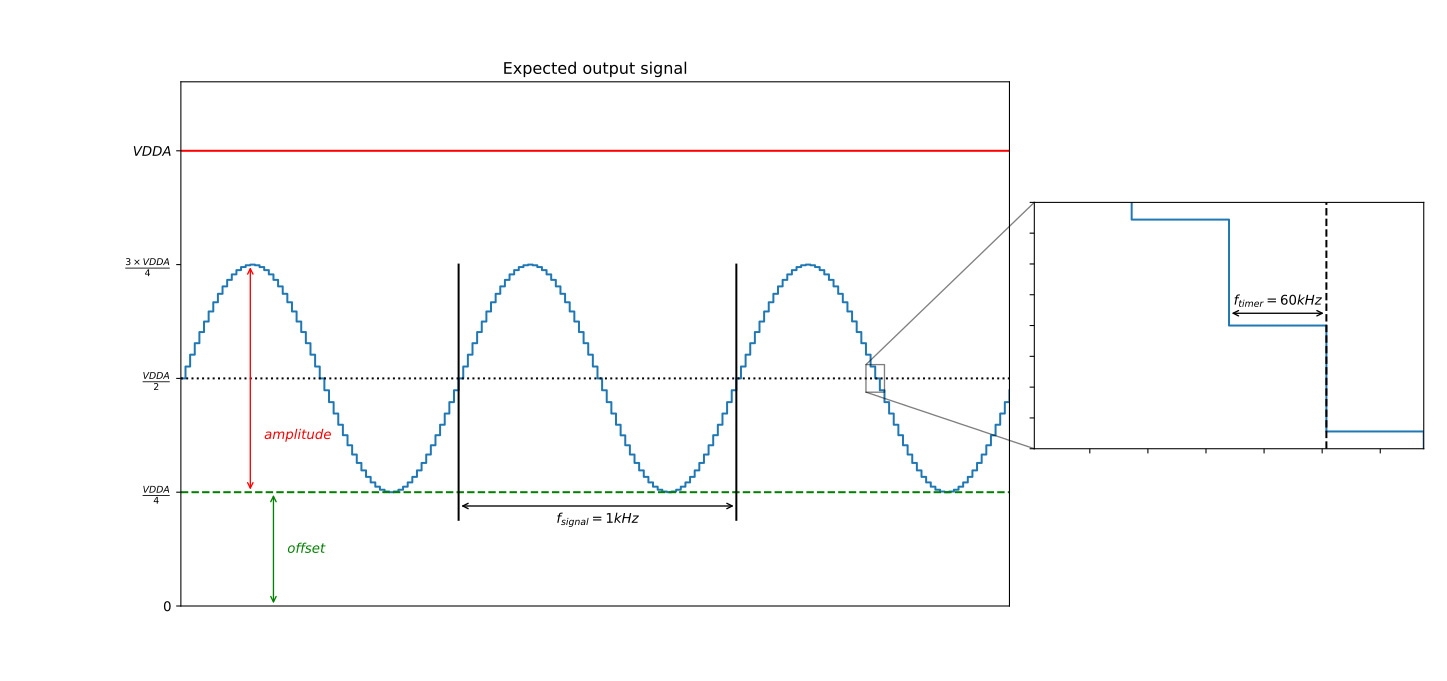
A signal diagram shows the expected signal produced by the example scenario. For example, the diagram below shows the expected sinusoidal signal of a DAC example.
When an example implements application logs, the README shows the expected logs. For example, the logs snippet below shows the expected logs of a board to board communication using the I2C protocol.
[INFO] Step 1: Device initialization COMPLETED.
[INFO] Controller - Tx/Rx Buffers IDENTICAL. Transfer COMPLETED of I2C Two Boards Communication - Message A
[INFO] Controller - Tx/Rx Buffers IDENTICAL. Transfer COMPLETED of I2C Two Boards Communication - Message B
[INFO] Controller - Tx/Rx Buffers IDENTICAL. Transfer COMPLETED of I2C Two Boards Communication - Message A
[INFO] Controller - Tx/Rx Buffers IDENTICAL. Transfer COMPLETED of I2C Two Boards Communication - Message B
Example configuration 
The main information about the example configuration is provided in the Example configuration section. Hardware specific information complements it in the Hardware environment and setup section. The Troubleshooting section provides additional information about some points of attention to ensure the proper operation of the example.
For example, in the configuration of the PWM output example, the following information is available in the README file:
This section summarizes the configuration of the TIM peripheral. It also gives the generic rules to compute the PWM frequency and duty cycle.
The timer autoreload register (ARR) defines the PWM period in number of "timer counter clock" (tim_cnt_ck) cycles.
The ARR value is chosen as indicated below:

    PWM period = tim_cnt_ck period * (ARR + 1)
    PWM frequency = tim_cnt_ck frequency / (ARR + 1)
    ARR = (tim_cnt_ck frequency / PWM frequency) - 1
A collapsed section can be expanded to see the numerical calculations:
To set a PWM output frequency to 24kHz with a 1MHz timer counter clock:

    ARR = (1 MHz / 24 kHz) - 1
    ARR = (1000000 / 24000) - 1 = 40.66
    ARR = 40 (integer rounded down to fit into the register)
This section provides hardware specific information for each of the supported STM32 series and board.
For instance, it may describe the peripheral clocks and demonstrate some precise calculations for the chosen hardware:
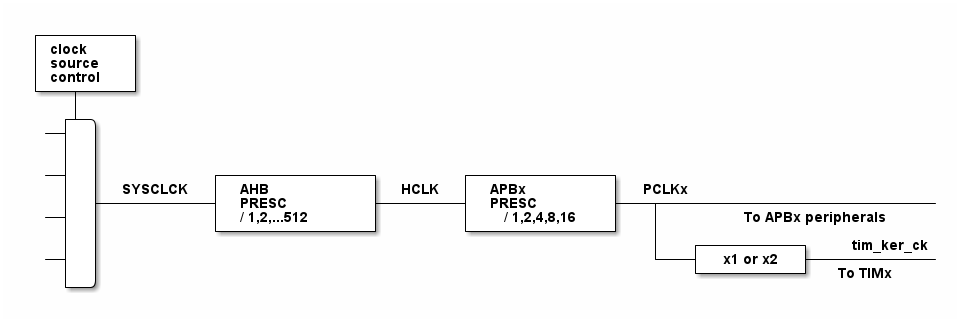
In this configuration:

- The HCLK is set to 160 MHz.
- The timer counter clock is set to 1 MHz.

To obtain a timer counter clock at 1 MHz with the APB prescaler set to 1 and the HCLK set to 160 MHz, the timer prescaler is calculated as follows:

      timer_prescaler = (160 MHz / 1 MHz) - 1 = 159
Specific points of attention are highlighted, for example:
__System clock__: The timer clock depends on the system clock configuration. Changing the CPU clock or the peripheral bus' clock affects the PWM frequency and duty cycle.
See also section 
The See also section provides links to other documents that can help understand the example topic more broadly and go further with the demonstrated features:
Application notes
User manuals
Reference manuals
Other examples related to the same topic
It goes beyond the specific example and enlarges the view of a particular topic.