
 st-edge-ai-core

How to use the AiRunner package 
Overview 
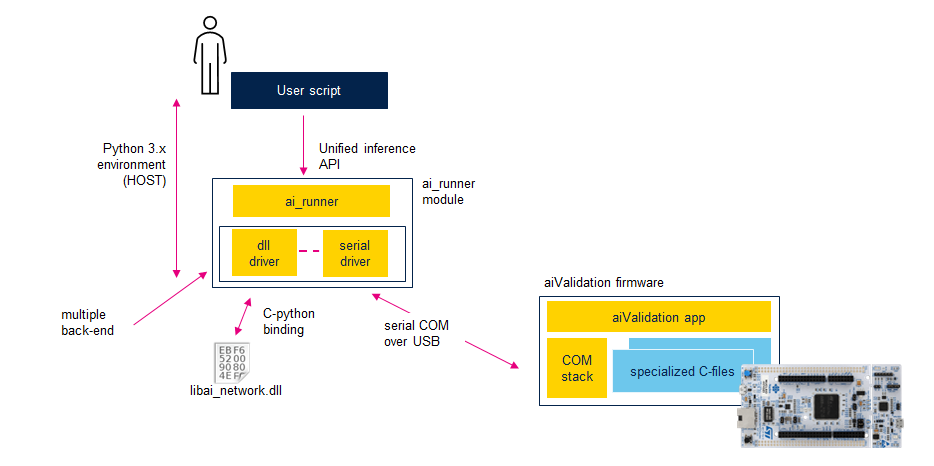
This article explains how to use the
'stm_ai_runner'
Python package, also known as
'ai_runner', to profile and validate
a deployed C-model. As illustrated in the following figure, the model can be deployed either on a target device or on the host.
The AiRunner object provides a simple and unified interface for inference and profiling, allowing users
to inject data, execute inference, and retrieve predictions.
The
'stm_ai_runner'
Python package is also integrated into the ST Edge Core AI CLI
(used by the
‘validate’
command). But it can also be used independently
to extend the default validation process. End-users (data scientists or ML/AI designers)
can update (with minor adaptations) its classical validation Python scripts to validate the deployed model with
the real dataset and metrics.
Multiple back-ends are supported, in this article two main configurations are considered:
Execution on host. Through the
'generate'command, the user has the possibility to create a shared library (or DLL, using the ‘–dll’ option) containing the specialized c-files. This shared library exports the embedded C-API functions (legacy API or st-ai API) which are bound in the Python environment to export a common API.Execution on a physical target. The specialized files are linked with a generic embedded test application (also called the aiValidation application). On the host side, a simple message-based protocol on top of a serial protocol exposes a set of services for discovering and using the deployed models.
Setting up a work environment 
Following Python packages should be installed in a Python 3.x environment to use the
'stm_ai_runner'
package
it is recommended to use a virtual environment.
protobuf<3.21
tqdm
colorama
pyserial
numpy
To be able to import the
'stm_ai_runner'
package, set the
'PYTHONPATH'
environment variable:
export PYTHONPATH=$STEDGEAI_CORE_DIR/Utilities/scripts/ai_runner:$PYTHONPATH
Note
%STEDGEAI_CORE_DIR%
represents the root location where the ST Edge AI Core components
are installed, typically in a path like
"<tools_dir>/STEdgeAI/2.1/".
Tip
The
stm_ai_runner
package communicates with the board using a protocol based on the
'Nanopb'
module version 0.3.x.
'Nanopb'
is a plain-C implementation of Google’s Protocol Buffers data format. The
stm_ai_runner
package is fully
compatible with protobuf versions below 3.21. For more information, you can visit the
Nanopb website. If
a
more recent version
of
'protobuf'
is required and the protobuf package cannot be downgraded, the following
environment variable can be used:
export


             PROTOCOL_BUFFERS_PYTHON_IMPLEMENTATION=python
Generating the model for execution on host 
To generate a model which can be executed on the host machine, the
‘–dll’
option is used. By default, the shared library is generated
in the
<workspace-directory-path>\inspector_network\workspace\lib\
folder.
$ stedgeai generate -m <model_path> --target stm32 --c-api st-ai --dll
...

 Generated files (6)
 ------------------------------------------------------------------------------------------
 <workspace-directory-path>\inspector_network\workspace\generated\network_data.h
 <workspace-directory-path>\inspector_network\workspace\generated\network_data.c
 <workspace-directory-path>\inspector_network\workspace\generated\network_details.h
 <workspace-directory-path>\inspector_network\workspace\generated\network.h
 <workspace-directory-path>\inspector_network\workspace\generated\network.c
 <workspace-directory-path>\inspector_network\workspace\lib\libai_network.dll

Creating txt report file <output-directory-path>\network_generate_report.txt
Note
The specialized c-files which are used to generate the shared library are also generated in the same directory.
To check the generated shared library, the
‘validate’
command can be used.
with the
-d


             file:st_ai_ws
option (It indicates that the
libai_network.dll
from the
st_ai_ws
folder
should be used)
$ stedgeai validate -m <model_path> --target stm32 --mode target -d file:st_ai_ws
The
'checker.py'
script can be also used without option:
$ python $STEDGEAI_CORE_DIR/Utilities/scripts/ai_runner/examples/checker.py
Generating the model for execution on a physical target 
To use the
'stm_ai_runner'
Python package with a model excecuting on a physical target,
it should be flashed with a firmware which includes the generic aiValidation built-in
application and the specialized C-files.
For the
'stm32n6'
target, which requires NPU support, a quick and typical process
is described in the article titled
“How to evaluate a model on an STM32N6 board”.
For the others
'stm32xx'
targets, the X-CUBE-AI UI plug-in can be leveraged, as detailed in the
“Getting started with X-CUBE-AI Expansion Package for Artificial Intelligence (AI)”
user manual.
To check the deployed c-model on the target,
‘validate’
command can be used
with the
'-d/--desc


             serial'
option.
$ stedgeai validate -m <model_path> --target stm32 --mode target -d serial
The
'checker.py'
script can be also used with
'-d/--desc


             serial'
option:
$ python $STEDGEAI_CORE_DIR/Utilities/scripts/ai_runner/examples/checker.py -d serial
By default for STM32N6 board,
'-d


             serial:921600'
option should be used.
Getting started - Minimal script 
Following code shows a minimal script to perform a model inference (with random input data) running on a physical target and to display the profiling information.
import sys
import argparse

from stm_ai_runner import AiRunner

desc = 'serial'

# create AiRunner object
runner = AiRunner()
# connection
runner.connect(desc)
# display and retrieve model info (optional)
runner.summary()
model_info: dict = runner.get_info()
input_details: list[dict] = runner.get_input_infos()  # = model_info['inputs']
output_details: list[dict] = runner.get_output_infos()  # = model_info['outputs']
# generate the random input data
inputs: list[np.ndarray] = runner.generate_rnd_inputs(batch_size=2)
# perform the inference
mode: AiRunner.Mode = AiRunner.Mode.PER_LAYER
outputs, profiler = runner.invoke(inputs, mode=mode)
# display the profiling info
runner.print_profiling(inputs, profiler, outputs)
# disconnect
runner.disconnect()
This excerpt is part of the
'$STEDGEAI_CORE_DIR/Utilities/scripts/ai_runner/examples'
folder (see
'minimal.py'
and
'checker.py'
files).
AiRunner API 
The
'$STEDGEAI_CORE_DIR/Utilities/scripts/ai_runner/examples'
folder provides different simple scripts
using the AiRunner API.
Connection 
connect() 
The
'connect()'
method allows to bind a AiRunner object to a given ST AI runtime. The
'desc'
parameter is used
to specify the used back-end or driver.
import sys
from stm_ai_runner import AiRunner

desc=...

runner = AiRunner()
runner.connect(desc)

if not runner.is_connected:
    print('No c-model available, use the --desc/-d option to specifiy a valid path/descriptor')
    print(f' {runner.get_error()}')
    sys.exit(1)
...
‘desc’ parameter 
Format (str type):
<protocol/backend>[:<parameters>]
The first part of the descriptor defines the used back-end or driver to perform the connection with a given
runtime embedding one or more deployed models. The definition of the
'parameters'
field is driver-specific.
|
back-end/driver |
description |
|---|---|
|
|
used to bind a shared library exporting the embedded c-api. The
|
|
|
used to open a connection with a physical target through a serial link. The target should be flashed with a specific build-in profiling application (aiValidation application) embedding the deployed models. |
Parameters for the serial driver 
Format (str type):
:<com


               port>[:<baud-rate>]
The parameter argument is optional, by default, an autodetection mechanism is applied to discover a connected board at 115200 or 921600 for ISPU. The baud rate should be aligned with the value defined in the firmware.
set the baud rate to 921600
$ stedgeai ... -d serial:921600set a specific COM port
$ stedgeai ... -d serial:COM4     # Windows environment
$ stedgeai ... -d /dev/ttyACM0    # Linux-like environment
set the COM port and the baud rate
$ stedgeai ... -d serial:COM4:921600
Typical connection errors 
No shared library found.
descdesignates a folder without valid shared library file.invalid/unsupported "st_ai_ws/:" descriptorProvided generated shared library is invalid. Error message indicates that the shared library has been generated without weights. This can appear when the
validatecommand has been performed in the default./st_ai_ws/directory.E801(HwIOError): No weights are available (1549912 bytes expected)The STM32 board is not connected. autodetect mode.
E801(HwIOError): No SERIAL COM port detected (STM board is not connected!)COM port is already opened by another application (like TeraTerm(r) for example)
E801(HwIOError): could not open port 'COM6': PermissionError(13,
                 'Access is denied.', None, 5)
STM32 board is not flashed with a valid aiValidation firmware.
E801(HwIOError): Invalid firmware - COM6:115200
names 
Multiple models can be deployed in a given AI runtime environment running on board. Each model should be deployed
with a specific ‘c-name’ which is used as a selector. The
'names'
method can be used to have the list
of available c-models.
available_models: list[str] = runner.names
print(available_models)
# ['network0', 'network1', ...]
AiRunnerSession() 
To facilitate the use of a specific named c-model, the
'session(name:


              Optional[str])'
method returns a
dedicated handler object called AiRunnerSession. This object provides the same methods as the AiRunner
object for using a deployed model.
runner = AiRunner()
runner.connect(desc)
...
session: AiRunnerSession = runner.session('network_2')
Model information 
get_info() 
The
'get_info(name:


              Optional[str]


              =


              None)'
method allows to retrieve the
detailed information (
dict form)
for a given model.
model_info: dict = runner.get_info() # equivalent to runner.get_info(available_models[0])
Model dict 
|
key |
type |
description |
|---|---|---|
|
‘version’ |
tuple |
version of the dict -
|
|
‘name’ |
str |
c-name of the model (
|
|
‘compile_datetime’ |
str |
date-time when the model has been compiled |
|
‘n_nodes’ |
int |
number of deployed c-nodes to implement the model |
|
‘inputs’ |
list[dict] |
|
|
‘outputs’ |
list[dict] |
|
|
‘hash’ |
Optional[str] |
hash (md5) of the original model file |
|
‘weights’ |
Optional[int, list[int]] |
accumulated size in bytes of the weights/params buffers |
|
‘activations’ |
Optional[int, list[int]] |
accumulated size in bytes of the activations buffer |
|
‘macc’ |
Optional[int] |
equivalent number of macc |
|
‘rt’ |
str |
short description of the used AI runtime API |
|
‘runtime’ |
dict |
main properties of the AI runtime/environment running the deployed model |
|
‘device’ |
dict |
main properties of the device supporting the AI runtime |
Tensor dict 
|
key |
type |
description |
|---|---|---|
|
‘name’ |
str |
name of tensor (c-string) |
|
‘shape’ |
tuple |
shape |
|
‘type’ |
np.dtype |
data type |
|
‘scale’ |
Optional[np.float32] |
if quantized, scale value |
|
‘zero_point’ |
Optional[np.int32] |
if quantized, zero-point value |
AI runtime/environment dict 
|
key |
type |
description |
|---|---|---|
|
‘protocol’ |
str |
description of the used back-end/driver |
|
‘name’ |
str |
short description of the used AI runtime API |
|
‘tools_version’ |
tuple |
version of the tools used to deploy the model (STEdgeAI core version) |
|
‘rt_lib_desc’ |
str |
description of the AI used AI runtime libraries |
|
‘version’ |
tuple |
version of the AI used AI runtime libraries |
|
‘capabilities’ |
list[AiRunner.Caps] |
capabilities of the AI runtime |
|
capability |
description |
|---|---|
|
AiRunner.Caps.IO_ONLY |
minimal capability (mandatory) allowing to inject the data and to retrieve the predictions |
|
AiRunner.Caps.PER_LAYER |
capability to report the intermediate tensor information without the data |
|
AiRunner.Caps.PER_LAYER_WITH_DATA |
capability to report the intermediate tensor informations including the data |
Device dict 
|
key |
type |
description |
|---|---|---|
|
‘dev_type’ |
str |
target name |
|
‘desc’ |
str |
short description of the device including the main frequencies |
|
‘dev_id’ |
Optional[str] |
device id (target specific) |
|
‘system’ |
str |
short description of the platform |
|
‘sys_clock’ |
Optional[int] |
frequency (Hz) of the MCU |
|
‘bus_clock’ |
Optional[int] |
frequency (Hz) of the main system bus |
|
‘attrs’ |
Optional[list[str]] |
attributes (target specific) |
get_input_infos(), get_output_infos() 
The
'get_input_infos(name:


              Optional[str]


              =


              None)'
and
'get_output_infos(name:


              Optional[str]


              =


              None)'
methods
allow to retrieve the detailed information of the input/output tensors (
dict form).
model_inputs: list[dict] = runner.get_input_infos()  # equivalent to runner.get_input_infos(available_models[0])
model_outputs: list[dict] = runner.get_output_infos()  # equivalent to runner.get_output_infos(available_models[0])
Perform the inference 
invoke() 
The
'invoke(inputs:


              Union[np.ndarray,


              List[np.ndarray]])'
method allows performing inference with
the input data. It returns a tuple containing the predictions (
'outputs') and a Python dictionary
with the
profiling information
(
'profiler').
# perform the inference
mode: AiRunner.Mode = AiRunner.Mode.PER_LAYER
outputs, profiler = runner.invoke(inputs, mode=mode)
‘mode’ parameter 
The
'mode'
parameter consists of OR-ed flags that allow setting the mode of the AI runtime.
It is dependent on the returned
capabilities.
|
mode |
description |
|---|---|
|
AiRunner.Mode.IO_ONLY |
out-of-the-box execution, only the predictions are dumped, intermediate information are not reported |
|
AiRunner.Mode.PER_LAYER |
descriptions of the intermediate nodes are reported without the data |
|
AiRunner.Mode.PER_LAYER_WITH_DATA |
when supported the intermediate data are also dumped |
|
AiRunner.Mode.PERF_ONLY |
no input data are sent to the target, and the results are not dumped |
Profiling dict 
|
key |
type |
description |
|---|---|---|
|
‘info’ |
dict |
model/AI runtime information (dict form), refer to ‘Model dict’ section |
|
‘mode’ |
‘AiRunner.Mode’ |
used mode |
|
‘c_durations’ |
List[float] |
List with inference time (ms) by sample |
|
‘c_nodes’ |
Optional[List[dict]] |
List with the profiled c-node information. One entry by node,
|
|
‘debug’ |
str |
c-name of the model (
|
Warning
The returned profiling information depends on the AI runtime environment and/or target. For example, if the deployed model is executed on the host, information about the cycles is not returned. This is because such information is not relevant, as the implementation of the kernels is not optimized for the host/development machine.
C-node dict 
|
key |
type |
description |
|---|---|---|
|
‘name’ |
str |
name of the node |
|
‘m_id’ |
int |
{optional} associated index of layer from the original model |
|
‘layer_type’ |
int |
id type of the node. Definition is AI runtime specific |
|
‘layer_desc’ |
str |
short description of the node |
|
‘type’ |
List[np.ndarray] |
data type of the associated output tensors |
|
‘shape’ |
List[Tuple[int]] |
shape of the associated output tensors |
|
‘scale’ |
Optional[List[np.float32]] |
if quantized, scale value |
|
‘zero_point’ |
Optional[List[np.int32]] |
if quantized, zero-point value |
|
‘c_durations’ |
List[float] |
Inference time (ms) of the node by sample |
|
‘clks’ |
Optional[List[Union[int, list[int]]] |
Number of MCU/CPU clocks to execute the node, AI runtime/target dependent |
|
‘data’ |
Optional[List[np.ndarray]] |
when available (capability AiRunner.Caps.PER_LAYER_WITH_DATA), dumped data of the associated output tensors after each node execution |
Services 
summary() 
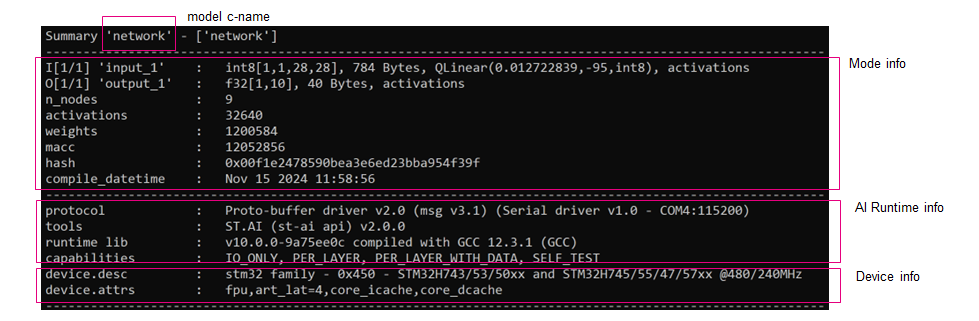
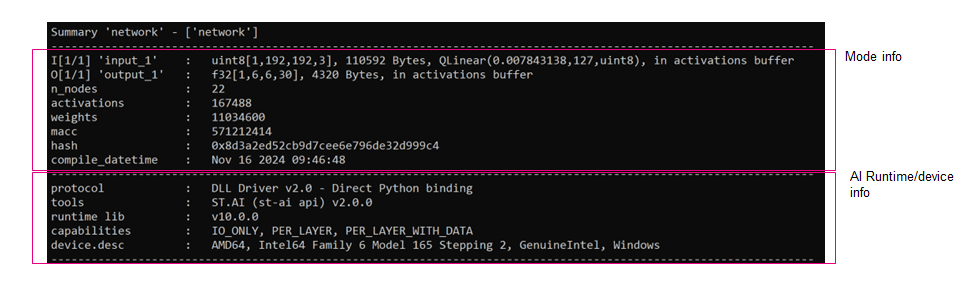
The
'summary(name:


              Optional[str]


              =


              None)'
method displays a summary of the information provided by the
‘get_info(name: Optional[str] = None)’
method.
runner.summary()
generate_rnd_inputs() 
The
'AiRunner.generate_rnd_inputs(name:


              Optional[str])'
method is a helper service allowing to generate the input
data for a given model.
val
parameter is used to set the range of the data which are uniformly
distributed over a specific interval
[low,


              high[
. Default is
[-1.0,


              1.0[
for the floating-point type.
inputs: Union[np.ndarray, List[np.ndarray]] = runner.generate_rnd_inputs(name='network', batch_size=2)
print_profiling() 
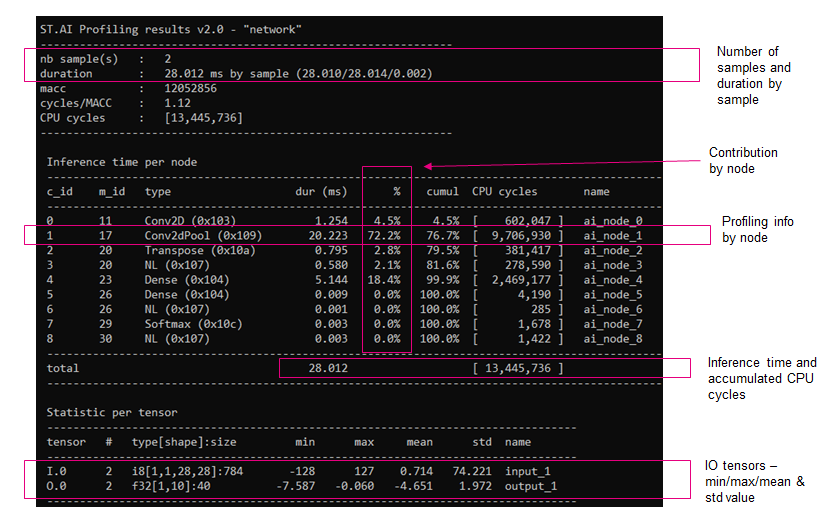
The
'print_profiling(inputs,


              profiler,


              outputs)'
method displays a summary of the profiling information returned by the
‘invoke()’
method.
# perform the inference
outputs, profiler = runner.invoke(inputs)
# display the profiling info
runner.print_profiling(inputs, profiler, outputs)
Examples 
Location:
%STEDGEAI_CORE_DIR%/script/ai_runner/example/
checker.pyprovides an example to use theai_runnermodule including the profiling information# Try to load the shared library located in the default location: ./st_ai_ws. # It displays a summary and performs two inferences with the random data. $ python checker.py # As previously, but it performs a connection with a STM32 board (auto-detect mode) $ python checker.py -d serial # Set the expected COM port and baudrate $ python checker.py -d serial:COM6:115200
tflite_test.pyprovides a typical example to compare the outputs of the generated C-model against the predictions from thetf.lite.Interpreter.mnistprovides a complete example with two scripts allowing to train a model (train.py) and to test (test.py) with the generated c-model.