
 st-edge-ai-core

How to upgrade a STM32 project 
Overview 
This article describes how to upgrade an STM32CubeMX-based or proprietary source tree with a new version of the STM32 runtime library. The update of generated C-model files is explained in the “Update an ioc-based project” section. For the interface between them, backward and/or forward compatibility is never guaranteed. If the generated C-model files are updated with a new version of the STEdge Core AI tools, the library files should also be aligned. Without specific notification or advice (see the “CLI” and “Embedded C-API” sections in the release note), no breaking changes to the embedded inference API that could break the client’s application are expected.
A typical source tree (
%STEDGEAI_CORE_DIR%
indicates the root directory of the project):
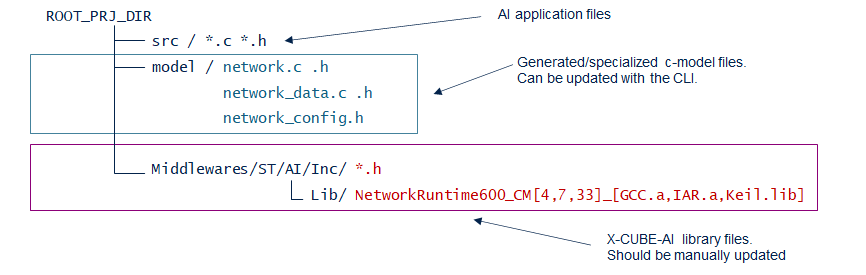
If the project source tree has been generated through a STM32CubeMX-based project with the X-CUBE-AI expansion pack, the IOC-file can be reloaded to update the project including a new version of the X-CUBE-AI pack.
A typical command to update the generated C-model files using the CLI in the project source tree is:
stedgeai generate -m <my_model> <my_options> -o %ROOT_PRJ_DIR%/model
Warning
It is recommended to compile the application using the same compilation options as the library to ensure compatibility. Additionally, link the application with the same toolchain used to build the library to avoid potential issues.
Network runtime library 
The C-header files and network runtime libraries should be directly copied from the installed STEdge AI core pack. The %STEDGEAI_CORE_DIR% indicates the root location where the STEdge AI core pack is installed.
|
Directory |
Contains |
|---|---|
|
|
all C-header files requested to build the generated c-model files |
|
|
by STM32 series and by toolchain, the network runtime libraries |
Library naming convention 
NetworkRuntime<version>_<core>_<toolchain>[_<extra>].<extension>
<version>: Indicates the version of the library (always aligned with the version of the STEdge AI core).<core>: Specifies the targeted Arm® Cortex® core.<toolchain>: Specifies the embedded ARM toolchain used to generate the library.<extra>: (optional): Provides additional description if a specific case or variant is generated (e.g., when default options are overridden).<extension>: The library file extension, which depends on the toolchain.
Compilation options 
All libraries are generated as static libraries. When applicable, the hard FPU ABI (
-mfloat-abi=hard) is used; otherwise, the soft FPU ABI (
-mfloat-abi=soft) is defined if no FPU support is available. According to the toolchain used, optimization for speed (
-Ofast) is applied, and all libraries are delivered without debug information.
‘armcc’ designates the Keil® MDK-ARM Professional - ARM Compiler 5 toolchain.
‘armclang’ designates the Keil® MDK-ARM Professional - ARM Compiler 6 toolchain.
‘armgcc’ designates the GNU ARM Embedded toolchain from the STM32CubeIDE/STM32CubeCLT package.
‘armiar’ designates the IAR Embedded Workbench® IDE toolchain.
Options for STM32F0, STM32G0, STM32L0 and STM32WL series (Arm® Cortex® w/o FPU) 
|
compiler feature |
armcc |
armclang (*) |
armgcc |
armiar |
|---|---|---|---|---|
|
wchar and enum size |
short wchar, smallest enum |
short wchar, smallest enum |
32b wchar, smallest enum |
32b wchar, smallest enum |
|
float-abi |
soft |
soft |
soft |
soft |
|
optimization |
-O3 |
-O3 |
-Ofast |
-Ohs |
(*) For armclang, the following options are used to overwrite the default behavior:
-fshort-wchar


              -fshort-enums


              -funsigned-char
.
Options for other STM32 series 
|
compiler feature |
armcc |
armclang (*) |
armgcc |
armiar |
|---|---|---|---|---|
|
wchar and enum size |
short wchar, smallest enum |
short wchar, smallest enum |
32b wchar, smallest enum |
32b wchar, smallest enum |
|
float-abi |
hard |
hard |
hard |
hard |
|
optimization |
-O3 |
-O3 |
-Ofast |
-Ohs |
(*) For armclang, the following options are used to overwrite the default behavior:
-fshort-wchar


              -fshort-enums


              -funsigned-char
.
For the STM32 series (STM32N6 and STM32N8) based on the Arm® Cortex® M85/M55 core, the libraries are compiled with the Arm Helium technology support (default configuration).
Subdirectory organization by toolchain 
The root folder (
%STEDGEAI_CORE_DIR%/Middlewares/ST/AI/Lib) contains subdirectories for different toolchains,
each providing libraries compatible with specific development environments:
|
Subdirectory |
Contains |
|---|---|
|
ABI2.1 |
Libraries for the IAR Embedded Workbench® IDE targeting ARM v8.x/v9.x toolchain or later. |
|
GCC |
Libraries for GNU ARM Embedded projects, compatible with STMicroelectronics STM32CubeIDE version 1.0.1 or later. |
|
MDK |
Libraries for Keil® MDK-ARM Professional environment. |
Subdirectory organization by STM32 Series 
Inside each toolchain directory, there are subdirectories organized by STM32 series. Select the folder that matches your target STM32 device series. If a specialized series folder is not available, use the generic STM32 Cortex-M folder.
In each
<tool-chain>
directory, there is one subdirectory per STM32 series. According to the targeted STM32
device, select the specialized STM32 series folder first; otherwise, use the generic STM32 Cortex-M/R/A folder.
|
Folder Name |
Description |
|---|---|
|
STM32WL |
Specialized library for the STM32WLxx series |
|
STM32MP1 |
Specialized library for the Arm® Cortex® M4 core inside STM32MP1 devices |
|
STM32H7 |
Specialized library for the STM32H7xx series |
|
ARMCortexM0 |
Devices based on the Arm® Cortex® M0, STM32F0xx serie |
|
ARMCortexM0+ |
Devices based on the Arm® Cortex® M0+, STM32L0xx, STM32G0xx, STM32C0xx series |
|
ARMCortexM4 |
Devices based on the Arm® Cortex® M4, STM32F3xx, STM32L4xx, STM32F4xx series |
|
ARMCortexM7 |
Devices based on the Arm® Cortex® M7, STM32F7xx serie |
|
ARMCortexM33 |
Devices based on the Arm® Cortex® M33, STM32U3xx, STM32L5xx, STM32U5xx, STM32C5xx, STM32G5xx series |
|
ARMCortexM55 |
Devices based on the Arm® Cortex® M55, STM32N6xx series |
|
ARMCortexM85 |
Devices based on the Arm® Cortex® M85, STM32V8xx series |
|
ARMCortexA35 |
Devices based on the Arm® Cortex® A35, STM32MP2 series (bare-metal mode) |
Warning
When the project source tree is updated, don’t forget to update also the associated build system to use the new library file.
Note
Library files with the name suffixed with
_PIC
should be not used.
Toolchain versions 
|
Toolchain |
Version |
|---|---|
|
MDK |
For the STM32 series based on the Arm® Cortex® M85/M55/M33, the MDK Professional 5.40 with Arm Compiler for Embedded 6.22 is used to generate the MDK libraries else ARM Compiler 5.06 is used. |
|
GCC |
GNU ARM Embedded (STM32 13.3.rel1.20240926-1715) 13.3.1 is used for all series. |
|
ABI2.1 - IAR Embedded Workbench® IDE |
IAR ANSI C/C++ Compiler V9.40 for ARM is used for the STM32N6 and STM32V8 series else the IAR ANSI C/C++ Compiler V8.5 for ARM is used for the other targets. |
Specific library for STM32N6 series 
For performance reasons (approximately 10–20% faster execution time), a compatible library compiled with the MDK Arm Compiler for Embedded 6.22 toolchain is provided for use in GCC or IAR application environments. The library file is located at:
MDK\ARMCortexM55\NetworkRuntime1102_CM55_Keil_COMPATIBLE.a
The following compilation options are used:
-fno-short-wchar-nostdlib-funsigned-char-fshort-enums
Upgrading the X-CUBE-AI library for a STM32F411 device and GCC-base build system 
# remove the previous files
rm %ROOT_PRJ_DIR%/Middlewares/ST/AI/Inc/*.h
rm %ROOT_PRJ_DIR%/Middlewares/ST/AI/Lib/*.a
# copy the new files
cp %X_CUBE_AI_DIR%/Middlewares/ST/AI/Inc/*  %ROOT_PRJ_DIR%/Middlewares/ST/AI/Inc/
cp %X_CUBE_AI_DIR%/Middlewares/ST/AI/Lib/GCC/ARMCortexM4/NetworkRuntime700_CM4_GCC.a
     %ROOT_PRJ_DIR%/Middlewares/ST/AI/Lib/
Upgrading the X-CUBE-AI library for a STM32H7xx device and Keil IDE 
# remove the previous files
rm %ROOT_PRJ_DIR%/Middlewares/ST/AI/Inc/*.h
rm %ROOT_PRJ_DIR%/Middlewares/ST/AI/Lib/*.a
# copy the new files
cp %X_CUBE_AI_DIR%/Middlewares/ST/AI/Inc/*  %ROOT_PRJ_DIR%/Middlewares/ST/AI/Inc/
cp %X_CUBE_AI_DIR%/Middlewares/ST/AI/Lib/MDK/STM32H7/NetworkRuntime700_CM7_Keil.lib
     %ROOT_PRJ_DIR%/Middlewares/ST/AI/Lib/