
 st-edge-ai-core

Command-line Interface 
Overview 
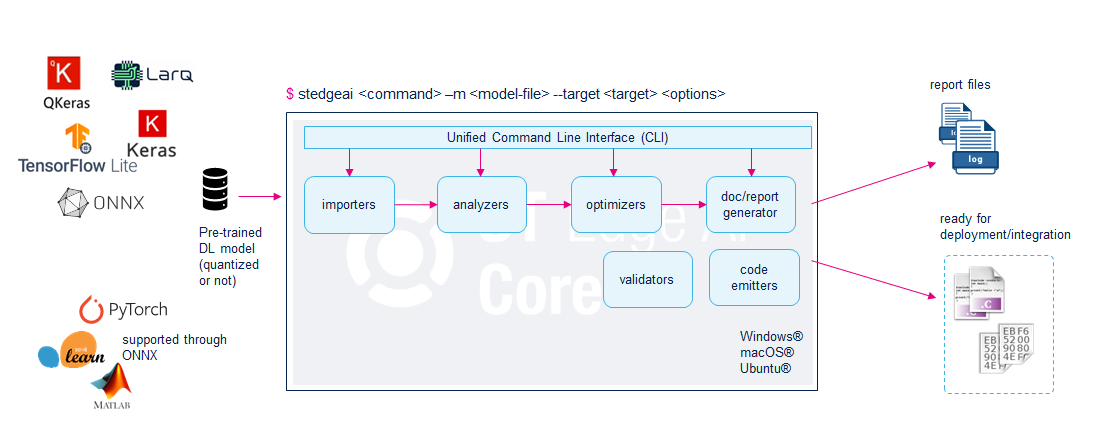
The stedgeai application is a console utility. It provides a complete and unified command-line interface (CLI) for compiling a pre-trained deep learning (DL) or machine learning (ML) model into an optimized library. This library can run on an ST device or target, enabling edge AI on microcontrollers (MCUs) with or without ST Neural ART NPU, microprocessors (MPUs), and smart sensors. It consists of three main commands: analyze, validate, and generate. Each command can be used independently with the same set of common options (model files, compression factor, output directory, etc.) and specific options. The supported-ops command lists the supported operators and associated constraints for a given deep learning framework.
Supported ST device/target 
|
target |
description |
|---|---|
|
The
STM32 family of 32-bit microcontrollers
based on the Arm Cortex-M processor.
|
|
|
Series of MCUs based on the Arm Cortex-M7 processor and tailored for the specific requirements of electrified vehicles, ensuring efficient actuation of power conversion and e-drive train applications |
|
|
Series of MCUs
(P families), based on Arm Cortex-R52+ and Arm Cortex-M4 processors, designed to meet the demands of integrating next-generation drivetrains and electrification solutions, including X-in-1 vehicle motion control and domain-oriented systems. It delivers a new level of real-time performance, safety and determinism, along with a rich set of I/Os and peripherals.
|
|
|
Series of MCUs
(G families), based on Arm Cortex-R52+ and Arm Cortex-M4 processors, to address the key challenges of next-generation body and gateway integration, as well as zonal architectures. It ensures performance, safety, and power efficiency, combined with wide connectivity and high security.
|
|
|
Series of MCUs
(P families), based on Arm Cortex-R52+ and Arm Cortex-M4 processors, with integrated Neural-ART Processing Unit (NPU) enabling advanced Artificial Intelligence (AI) use cases such as predictive maintenance and precise motor-control algorithms for smoother operation. Interfaces have been upgraded to deliver more efficient outputs and faster response times, a key requirement for electrification applications.
|
|
|
|
A new generation of MEMS sensors featuring an embedded intelligent sensor processing unit (ISPU) |
|
|
MEMS sensors embedding the machine learning core (MLC) |
Synopsis 
usage: stedgeai --model FILE --target stm32|sr5[xx]|sr6p[xx]|sr6g[xx]|ispu|mlc [--type keras|onnx|tflite] [--name STR]
                [--compression none|lossless|low|medium|high]
                [--no-inputs-allocation] [--no-outputs-allocation]
                [--input-memory-alignment INT] [--output-memory-alignment INT]
                [--workspace DIR] [--output DIR]
                [--split-weights] [--optimization OBJ] [--memory-pool FILE] [--no-onnx-optimizer]
                [--use-onnx-simplifier] [--fix-parametric-shapes FIX_PARAMETRIC_SHAPES]
                [--input-data-type float32|int8|uint8] [--output-data-type float32|int8|uint8]
                [--inputs-ch-position chfirst|chlast] [--outputs-ch-position chfirst|chlast]
                [--prefetch-compressed-weights] [--custom FILE] [--c-api st-ai|legacy]
                [--cut-input-tensors CUT_INPUT_TENSORS] [--cut-output-tensors CUT_OUTPUT_TENSORS]
                [--cut-input-layers CUT_INPUT_LAYERS] [--cut-output-layers CUT_OUTPUT_LAYERS]
                [--allocate-activations] [--allocate-states] [--st-neural-art [ST_NEURAL_ART]]
                [--binary] [--dll] [--address ADDR] [--copy-weights-at ADDR] [--relocatable]
                [--lib DIR] [--batch-size INT] [--mode host|target|host-io-only|target-io-only]
                [--desc DESC] [--val-json FILE] [--valinput FILE [FILE ...]] [--valoutput FILE [FILE ...]]
                [--range MIN MAX [MIN MAX ...]] [--full] [--io-only] [--save-csv] [--classifier]
                [--no-check] [--no-exec-model] [--seed SEED] [--with-report] [--no-report]
                [--no-workspace] [-h]
                [--version] [--tools-version] [--verbosity [0|1|2|3]] [--quiet]
                analyze|generate|validate|supported-ops
A short description of the options can be displayed with the following command:
$ stedgeai --help
...
To know the versions of the main Python modules which are used:
$ stedgeai --tools-version
stedgeai - ST Edge AI Core v4.0.0
- Python version   : 3.9.13
- Numpy version    : 1.26.4
- TF version       : 2.18.0
- TF Keras version : 3.7.0
- ONNX version     : 1.16.2
- ONNX RT version  : 1.19.2
Options for a given target 
The ‘target’ option can be specified to know the options which are available for a given target.
$ stedgeai --target mlc --help
usage: stedgeai [--target STR] [--output DIR] --device DEVICE [--script FILE]
                [--json FILE] [--type {arff,ucf}] [--port COM] [--ucf FILE]
                [--logs FILE | DIR] [--ignore-zero] [--tree FILE] [--arff FILE]
                [--meta FILE] [--no-report] [--help] [--version] [--tools-version]
                [--verbosity [{0,1}]]
                generate|validate|analyze

ST Edge AI Core v1.0.0 (MLC 1.0.0)
...
Command workflow 
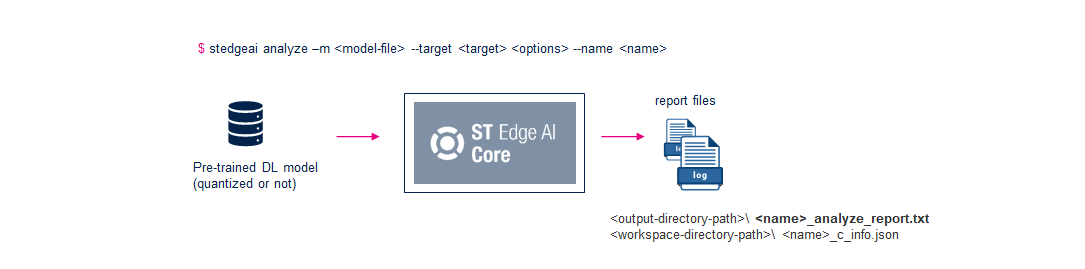
For each command, the same preliminary steps are applied. A report (txt file) is systematically created and fully or partially displayed. Additional JSON files (dictionary based) are generated in the workspace directory to be parsed by the external tools/script to retrieve the results. Note that they can also be used by a nonregression environment. The format of these files is out of the scope of this document.
<workspace-directory-path>\<name>_c_info.json
<output-directory-path>\<name>_<cmd_name>_report.txt
'analyze'workflowimport the model
map, render, and optimize internally the model
log and display a report
'validate'workflowimport the model
map, render, and optimize internally the model
execute the generated C-model (on the desktop or on the board)
execute the original model using the original deep learning runtime framework for x86
evaluate the metrics
log and display a report
'generate'workflowimport the model
map, render, and optimize internally the model
export the specialized C-files
log and display a report
Enable AutoML pipeline for resource-constrained environment 
The CLI can be integrated into an automatic or manual pipeline. It allows to design a deployable, and effective neural network architecture for a resource-constrained environment (that is, with low memory/computational resources and/or critical power consumption budgets). The main loop can be extended with a post-analyzing/validating step of the pretrained models. The candidates are checked according to the end-user target constraints thanks to the respective analyze and validate commands.
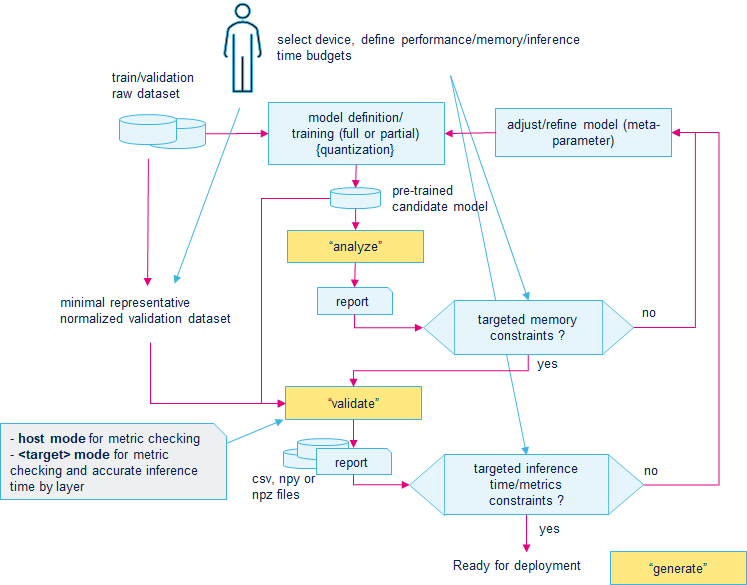
Checking of the budgeted memory (ROM/RAM) can be done in the inner loop (topology selection/definition) before the time-consuming training process (or retraining process) to preconstraint the choices of the neural network architecture according to the memory budgets.
Note that the “analyze” and “host validate” step can be merged, “analyze” information are also available in the “validate” reports.
Error handling 
During the execution of a given command, after the parsing of the arguments if an error
is raised, the
stedgeai
application returns
-1
(else
0
is returned).
A category and a short description prefix an error message.
|
category |
description |
|---|---|
|
CLI ERROR |
specific CLI error |
|
LOAD ERROR |
error during the load/import of the model or the connection with the board - OSError, IOError |
|
NOT IMPLEMENTED |
expected feature is not implemented - NotImplementedError |
|
INTERRUPT |
indicates that the execution of the command has been interrupted (
|
|
TOOLS ERROR, INTERNAL ERROR |
internal error - ImportError, RuntimeError, ValueError |
Note
There is a specific attention to have explicit and relevant short description of the error messages. Unfortunately, this is not always the case, do not hesitate to contact the local support or to use the product ST Community channel/forum, “Edge AI”.
Example of specific error
$ stedgeai validate model.tflite --target ispu -t keras
...
E102(CliArgumentError): Wrong model files for 'keras'
Analyze command 
|
✓ |
|
|
✓ |
|
|
✓ |
|
|
✓ |
|
|
✓ |
|
|
✓ |
|
|
✗ |
Description 
The
'analyze'
command is the primary command to import, parse, and check an uploaded pretrained model. A detailed report
provides the main metrics to know if the generated code can be deployed on the targeted device. It also includes the rendering information by layer or/and operator
(see “C-graph description” section). It provides the size of the requested RT memory size to store the
kernel and specific network binary objects. After completion, the user can be fully
confident
in the imported model in term of supported layers/operators.
Examples 
Analyze a model
$ stedgeai analyze -m <model_file_path> --target <target>Analyze Keras model saved in two separated files: model.json + model.hdf5
$ stedgeai analyze -m <model_file_path>.json -m <model_file_path>.hdf5 --target <target>Analyze a 32b float model with compression request
$ stedgeai analyze -m <model_file_path> -c low --target <target>Analyze a model with the input tensors placed in the activations buffer
$ stedgeai analyze -m <model_file_path> --allocate-inputs --target <target>
Common options 
This section describes the common options for the analyze, validate, and generate commands. The specific options are described in the respective command section.
-m/--model


              FILE

Path of the model files (see
“Deep Learning (DL) framework detection”
section). Note that
the same
-m
argument should be also used to indicate the weights file if necessary -
Mandatory
Details
Deep Learning (DL) framework detection 
Extensions of the model files are used to identify the DL framework which should be
used to import the model. If the autodetection is ambiguous, the
'--type/-t'
option
should be used to define the correct framework.
|
DL framework |
type (–type/-t) |
file extension |
|---|---|---|
|
Keras |
|
|
|
TensorFlow lite |
|
|
|
ONNX |
|
|
--target


             STR

Indicates the ST targeted device or series. - Mandatory
-t/--type


             STR

Indicates the type of the original deep learning (DL) framework when the extension of the model files does not allow inference (see “DL framework detection” section) - Optional
-w/--workspace


             DIR

Indicates a working or temporary directory for the intermediate or temporary files (default:
"./st_ai_ws/"
directory) -
Optional
-o/--output


             DIR

Indicates the output directory for the generated C files and report files (default:
"./st_ai_output/"
directory) -
Optional
-n/--name


             STR

Indicates the C-name (
C-string
type) for the imported model. This name is used to prefix the names of specialized neural
network (NN) C-files and API functions. It is also used for temporary files, allowing the use of the same workspace and output
directories for different models (default:
"network"). -
Optional
-c/--compression


             STR

supported target:
stm32xx,sr5[xx],sr6p[xx],sr6g[xx],sr6p3eunsupported target:
stm32n6with NPU,sr6p3ewith NPU,mlc,ispu
Indicates the expected compression level applied on the different operators.
Supported values:
none|lossless|low|medium|high
(Default:
lossless) to apply the same level
for all operators, or a simple
json
file to define a compression level by operator. -
Optional
Details
During the optimization passes of the imported model, different compression level can be applied. Underlying applied compression algorithms depend on the selected level and the configuration of the operator/layer itself.
|
level |
description |
|---|---|
|
|
no compression |
|
|
applied algorithms ensuring the accuracy (structural compression) |
|
|
applied algorithms trying to reduce the size of the parameters with a minimum of accuracy loss |
|
|
more aggressive algorithms, the final accuracy loss can be more important |
|
|
extreme aggressive algorithms (not used) |
Supported compressions by operator 
Floating-point dense or fully connected layers:
'low/medium/high'enables the compression of weights or/and bias. With'low', a targeted compression factor of'4'is applied while with'medium/high'the targeted compression factor is'8'.ONNX-ML TreeEnsembleClassifier operator: With
'none'level, no compression or optimization is applied.'lossless'enables a first level of compression w/o loss of accuracy.'low','medium','high'enable compression weights.
Warning
Only float32 (or float) are supported by the code generator, this implies that during the import of the operator, the float64 (or double) values are converted in float32.
Specify a compression level by operator 
By default, the compression process tries to apply globally the same compression level for all eligible operators. If the global accuracy is too much impacted or to force the compression, the user has the possibility to refine the expected compression level layer-by-layer.
A JSON file must be defined to indicate what is the compression level which must be applied for a given layer. The original name specifies the name of the layer.
{
    "layers": {
        "dense_2": {"factor": "high"}
    }
}
The option
-c/--compression
can be used to pass the configuration file.
$ stedgeai analyze -m <model_file> --target stm32 -c <conf_file>.json
Note
Be aware that a specific layer could not be compressed if the gain of weight size is not enough.
--no-inputs-allocation

supported target:
stm32xx,stm32n6with NPU,sr5[xx],sr6p[xx],sr6g[xx],ispu,sr6p3ew/ and w/o NPUunsupported target:
mlc
If defined, this flag indicates that no space is reserved in the activations buffer to store the input buffers. The application must allocate them separately in the user memory space and provide them to the execution engine before performing the inference. Refer to the “IO buffers into activations buffer” section. - Optional
--no-outputs-allocation

supported target:
stm32xx,stm32n6with NPU,sr5[xx],sr6p[xx],sr6g[xx],ispu,sr6p3ew/ and w/o NPUunsupported target:
mlc
If defined, this flag indicates that no space is reserved in the activations buffer to store the output buffers. The application must allocate them separately in the user memory space and provide them to the execution engine before performing the inference. Refer to the “IO buffers into activations buffer” section. - Optional
--input-memory-alignment


            INT

supported target:
stm32xx,sr5[xx],sr6p[xx],sr6g[xx],ispu,sr6p3eunsupported target:
stm32n6with NPU,mlc,sr6p3ewith NPU
If defined, set the memory-alignment constraint in bytes (multiple of 2) to allocate the input buffer inside the “activations” buffer. By default 4 (or 8 bytes dependent of system bus-width) are used. Refer to the “I/O buffers into activations buffer” section. - Optional
--output-memory-alignment


            INT

supported target:
stm32xx,sr5[xx],sr6p[xx],sr6g[xx],ispu,sr6p3eunsupported target:
stm32n6with NPU,mlc,sr6p3ewith NPU
If defined, set the memory-alignment constraint in bytes (multiple of 2) to allocate the output buffer inside the “activations” buffer. By default 4 (or 8 bytes dependent of system bus-width) are used. Refer to the “I/O buffers into activations buffer” section. - Optional
--memory-pool


            FILE

supported target:
stm32xx,sr5[xx],sr6p[xx],sr6g[xx],sr6p3eunsupported target:
stm32n6with NPU,mlc,ispu,sr6p3ewith NPU
Indicate the file path of the memory pool descriptor file. It allows to describe the memory regions allowing to support the multiheap use-case. - Optional
Details
Description of the Memory pools 
For advanced use-cases, the user has the possibility to pass (through the
'--memory-pool'
option),
a text file (JSON file format) allowing to specify some properties of the targeted device.
The
“1.0”
JSON version allows only to provide the descriptions of the memory pools.
{
    "version": "1.0",
    "memory": {
        "mempools": [
            {
                "name": "sram",
                "size": "128KB",
                "usable_size": "96KB"
            }
        ]
    }
}
|
key |
description |
|---|---|
|
|
version/format of the JSON file. Only
|
|
|
key to describe the memory properties (dict) - optional |
|
|
key to describe the memory pool (list of dict) - optional |
Memory pool description (
"mempools"
item)
|
key |
description |
|---|---|
|
|
user name, if not defined a generic name is generated:
|
|
|
indicate the total size - mandatory |
|
|
indicate the maximum size which can be used - if not defined,
|
|
|
indicate the base @ of memory pool (ex.
|
value is defined as a string,
"B,KB,MB"can be used to indicate the size."0x"prefix indicates value in hexadecimal.no target device database is embedded in the CLI to check that the provided memory pool descriptors are valid.
Note that if
"address"attribute is defined and if the associated memory pool is used, the value is used as-is to define the default address of the activations buffer by the generated code (see generated<network>_data.cfile).
A typical example of JSON file indicates that two budgeted memory pools can be used to place the activations buffer.
"dtcm"
memory pool is privileged to place the critical buffers.
{
    "version": "1.0",
    "memory": {
        "mempools": [
            {
                "name": "dtcm",
                "size": "128KB",
                "usable_size": "64KB"
            },
            {
                "name": "ram_d1",
                "size": "512KB",
                "usable_size": "256KB"
            },
            {
                "name": "default"
            }
        ]
    }
}
--fix-parametric-shapes

supported target:
stm32xx,stm32n6with NPU,sr5[xx],sr6p[xx],sr6g[xx],ispu,sr6p3ew/ and w/o NPUunsupported target:
mlc
Set parametric dimensions in the shapes of the input tensors (default: parametric dimensions are set to 1) - Optional
Details
Accepted formats are
|
format |
description |
|---|---|
|
List of tuples |
A list of tuples specifying for each input tensor its input shape. The tensors order is the same shown by Netron. Example:
|
|
Dictionary (tensors) |
A dictionary which associates an input tensor name with its value. Example:
|
|
Dictionary (dimensions) |
A dictionary which associates a dimension name with its value. Example:
|
--split-weights

supported target:
stm32xx,sr5[xx],sr6p[xx],sr6g[xx],ispu,sr6p3eunsupported target:
stm32n6with NPU,mlc,sr6p3ewith NPU
If defined, this flag indicates that one c-array is generated per weights/bias data tensor instead to have a unique C-array (“weights” buffer) for the whole model (default: disabled), (refer to “Split weights buffer” section) - Optional
-O/--optimization


           STR

supported target:
stm32xx,sr5[xx],sr6p[xx],sr6g[xx],sr6p3eunsupported target:
stm32n6with NPU,mlc,ispu,sr6p3ewith NPU
Indicate the objective of the applied optimization passes - Optional
Details
Optimization objectives 
The
'-O/--optimization'
option is used to indicate the objective of the optimization
passes which are applied to deploy the c-model. Note that the accuracy/precision of the
generated model is not impacted. By default (w/o option), a trade-off (that is,
balanced) is considered.
|
objective |
description |
|---|---|
|
|
apply the optimization passes to reduce the inference time (or latency). In this case, the size of the used RAM (activations buffer) can be impacted. |
|
|
apply the optimization passes to reduce the RAM used for the activations. In this case, the inference time can be impacted. |
|
|
trade-off between the
|
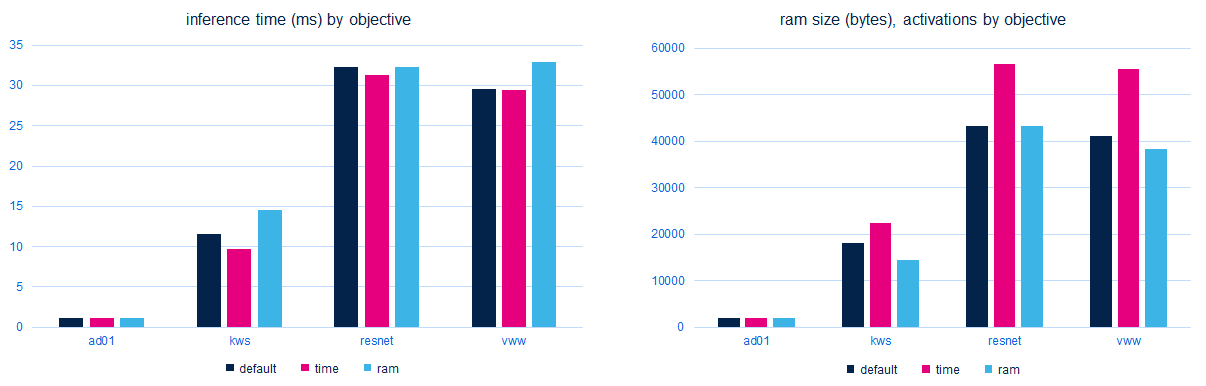
The following figure illustrates the usage of the optimization option. It is based on the
'Nucleo-H743ZI@480MHz'
board with the small
MLPerf Tiny quantized models from
https://github.com/mlcommons/tiny/tree/master/benchmark/training.
--c-api


           STR

supported target:
stm32xx,sr5[xx],sr6p[xx],sr6g[xx],sr6p3e(forispuonlyst-aiis supported)unsupported target:
stm32n6with NPU,mlc,sr6p3ewith NPU
Select the generated embedded inference C-API:
'legacy'
or
'st-ai'. The default is
'st-ai'
for all supported targets.
For more details, refer to the
“Embedded Inference Client API”
and
“Embedded Inference Client ST Edge AI API”
articles -
Optional
--allocate-activations

supported target:
stm32xx,sr5[xx],sr6p[xx],sr6g[xx],ispu,sr6p3eunsupported target:
stm32n6with NPU,mlc,sr6p3ewith NPU
(Experimental) Supported only with the
st-ai
c-api, this option indicates that the runtime space must allocate the memory buffers
to store the activations. Otherwise, the application must provide them (default behavior) -
Optional
--allocate-states

supported target:
stm32xx,sr5[xx],sr6p[xx],sr6g[xx],ispu,sr6p3eunsupported target:
stm32n6with NPU,mlc,sr6p3ewith NPU
(Experimental) Supported only with the
st-ai
c-api, this option indicates that the runtime space must allocate the memory buffers
to store the states. Otherwise, the application must provide them (default behavior) -
Optional
--input-data-type

supported target:
stm32xx,stm32n6with NPU,sr5[xx],sr6p[xx],sr6g[xx],ispu,sr6p3ew/ and w/o NPUunsupported target:
mlc
For the quantized models, indicates the expected inputs data type of generated implementation. Multiple inputs definition is supported: in_data_type_1,in_data_type_2,… If one data type is given, it will be applied for all inputs (possible values: float32|int8|uint8) - Optional
Details
|
model type |
supported options |
|---|---|
|
Keras (float) |
|
|
ONNX (float) |
|
|
TFlite (float) |
|
|
TFlite (quantized) |
|
|
ONNX (quantized)* |
|
(*) by default for this type of model, the original I/O data type (float32) is converted to int8 data type to feed directly the int8 kernels allowing to support efficiently the deployed ONNX QDQ models (see “QDQ format deployment” section).
--output-data-type

supported target:
stm32xx,stm32n6with NPU,sr5[xx],sr6p[xx],sr6g[xx],ispu,sr6p3ew/ and w/o NPUunsupported target:
mlc
For the quantized models, indicates the expected outputs data type of generated implementation. Multiple outputs definition is supported: out_data_type_1,out_data_type_2,… If one data type is given, it is applied for all outputs (possible values: float32|int8|uint8) - Optional
--cut-input-tensors

For the TFlite models should be specified a single tensor location or a comma separated list of tensors locations by which to cut the input model. For the ONNX models should be specified a single tensor name or a comma separated list of tensors names by which to cut the input model.
--cut-output-tensors

For the TFlite models should be specified a single tensor location or a comma separated list of tensors locations by which to cut the input model. For the ONNX models should be specified a single tensor name or a comma separated list of tensors names by which to cut the input model.
--cut-input-layers

For the TFlite models should be specified a single layer location or a comma separated list of layers locations by which to cut the input model. For the Keras models should be specified a single layer index or a comma separated list of layers indexes by which to cut the input model.
--cut-output-layers

For the TFlite models should be specified a single layer location or a comma separated list of layers locations by which to cut the input model. For the Keras models should be specified a single layer index or a comma separated list of layers indexes by which to cut the input model.
--inputs-ch-position

supported target:
stm32xx,stm32n6with NPU,sr5[xx],sr6p[xx],sr6g[xx],ispu,sr6p3ew/ and w/o NPUunsupported target:
mlc
Indicate the expected NCHW (channel first) or NHWC (channel last) data layout for the inputs (refer to “How to change the I/O data type or layout (NHWC vs NCHW)” article for more details). Note that this option is applied for all inputs if multiple inputs - possible values: chfirst|chlast - Optional
--outputs-ch-position

supported target:
stm32xx,stm32n6with NPU,sr5[xx],sr6p[xx],sr6g[xx],ispu,sr6p3ew/ and w/o NPUunsupported target:
mlc
Indicate the expected NCHW (channel first) or NHWC (channel last) data layout for the outputs (refer to “How to change the I/O data type or layout (NHWC vs NCHW)” article for more details). Note that this option is applied for all outputs if multiple outputs - possible values: chfirst|chlast - Optional
--no-onnx-optimizer

supported target:
stm32xx,stm32n6with NPU,sr5[xx],sr6p[xx],sr6g[xx],ispu,sr6p3ew/ and w/o NPUunsupported target:
mlc
Disable the ONNX optimizer pass before to import the ONNX model - Optional
--use-onnx-simplifier

supported target:
stm32xx,stm32n6with NPU,sr5[xx],sr6p[xx],sr6g[xx],ispu,sr6p3ew/ and w/o NPUunsupported target:
mlc
Enable the ONNX simplifier pass before to import the ONNX model (default: False) - Optional
--st-neural-art


           STR

supported target: stm32n6, sr6p3e with ST Neural-ART NPU
unsupported target:
stm32xx,sr5[xx],sr6p[xx],sr6g[xx],ispu,mlc
Set the selected profile (including the ST Neural-ART compiler options, refer to “ST Neural ART compiler primer” article) from a well-defined configuration file.
--custom


           FILE

supported target:
stm32xx,stm32n6with NPU,sr5[xx],sr6p[xx],sr6g[xx],ispu,sr6p3ew/ and w/o NPUunsupported target:
mlc
Path of the configuration file (JSON file) to support the custom layers (refer to “Keras Lambda/custom layer support” article) - Optional
-v/--verbosity


           {0,1,2,3}

Set the level of verbosity (or level of displayed information). Supported values: 0,1,2 (default:
1) -
Optional
--quiet

Disable the display of the progress bar during the execution of the command - Optional
Out-of-the-box information 
The first part of the log shows the used arguments and the main metrics of the C implementation.
$ stedgeai analyze -m ds_cnn.h5 --target stm32
..
 Exec/report summary (analyze)
 -------------------------------------------------------------------------------------------
 model file         :   <model-path>\ds_cnn.h5
 type               :   keras
 c_name             :   network
 compression        :   lossless
 optimization       :   balanced
 target/series      :   stm32h7
 workspace dir      :   <workspace-directory-path>
 output dir         :   <output-directory-path>
 model_fmt          :   float
 model_name         :   ds_cnn
 model_hash         :   0xb773f449281f9d970d5b982fb57db61f
 params #           :   40,140 items (156.80 KiB)
 -------------------------------------------------------------------------------------------
 input 1/1          :   'input_0', f32(1x49x10x1), 1.91 KBytes, user
 output 1/1         :   'dense_1', f32(1x12), 48 Bytes, user
 macc               :   4,833,792
 weights (ro)       :   158,768 B (155.05 KiB) (1 segment) / -1,792(-1.1%) vs float model
 activations (rw)   :   55,552 B (54.25 KiB) (1 segment)
 ram (total)        :   57,560 B (56.21 KiB) = 55,552 + 1,960 + 48
 -------------------------------------------------------------------------------------------
...
The initial subsection recalls the CLI arguments. Note that the full raw command line is saved at the
beginning of the generated report file:
<output-directory-path>\network_<cmd>_report.txt
|
field |
description |
|---|---|
|
model file |
reports the full-path of the original model files (
|
|
type |
reports the
|
|
c_name |
reports the expected C-name for the generated C-model (
|
|
compression |
reports the applied compression level (
|
|
optimization |
reports the selected objective:
|
|
target/series |
reports the selected target/series (
|
|
workspace dir |
full-path of the workspace directory (
|
|
output dir |
full-path of the output directory (
|
The second part shows the results of the importing and rendering stages.
|
field |
description |
|---|---|
|
model_fmt |
designates the main format of the generated model:
|
|
model_name |
designates the name of the provided model. This is generally the name of the model file. |
|
model_hash |
provides the computed MD5 signature of the imported model files. |
|
input |
indicates the name, the format, the shape, and the size in bytes of an input tensor. There is one line by input.
|
|
output |
indicates the name, the format, the shape, and the size of the output tensor. There is one line by output.
|
|
params # |
indicates the total number of parameters of the original model and its associated size in bytes. |
|
macc |
indicates the whole computational complexity of the original model. Value is defined in
|
|
weights (ro) |
indicates the requested size (in bytes) for the generated constant RO parameters (weights and bias tensors). The size is 4 bytes aligned. If the value is different from the original model files, the ratio is also reported. (refer to Memory-related metrics section) |
|
activations (rw) |
indicates the requested size (in bytes) for the working RW memory buffer (also called activations buffer). It is mainly used as an internal heap for the activations and temporary results. (refer to Memory-related metrics section) |
|
ram (total) |
indicates the requested total size (in bytes) for the RAM including the input and output buffers. |
Note that when the
–memory-pool
is passed, the next part
'Memory-pools


           summary'
summarizes
the usage of the memory pools.
Memory-pools summary (activations/ domain)
--------------------------- ---- -------------------------- ---------
name                        id   used                       buffer#
--------------------------- ---- -------------------------- ---------
sram                        0    54.25 KiB (10.8%)          34
weights_array               1    155.05 KiB (15876800.0%)   35
input_0_output_array_pool   2    1.91 KiB (196000.0%)       1
dense_1_output_array_pool   3    48 B (4800.0%)             1
--------------------------- ---- -------------------------- ---------
Example of ‘input/output’ description
'input_0', f32(1x49x10x1), 1.91 KBytes, userIndicates that
input_0tensor has a size of 490 floating-point items (size in bytes =490 x 4B = 1.91KiB) with a(1x49x10x1)shape, the associated memory chunk will be provided by the application ('user'domain) application (refer to “I/O tensor description” section). On the contrary in'input_0', f32(1x49x10x1), 1.91 KBytes, activationsThe description is similar, however thanks the
--allocate-inputsoption, a specific region is reserved in the activations buffer for the input ('activations'domain).Compressed floating-point model example
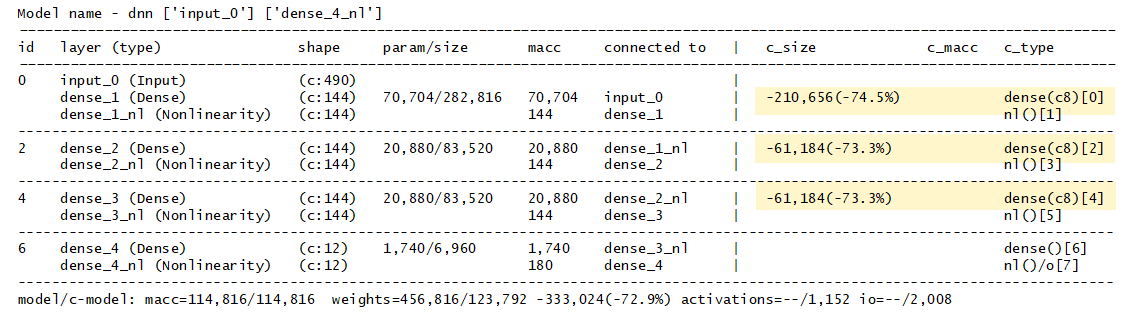
For a “compressed” floating-point model, the compression gain for the
'weights'size, here -72.90% is the global difference between a 32b float model and the generated “compressed” C-model. Note that only the full-connected or dense layers can be compressed.$ stedgeai analyze -m dnn.h5 -c low --target stm32 ... compression : low ... input 1/1 : 'input_0', f32(1x490), 1.91 KBytes, user output 1/1 : 'dense_4', f32(1x12), 48 Bytes, user macc : 114,816 weights (ro) : 123,792 B (120.89 KiB) (1 segment) / -333,024(-72.9%) vs float model activations (rw) : 1,152 B (1.12 KiB) (1 segment) ram (total) : 3,160 B (3.09 KiB) = 1,152 + 1,960 + 48 ...
Quantized TFLite model example - integer format
The following report shows the case where a TensorFlow lite quantized model is imported and the inputs are placed in the activations buffer. Note that for each input (or output), type/scale, and zero-point value are reported. Additional infos are displayed in the “IR Graph description” section.
$ stedgeai analyze -m <quantized_model_file>.tflite --allocate-inputs --target stm32
...
input 1/1          :   'Reshape_1', int8(1x1960), 1.91 KBytes, QLinear(0.101715684,-128,int8), activations
output 1/1         :   'nl_3', int8(1x4), 4 Bytes, QLinear(0.003906250,-128,int8), user
macc               :   336,072
weights (ro)       :   16,688 B (16.30 KiB) (1 segment) / -49,920(-74.9%) vs float model
activations (rw)   :   12,004 B (11.72 KiB) (1 segment) *
ram (total)        :   12,008 B (11.73 KiB) = 12,004 + 0 + 4

(*) input buffers can be used from the activations buffer
...
IR graph description 
The outlined “graph” section (table form) provides a summary of the topology of the network which is considered
before the optimization, render, and generation stages. The
'id'
column indicates the index of the operator from the original graph.
It is generated by the importer. The described graph is an internal platform-independent
representation (or IR) created during the import of the model. Only training operators are ignored. Note that
if no input operator is defined, an “input” layer is added and the nonlinearity functions are unfused.
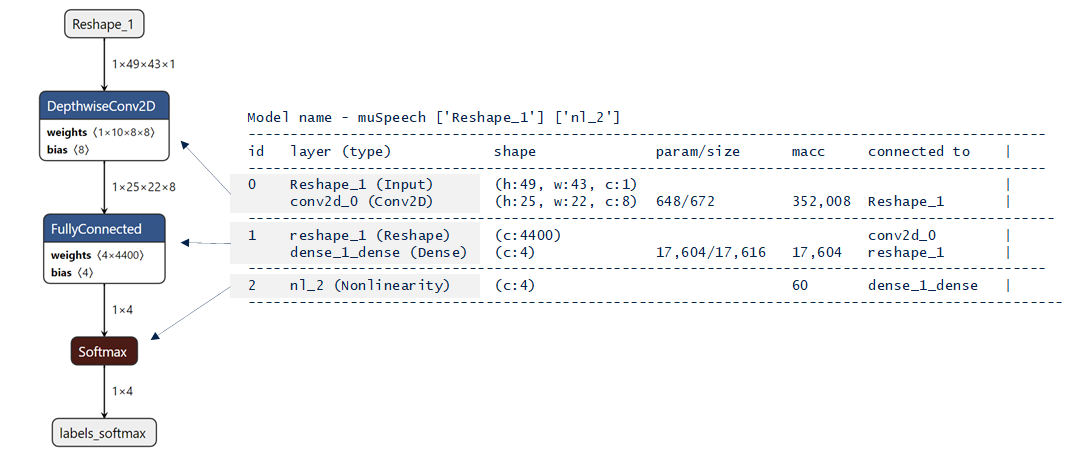
|
field |
description |
|---|---|
|
id |
indicates the layer/operator index in the original model. |
|
layer (type) |
designates the name and type of the operator. The name is inferred from the original name. In the case where a nonlinearity function is unfused, the new IR-node is created with the original name suffixed with
|
|
shape |
indicates the output shape of the layer. Follow the “HWC” layout or channel last representation (refer to “I/O tensor” section) |
|
param/size |
indicates the number of parameters and their sizes in bytes (4 bytes aligned) |
|
macc |
designates the complexity in multiply-accumulated operations, refer to Computational complexity: MACC and cycles/MACC |
|
connected to |
designates the name of the incoming operators/layers |
The right side of the table (
'c_*'
columns) reports generated C-object
after optimization and rendering stages.
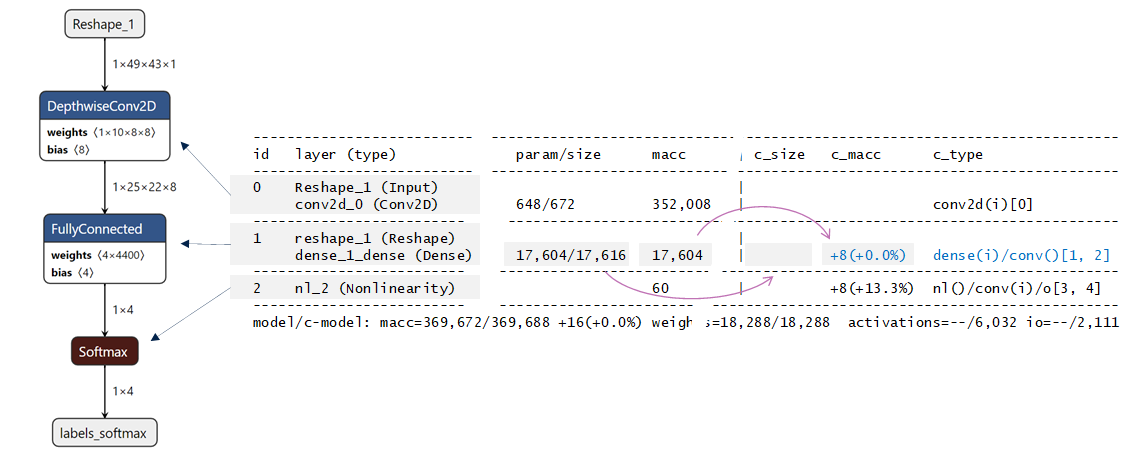
|
field |
description |
|---|---|
|
c_size |
indicates the difference in bytes of the size for the implemented weights/params tensors. If nothing is indicated, the size is unchanged compared to the original size (
|
|
c_macc |
indicates the difference in MACC. If nothing is displayed, the final complexity of the C-operator is comparable to the complexity of the original layer/operator (
|
|
c_type |
indicates the type of the c-operator. The value between square is the index in the c-graph. The value between parenthesis is the data type:
|
Footer summarizes the differences for the whole model including the requested RAM size for the activations buffer and for the I/O tensors.
model/c-model: macc=369,672/369,688 +16(+0.0%) weights=18,288/18,288
           activations=--/6,032 io=--/2,111
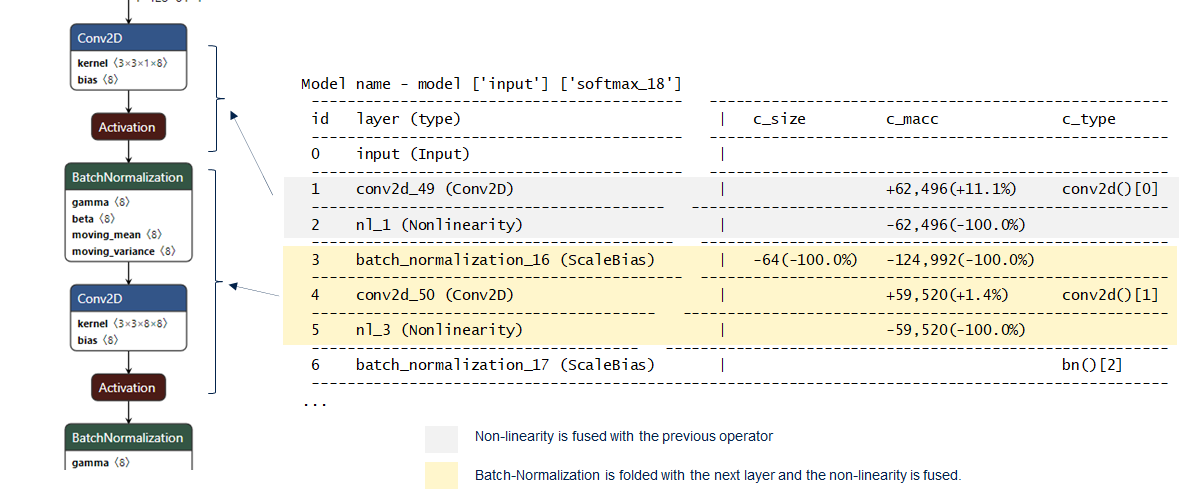
In the case where the optimizer engine has folded or/and fused the IR nodes, the
'c_type'
is empty.
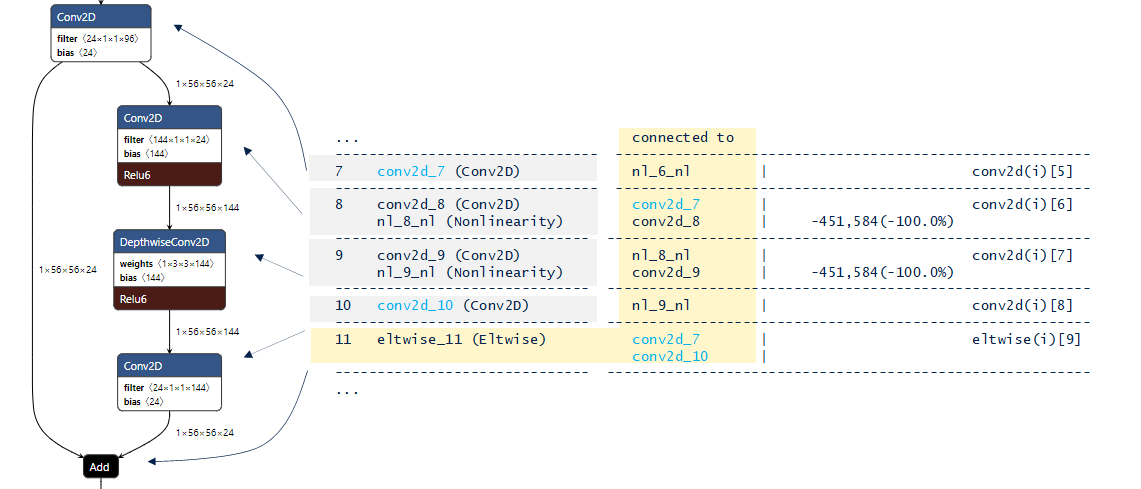
The following figure is an example of an IR graph with a residual neural network. As for the multiple branches,
no specific information is added,
'connected


           to'
column allows to know the connections.
Warning
For a compressed or quantized model, the MACC values (by layer or globally) are unchanged since the number of operations is always the same. Only the associated number of CPU cycles by MACC is changed. In particular, for the quantized models.
Number of operations per c-layer 
Number of operations by generated C-layer (
'c_id') according to the type of data
is provided. With the synthesis by types of operations for the entire model, this information
makes it possible to know the partitioning of the operations in relation with the types of data.
Number of operations per c-layer
----------------------------------------------------------------------------------------------
c_id    m_id   name (type)                                     #op (type)
----------------------------------------------------------------------------------------------
0       1      quant_conv2d_conv2d (conv2d_dqnn)                       230,416 (smul_s8_s8)
1       3      quant_conv2d_1_conv2d (conv2d_dqnn)                   1,843,200 (sxor_s1_s1)
...
14      25     quant_depthwise_conv2d_3_conv2d (conv2d_dqnn)            28,800 (sxor_s1_s1)
...
16      28     quant_conv2d_7_conv2d (conv2d_dqnn)                   1,638,400 (sxor_s1_s1)
17      30     activation (nl)                                           6,400 (op_f32_f32)
18      32     conv2d_conv2d (conv2d)                                   76,812 (smul_f32_f32)
----------------------------------------------------------------------------------------------
total                                                               10,067,228

  Number of operation types
  ---------------------------------------------
  smul_s8_s8               230,416        2.3%
  sxor_s1_s1             9,740,800       96.8%
  op_s1_s1                  12,800        0.1%
  op_f32_f32                 6,400        0.1%
  smul_f32_f32              76,812        0.8%
|
operation |
description |
|---|---|
|
|
floating-point macc-type operation |
|
|
8-bit signed integer macc-type operation |
|
|
Floating point operation (nonlinearity, elemtwise op…) |
|
|
converter operation; s8 -> f32 |
|
|
binary operation (~macc) |
Complexity report per layer 
The last part of the report summarizes the relative network complexity in term of MACC
and associated ROM size by layer. Note that only the operators which contribute to the global
'c_macc'
and
'c_rom'
metrics are reported.
'c_id'
indicates the index of the
associated c-node.
Complexity report per layer - macc=18,752,688 weights=7,552 act=3,097,600 ram_io=602,184
---------------------------------------------------------------------------------------------------
id   name                             c_macc                    c_rom                     c_id
---------------------------------------------------------------------------------------------------
1    separable_conv1                  ||                 1.8%   ||                 1.6%   [0]
1    separable_conv1_conv2d           |||                3.2%   ||||               3.4%   [1]
2    depthwise_conv2d_1               |||||||||         10.3%   ||||||||           8.5%   [2]
3    conv2d_1                         ||||||||||||||||  17.6%   ||||||||||||||    14.4%   [3]
5    dw_conv_branch1                  ||||||||           9.3%   ||||||||           8.5%   [7]
6    pw_branch1                       ||||||||||||||||  17.6%   ||||||||||||||    14.4%   [8]
7    dw_conv_branch0                  ||||||||           9.3%   ||||||||           8.5%   [6]
8    batch_normalization_1            ||                 2.1%   ||                 1.7%   [9]
9    separable_conv1_branch2          ||||||||           9.3%   ||||||||           8.5%   [4]
9    separable_conv1_branch2_conv2d   |||||||||||||||   16.5%   ||||||||||||||    14.4%   [5]
10   add_1                            ||                 2.1%   |                  0.0%   [10, 11]
11   global_average_pooling2d_1       |                  1.0%   |                  0.0%   [12]
12   dense_1                          |                  0.0%   ||||||||||||||||  16.2%   [13]
12   dense_1_nl                       |                  0.0%   |                  0.0%   [14]
C-graph description 
Additional “Generated C-graph summary” section is included in the report (also displayed
with
'-v


           2'
argument). It summarizes the main computational and associated
elements (c-objects) used by the C-inference engine (runtime library). It is based on the c-structures
generated inside the
'<name>.c'
file. A complete graphic representation is available through the UI
(refer to
[UM]).
The first part recalls the main structural elements: c-name, number of c-nodes, number of C-array for the data storage of the associated tensors. Input and output name of the I/O tensors.
Generated C-graph summary
---------------------------------------------------------------------------------------------------
model name         : microspeech_01
c-name             : network
c-node #           : 5
c-array #          : 11
activations size   : 4352
weights size       : 16688
macc               : 336084
inputs             : ['Reshape_1_output_array']
outputs            : ['nl_2_fmt_output_array']
As illustrated in the following figure, the implemented c-graph ( legacy API) can be considered as a sequential graph, managed as a simple linked list. Fixed-executing order is defined by the C-code optimizer according to two main criteria: data-path dependencies (or tensor dependencies) and the minimization of the RAM memory peak usage.
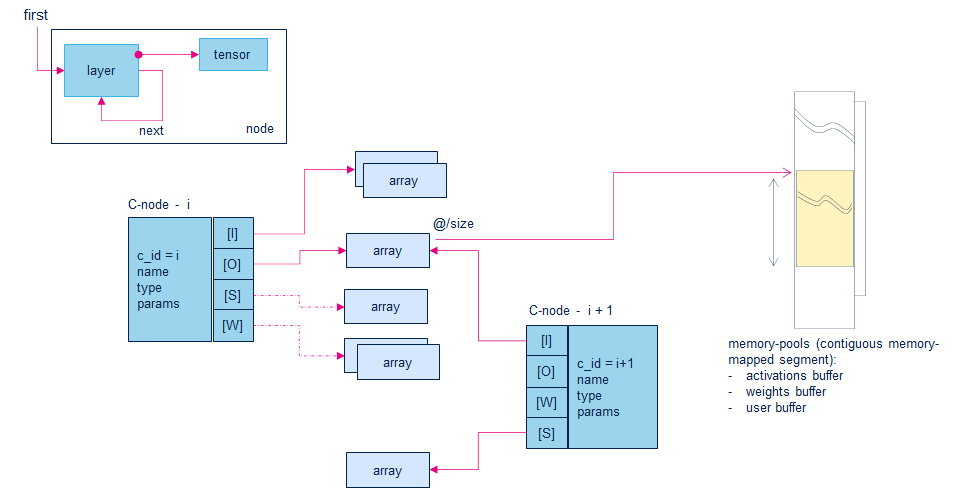
Each computational c-node is entirely defined by:
operation type, parameters
input tensors list: [I]
optional weights/bias tensors list: [W]
optional scratches tensors list: [S]
outputs tensors list: [O]
C-Arrays table 
'C-Arrays'
table lists the objects allowing to handle the base address, size, and metadata
of the data memory segments for the different tensors. For each item, number of items, size in byte
(
'item/size'), memory segment location (
'mem-pool'), type (
'c-type') and short format
description (
'fmt') are reported.
C-Arrays (11)
---------------------------------------------------------------------------------------------------
c_id  name (*_array)      item/size           mem-pool     c-type         fmt         comment
---------------------------------------------------------------------------------------------------
0     conv2d_0_scratch0   352/352             activations  uint8_t        ua8
1     dense_1_bias        4/16                weights      const int32_t  ss32
2     dense_1_weights     16000/16000         weights      const uint8_t  ua8
3     conv2d_0_bias       8/32                weights      const int32_t  ss32
4     conv2d_0_weights    640/640             weights      const uint8_t  ua8
5     Reshape_1_output    1960/1960           user         uint8_t        ua8         /input
6     conv2d_0_output     4000/4000           activations  uint8_t        ua8
7     dense_1_output      4/4                 activations  uint8_t        ua8
8     dense_1_fmt_output  4/16                activations  float          float
9     nl_2_output         4/16                activations  float          float
10    nl_2_fmt_output     4/4                 user         uint8_t        ua8         /output
---------------------------------------------------------------------------------------------------
|
mem_pool |
description |
|---|---|
|
activations |
part of the activations buffer |
|
weights |
part of a ROM segment |
|
user |
part of a memory segment owned by the user (client application level) |
|
fmt |
format description |
|---|---|
|
float |
32b float numbers |
|
s1/packed |
binary format |
|
bool |
boolean format |
|
c4/c8 |
compressed 32b float numbers. The size includes the dictionary. |
|
s, u, ua, ss, sa |
integer or/and quantized format (refer to
quantization
article).
|
C-Layers table 
'C-Layers'
table lists the c-nodes. For each node, the c-name (
name), type,
macc, rom and associated tensors (with the shape for the I/O tensors) are reported.
Associated c-array can be found with its name (or array id).
C-Layers (5)
---------------------------------------------------------------------------------------------------
c_id  name (*_layer)  id  type    macc        rom         tensors                shape (array id)
---------------------------------------------------------------------------------------------------
0     conv2d_0        0   conv2d  320008      672         I: Reshape_1_output    [1, 49, 40, 1] (5)
                                                          S: conv2d_0_scratch0
                                                          W: conv2d_0_weights
                                                          W: conv2d_0_bias
                                                          O: conv2d_0_output     [1, 25, 20, 8] (6)
---------------------------------------------------------------------------------------------------
1     dense_1         1   dense   16000       16016       I: conv2d_0_output0    [1, 1, 1, 4000] (6)
                                                          W: dense_1_weights
                                                          W: dense_1_bias
                                                          O: dense_1_output      [1, 1, 1, 4] (7)
---------------------------------------------------------------------------------------------------
2     dense_1_fmt     1   nl      8           0           I: dense_1_output      [1, 1, 1, 4] (7)
                                                          O: dense_1_fmt_output  [1, 1, 1, 4] (8)
---------------------------------------------------------------------------------------------------
3     nl_2            2   nl      60          0           I: dense_1_fmt_output  [1, 1, 1, 4] (8)
                                                          O: nl_2_output         [1, 1, 1, 4] (9)
---------------------------------------------------------------------------------------------------
4     nl_2_fmt        2   nl      8           0           I: nl_2_output         [1, 1, 1, 4] (9)
                                                          O: nl_2_fmt_output     [1, 1, 1, 4] (10)
---------------------------------------------------------------------------------------------------
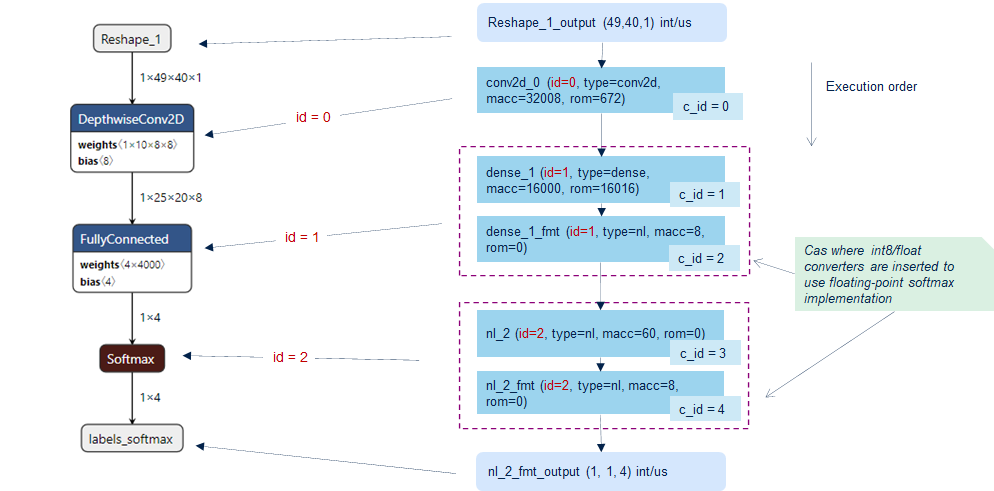
'id'designates the layer/operator index from the original model allowing to retrieve the link with the implemented node ('c_id').
The following figure illustrates a quantized model where the softmax operator is implemented in float requesting to insert two converters. Note that this is just an example, the softmax operator is fully supported in int8.
Runtime memory size 
“Runtime” identifies all involved
kernel
objects (software components) which are requested to execute the deployed c-model on a given device
(also called runtime AI-stack). To compute these information, the
–target
option is used to know the targeted device
and an embedded gcc-based compiler application should be available in the
PATH.
The first part indicates the final contribution by module (generated c-file or library) and by type of memory segment.
'RT


           total'
line sum-ups
the different contributors.
'lib


           (toolchain)'
indicates the contribution of the used toolchain objects (including typically the low-level
floating point operations from the libm/libgcc libraries). The extra lines
weights/activations/io
recalls the requested size for respectively
the weights, the activations buffer and the payload for the input/output tensors (refer to
memory-related metrics
section
from
Evaluation report and metrics
article).
|
segment |
description |
|---|---|
|
text |
size in bytes for the code |
|
rodata |
size in bytes for the const data (usually stored in nonvolatile memory device, FLASH type, except for ISPU) |
|
data |
size in bytes for the initialized data (stored in volatile memory device like embedded RAM, initial values is stored in FLASH, except for ISPU) |
|
bss |
size in bytes for the zero-initialized data (stored in RAM) |
$ stedgeai analyze -m <model_path> --target stm32h7 --c-api legacy
...
 Requested memory size by section - "stm32h7" target
 ----------------------------- -------- -------- ------- --------
 module                            text   rodata    data      bss
 ----------------------------- -------- -------- ------- --------
 NetworkRuntime910_CM7_GCC.a     19,100        0       0        0
 network.o                          482      213   1,520      116
 network_data.o                      48       16      88        0
 lib (toolchain)*                   104        0       0        0
 ----------------------------- -------- -------- ------- --------
 RT total**                      19,734      229   1,608      116
 ----------------------------- -------- -------- ------- --------
 weights                              0   16,688       0        0
 activations                          0        0       0   12,004
 io                                   0        0       0    1,964
 ----------------------------- -------- -------- ------- --------
 TOTAL                           19,734   16,917   1,608   14,084
 ----------------------------- -------- -------- ------- --------
 *  toolchain objects (libm/libgcc*)
 ** RT AI runtime objects (kernels+infrastructure)
|
module |
description |
|---|---|
|
NetworkRuntime910_CM7_GCC.a |
kernel objects implementing the requested operators |
|
network.o |
specialized code/data to manage the c-model |
|
network_data.o |
specialized code/data to manage the weight/activation buffers |
Note
The
'<network>_params_data.o'
file does not appear in the table, because it contains
only the values of the weights (c-array form) which is represented by the
'*weights*'
extra line.
The last part summarizes the whole requested memory size per type of memory. It also illustrates the breakdown between the RT objects and the main dimensioning memory-related metrics of the deployed c-model (that is, ROM/RAM metrics).
Summary - "stm32h7" target
---------------------------------------------------
             FLASH (ro)      %*   RAM (rw)       %
---------------------------------------------------
RT total         21,571   56.4%      1,724   11.0%
---------------------------------------------------
TOTAL            38,259             15,692
---------------------------------------------------
*  rt/total
ISPU example 
The following log illustrates an example for the
'ispu'
target. In the final summary, as the firmware is loaded in the
internal RAM through a serial interface by a host processor, the requested size to store the initialized
value of the
.data
section is not considered.
$ stedgeai analyze -m <model_path> --target ispu --c-api stai
...
 Requested memory size by section - "ispu" target
 ------------------- -------- -------- ------ --------
 module                  text   rodata   data      bss
 ------------------- -------- -------- ------ --------
 network_runtime.a     10,970        0      4        0
 network.o              1,968       80      0        0
 lib (toolchain)*       1,844      428      0        0
 ------------------- -------- -------- ------ --------
 RT total**            14,782      508      4        0
 ------------------- -------- -------- ------ --------
 weights                    0   16,688      0        0
 activations                0        0      0   12,004
 states                     0        0      0        0
 io                         0        0      0    1,964
 ------------------- -------- -------- ------ --------
 TOTAL                 14,782   17,196      4   13,968
 ------------------- -------- -------- ------ --------
 *  toolchain objects (libm/libgcc*)
 ** RT AI runtime objects (kernels+infrastructure)

  Summary - "ispu" target
  ----------------------------------------------------------
               Code RAM (ro)      %*   Data RAM (rw)      %
  ----------------------------------------------------------
  RT total            15,290   47.8%               4   0.0%
  ----------------------------------------------------------
  TOTAL               31,978                  13,972
  ----------------------------------------------------------
  *  rt/total
Validate command 
|
✓ |
|
|
✓ |
|
|
✓ |
|
|
✓ |
|
|
✓ |
|
|
✓ |
|
|
✗ |
Description 
The
'validate'
command allows validating the generated/deployed model.
Two modes (
–mode
option) are considered:
host
and
target.
The detailed descriptions of the used metrics are described in the
Evaluation report and metrics
article.
Native host runtime environment for model evaluation 
The native runtime environment executes the original model on the host machine. This runtime relies on Python packages
associated with the framework used to evaluate the model, such as the TFLite interpreter for the TFLite file,
ONNX runtime for the ONNX-based model, and the Keras package with TensorFlow backend for Keras files.
These runtimes are embedded into the ST Edge AI CLI executable without modification. Use the
'stedgeai


             --tools-version'
command to check the versions of the associated packages. The purpose of these environments is to generate references for
comparison
with the
predictions produced by the deployed model
in terms of accuracy. Execution time is not considered.
Therefore, all optimizations aimed at improving inference time for the quantized models are disabled by default
to utilize the reference kernels, avoiding side effects related to the CPU-specific optimizations.
For the ONNX model, the ONNX runtime session is configured with the
onnxruntime.GraphOptimizationLevel.ORT_DISABLE_ALL
option and for the TFlite models, the experimental TFLite interpreter option (
tf.lite.experimental.OpResolverType.BUILTIN_REF)
to use the reference kernels should be enabled with the additional options:
--validate.experimentale


             kref
.
$ stedgeai validate -m <tflite_model>.tflite --target stm32h7 --validate.experimental kref
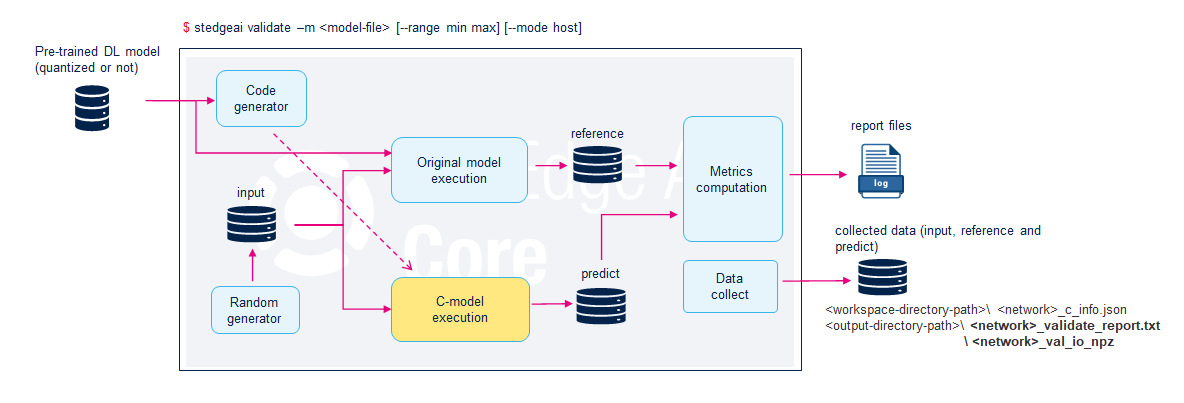
Validation on host 
Option:
'--mode


             host'
(Default)
The specialized NN generated c-files are compiled on the host and linked with a specific network-runtime library implementing the reference C-kernels closed to the target implementation.
Validation on target 
Option:
'--mode


             target


             -d


             <desc>'
This mode allows validating the deployed model on the associated board. Before to execute the
'validate'
command,
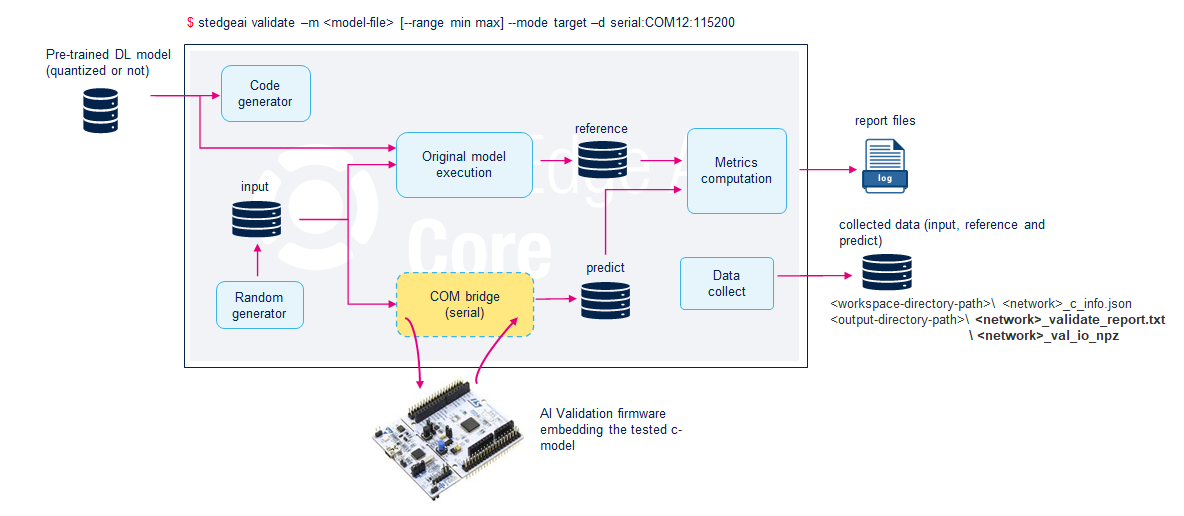
the board should be flashed with a specific validation firmware including a specific COM stack and the deployed C-model.
For each target the way to deploy the model on the associate development board can be specific.
When the board is flashed and started, the same validation process is applied, only the execution of the deployed c-model is delegated to the target.
Examples 
Minimal command to validate a 32b float model with the self-generated random input data (“Validation on desktop”).
stedgeai validate -m <model_f32p_file_path> --target stm32Minimal command to validate a 32b float model on STM32 target. Note that a complete profiling report including execution time by layer is generated by default.
stedgeai validate -m <model_f32p_file_path> --mode target --target stm32Validation of a 32b float model with compression factor (“Validation on desktop”)
stedgeai validate -m <model_f32p_file_path> -c medium --target stm32Validate a model with a custom dataset (input samples)
stedgeai validate -m <model_file_path> -vi test_data.csv --target stm32
Specific options 
--mode

Indicates the mode of validation - Optional
|
mode |
description |
|---|---|
|
|
default value - Performs a validation on the host. |
|
|
Perform a validation on target. |
|
|
alias equivalent to ‘–mode host –io-only’ - deprecated - default behavior |
|
|
alias equivalent to ‘–mode target –io-only’ |
--val-json

This option specifies the generated
<network>_c_info.json
file to be used during model validation.
It is valid only when running the
validate
command in
target
mode. It improves the execution time of the validation process
skipping the preliminary passes such importing or compiling the model file. All requested information is directly extracted from
the provided JSON file. After validation the file is updated with the
computed metrics
including
the measured inference time information -
Optional
Note
Since the release 3.0, if this option is not specified, the computed metrics and measured inference time information are stored in an
extra file:
"<network>_c_info_valid.json".
-vi/--valinput

Indicates the custom test dataset which must be used. If not defined an internal self-generated random dataset is used (refer to Input validation files section) - Optional
-vo/--valoutput

Indicates the expected custom output values. If the data are already provided in a simple file (
'*.npz') through the
'-vi'
option this argument is skipped -
Optional
-b/--batches

Indicates how many random data samples is generated (default:
'10') or how many custom test data are used (default: all) -
Optional
-d/--desc

Describes the protocol and associated parameters required to communicate with the deployed c-model. The syntax is
'<driver>[:parameters]'. This option
is mandatory if the
--mode


             target
is specified. A typical use case is to specify the COM port used to communicate with a
board (see
Serial COM port configuration
section).
--full

supported target:
stm32xx,sr5[xx],sr6p[xx],sr6g[xx],sr6p3eunsupported target:
ispu,stm32n6with NPU,mlc,sr6p3ewith NPU
DEPRECATED - Apply an extended validation process to report the L2r error layer-by-layer for the floating-point Keras model, experimental for the other models. Otherwise, the L2r is evaluated only on the last or output layers - Optional
Note: This option will be removed in a future release.
--io-only

Force the execution of the deployed model without instrumentation to retrieve
the intermediate data (alias to
'host-io-only'
and
'target-io-only'
mode) -
Optional
--classifier

Consider the provided model as a classifier.
This implies that the computation of the
'CM'
and
'ACC'
metrics are evaluated, else an autodetection
mechanism is used to evaluate if the model is a classifier or not. -
Optional
--no-check

Combined with the
'target'
mode, reduce for debug purpose the full preliminary check-list to make sure that the flashed target C-model has been generated with the same tools and options.
Only the c-name and network I/O shape/format are checked. -
Optional
--no-exec-model

Do not execute the original model on the host with a deep learning framework runtime. Only the generated c-model is executed (see no-exec-model article) - Optional
--range

Indicates the min and max values (in float) for the generated random data, default is
'[0.0,


             1.0['
.
To generate randomly and uniformly the data between
'-1.0'
and
'1.0', following parameters should be
passed:
'--range


             -1


             1'
(Refer to
Random data generation
section) -
Optional
--seed

Define the seed which is used to initialize the pseudorandom number generator for the random data generation. Else a fixed seed is used - Optional
--save-csv

Save the whole data in the respective ‘*.csv’ files. By default, for performance reasons, only a limited part are saved. - Optional
For
'ispu'
target an additional option is defined to specify the file needed to load the ISPU program
(see the
“Validate command extension”
section of the ISPU specific documentation).
Serial COM port configuration 
The
'-d/--desc'
option should be used to indicate how to configure the serial COM driver
to access the board.
By default, an autodetection mechanism is applied to discover a connected board
at 115200 (default value:
default:115200) or 921600 for ISPU
Set the baud rate to 921600
$ stedgeai validate -m <model_file_path> --target stm32 --mode target -d serial:921600Set the COM port to
COM16(Windows case) or/dev/ttyACM0(Linux case)$ stedgeai validate -m <model_file_path> --target stm32 --mode target -d serial:COM16 $ stedgeai validate -m <model_file_path> --target stm32 --mode target -d serial:/dev/ttyACM0
Set the COM port to
COM16and the baud rate to 921600$ stedgeai validate -m <model_file_path> --target stm32 --mode target -d serial:COM16:921600
Extended complexity report per layer 
If
'-v


            2'
option is used, the
“Complexity report per layer”
table
is extended with a specific column to report the metric according the data type:
'l2r'
for the floating-point models and
'rmse'
for the integer or quantized models.
$ stedgeai validate -m <model_f32p_file_path> --target stm32 -v 2
 ...
 Complexity report per layer - macc=4,013 weights=15,560 act=192 ram_io=416
 ---------------------------------------------------------------------------------------------------------
 id   name           c_macc                    c_rom                     c_id   c_dur    l2r (X-CROSS)
 ---------------------------------------------------------------------------------------------------------
 0    dense_1        ||||||||||||||||  82.2%   ||||||||||||||||  84.8%   [0]     11.3%
 1    activation_1   |                  0.8%   |                  0.0%   [1]     13.3%
 2    dense_2        |||               12.7%   |||               13.1%   [2]     16.5%
 3    activation_2   |                  0.4%   |                  0.0%   [3]     17.7%
 4    dense_3        |                  2.0%   |                  2.1%   [4]     19.4%
 5    activation_3   |                  1.9%   |                  0.0%   [5]     21.9%   3.95458301e-07 *
 ...
(*) indicates the max value
By default, the metric is computed only on the last layers (outputs of the model), however
for the Keras floating-point model, the
'--full'
option allows computing this error
layer-by-layer.
$ stedgeai validate -m <model_f32p_file_path> --target stm32 --full
...
 Complexity report per layer - macc=4,013 weights=15,560 act=192 ram_io=416
 ---------------------------------------------------------------------------------------------------------
 id   name           c_macc                    c_rom                     c_id   c_dur    l2r (X-CROSS)
 ---------------------------------------------------------------------------------------------------------
 0    dense_1        ||||||||||||||||  82.2%   ||||||||||||||||  84.8%   [0]     11.0%   5.62010030e-08
 1    activation_1   |                  0.8%   |                  0.0%   [1]     13.3%   5.57235715e-08
 2    dense_2        |||               12.7%   |||               13.1%   [2]     16.3%   8.20674515e-08
 3    activation_2   |                  0.4%   |                  0.0%   [3]     18.0%   8.00048383e-08
 4    dense_3        |                  2.0%   |                  2.1%   [4]     19.6%   1.32168850e-07
 5    activation_3   |                  1.9%   |                  0.0%   [5]     21.9%   3.95458301e-07 *
...
Warning
'--full'
option can be also used for validation on target (
'--mode


             target'
),
to report the
L2r
error per layer, however, be aware that
the validation time is significantly increased due to the download of the
intermediate results.
Execution time per layer 
Validation on target 
The validation on target allows to have a full and accurate profiling report including:
inference-time
number of CPU cycles by MACC
execution time per layer
Device HW settings/configurations (clock frequency, memory configuration)
...
Running the ST.AI c-model (AI RUNNER)...(name=network, mode=TARGET)

 Proto-buffer driver v2.0 (msg v3.1) (Serial driver v1.0 - COM4:115200) ['network']

  Summary 'network' - ['network']
  -----------------------------------------------------------------------------------
  I[1/1] 'input_1'    :   int8[1,1,28,28], 784 Bytes, QLinear(0.012722839,-95,int8),
                          activations
  O[1/1] 'output_1'   :   f32[1,10], 40 Bytes,
                          activations
  n_nodes             :   9
  activations         :   32640
  weights             :   1200584
  macc                :   12052856
  hash                :   0x00f1e2478590bea3e6ed23bba954f39f
  compile_datetime    :   Nov 5 2024 11:58:56
  -----------------------------------------------------------------------------------
  protocol            :   Proto-buffer driver v2.0 (msg v3.1)
                          (Serial driver v1.0 - COM4:115200)
  tools               :   ST.AI (st-ai api) v2.0.0
  runtime lib         :   v10.0.0-9a75ee0c compiled with GCC 12.3.1 (GCC)
  capabilities        :   IO_ONLY, PER_LAYER, PER_LAYER_WITH_DATA, SELF_TEST
  device.desc         :   stm32 family - 0x450 - STM32H743/53/50xx and
                          STM32H745/55/47/57xx @480/240MHz
  device.attrs        :   fpu,art_lat=4,core_icache,core_dcache
  -----------------------------------------------------------------------------------

  ST.AI Profiling results v2.0 - "network"
  ---------------------------------------------------------------
  nb sample(s)   :   10
  duration       :   28.016 ms by sample (28.010/28.023/0.004)
  macc           :   12052856
  cycles/MACC    :   1.12
  CPU cycles     :   [13,447,454]
  ---------------------------------------------------------------

   Inference time per node
   ----------------------------------------------------------------------------------------------
   c_id    m_id   type                   dur (ms)       %    cumul  CPU cycles       name
   ----------------------------------------------------------------------------------------------
   0       11     Conv2D (0x103)            1.255    4.5%     4.5%  [    602,299 ]   ai_node_0
   1       17     Conv2dPool (0x109)       20.223   72.2%    76.7%  [  9,707,063 ]   ai_node_1
   2       20     Transpose (0x10a)         0.795    2.8%    79.5%  [    381,426 ]   ai_node_2
   3       20     NL (0x107)                0.580    2.1%    81.6%  [    278,565 ]   ai_node_3
   4       23     Dense (0x104)             5.147   18.4%    99.9%  [  2,470,516 ]   ai_node_4
   5       26     Dense (0x104)             0.009    0.0%   100.0%  [      4,214 ]   ai_node_5
   6       26     NL (0x107)                0.001    0.0%   100.0%  [        292 ]   ai_node_6
   7       29     Softmax (0x10c)           0.003    0.0%   100.0%  [      1,652 ]   ai_node_7
   8       30     NL (0x107)                0.003    0.0%   100.0%  [      1,427 ]   ai_node_8
   ----------------------------------------------------------------------------------------------
   n/a     n/a    Inter-nodal               0.000    0.0%   100.0%                   n/a
   ----------------------------------------------------------------------------------------------
   total                                   28.016                   [ 13,447,454 ]
   ----------------------------------------------------------------------------------------------

   Statistic per tensor
   ----------------------------------------------------------------------------------
   tensor   #    type[shape]:size         min      max     mean      std  name
   ----------------------------------------------------------------------------------
   I.0      10   i8[1,1,28,28]:784       -128      127   -1.681   73.679  input_1
   O.0      10   f32[1,10]:40          -7.937   -0.033   -4.356    1.900  output_1
   ----------------------------------------------------------------------------------
...
This report can be used to identify the main contributors in terms of inference time and to re-fine the model accordingly.
'c_id'
column references the index of the c-node (see
“C-graph description”
section) and the
'm_id'
identifies the index from the original model.
out-of-the-box execution 
When
'target-io-only'
mode or
--io-only
options are used, the deployed model is only executed
out-of-the-box. Executing time or l2r per layer are no more computed. This can be used to limit the
traffic between the host and the target reducing the validation time.
...
  ST.AI Profiling results v2.0 - "network"
  ------------------------------------------------------------------
  nb sample(s)      :   10
  duration          :   28.016 ms by sample (28.007/28.044/0.010)
  macc              :   12052856
  cycles/MACC       :   1.12
  CPU cycles        :   [13,447,610]
  used stack/heap   :   1300/0 bytes
  ------------------------------------------------------------------

   Statistic per tensor
   ----------------------------------------------------------------------------------
   tensor   #    type[shape]:size         min      max     mean      std  name
   ----------------------------------------------------------------------------------
   I.0      10   i8[1,1,28,28]:784       -128      127   -1.681   73.679  input_1
   O.0      10   f32[1,10]:40          -7.937   -0.033   -4.356    1.900  output_1
   ----------------------------------------------------------------------------------
...
Validation on host 
For
validation on host, the relative execution time per layer is
not reported by default; the
'-v


             2'
option should be used to display them. Nevertheless, it is
important to note that these values are only
indicators. They depend on the implementation of the kernels,
which are not optimized, and the workload of the desktop/host machine (see
device.desc
field). This contrasts
with the reported inference times for validation on the target.
$ stedgeai validate -m <model_file_path> --target stm32 -v 2 [--mode host]
...
Running the ST.AI c-model (AI RUNNER)...(name=network, mode=HOST)

 DLL Driver v2.0 - Direct Python binding
   (<workspace-directory-path>\inspector_network\workspace\lib\libai_network.dll) ['network']

  Summary 'network' - ['network']
  -----------------------------------------------------------------------------------
  I[1/1] 'input_1'    :   int8[1,28,28,1], 784 Bytes, QLinear(0.012722839,-95,int8),
                          in activations buffer
  O[1/1] 'output_1'   :   f32[1,1,1,10], 40 Bytes, in activations buffer
  n_nodes             :   9
  activations         :   32640
  weights             :   1200584
  macc                :   12052856
  hash                :   0x00f1e2478590bea3e6ed23bba954f39f
  compile_datetime    :   Nov 15 2024 12:49:14
  -----------------------------------------------------------------------------------
  protocol            :   DLL Driver v2.0 - Direct Python binding
  tools               :   ST.AI (legacy api) v2.0.0
  runtime lib         :   v10.0.0
  capabilities        :   IO_ONLY, PER_LAYER, PER_LAYER_WITH_DATA
  device.desc         :   AMD64, Intel64 Family 6 Model 165 Stepping 2, GenuineIntel,
                          Windows
  -----------------------------------------------------------------------------------

 NOTE: The duration and execution time per layer are just indications. They depend
 on the host machine's workload.

  ST.AI Profiling results v2.0 - "network"
  ------------------------------------------------------------------
  nb sample(s)       :   10
  duration           :   6.068 ms by sample (5.698/6.571/0.223)
  macc               :   12052856
  ------------------------------------------------------------------
  DEVICE duration    :   7.066 ms by sample (including callbacks)
  HOST duration      :   0.074 s (total)
  used mode          :   Mode.PER_LAYER
  number of c-node   :   9
  ------------------------------------------------------------------

   Inference time per node
   --------------------------------------------------------------------------------
   c_id    m_id   type                   dur (ms)       %    cumul     name
   --------------------------------------------------------------------------------
   0       11     Conv2D (0x103)            0.144    2.4%     2.4%     ai_node_0
   1       17     Conv2dPool (0x109)        5.142   84.7%    87.1%     ai_node_1
   2       20     Transpose (0x10a)         0.035    0.6%    87.7%     ai_node_2
   3       20     NL (0x107)                0.009    0.2%    87.8%     ai_node_3
   4       23     Dense (0x104)             0.731   12.0%    99.9%     ai_node_4
   5       26     Dense (0x104)             0.002    0.0%    99.9%     ai_node_5
   6       26     NL (0x107)                0.001    0.0%    99.9%     ai_node_6
   7       29     Softmax (0x10c)           0.002    0.0%   100.0%     ai_node_7
   8       30     NL (0x107)                0.001    0.0%   100.0%     ai_node_8
   --------------------------------------------------------------------------------
   n/a     n/a    Inter-nodal               0.001    0.0%   100.0%     n/a
   --------------------------------------------------------------------------------
   total                                    6.068
   --------------------------------------------------------------------------------

   Statistic per tensor
   ----------------------------------------------------------------------------------
   tensor   #    type[shape]:size         min      max     mean      std  name
   ----------------------------------------------------------------------------------
   I.0      10   i8[1,28,28,1]:784       -128      127   -1.681   73.679  input_1
   O.0      10   f32[1,1,1,10]:40      -7.937   -0.033   -4.356    1.900  output_1
   ----------------------------------------------------------------------------------
...
c_iddesignates the c-layer index in the C-graph description.
Generate command 
|
✓ |
|
|
✓ |
|
|
✓ |
|
|
✓ |
|
|
✓ |
|
|
✓ |
|
|
✗ |
Description 
The
generate
command is used to generate the specialized network and data C-files. According to the
c-api
option,
the used target, and other additional options, the generated files can be different.
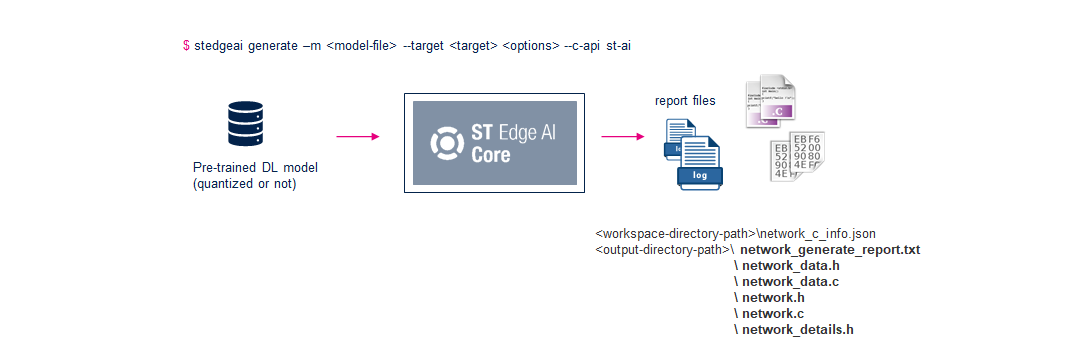
Generated files with "legacy" C-API option
With the
legacy
C-API, the following files are generated:
$ stedgeai generate -m <model_file_path> --target stm32 -o <output-directory-path> [--c-api legacy]
...
Generated files (7)
-----------------------------------------------------------
<output-directory-path>\<name>_config.h
<output-directory-path>\<name>.c
<output-directory-path>\<name>_data.c
<output-directory-path>\<name>_data_params.c
<output-directory-path>\<name>.h
<output-directory-path>\<name>_data.h
<output-directory-path>\<name>_data_params.h

Creating report file <output-directory-path>\network_generate_report.txt
...
<name>.c/.hfiles contain the topology of the C-model (C-struct definition of the tensors and the operators), including the embedded inference client API (refer to “Embedded Inference Client API”) to use the generated c-model on the top of the optimized inference runtime library.<name>_data_params.c/.hfiles contain by default a simple C-array with the data of the weight/bias tensors. However, the--split-weightsoption allows having a C-array by tensor (refer to “Split weights buffer” section) and the--binaryoption creates a binary file with the data of the weight/bias tensors. The--relocatable/-roption (available only for stm32) allows generating a relocatable binary model including the topology definition, the requested kernels, and the weights in a single binary file (refer to “Relocatable binary model support” article).<name>_data.c/.hfiles contain the intermediate functions requested by the specialized init function to manage the C-array with the weights.
Generated files with "st-ai" C-API option
With the
st-ai
C-API, the following files are generated:
$ stedgeai generate -m <model_file_path> --target sr5[xx] -o <output-directory-path> --c-api st-ai
or
$ stedgeai generate -m <model_file_path> --target sr6p[xx] -o <output-directory-path> --c-api st-ai
or
$ stedgeai generate -m <model_file_path> --target sr6g[xx] -o <output-directory-path> --c-api st-ai
...
Generated files (5)
-----------------------------------------------------------
<output-directory-path>\<name>.c
<output-directory-path>\<name>_data.c
<output-directory-path>\<name>.h
<output-directory-path>\<name>_data.h
<output-directory-path>\<name>_details.h

Creating report file <output-directory-path>\network_generate_report.txt
...
<name>.c/.hfiles contain the topology of the C-model (C-struct definition of the tensors and the operators), including the embedded inference client API (refer to “Embedded Inference Client ST Edge AI API”) to use the generated c-model on the top of the optimized inference runtime library.<name>_data.c/.hfiles contain by default a simple C-array with the data of the weight/bias tensors. However, the--split-weightsoption allows having a C-array by tensor (refer to “Split weights buffer” section)<name>_details.hfiles contain the debug information about the intermediate tensors (debug/advanced purpose)
For ISPU target, the generated output also contains the runtime library and its header files and is structured in a manner to correctly populate the provided templates. For more details refer to the “Generate command extension” section of the ISPU specific documentation.
Examples 
Generate the specialized NN C-files (default options).
$ stedgeai generate -m <model_file_path> --target sr5[xx]
or
$ stedgeai generate -m <model_file_path> --target sr6p[xx]
or
$ stedgeai generate -m <model_file_path> --target sr6g[xx]
Generate the specialized NN C-files for a 32b float model with compression factor.
$ stedgeai generate -m <model_file_path> --target stm32 -c medium
Specific options 
For
stm32target a set of specific options is defined (see “Generate command extension” section) to address the additional UCs:generation of a shared library to run the model locally (on the host machine) through a specific Python module (see “How to use the AiRunner package” article)
generation of relocatable binary object to be installed and executed anywhere in an STM32 device (see “Relocatable binary model support” article)
Supported-ops command 
|
✓ |
|
|
✓ |
|
|
✓ |
|
|
✓ |
|
|
✓ |
|
|
✗ |
stm32n6, sr6p3e with NPU (see “ST Neural-ART NPU - Supported operators and limitations” article) |
|
✗ |
Description 
The
supported-ops
command is used to display the list of the supported operators
for a given deep learning framework with the
‘-t/–type’
option.
Else by default, all operators are listed.
Specific arguments 
--with-report

If defined, this flag allows generating a report, txt file (Markdown format) with the list of the operators and associated constraints. - Optional
This option has been used to generate the following articles: “Keras toolbox support”, “TFLite toolbox support” and “ONNX toolbox support”
Examples 
Generate the list of the supported operators (default)
$ stedgeai supported-ops
ST Edge AI Core v1.0.0
281 operators found
    Abs (ONNX), ABS (TFLITE), Acos (ONNX), Acosh (ONNX), Activation (KERAS),
    ActivityRegularization (KERAS), Add (KERAS), Add (ONNX), ADD (TFLITE),
    AlphaDropout (KERAS), And (ONNX), ARG_MAX (TFLITE), ARG_MIN (TFLITE),
    ArgMax (ONNX), ArgMin (ONNX), ArrayFeatureExtractor (ONNX), Asin (ONNX),
    Asinh (ONNX),...
Generate the list of the supported Keras operators
$ stedgeai supported-ops -t keras
ST Edge AI Core v1.0.0
Parsing operators for KERAS toolbox
62 operators found
 Activation, ActivityRegularization, Add, AlphaDropout, Average, AveragePooling1D, AveragePooling2D,
 BatchNormalization, Bidirectional, Concatenate, Conv1D, Conv2D, Conv2DTranspose, Cropping1D,
 Cropping2D, Dense, DepthwiseConv2D, Dropout, ELU, Flatten, GaussianDropout, GaussianNoise,
 GlobalAveragePooling1D, GlobalAveragePooling2D, GlobalMaxPooling1D, GlobalMaxPooling2D, GRU
 InputLayer, ..
30 custom operators found
 Abs, Acos, Acosh, Asin, Asinh, Atan, Atanh, Ceil, Clip, Cos, Exp, Fill, FloorDiv, FloorMod, Gather,
 CustomLambda, Log, Pow, Reshape, Round, Shape, Sign, Sin, Split, Sqrt, Square, Tanh, Unpack, Where,
 TFOpLambda
Generate the list of the supported ONNX operators
$ stedgeai supported-ops -t onnxGenerate the list of the supported tflite operators
$ stedgeai supported-ops -t tfliteGenerate the list of the supported Keras operators with a full report
$ stedgeai supported-ops -t keras --with-report
...
Building report..
creating file : <output-directory-path>/supported_ops_keras.md