
 st-edge-ai-core

ST Edge AI Core for STELLAR MCUs 
Overview 
The article describes the specificities of the command line for the Stellar (E or P or G) target when used in the Stellar Studio environment. A Stellar Studio AI SDK (Stellar-E or Stellar P/G) based project requires the full Stellar Studio ecosystem with the Stellar SDKs, TOOLS and the ST Edge AI software packages installation. Please refer always to the latest available versions of all the Stellar Studio ecosystem tools.
Comparison with the STELLAR STUDIO AI UI plug-in features 
The
stedgeai
application is used as back-end by the Stellar Studio AI UI plug-in
(refer to
“User manual - Getting started with Stellar Studio AI plugin for Artificial Intelligence (AI)”).
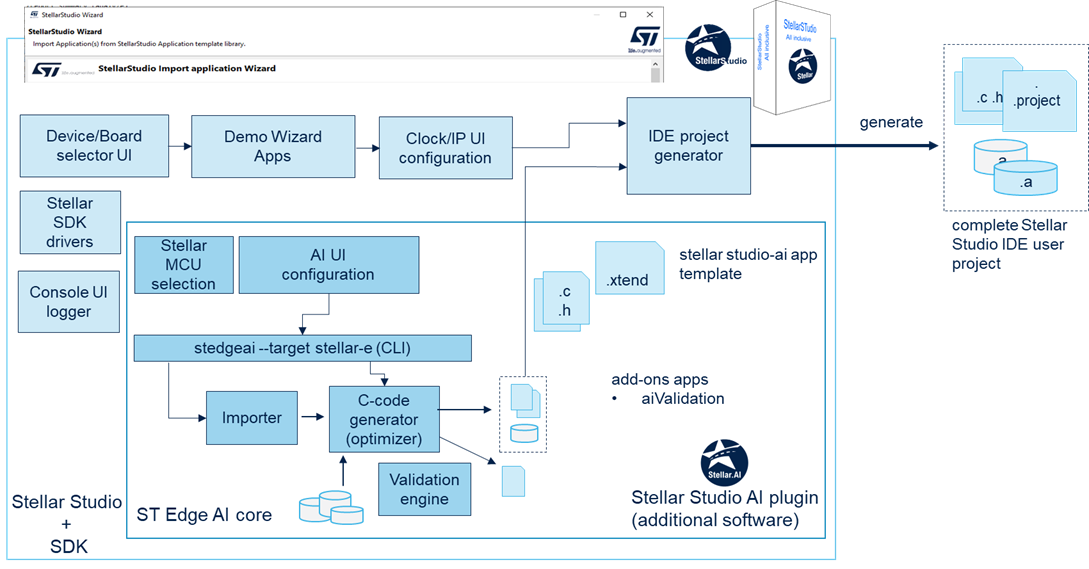
In comparison with the Stellar Studio AI UI plug-in, the following high-level features are not supported:
extra C-code wrapper to manage multiple models (validation refers always to only the selected network). CLI manages only one model at the time.
creation of a whole Stellar Studio IDE SDK based project including the optimized inference runtime library, AI headers files and the C-files related to the HW settings. CLI can be only used to generate the specialized NN C-files. However, it allows to update an initial IDE project, Stellar Studio SDK based or proprietary source tree (see “Update a stellar studio ai sdk based project” section).
the check to know if a model will fit, in term of memory layout in a selected Stellar memory device. CLI reports (see analyze command) only the main system level dimensioning metrics: ROM, RAM, MACC.. (refer to [METRIC] for details)
for the “Validation process on target”, as a full Stellar Studio SDK based project is expected, it must be generated previously through the UI. Note that this project can be updated later (see “Update a stellar studio ai sdk based project” section). “Validation process on desktop” is fully supported through the CLI without restriction.
No graphic visualization of the generated c-graph. CLI provides instead a textual representation (table form) of the c-graph including a description of the tensors/operators (see analyze command).
Supported STELLAR-E series 
|
supported series |
description |
|---|---|
|
|
SR5 E1 devices — 32 bit Arm® Cortex® M7 automotive electrification MCUs with FPU support enabled (double precision). |
Supported STELLAR P/G series 
|
supported series |
description |
|---|---|
|
|
SR6 P3, P6, P7 devices — 32 bit Arm® Cortex® R52+ automotive integration MCUs, with FPU support enabled (single precision): Neon™ (with SIMD, dual-precision floating point) is supported. — 32 bit Arm® Cortex® M4 automotive integration MCUs, with FPU support enabled (single precision). |
|
|
SR6 G6, G7 — 32 bit Arm® Cortex® R52+ automotive integration MCUs, with FPU support enabled (single precision): Neon™ (with SIMD, dual-precision floating point) is supported. — 32 bit Arm® Cortex® M4 automotive integration MCUs, with FPU support enabled (single precision). |
|
|
SR6 P7G7 devices — 32 bit Arm® Cortex® R52+ automotive integration MCUs, with FPU support enabled (single precision): Neon™ (with SIMD, dual-precision floating point) is supported. — 32 bit Arm® Cortex® M4 automotive integration MCUs, with FPU support enabled (single precision). |
|
|
SR6 P3E device — 32 bit Arm® Cortex® R52+ and M4 automotive integration MCUs, with FPU support enabled (single precision) including or not the Neural-ART accelerator™. |
Warning
Be aware that all supported inference runtime libraries for
the Stellar-E or Stellar P/G microcontrollers (including SR6P3E series) are compiled
with the FPU enabled and the
hard
float EABI option for performance reasons.
SR6P3E series supporting the Neural-ART accelerator™ 
An SR6P3E device without the ST Neural-ART NPU is supported similarly to the classical SR6PXX series using the optimized AI runtime libraries for Arm® Cortex® R52+ and M4 cores (Neon available only on some cores).
A specific ST Neural-ART Compiler generates the specialized C-files for an SR6P3E device with the ST Neural-ART NPU. Note that simulator or emulator is not provided, so the “Validation on host” feature is not supported.
Update a stellar studio ai CPU/NPU sdk based project 
For a Stellar Studio AI CPU/NPU SDK based project, the user has the possibility to update only
the generated NN C-files. In this case, the
'--output'
option is used to indicate
the directory where to copy the new generated NN C-files.
$ stedgeai generate -m <model_path> --target sr5e1 -n <name> -c low -o <nn_c_files_folder>
or
$ stedgeai generate -m <model_path> --target sr6p3 -n <name> -c low -o <nn_c_files_folder>
or
$ stedgeai generate -m <model_path> --target sr6p6 -n <name> -c low -o <nn_c_files_folder>
or
$ stedgeai generate -m <model_path> --target sr6p7 -n <name> -c low -o <nn_c_files_folder>
or
$ stedgeai generate -m <model_path> --target sr6p7g7 -n <name> -c low -o <nn_c_files_folder>
or
$ stedgeai generate -m <model_path> --target sr6g6 -n <name> -c low -o <nn_c_files_folder>
or
$ stedgeai generate -m <model_path> --target sr6g7 -n <name> -c low -o <nn_c_files_folder>
or
$ stedgeai generate -m <model_path> --target sr6p3e -n <name> -c low -o <nn_c_files_folder>

Generated files (5)
-----------------------------------------------------------
 <nn_c_files_folder>\inc\<name>_details.h
 <nn_c_files_folder>\inc\<name>.h
 <nn_c_files_folder>\src\<name>.c
 <nn_c_files_folder>\inc\<name>_data.h
 <nn_c_files_folder>\src\<name>_data.c

Creating report file <nn_c_files_folder>\<name>_generate_report.txt

OR

$ stedgeai generate -m <model_path> --target sr5e1 --c-api legacy -n <name> -c low -o <nn_c_files_folder>
or
$ stedgeai generate -m <model_path> --target sr6p3 --c-api legacy -n <name> -c low -o <nn_c_files_folder>
or
$ stedgeai generate -m <model_path> --target sr6p6 --c-api legacy -n <name> -c low -o <nn_c_files_folder>
or
$ stedgeai generate -m <model_path> --target sr6p7 --c-api legacy -n <name> -c low -o <nn_c_files_folder>
or
$ stedgeai generate -m <model_path> --target sr6p7g7 --c-api legacy -n <name> -c low -o <nn_c_files_folder>
or
$ stedgeai generate -m <model_path> --target sr6g6 --c-api legacy -n <name> -c low -o <nn_c_files_folder>
or
$ stedgeai generate -m <model_path> --target sr6g7 --c-api legacy -n <name> -c low -o <nn_c_files_folder>
or
$ stedgeai generate -m <model_path> --target sr6p3e --c-api legacy -n <name> -c low -o <nn_c_files_folder>

Generated files (7)
-----------------------------------------------------------
 <nn_c_files_folder>\inc\<name>_config.h
 <nn_c_files_folder>\inc\<name>.h
 <nn_c_files_folder>\src\<name>.c
 <nn_c_files_folder>\inc\<name>_data_params.h
 <nn_c_files_folder>\src\<name>_data_params.c
 <nn_c_files_folder>\inc\<name>_data.h
 <nn_c_files_folder>\src\<name>_data.c

Creating report file <nn_c_files_folder>\<name>_generate_report.txt

OR (sr6p3e + NPU w/ epoch controller)

$ stedgeai generate -m <model_path> --target sr6p3e --st-neural-art <profile_w_epoch_controller>[@<conf_file>] -n <name> -o <nn_c_files_folder>

Generated files (5)
-----------------------------------------------------------
 <nn_c_files_folder>\<name>_ecblobs.h
 <nn_c_files_folder>\<name>.h
 <nn_c_files_folder>\<name>.c
 <nn_c_files_folder>\stai_network.h
 <nn_c_files_folder>\stai_network.c

Creating report file <nn_c_files_folder>\<name>_generate_report.txt

OR (sr6p3e + NPU w/o epoch controller)

$ stedgeai generate -m <model_path> --target sr6p3e --st-neural-art <profile_wo_epoch_controller>[@<conf_file>] -n <name> -o <nn_c_files_folder>

Generated files (4)
-----------------------------------------------------------
 <nn_c_files_folder>\<name>.h
 <nn_c_files_folder>\<name>.c
 <nn_c_files_folder>\stai_network.h
 <nn_c_files_folder>\stai_network.c

Creating report file <nn_c_files_folder>\<name>_generate_report.txt

OR (sr6p3e + NPU w/ epoch controller and legacy api)

$ stedgeai generate -m <model_path> --target sr6p3e --st-neural-art <profile_w_epoch_controller>[@<conf_file>] --c-api legacy -n <name> -o <nn_c_files_folder>

Generated files (3)
-----------------------------------------------------------
 <nn_c_files_folder>\<name>_ecblobs.h
 <nn_c_files_folder>\<name>.h
 <nn_c_files_folder>\<name>.c

Creating report file <nn_c_files_folder>\<name>_generate_report.txt

OR (sr6p3e + NPU w/o epoch controller and and legacy api)

$ stedgeai generate -m <model_path> --target sr6p3e --st-neural-art <profile_wo_epoch_controller>[@<conf_file>] --c-api legacy -n <name> -o <nn_c_files_folder>

Generated files (2)
-----------------------------------------------------------
 <nn_c_files_folder>\<name>.h
 <nn_c_files_folder>\<name>.c

Creating report file <nn_c_files_folder>\<name>_generate_report.txt
...
For multiple networks support, the update mechanism for a particular model
is the same.
Users
should be vigilant to use the correct
name
(
'--name


             my_name'
)
to avoid to overwrite/update an incorrect file and to be aligned with the multi-network
helpers functions which are only generated by the Stellar Studio AI UI:
'\app_stellar-studio-ai.c/.h'
files. If the number of networks is changed, Stellar Studio AI UI should be used to update the generated c-models.