
 st-edge-ai-core

ST Edge AI Core for STM32 series 
Overview 
The article describes the specificities of the command line options for the STM32 target.
Supported STM32 series 
The STM32 family of 32-bit microcontrollers is based on the Arm Cortex®-M processor.
|
supported series |
description |
|---|---|
|
|
all STM32F4xx/STM32G4xx/STM32F3xx/STM32WBxx devices with an Arm® Cortex® M4 core and FPU support enabled (simple precision). |
|
|
all STM32L4xx/STM32L4Rxx devices with an Arm® Cortex® M4 core and FPU support enabled (simple precision). |
|
|
all STM32N6xx devices with an Arm® Cortex® M55 core including or not the Neural-ART accelerator™. |
|
|
all STM32L5xx/STM32U5xx/STM32H5xx/STM32C5xx/STM32U3xx devices with a Arm® Cortex® M33 core and FPU support enabled (simple precision). For the stm32u3 series supporting the Hardware Signal Processing (HSP) unit, the –hsp option should be used. |
|
|
all STM32F7xx devices with a Arm® Cortex® M7 core and FPU support enabled (simple precision). |
|
|
all STM32H7xx devices with a Arm® Cortex® M7 core and FPU support enabled (double precision). |
|
|
all STM32V8xx devices with an Arm® Cortex® M85 core. |
|
|
all STM32L0xx//STM32G0xx/STM32C0xx devices with an Arm® Cortex® M0+ core, w/o FPU support and w/o DSP extension. |
|
|
all STM32F0xx device with an Arm® Cortex® M0+ core, w/o FPU support and w/o DSP extension. |
|
|
all STM32WLxx device with an Arm® Cortex® M4 core, w/o FPU support and with DSP extension. |
|
|
all STM32MP2 device with an Arm® Cortex® A35 core, w/ NEON extension. |
Warning
Be aware that all provided inference runtime libraries for
the different STM32 series (excluding STM32WL series) are compiled
with the FPU enabled and the
hard
float EABI option for performance reasons.
STM32N6 series supporting the Neural-ART accelerator™ 
An STM32N6 device without the ST Neural-ART NPU is supported similarly to the classical STM32xx series using the optimized AI runtime libraries for Arm® Cortex® M55 core. It is implemented to use the M-Profile Vector Extension (MVE). Consequently, the generated C-file cannot be executed on the host machine, and the “Validation on host” feature is not supported.
A specific ST Neural-ART Compiler generates the specialized C-files for an STM32N6 device with the ST Neural-ART NPU. Note that simulator or emulator is provided, so the “Validation on host” workflow is not supported.
STM32U3 series supporting the Hardware Signal Processing (HSP) unit 
An STM32U3 device without the HSP unit is supported similarly to the classical STM32U3 series using the optimized AI runtime libraries for Arm® Cortex® M33 core.
For an STM32U3 device with the HSP unit, when using the –hsp option, the stedgeai command-line interface (CLI) produces the most efficient code by selecting the appropriate functions, either HSP-optimized functions or an STM32 software implementation when preferable, and manages all memory allocation as well as layer connections. Individual layers of a convolutional neural network (CNN) model can be accelerated by using HSP middleware CNN direct commands. Only 8-bit quantized pointwise (PW), depthwise (DW), dense (fully connected), Conv2D, and 2D pooling (average or max) layers are supported (refer to the application note: “AN6400 - How to use the HSP for executing DSP and CNN operations on STM32 MCUs”). Note that no simulator or emulator is provided, so the “Validation on host” workflow is not supported.
The typical output of the analyze command shows the operators that the HSP unit accelerates.
The output illustrates this by using the
"(hspX)"
description type extension.
Number of operations per c-layer
------- ------ ------------------------------ ----------- ------------
c_id    m_id   name (type)                            #op         type
------- ------ ------------------------------ ----------- ------------
0       0      conv2d_0 (Conv2D)  (hsp2)          320,064   smul_s8_s8
1       1      conv2d_1 (Conv2D_DW)  (hsp2)        72,064   smul_s8_s8
2       2      conv2d_2 (Conv2D_PW)  (hsp2)       512,064   smul_s8_s8
3       3      conv2d_3 (Conv2D_DW)  (hsp2)        72,064   smul_s8_s8
4       4      conv2d_4 (Conv2D_PW)  (hsp2)       512,064   smul_s8_s8
5       5      conv2d_5 (Conv2D_DW)  (hsp2)        72,064   smul_s8_s8
6       6      conv2d_6 (Conv2D_PW)  (hsp2)       512,064   smul_s8_s8
7       7      conv2d_7 (Conv2D_DW)  (hsp2)        72,064   smul_s8_s8
8       8      conv2d_8 (Conv2D_PW)  (hsp2)       512,064   smul_s8_s8
9       9      pool_9 (Pool_Avg)  (hsp1)            8,000   smul_s8_s8
10      11     gemm_11 (Dense)                        780   smul_s8_s8
11      12     nl_12 (Nonlinearity)                   180     op_s8_s8
------- ------ ------------------------------ ----------- ------------
total                                           2,665,536
STM32MP2 solution (bare-metal mode) 
As for an STM32 target based on the Arm® Cortex® core, ST Edge AI Core allows to deploy the models on an Arm® Cortex®‑A35 core of the STM32MP2 in bare‑metal mode.
In this configuration:
The NPU is not used: all AI inference is executed on the Cortex‑A35 core(s).
Only the standard arm-none-eabi-gcc toolchain is used to:
compile the user application and the generated inference code,
link with the ST Edge AI Core runtime libraries,
produce a standalone executable image for the STM32MP2.
This bare‑metal solution:
Provides deterministic and low‑latency execution, since no operating system or Linux is involved.
Is well adapted to real‑time control + AI use cases, where the application, peripherals, and AI inference must be tightly integrated.
Reuses the same ST Edge AI Core model conversion flow as other STM32 devices:
model design and training on the PC (e.g. TensorFlow®, PyTorch®, ONNX),
conversion and optimization with ST tools,
C/C++ code and configuration generation,
integration in a bare‑metal project compiled with arm-none-eabi-gcc.
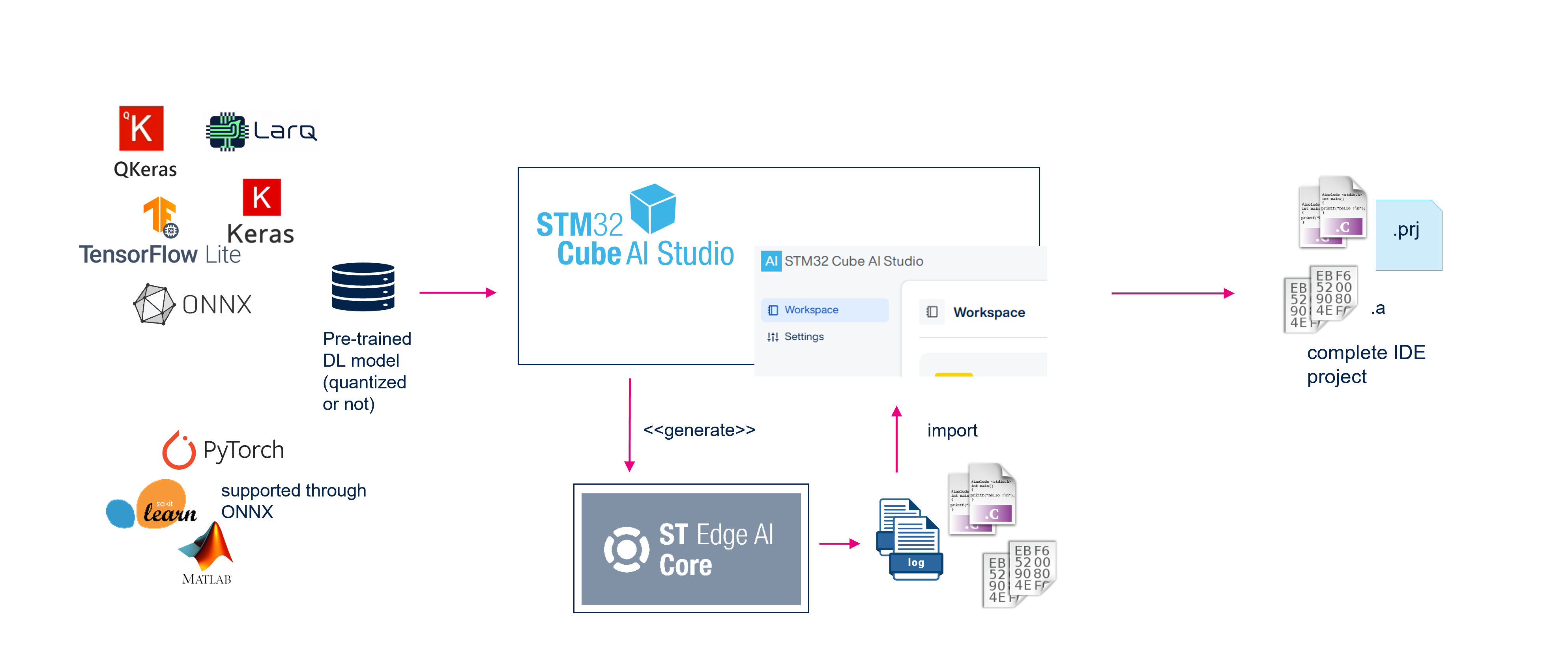
Comparison with the STM32Cube AI Studio features 
The
stedgeai
application serves as the back-end for the
STM32Cube AI Studio. However, compared
to
STM32Cube AI Studio, the command-line interface (CLI) lacks support for several high-level features:
Complete IDE Project Generation: Unlike STM32Cube AI Studio, the CLI cannot create a full integrated development environment (IDE) project that includes the optimized inference runtime library, AI header files, and hardware-specific C files. It can only generate specialized neural network (NN) C files. Nevertheless, the CLI supports updating existing IDE projects, whether STM32CubeMX-based or proprietary (see “Update an ioc-based project” section).
Memory Layout Verification: The CLI provides only key system-level metrics such as ROM, RAM, and multiply-accumulate (MACC) operations through the analyze command. It does not perform a detailed memory layout fit check for specific STM32 devices (refer to the “Evaluation report and metrics” article for more details).
Built-in Validation Firmware Generation: This ready-to-use validation application firmware is requested to perform the validation on target workflow. This project can be updated later using the CLI (see “Update an ioc-based project” section). Host validation, however, is fully supported by the CLI without restrictions.
Visualization of C-Graph: The CLI offers only a textual, tabular representation of the generated C-graph, including tensor and operator descriptions (via the analyze command). It lacks the graphical visualization and RAM usage insights available in the STM32Cube AI Studio UI.
Generate command extension 
Specific options 
--hsp


              <integer>

If defined, this option enables optimization passes that use the Hardware Signal Processing (HSP) unit to accelerate specific kernels. The integer argument (default: 4096, i.e. the maximum value) specifies the amount of BRAM reserved for this purpose, expressed in words.
--dll

Optional flag to instruct the code generator to produce only a host shared library (DLL). This shared library is intended for use by the ai_runner module to perform advanced validation of the model on the host machine. - Optional
This feature is not supported with STM32 target based on Arm® Cortex®‑M processors with Arm® Helium™ technology, nor on STM32 devices that include AI accelerators such as the Hardware Signal Processing (HSP) unit and/or the ST Neural-ART NPU.
--relocatable

Short syntax:
-r/--reloc
Enables the generation of a runtime loadable model (also called relocatable model). This allows to be loaded and relocated at runtime rather than being fixed at compile/link time. - Optional
The generation and management of the runtime-loadable model depend on the underlying runtime and hardware.
|
STM32 series |
Refer to the article for detailed guidance |
|---|---|
|
SW only solution |
“STM32 Arm® Cortex® M - Relocatable binary (or runtime loadable) model support” |
|
Hardware-assisted solution |
--address/--copy-weights-at

Only supported with the Legacy API (see the –c-api option).
With the –binary flag, these helper options specify the address where the weights are located or/and the destination address where the weights will be copied during initialization. This is achieved using a specific generated ‘<name>_data.c’ file (refer to the “Particular network data c-file” section).
With the –relocatable option, the
--addressargument instructs the code generator to produce an Intel Hexadecimal Object File Format from on the generated runtime loadable model based on the provided address.
This feature is not supported with STM32 target enabling the ST Neural-ART NPU unit. The management of the weights and parameters is specific (see the article “ST Neural-ART - How to deploy/manage the NPU memory initializers”).
--binary

Only supported with the Legacy API (see the –c-api option).
Optional flag to instruct the code generator to produce a binary file named
'<name>_data.bin'
that contains
only the raw data
of the
weights and bias tensors. Note that the metadata such
as scale factors, zero-points, and other parameters are
always
included in the
<name>.c/.h
files.
The
'<name>_data.c'
and
'<name>_data.h'
files are always generated, regardless of the
'--binary'
flag
(see
“Particular network data c-file”
section).
This feature is not supported when the STM32 target enables the ST Neural-ART NPU unit. The management of the weights and parameters is specific (see the article “ST Neural-ART - How to deploy/manage the NPU memory initializers”).
Example 
Generate only the network NN C-file, weights/bias parameters are provided as a binary file/object.
$ stedgeai generate -m <model_file_path>  --target stm32 -o <output-directory-path> -n <name> --binary
...
Generated files (8)
-----------------------------------------------------------
 <output-directory-path>\<name>_config.h
 <output-directory-path>\<name>.h
 <output-directory-path>\<name>.c
 <output-directory-path>\<name>_data.bin
 <output-directory-path>\<name>_data.h
 <output-directory-path>\<name>_data.c
 <output-directory-path>\<name>_data_params.h
 <output-directory-path>\<name>_data_params.c

Creating report file <output-directory-path>\<name>_generate_report.txt
...
Generate a full relocatable binary file for a STM32H7 series (refer to “Relocatable binary model support” article).
$ stedgeai generate -m <model_file_path> --target stm32h7 -o <output-directory-path> --relocatable
...
Generated files (10)
-----------------------------------------------------------
 <output-directory-path>\<name>_config.h
 <output-directory-path>\<name>.h
 <output-directory-path>\<name>.c
 <output-directory-path>\<name>_data.h
 <output-directory-path>\<name>_data.c
 <output-directory-path>\<name>_data_params.h
 <output-directory-path>\<name>_data_params.c
 <output-directory-path>\<name>_rel.bin
 <output-directory-path>\<name>_img_rel.c
 <output-directory-path>\<name>_img_rel.h

Creating report file <output-directory-path>\network_generate_report.txt
...
Generate a relocatable binary file w/o the weights for a STM32F4 series. Weights/bias data are generated in a separated binary file (refer to “Relocatable binary model support” article)
$ stedgeai generate -m <model_file_path> --target stm32h7 -o <output-directory-path> -n <name> --relocatable --binary
...
Generated files (11)
-----------------------------------------------------------
 <output-directory-path>\<name>_config.h
 <output-directory-path>\<name>.h
 <output-directory-path>\<name>.c
 <output-directory-path>\<name>_data.h
 <output-directory-path>\<name>_data.c
 <output-directory-path>\<name>_data_params.h
 <output-directory-path>\<name>_data_params.c
 <output-directory-path>\<name>_data.bin
 <output-directory-path>\<name>_rel.bin
 <output-directory-path>\<name>_img_rel.c
 <output-directory-path>\<name>_img_rel.h

Creating report file <output-directory-path>\<name>_generate_report.txt
...
Particular network data c-file 
The helper
'--address'
and
'--copy-weights-at'
options are the convenience
options to generate a specific
ai_network_data_weights_get()
function.
The returned address is passed to the
ai_<network>_init()
function
thanks the
ai_network_params
structure (refer to [API]).
Note that this (including the copy function) can be fully managed by the application
code itself.
If the
--binary
(or
--relocatable) option is passed without the
'--address'
or
'--copy-weights-at'
arguments, following
network_data.c
file is generated
#include "network_data.h"

ai_handle ai_network_data_weights_get(void)
{
  return AI_HANDLE_NULL;
}
Example of generated
network_data.c
file with the
--binary
and
--address


             0x810000
options.
#include "network_data.h"

#define AI_NETWORK_DATA_ADDR 0x810000

ai_handle ai_network_data_weights_get(void)
{
  return AI_HANDLE_PTR(AI_NETWORK_DATA_ADDR);
}
Example of generated
network_data.c
file with the
--binary,
--address


             0x810000
and
--copy-weights-at


             0xD0000000
options.
#include <string.h>
#include "network_data.h"

#define AI_NETWORK_DATA_ADDR 0x81000
#define AI_NETWORK_DATA_DST_ADDR 0xD0000000

ai_handle ai_network_data_weights_get(void)
{
  memcpy((void *)AI_NETWORK_DATA_DST_ADDR, (const void *)AI_NETWORK_DATA_ADDR,
                                            AI_NETWORK_DATA_WEIGHTS_SIZE);
  return AI_HANDLE_PTR(AI_NETWORK_DATA_DST_ADDR);
}
Update an ioc-based project 
For a STM32CubeMX project (ioc-based), the user has the possibility to update only
the generated NN C-files. In this case, the
'--output'
option is used to indicate
the root directory of the IDE project, that is, location of the
'.ioc'
file. The destination
of the previous NN c-files is automatically discovered in the source tree else the output
directory is used.
$ stedgeai generate -m <model_path> --target stm32 -n <name> -c low -o <root_project_folder>
...
IOC file found in the output directory
...
Generated files (5)
-----------------------------------------------------------
 <root_project_folder>\inc\<name>_details.h
 <root_project_folder>\inc\<name>.h
 <root_project_folder>\src\<name>.c
 <root_project_folder>\inc\<name>_data.h
 <root_project_folder>\src\<name>_data.c

Creating report file <root_project_folder>\<name>_generate_report.txt

or

$ stedgeai generate -m <model_path> --target stm32 -n <name> --c-api legacy -o <root_project_folder>
...
IOC file found in the output directory
...
Generated files (7)
-----------------------------------------------------------
 <root_project_folder>\Inc\<name>_config.h
 <root_project_folder>\Inc\<name>.h
 <root_project_folder>\Src\<name>.c
 <root_project_folder>\Inc\<name>_data_params.h
 <root_project_folder>\Src\<name>_data_params.c
 <root_project_folder>\Inc\<name>_data.h
 <root_project_folder>\Src\<name>_data.c

Creating report file <root_project_folder>\<name>_generate_report.txt
...
Update a proprietary source tree 
The
'--output'
option is used to indicate the single destination of the generated
NN C-files. Note that an empty file with the
'.ioc'
extension can be defined in the
root directory of the custom source tree to use the discovery mechanism as for
the
update of an ioc-based project.