
 st-edge-ai-core

ST Neural-ART compiler primer 
Overview 
This article describes the main options and required input files for the ST Neural-ART compiler (also known as the neural processing unit (NPU) compiler), used to deploy artificial intelligence (AI) and deep learning (DL) models on ST Neural-ART NPU-based devices.
Note that the NPU compiler is integrated as a specific back end in the ST Edge AI Core command-line interface (CLI). The CLI acts as a driver or front end. However, it is also possible to use the NPU compiler directly with the generated intermediate files (ONNX and JSON files). Only these input files representing the original model are supported. It is not possible to pass an ONNX quantization-dequantization (QDQ) or quantized TensorFlow Lite (TFLite) file directly. In this case, the options are passed directly to the compiler as arguments.
Warning
It is not recommended to use directly the
atonn
executable. Some features (such
epoch controller support
or
IO data type and layout changes) are only supported
via the front-end.
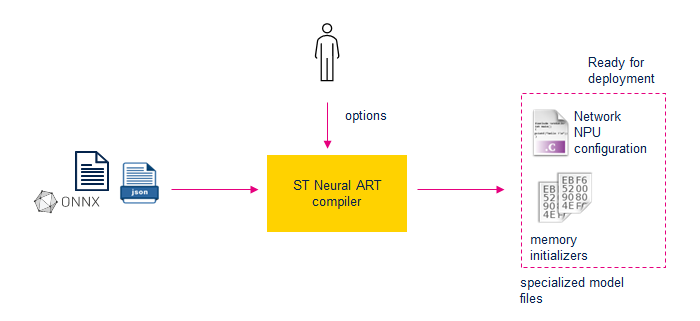
The main outputs are:
A
'.c'file representing the specialized or configuration file to execute the model against the associated NPU runtime software stack. It is added to a classical embedded C-project which includes the source files of the NPU runtime code (also called ‘ll_ATON’ files) and the associated optimized network runtime library for the delegated or no-hardware assisted software operators. If the epoch controller (EC) is used, an additional'network_ecblobs.h'file is created, it contains the “blob” (command stream) for the epoch controller unit.The memory initializers are used to program weights/parameters of the network on the board.
Tip
The NPU compiler is configurable and offers several options to modify how a network is compiled. This article covers only the main relevant
options. To view the complete list of options with brief descriptions, use the
--help
option. Note that it is preferable to invoke the
NPU compiler through the
ST Edge AI Core command-line interface; in this case, the
compilation profile file (json fomat)
is used to pass the NPU compiler options.
atonn --help
NPU compiler location 
‘atonn’ designates the name of the executable.
%STEDGEAI_CORE_DIR%\Utilities\<host_os>\atonn

:doc:`%STEDGEAI_CORE_DIR% <core-setting-environment>` indicates the location where the ST Edge AI Core components are installed.
Options 
For a STM32N6 device including an ST Neural ART NPU, the minimal options needed to operate properly are the following ones:
$ atonn --load-mpool my_mpool.mpool --onnx-input my_model_OE_3_1_0.onnx --json-quant-file my_model_OE_3_1_0_Q.json
  --cache-maintenance --Ocache-opt --native-float --enable-virtual-mem-pools --load-cdesc cortex-m55 --load-mdesc stm32n6
Recommended default options:
$ atonn --load-mpool my_mpool.mpool --onnx-input my_model_OE_3_1_0.onnx --json-quant-file my_model_OE_3_1_0_Q.json
  --cache-maintenance --Ocache-opt --native-float --enable-virtual-mem-pools --load-cdesc cortex-m55 --load-mdesc stm32n6
  --enable-virtual-mem-pools --enable-epoch-controller -Os
--load-cdesc: indicates the file describing the requested characteristics of the host/mcu sub-system--load-mdesc: indicates the file describing the requested characteristics of the ST Neural ART sub-system
Mandatory options 
Model/Platform configuration options 
|
Option |
Description |
|---|---|
|
|
Input ONNX file path |
|
|
Input JSON file path (Quantization information) |
|
|
Output .c file path |
|
|
Specifies the MCU description file |
|
|
Specifies the target machine to use, machine description (.mdesc) file path |
|
|
Specifies the memory pool descriptors to use, memory pool (.pool) file path |
The NPU supports only the quantized models that have been “translated” to the ONNX+JSON format by the ST Edge AI Core CLI.
To enable code-generation of the compiler, the
'-g'option is mandatory and sets the name of the.coutput file.The NPU compiler is platform-agnostic. The
--load-mdesc/--targetoption allows to provide the configuration of the Neural ART accelerator™ which is implemented (also called machine descriptor file, the ‘stm32n6.mdesc’ file should be not modified).The
--load-mpoolprovides the description of the memory pools which can be used to implement the provided model. This file is user specific.
Specific STM32N6 device options 
An additional set of mandatory options should be used when using the STM32N6 as the target:
|
Option |
Description |
|---|---|
|
|
Consider all floats without quantization info as native floats |
|
|
Enable the scratch buffers generation for Arm® Cortex® M55 core with MVE extension |
|
|
Enable generation of cache maintenance code for both MCU & NPU caches |
|
|
Enables usage of the NPU cache path for memory pools which have the attribute ‘cacheable’ set in the memory-pool description file, requires option ‘–cache-maintenance’ to be passed as well. When requested the NPU compiler emits instructions which make use the NPU cach path for the streaming engine configurations. |
The
--native-floatis mandatory to bypass the check that everything should be quantized in the network given as argument. Not quantizing parts of the network results in lengthy floating operations, but this is not prevented the compiler from completing its work.
Warning
For performance reasons, it is recommended to enable the NPU cache (using the
--Ocache-opt
option) for the NPU memory
regions stored in external memories (flash/RAM). The shared memory regions between the NPU and MCU domains, used for
input/output buffers and by the software epochs, must be cacheable MCU regions. To guarantee
memory coherence
during inference, the
--cache-maintenance
option is mandatory.
However, it is the application’s responsibility to use cache maintenance functions when filling or using the input/output
or activations memory regions before to perform the inference.
Recommended options 
Some options are recommended, to allow for greater performances, or better user experience in most of the cases:
|
Option |
Description |
|---|---|
|
|
Enable automatic use of an adjacent memory pool with the same properties for large buffer allocation |
|
|
Enables code generation using epoch controller (EC) (but see below) |
|
|
Do not map on EC epochs that use user allocated input/outputs. |
|
|
Do not merge into previous EC blobs epochs that use user allocated input/outputs. |
|
|
Optimize size: attempts to reduce memory buffers size. |
The
--enable-virtual-mem-poolsoption is important to allow the compiler to “fuse”/”merge” multiple memory pools that are adjacent. The default behavior is not to allocate buffers that spread over multiple pools, this option removes this constraint. The resulting buffer allocation is usually more space-efficient (and allows for a greater use of internal memories to handle activation buffers).The
-Osoption provides usually good results without inference speed reduction.The
--enable-epoch-controlleroption is required to enable the epoch controller unit and to generate the “command stream” as C-array tables (part of thenetwork_ecblobs.hfile). The--ec-user-io-skipand--ec-user-io-aloneallow to avoid generating an EC blob or to generate a simple blob that should be patched with the IO address before starting inference.
Warning
The NPU compiler does not fully integrate support for the epoch controller, so a postprocess script is needed to build the additional file. This feature is integrated into the ST Edge AI Core; therefore, users should not directly call the NPU compiler.
|
Option |
Description |
|---|---|
|
|
Useful option to enable the mapping recap during the code generation phase |
Recommended options with possible accuracy variance 
The following options adjust the computation graph by fusing or expanding operations to enable more efficient hardware inference on the NPU. However, there are corner cases where clipping and rounding operations on intermediate activations may be evaluated differently compared with the original graph.
Users must evaluate and validate whether the resulting accuracy variance is acceptable for their application.
|
Option |
Description |
|---|---|
|
|
Enable softmax expansion into operations supported by the NPU. |
|
|
Enable complete softmax expansion into operations supported by the NPU. |
|
|
Enable GELU recognition pattern ignoring internal quantization info. |
|
|
Enable SWISH recognition pattern ignoring internal quantization indo. |
|
|
Enable experimental epoch controller blobs optimizations. |
Guideline for expand-softmax option 
The
--expand-softmax-full
option enables
complete expansion
of the softmax function and can be used in
all
scenarios.
Its implementation uses more processing units, which generally provides
higher numerical precision, but may
increase inference time,
especially when softmax is computed over
multi-dimensional tensors. In some cases, the overhead of configuring and using
all these units can outweigh the benefit in terms of latency.
The
--expand-softmax
option provides a faster implementation because it uses fewer units. It is numerically accurate overall,
and preserves the position of the maximum value in the softmax output. This loss of precision may be negligible in applications
where the exact softmax values are not critical. For example, in a classification model where:
only the index of the predicted class is used, and
no confidence threshold is applied,
the approximate implementation is often sufficient. However, the user must assess whether this is acceptable for their specific use case.
Practical guidance (recommendation is not absolute):
If the softmax function is computed on a 1D array as the last layer of the model (typical classifier output), you can generally use the fastest implementation, i.e.
--expand-softmax.In other cases (e.g. softmax on intermediate layers, multi-dimensional tensors, or when probabilities are used quantitatively, such as thresholds, calibration, post-processing, etc.), it is recommended to use
--expand-softmax-full.Users may decide to always use the fastest implementation (
--expand-softmax) if latency is critical and a slight loss of precision is acceptable.Conversely, they may choose to use full expansion (
--expand-softmax-full) even in classifiers when probability values are important (e.g. confidence thresholds, ranking stability, calibration).
In all cases, neither implementation guarantees a bit‑true result with respect to the original quantized model. This is precisely why this option is provided: to let users trade off precision versus performance according to their application requirements.
ONNX GELU support considerations 
Depending on the ONNX opset, the PyTorch GELU operator can:
be expanded into a subgraph of basic operations (older opsets), or
be exported as a single ONNX GELU operator (for example, opset ≥ 20, depending on the framework).
When GELU is exported as a
single ONNX operator, the ST Edge AI Core front end expands it internally into a supported
form for the NPU compiler. Because no internal quantization information is available for this operator, the resulting hardware mapping
is effectively equivalent to enabling the
--GELU-recognition
option on an expanded GELU pattern.
As a consequence:
The GELU mapping may slightly differ from a fully quantization‑aware, hand‑tuned expansion.
Users should verify accuracy when using GELU‑based models with recent ONNX opsets, particularly if GELU appears in critical parts of the network.
SWISH (or SiLU) support considerations 
For SWISH (or SiLU), only the expanded version of the operator is supported by the NPU compiler.
When alpha = 1.0 and the intermediate values are quantized, the SWISH pattern is automatically recognized and mapped to a single hardware processing unit, with no need for additional options.
If alpha is not equal to 1.0, or if the intermediate values are not quantized in the standard way, the automatic pattern recognition may fail.
In these cases, the
--SWISH-recognition
option:
enables recognition of SWISH with alpha ≠ 1, and
ignores intermediate quantization details to still map the operation to dedicated hardware.
As with the other options, ignoring internal quantization can introduce a small accuracy variance. Users should:
enable –SWISH-recognition when it provides meaningful performance or power benefits, and
validate that the resulting accuracy remains acceptable for their application.
Useful options 
|
Option |
Category |
Description |
|---|---|---|
|
|
global |
The output prefix used to specify the output directory for generated files. |
|
|
global |
Changes the generated network c-name (default:
|
|
|
global |
Export the full command line to a
|
|
|
global |
Import an exported
|
|
|
extra outputs |
Output ONNX filename. The NPU compiler makes manipulations/optimizations on the input ONNX file. The resulting ONNX file is then the one that is really transformed to a
|
|
|
extra outputs |
Dumps machine description in use to file |
|
|
extra outputs |
Dumps memory pools in use to file |
|
|
extra outputs |
Debug purpose - Dumps a
|
|
|
extra outputs |
Dumps a
|
|
|
optimization |
Enables iterative automatic optimization options selection for all options below (increases compilation time) |
|
|
optimization |
Where n is an int >0. Sets the maximum number of CONV_ACC used when pipelining (default is 0 meaning unlimited, max is defined in the machine descriptor file, mdesc file) |
|
|
optimization |
Enables alternate scheduler algorithm |
|
|
optimization |
Optimization level one of [0-3](speed) |
Each optimization can be done one-by-one. Using
-A,--Oautoexplores all combinations possible and assess which one seems to provide the “best” that is, fastest resultsAdding
--d-auto n(with0<n<3: provides debug information about automatic optimization done by-A,--Oauto)When using
-A,--Oauto,--Omax-ca-pipe 0should be added to ensure that the exploration of the configurations is optimal.
Experimental options 
The following table presents the main experimental options available. To list all available options, type
$


             atonn


             --help
.
|
Option |
Category |
Description |
|---|---|---|
|
|
optimization |
Enable experimental optimization to split convolutions channel-wise. |
|
|
optimization |
Enable experimental optimization to split convolutions kernel-wise. |
|
|
optimization |
Enable experimental optimization to split convolutions stripe-wise for 1xN kernels. |
|
|
optimization |
Enable experimental optimization to split convolutions stripe-wise for 1xN kernels. |
|
|
optimization |
Enable experimental optimization to split convolutions stripe-wise for any kernel size. |
Memory-pools 
Introduction 
Memory-pool descriptor files are used to give the NPU compiler a vision of the memory characteristics and mapping that is free to use for the compiler on the embedded system.
When the NPU compiler can use two memory locations to fit, for example, an activation buffer,
it decides which location is ‘the best’ based on estimated data access time.
For this allocation algorithm to perform well, it is then required to describe the memory with as much accuracy as possible.
The example
mpool
files are written for STM32N6 and contain descriptions for each internal memory cuts + external
memories accessed through XSPI:
Disposable AXISRAM is definitely slower than NPU-RAMs. The NPU compiler prefers using NPU-RAMs to allocate buffers and uses the AXISRAM if the NPU-RAMs are full.
External memories are even slower than AXISRAM. NPU compiler allocates data in external memories as a last-resort.
Additional characteristics can be specified for each memory region defined in the memory pool file:
rights: Read/write accesses are required for each defined region. Read-only regions contain weights, while write regions contain activations and, as a last resort, weights if read-only pools are full.constants_preferred: A cue can be added for each region to advise the NPU compiler to preferentially use a given pool for storing constants (weights).. This overrides speed considerations addressed above.chacheable: Cacheability can be enabled for each region.
Finally, if applicable, the cache structure and characteristics should be defined in the mpool file, this gives the NPU compiler all the information it needs to optimize as much as possible the inference time.
Example 
Below is an example of a memory-pool file used as a default configuration in the STEdgeaAI tool.
The syntax of the
mpool
file is strict JSON: no comments are allowed.
This example can be used as a base for variations, as it contains the mandatory section of such a file:
memory: Definition of the memory characteristics described abovecacheinfo: cache characteristicsmem_file_prefix: prefix for the memory initializer files generated by the NPU compiler.mempools: the memory-pools description
{
     "memory": {
             "cacheinfo": [
                     {
                             "nlines": 512,
                             "linesize": 64,
                             "associativity": 8,
                             "bypass_enable": 1,
                             "prop": { "rights": "ACC_WRITE",  "throughput": "MID",   "latency": "MID", "byteWidth": 8,
                                       "freqRatio": 2.50, "read_power": 13.584, "write_power": 12.645 }
                     }
             ],
             "mem_file_prefix": "atonbuf",
             "mempools": [
                     {
                             "fname": "AXIFLEXMEM",
                             "name":  "flexMEM",
                             "fformat": "FORMAT_RAW",
                             "prop":   { "rights": "ACC_WRITE", "throughput": "MID",  "latency": "MID", "byteWidth": 8,
                                         "freqRatio": 2.50, "read_power": 9.381,  "write_power": 8.569 },
                             "offset": { "value": "0x34000000", "magnitude":  "BYTES" },
                             "size":   { "value": "0",        "magnitude": "KBYTES" }
                     },
                     {
                             "fname": "AXISRAM1",
                             "name":  "cpuRAM1",
                             "fformat": "FORMAT_RAW",
                             "prop":   { "rights": "ACC_WRITE", "throughput": "MID",  "latency": "MID", "byteWidth": 8,
                                         "freqRatio": 2.50, "read_power": 16.616, "write_power": 14.522 },
                             "offset": { "value": "0x34064000", "magnitude":  "BYTES" },
                             "size":   { "value": "0",        "magnitude": "KBYTES" }
                     },
                     {
                             "fname": "AXISRAM2",
                             "name":  "cpuRAM2",
                             "fformat": "FORMAT_RAW",
                             "prop":   { "rights": "ACC_WRITE", "throughput": "MID",  "latency": "MID", "byteWidth": 8,
                                         "freqRatio": 2.50, "read_power": 17.324, "write_power": 15.321 },
                             "offset": { "value": "0x34100000", "magnitude":  "BYTES" },
                             "size":   { "value": "1024",       "magnitude": "KBYTES" }
                     },
                     {
                             "fname": "AXISRAM3",
                             "name":  "npuRAM3",
                             "fformat": "FORMAT_RAW",
                             "prop":   { "rights": "ACC_WRITE", "throughput": "HIGH", "latency": "LOW", "byteWidth": 8,
                                         "freqRatio": 1.25, "read_power": 18.531, "write_power": 16.201 },
                             "offset": { "value": "0x34200000", "magnitude":  "BYTES" },
                             "size":   { "value": "448",        "magnitude": "KBYTES" }
                     },
                     {
                             "fname": "AXISRAM4",
                             "name":  "npuRAM4",
                             "fformat": "FORMAT_RAW",
                             "prop":   { "rights": "ACC_WRITE", "throughput": "HIGH", "latency": "LOW", "byteWidth": 8,
                                         "freqRatio": 1.25, "read_power": 18.531, "write_power": 16.201 },
                             "offset": { "value": "0x34270000", "magnitude":  "BYTES" },
                             "size":   { "value": "448",        "magnitude": "KBYTES" }
                     },
                     {
                             "fname": "AXISRAM5",
                             "name":  "npuRAM5",
                             "fformat": "FORMAT_RAW",
                             "prop":   { "rights": "ACC_WRITE", "throughput": "HIGH", "latency": "LOW", "byteWidth": 8,
                                         "freqRatio": 1.25, "read_power": 18.531, "write_power": 16.201 },
                             "offset": { "value": "0x342e0000", "magnitude":  "BYTES" },
                             "size":   { "value": "448",        "magnitude": "KBYTES" }
                     },
                     {
                             "fname": "AXISRAM6",
                             "name":  "npuRAM6",
                             "fformat": "FORMAT_RAW",
                             "prop":   { "rights": "ACC_WRITE", "throughput": "HIGH", "latency": "LOW", "byteWidth": 8,
                                         "freqRatio": 1.25, "read_power": 19.006, "write_power": 15.790 },
                             "offset": { "value": "0x34350000", "magnitude":  "BYTES" },
                             "size":   { "value": "448",        "magnitude": "KBYTES" }
                     },
                     {
                             "fname": "xSPI1",
                             "name":  "hyperRAM",
                             "fformat": "FORMAT_RAW",
                             "prop":   { "rights": "ACC_WRITE", "throughput": "MID", "latency": "HIGH", "byteWidth": 2,
                                         "freqRatio": 5.00, "cacheable": "CACHEABLE_ON","read_power": 380, "write_power": 340.0,
                                                     "constants_preferred": "true" },
                             "offset": { "value": "0x90000000", "magnitude":  "BYTES" },
                             "size":   { "value": "32",         "magnitude": "MBYTES" }
                     },
                     {
                             "fname": "xSPI2",
                             "name":  "octoFlash",
                             "fformat": "FORMAT_RAW",
                             "prop":   { "rights": "ACC_READ",  "throughput": "MID", "latency": "HIGH", "byteWidth": 1,
                                         "freqRatio": 6.00, "cacheable": "CACHEABLE_ON", "read_power": 110, "write_power": 400.0,
                                                     "constants_preferred": "true" },
                             "offset": { "value": "0x70000000", "magnitude":  "BYTES" },
                             "size":   { "value": "64",         "magnitude": "MBYTES" }
                     }
             ]
     }
}
Note
In the descriptions for “AXIFLEXMEM” and “AXISRAM1”, the sizes for the memory regions mapped after
0x34000000
have been set to 0 bytes.
This is done to signal the Neural-ART compiler
not
to use those memory pools when allocating buffers. The reason for this is that,
in the full example, the embedded firmware is placed within this range (that is, the linker script places everything in
the range
0x34000000


              -


              0x34100000
)
Tip
It is mandatory that the memory ranges available for/used by the NPU compiler and the memory ranges available for the applicative firmware are disjoint. For example, if the firmware is stored somewhere and the NPU uses this location for storing activations, then the firmware is erased during inference.
Syntax description and main options 
“mempools” key 
This item contains a list that describes each of the memory regions.
Each memory region is described in an object. The keys of such objects are described below, with their main associated accepted values.
fname(string) File name to use for the memory initializer (the final name is also prefixed bymem_file_prefix)name(string) Memory Name (found in reports)fformatFile format used for the memory initializer. Values can be among:FORMAT_RAWRaw binary formatFORMAT_HEXSame as raw, but easier to read for humans: hexadecimal data representation of the contents.FORMAT_HEX16,FORMAT_HEX32can also be used.FORMAT_IHEXIntel-Hex file
offsetMemory start address. The value is an object with the following key/valuesvalue(string) Start address value. Either in decimal format (for example, 805306368) or hexadecimal format (for example, 0x30000000)magnitude(string) Unit to interpret the value field. Can be a value amongBYTES,KBYTES,MBYTES.
sizeMemory size. The value is an object with the following key/valuesvalue(string) Size of the memory. Either in decimal format (for example, 805306368) or hexadecimal format (for example, 0x30000000)magnitude(string) Unit to interpret the value field. Can be a value amongBYTES,KBYTES,MBYTES.
modeDefines whether the pool address is to be absolute or relative. For now, useUSEMODE_ABSOLUTE, relative mode is explained in other documents.propDefines multiple properties of the current pool, within an object. The keys/values of this object available for the object are as follows:rightsStates if the memory is read-only or read-write:ACC_READ,ACC_WRITEthroughputMemory throughput description:LOW,MIDorHIGH. The description here is relative to other pools (this is not an absolute value).latencyMemory latency description:LOW,MIDorHIGH. The description here is relative to other pools (this is not an absolute value).byte_width(uint32) Memory bus access widthfreq_ratio(float) Memory frequency ratio compared to accelerators (that is, NPU frequency) – bigger values mean slower frequency.Absolute values are used for estimations available in reports
Relative ratios between pools are important for the NPU compiler to take decisions (that is, if the reports are not used, it is not needed to change the values when changing the NPU frequency)
cacheableIs the pool cacheable?ONorOFF(default isOFF)read_power(float) Read power for a single byte_width access in mW (power measured at nominal frequency and voltage) – used for reportswrite_power(float) Active write power for a single byte_width access in mW (power measured at nominal frequency and voltage) – used for reportsconstants_preferred(bool) Preferred memory pool for constant values (for example, weights).trueorfalse(default:false)
“cacheinfo” key 
This part describes the cache architecture.
The provided memory-pools files give a good representation of the cache used in STM32N6 (CACHEAXI), and should not be modified.
Virtual mem-pools considerations 
The
--enable-virtual-mem-pools
allows the compiler to merge contiguous memory pool into a single,
virtual pool.
In the example above, the pools
cpuRAM2,
npuRAM3-npuRAM6
are all contiguous (that is, the end of
cpuRAM2
is the start of
npuRAM3).
When specifying
--enable-virtual-mem-pools, the NPU compiler considers all those pools as a single one, and thus will, if needed to allocate buffers
that span on multiple “concrete” pools.
This is, in a way, equivalent to create only one large entry in the memory pool file that would merge all the first memory pools.
Using
--enable-virtual-mem-pools
enables the user to
conveniently
use the same
.mpool
file to fit different models with different memory requirements.
This, however comes at the cost that if merged memory characteristics are very different, the resulting virtual pool inherits the
worst
characteristics
of them, and thus it may result in suboptimal allocation of buffers. (
When allocating buffers to the virtual memory pool, the underlying concrete
pools characteristics are not considered.)
To overcome this issue, it might be useful to add holes (for example, 1 byte) between ranges of memory that have very different characteristics, this prevents the compiler from merging heterogenous pools.
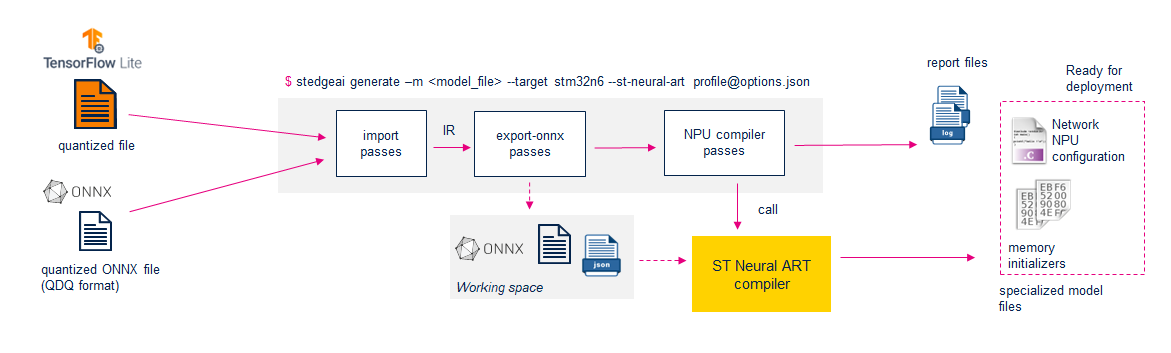
ST Edge AI Core command line interface 
The ST Edge AI core CLI is the recommended way for using the NPU compiler. It facilitates the application of specific
transformations
and generates the
intermediate representation (ONNX + JSON files). The ‘
--st-neural-art
’
option allows specifying a
compilation profiles json file
containing different sets of options named
“profiles”
that are directly passed to the compiler.
--st-neural-art


             STR

Argument syntax: empty or
<profile>[@<compilation-profiles-file-path>]
Set a profile from a compilation profile file. This option is mandatory to enable the passes allowing to analyze/generate a model.
|
Argument |
Description |
|---|---|
|
|
Print the NPU compiler help. |
|
|
Use a “default” profile. |
|
|
Use a built-in tool profile (see next section). |
|
|
Use the custom profiles. |
Tool built-in profiles 
The tool package provides a typical compilation profile file including different settings which can be selected with
the
'profile-'
argument of the
'--st-neural-art'
option. It references the
memory-pool descriptor files
allowing to dedicate the major part of the internal
memories and external memory devices to the
NPU memory subsystem.
Location of the compilation profile file:
$STEDGEAI_CORE_DIR/Utilities/windows/targets/stm32/resources/NPU/STM32N6xx/neural_art.json.Memory-pool descriptor file:
$STEDGEAI_CORE_DIR/Utilities/windows/targets/stm32/resources/NPU/STM32N6xx/stm32n6.mpool.
|
Profile name |
Description |
|---|---|
|
|
Mandatory options only. No optimization. All available memories can be used (
|
|
|
Extend the minimal profile enabling the optimization options to efficiently use the memory-pools |
|
|
Add optimization level 3 for speed +
|
|
|
Enable auto option |
|
|
|
Note
The provided profiles are the generic setting and should be customized according to the application constraints and the imported models.
--enable-epoch-controller

Enforce generation of
epoch-controller blobs
when using ST Neural-ART compiler.
This option only works in combination with
--st-neural-art.
Using this option on the command-line is equivalent to adding this option in the compiler options of the profile to be used. This allows to (some very limited extent) augment the profiles used on-the-fly with an extra argument directly from the command-line interface.
Front-end options 
The following options impact the generated files.
|
Option |
Description |
|---|---|
|
|
overwrite the name of the files generated by the NPU compiler (and symbols within the
|
|
|
inputs/outputs buffers will not be allocated by the NPU compiler in the provided memory pools and must be allocated/”linked” at runtime by the embedded application. |
|
|
used to change the type of data of the input/output tensors for the deployed model |
|
|
used to change the memory layout (NHWC vs NCHW) of the input/output tensors for the deployed model |
Compilation Profiles JSON File 
The following JSON snippet provides a typical
compilation profiles json file. This is not strict JSON format.
The comments are allowed and start with
//.
{
    "Globals": {
    // This section is required but can be empty
    },
    "Profiles": {
        // Minimal options required for the generated file to work
        "minimal" : {
            "memory_pool": "./mpools/stm32n6.mpool",
            "options": "--native-float --cache-maintenance --Ocache-opt"
        },
        // Advised minimal options
        "default" : {
            "memory_pool": "./mpools/stm32n6.mpool",
            "options": "--native-float --cache-maintenance --Ocache-opt --enable-virtual-mem-pools --Os"
        },
        "test" : {
            "memory_pool": "./mpools/stm32n6.mpool",
            "options": "--native-float --cache-maintenance --Ocache-opt --enable-virtual-mem-pools --optimization 1"
        },
        "test2" : {
            "memory_pool": "./my_memory_pools/stm32n6_test.mpool",
            "options": "--native-float --cache-maintenance --Ocache-opt --enable-virtual-mem-pools\
                       --optimization 1 --Oauto-sched --enable-epoch-controller"
        }
    }
}
This file has two sections:
"Globals"
and
"Profiles".
The
"Globals"section is used for debug purposes. It is optional, and can be removed from the profile file.The
"Profiles"section allows defining multiple named profiles that are selectable through the'--st-neural-art'option of the ST Edge AI CLI.
A *profile* is a combination of:
A path to a memory-pool descriptor file (.mpool file).
A list of options to be passed to the NPU compiler.
Optional: A path to a machine description file (.mdesc file) - by default, the stm32n6 description file is used.
Tips, variations around the basic use case 
Generic recommendations 
When using small-enough models, try to refrain from using external memories: any transaction with external memory is time-consuming!
Remember that
--enable-virtual-mem-pools, though convenient, may have massive disruptive effects on inference time.When in optimization steps, try to remove this option from the compiler’s parameters.
NPU compiler options 
Experiment with options, a lot of options can be added and may provide successful (or not) effects.
After a successful
--Oautocompilation for a model, note down the “best” options used, and report them in the arguments of the compiler at next compilation, this will save compilation time during development.
Memory-pools 
Warning
Always remember to have disjoint “memory spaces” available for the NPU compiler (that will allocate buffers and constants of the network) and the firmware compiler (that will allocate space for program, variables, etc.) to prevent memory issues.
Carving memory for performance-improvement of a model is a time-consuming activity.
Start with basic memory pools with e.g. virtual memory pools enabled.
Check if it seems possible to fit the whole model in internal memories.
If the firmware is small-enough, it is possible to evolve from the example mpool by adding space before the AXISRAM2 pool (do not forget to remove this memory space in the linker script)
When trying to optimize memory usage/allocation for speed, try to disjoint virtually-merged-pools (by adding small holes between them).
Ultimately, try not to use virtual-memory-pools.
For development purposes
An external RAM can be used easily instead of an external flash (for example, by setting the size of the external flash to 0 and adding constants_preferred=true to external ram characteristics) if both types of memories are available.
This prevents wear of the flash, will be quicker to load weights on the board, etc.
Be aware that this can make the inference faster (external RAM on discovery-kit board can use hexa-SPI vs. octo-SPI for external Flash)