
 STM32CubeIDE

Update an STM32CubeIDE installation 
The Eclipse ® update mechanism permits the quick update of available patches when STM32CubeIDE is already installed. To use this mechanism:
Launch STM32CubeIDE
Update the tool by [Help]>[Check for updates…]
Restart STM32CubeIDE
– Either automatically if STM32CubeIDE proposes it
– By exiting STM32CubeIDE and restarting it otherwise
By default, the update is done with the last version. If another version is needed, follow the steps below:
Open the Install dialog box as shown in Figure 16 by [Help]>[Install new software…]
Figure 17.Install dialog box
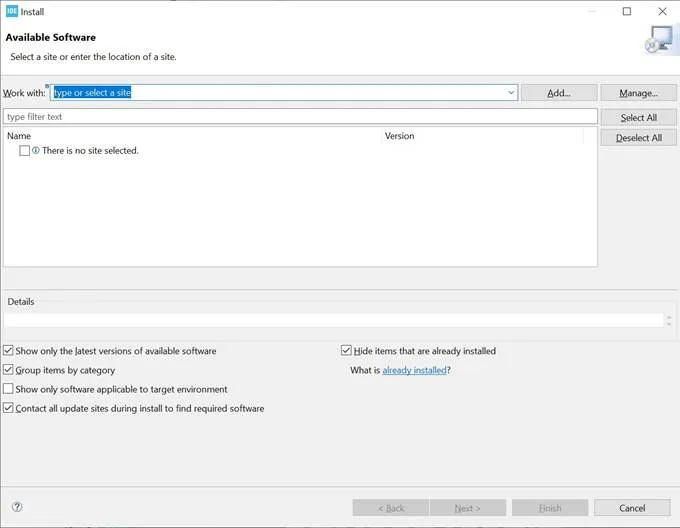
Click on the [Manage…] button
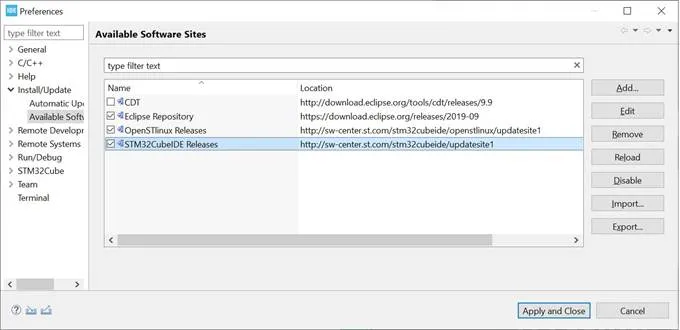
Select [STM32CubeIDE Releases] and click on [Edit] as shown in Figure 17
Figure 18.Preferences window>
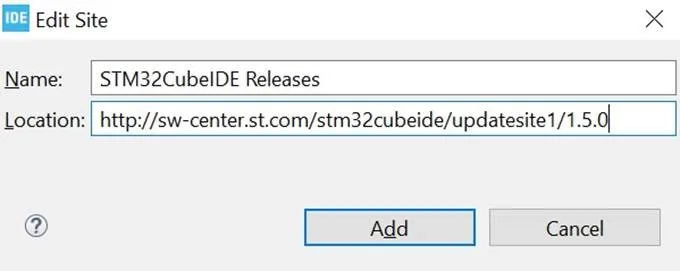
Add the desired version number at the end of the url in the [Location] field as shown in Figure 18
Figure 19.Edit Sitedi alog box>
Note: The update mechanism has the same requirements as the installation in term of administration rights. If the installation has been made with administration rights, the update must be made also with the same administration rights.