
 STM32CubeMX2

Project Generation 
Project Generation Settings 
For Project Generation Settings, a minimal configuration is required. Additional advanced settings available for further customization.
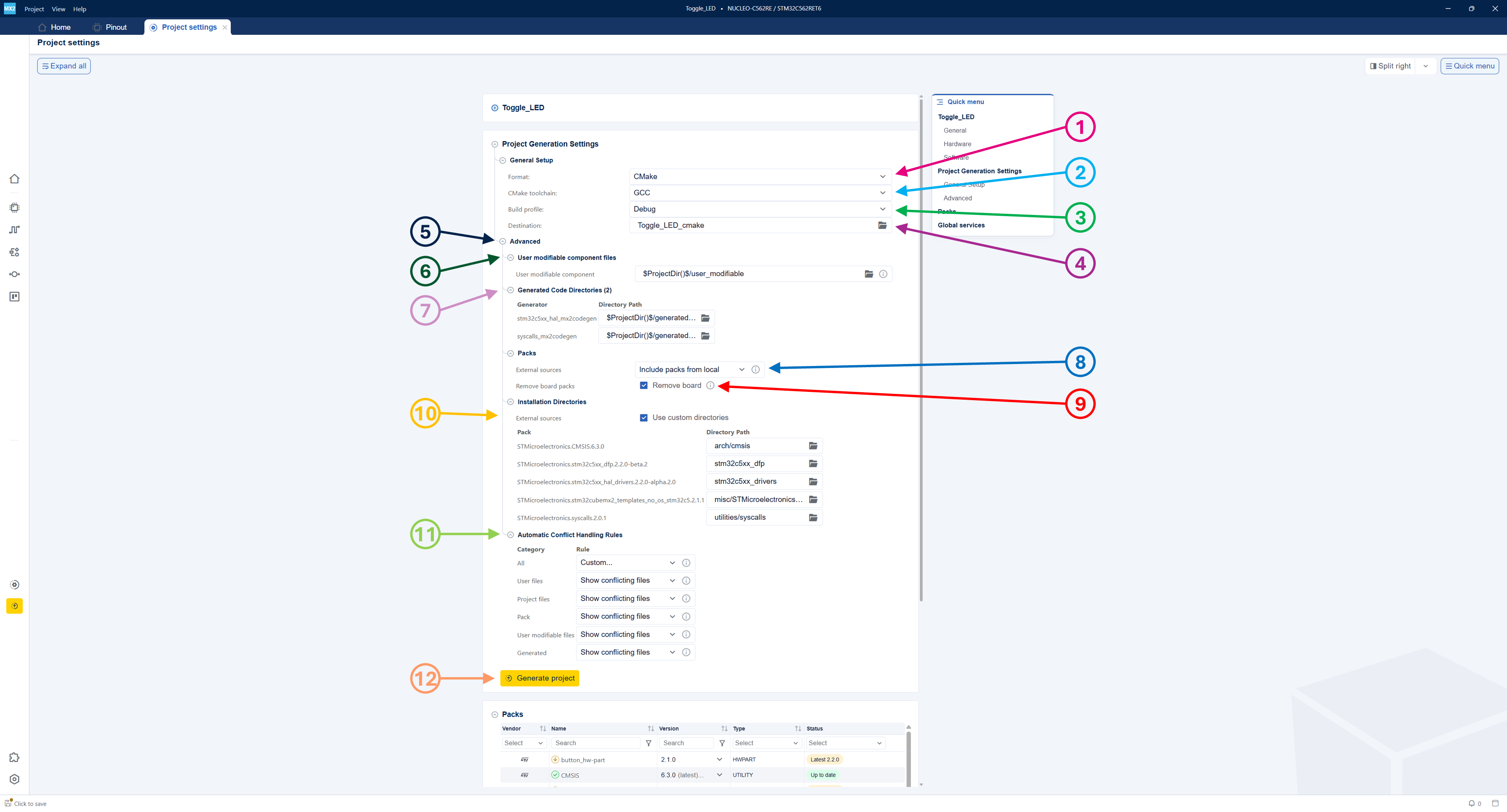
Project generation settings 
General setup 
Select the format, if applicable, the development toolchain, and the build profile. STM32CubeMX2 then generates the corresponding toolchain settings and project files to import as a new project.
Select format (1) 
IAR Embedded Workbench for ARM®
CMake [default]
Open-CMSIS(Keil µVision / Studio)
raw (no IDE project file)
Note
For STM32CubeIDE for VS Code, CMake is the required project format.
Open-CMSIS projects are compatible with Keil® µVision® and Keil® Studio: - Ensure that Keil® MDK for Arm® version 5.42 or higher is installed. - Keil® µVision® supports compiling and debugging the project, but it does not support project modification, such as adding files.
Select toolchain: (2) 
For the IAR Embedded Workbench only IAR is available as a toolchain.
For CMake, select GCC.
For Open-CMSIS, select IAR, GCC or AC6.
For raw, select IAR, GCC or AC6.
Select Build profile (3) 
Debug: for development and debugging purposes. [default]
Release: for optimized final builds.
Debug & Release: to have both profiles available.
Select destination (4) 
Browse and select the folder for the generated project.
The default path is the root folder of the created STM32CubeMX2 project.
Advanced setup (5) 
User modifiable component files (6) 
Optionally, change the path for user modifiable components.
Generated code directories (7) 
Optionally, change the default name and directory path for storing generated code.
Select external sources (8) 
Select the packs source. There are two options to manage packs for the exported project:
Include fresh packs 
Packs are always installed from the .pack file (downloaded if needed) inside the created project.
Relative pack paths cannot be outside of the created project (they are made local).
User code is always copied to the created project.
Generated code is always generated in the created project.
The created project is easily movable and is self-contained.
Include packs from local 
Packs are copied from $CMSIS_PACK_ROOT to the created project.
Relative pack paths cannot be outside of the created project (they are made local).
User code is always copied to the created project.
Generated code is always generated in the created project.
Created project is easily movable and is self-contained.
Do not include packs 
Packs are referenced from $CMSIS_PACK_ROOT to the created project.
Relative pack paths can be outside of the created project.
User code is always copied to the created project.
Generated code is always generated in the created project.
Created project is not self-contained.
Remove board packs (9) 
Exclude board support packages from the project.
Select packs installation directories (10) 
Use custom directories is unchecked 
Browse and select a path for the packs installation folder. The default folder is named misc and is placed under the created project folder.
Use custom directories is checked 
Organize installed packs into customized folders and modify folder paths and names. They have a default mapping corresponding to the pack categories.
Automatic Conflict Handling Rules (11) 
By default all files update on change.
By selecting Custom…, multiple ways are available to handle different types of conflict resolution.
Types of conflict resolution 
Show conflicting files: Launches the conflict resolution tool to handle each case.
Don’t generate: Keeps any existing files.
Backup: Creates backups of existing files and overwrites.
Overwrite: Overwrites existing files.
Types of files 
User files: Files owned by the user, for example,
main.c,main.h,my_lib.cppetc.Project files: Project files, for example,
CMakeLists.txt,.csolution.yml,cproject.yml,.eww,.ewp.Pack: Files within embedded software packs.
User-modifiable files: User-modifiable files from packs.
Generated: Generated files from packs that have a generator run during project export, for example, a tailored file based on the configuration in MX.
Generate project (12) 
Click the Generate project button to start the project creation process with all configured settings.
Note
When exporting, ensure to keep the default values for generator directories to avoid issues.
To prevent export problems, make sure that the generation directories are different for each configurable part.
Note
With the project settings configured, users can skip the Project settings tab and click the Generate project button (12) to start project generation for the selected format.
During the generation process, a popup appears to inform the user about the ongoing project generation and to provide progress updates.

Project generation popup 
After the generation process completes, a popup appears to notify the user that the project is finalized. The user can view the generated files on disk.

Project successfully finalized 
Project regeneration 
During the code regeneration process in STM32CubeMX2, conflicts may arise when the user previously modified files that the tool attempts to update. These conflicts occur because the regeneration process overwrites or modifies existing project files to incorporate the latest changes or configurations made in the tool.
To handle such situations, STM32CubeMX2 provides a conflict resolution mechanism that allows users to decide how each conflicting file is treated.
- During code regeneration, a popup appears to inform the user of the following options:
-
Go to project settings: Open the project settings menu to configure automatic conflict handling rules.
Show differences: Enables the user to view the differences between the existing files and the newly generated ones after the regeneration process completes. For each file, the user can choose an action:
Overwrite without backup: The existing file is directly overwritten with the new file containing the latest changes.
Overwrite with backup: The existing file is renamed to FILE_bckp, and a new file (FILE) with the latest changes is created.
Don’t generate: No action is taken, and the existing file remains unchanged.
Overwrite all: Overwrites all files with the latest changes without creating backups.
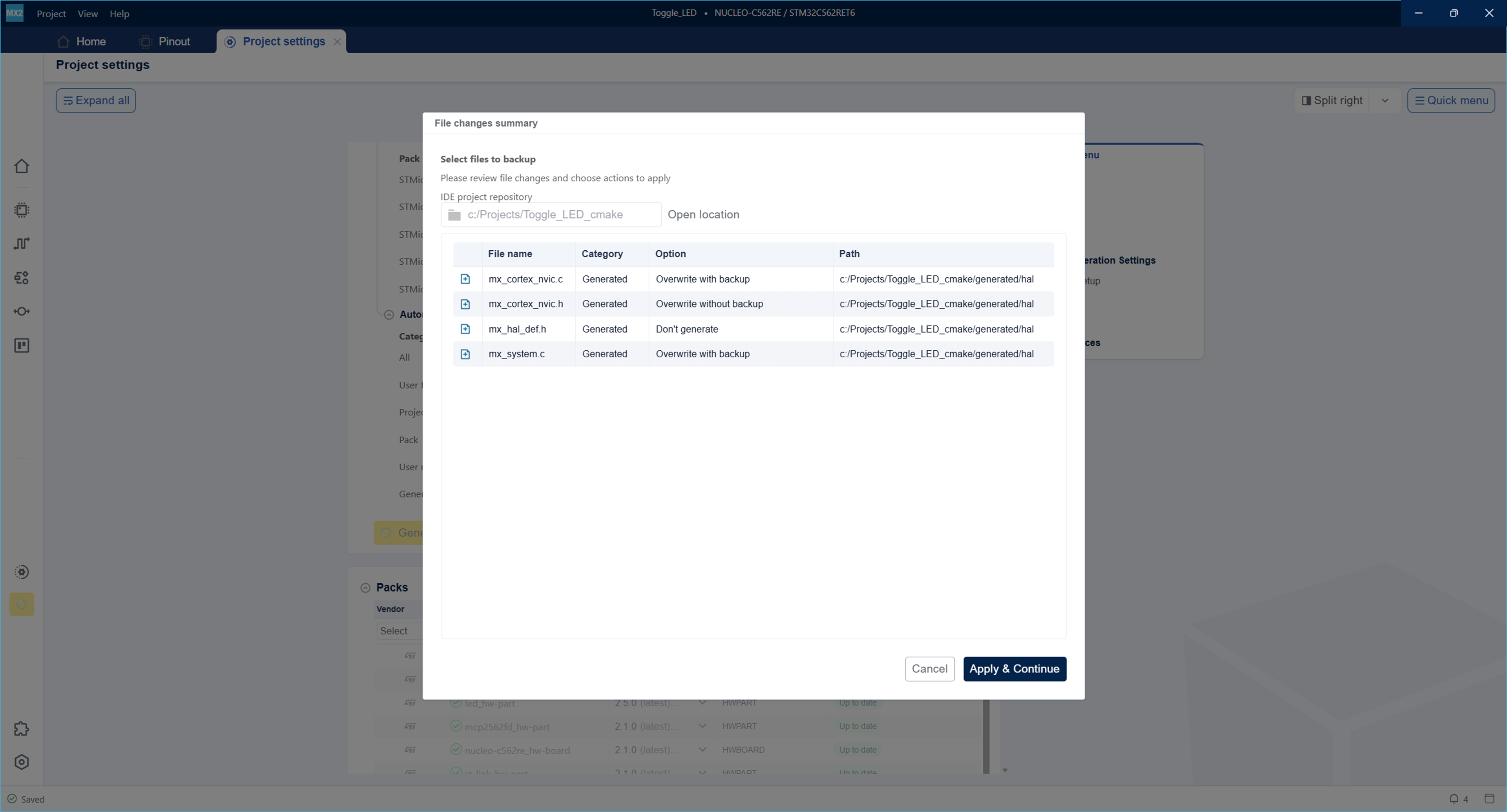
Project regeneration 
For more information about customizing this conflict resolution, refer to Automatic Conflict Handling Rules (11).
Project structure 
The STM32CubeMX2 project is organized to support multiple environments and build systems.
Below is an explanation of the project components and folder structures as illustrated in the figure below.
Project configuration file: MyFirstApp.ioc2 is the main configuration file for the STM32CubeMX2 project.
Project folders: The project generates multiple folders corresponding to different format and builds.
Each folder contains files and subfolders tailored to the specific environment:
CMake format — Default folder: MyFirstApp_cmake
.settings/: STM32CubeMX2 metadata used to track and regenerate project files.
arch/: Architecture-specific files.
cmake/: User file inclusion and CMake support files.
generated/: Generated source and header files.
stm32mcuxx_dfp/: Device support pack for the STM32 MCU.
stm32mcuxx_drivers/: Device drivers for the STM32 MCU.
user_modifiable/: Project files intended for user edits (application code, device configuration, and build variant).
utilities/: Utility source files.
CMakeLists.txt, CMakePresets.json: Build configuration files for CMake.
main.c, main.h: Application source and header files.
EWARM format — Default folder: MyFirstApp_ewarm
.settings/: STM32CubeMX2 metadata used to track and regenerate project files.
arch/: Architecture-specific files.
project/: Software project files including generated code.
stm32mcuxx_dfp/: Device support pack for the STM32 MCU.
stm32mcuxx_drivers/: Device drivers for the STM32 MCU.
utilities/: Utility source files.
MyFirstApp_SW.eww: EWARM project workspace file to open the project in the IDE.
Open-CMSIS format — Default folder: MyFirstApp_open-cmsis
.settings/: STM32CubeMX2 metadata used to track and regenerate project files.
arch/: Architecture-specific files.
project/: Software project files including generated code.
stm32mcuxx_dfp/: Device support pack for the STM32 MCU.
stm32mcuxx_drivers/: Device drivers for the STM32 MCU.
utilities/: Utility source files.
MyFirstApp.csolution.yml: CMSIS solution file describing the project structure.
RAW format — Default folder: MyFirstApp_raw
.settings/: STM32CubeMX2 metadata used to track and regenerate project files.
project/: Software project files including generated code.
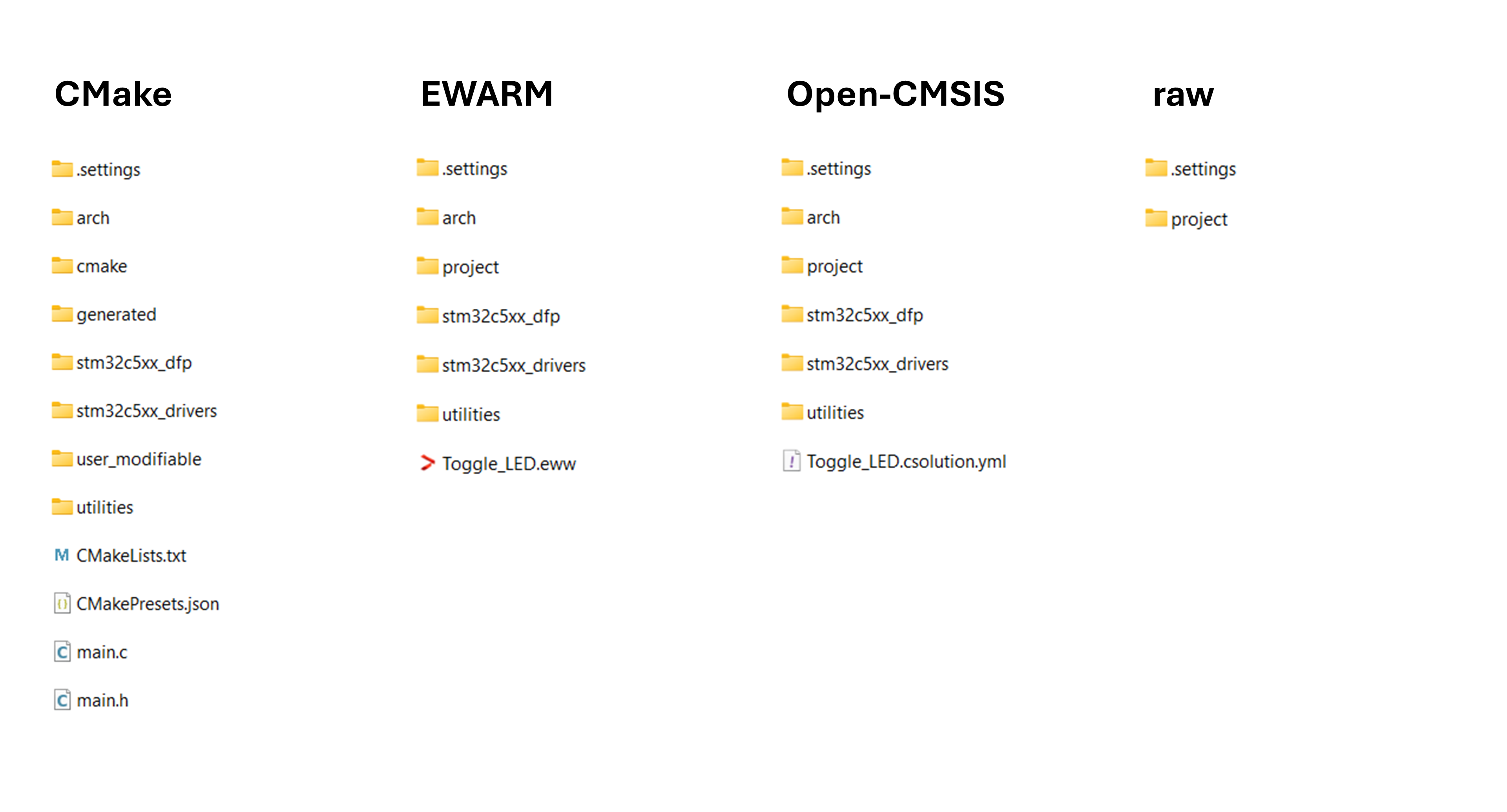
Project folder structure 