
 HAL2 Migrator

Typical HAL FDCAN use cases for migration 
This section provides information about the typical FDCAN use cases for migration from HAL1 to HAL2.
Note
The programming model has been kept consistent between HAL1 and HAL2 as follows:
First, initialization and configuration are performed, including setting up FDCAN filters and other parameters such as the clock calibration unit.
Then, the FDCAN peripheral is started. After that, messages can be added to the TX FIFO or buffer, and the system notifies when RX messages are received.
Users can choose to either:
Activate interrupts and handle incoming messages through corresponding callbacks.
Monitor TX and RX message reception using dedicated buffers and FIFOs through specific monitoring functions.
The changes in HAL2 focus on two key improvements:
Interrupt management:
The interrupt line configuration function was split into two separate functions, one to assign grouped interrupts and another to assign individual interrupts to interrupt line(s) (e.g., line 0 or line 1) based on the availability of interrupt grouping in the STM32 device.
The single notification activation function was divided into distinct functions to enable interrupt sources and to enable the corresponding interrupt lines.
Clock calibration:
The clock calibration configuration was modularized by splitting it into a function to enable or bypass the clock calibration unit, and another to set the calibration parameters.
Additionally, the calibration callback was separated into dedicated functions, and a dedicated IRQ handler was introduced to manage clock calibration interrupts independently.
Use case: Initialization, configuration and filter configuration 
Sequence diagram 
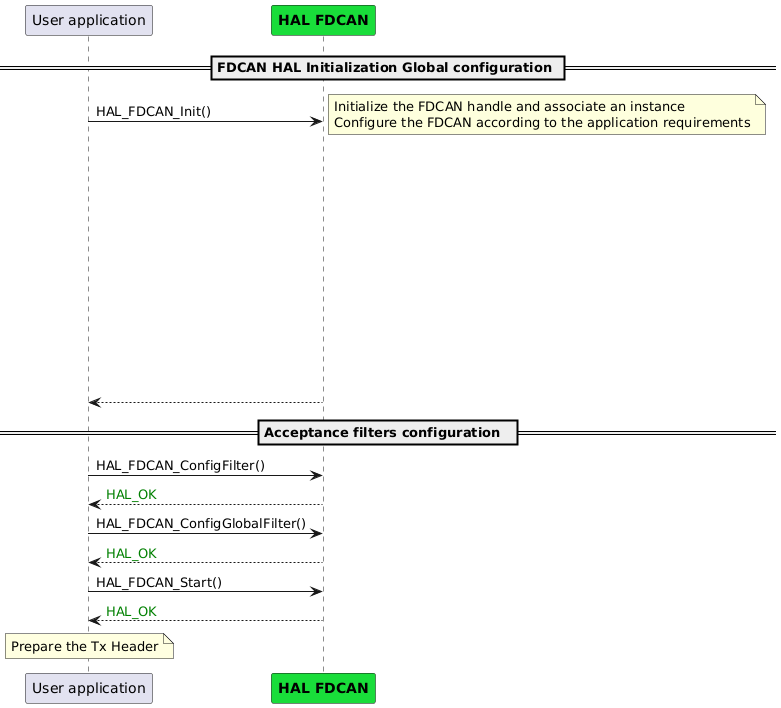
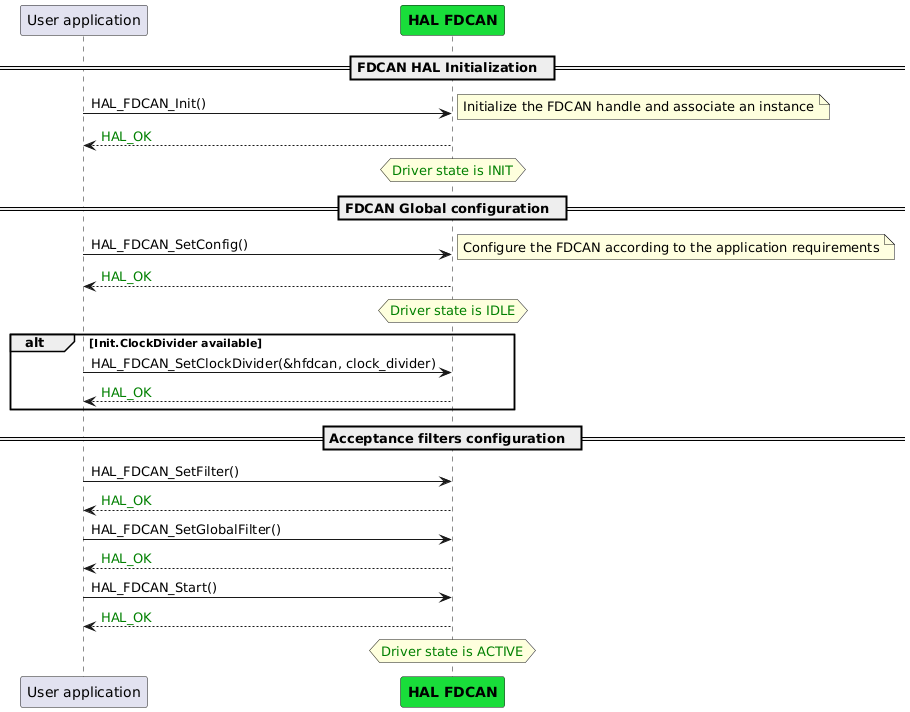
Code snippet 
|
HAL1 |
HAL2 |
|---|---|
hfdcan.Instance                = FDCAN1;
hfdcan.Init.FrameFormat        = FDCAN_FRAME_FD_BRS;
hfdcan.Init.Mode               = FDCAN_MODE_NORMAL;
hfdcan.Init.AutoRetransmission = ENABLE;
hfdcan.Init.TransmitPause      = DISABLE;
hfdcan.Init.ProtocolException  = ENABLE;


hfdcan.Init.NominalPrescaler     = 0x1;
hfdcan.Init.NominalSyncJumpWidth = 0x8;
hfdcan.Init.NominalTimeSeg1      = 0x1F;
hfdcan.Init.NominalTimeSeg2      = 0x8;


hfdcan.Init.DataPrescaler     = 0x1;
hfdcan.Init.DataSyncJumpWidth = 0x4;
hfdcan.Init.DataTimeSeg1      = 0x5;
hfdcan.Init.DataTimeSeg2      = 0x4;


hfdcan.Init.StdFiltersNbr       = 1;
hfdcan.Init.ExtFiltersNbr       = 0;
hfdcan.Init.TxFifoQueueMode     = FDCAN_TX_FIFO_OPERATION;

hfdcan.Init.ClockDivider        = FDCAN_CLOCK_DIV2;
HAL_FDCAN_Init(&hfdcan);

sFilterConfig.IdType       = FDCAN_STANDARD_ID;
sFilterConfig.FilterIndex  = 0;
sFilterConfig.FilterType   = FDCAN_FILTER_MASK;
sFilterConfig.FilterConfig = FDCAN_FILTER_TO_RXFIFO0;
sFilterConfig.FilterID1    = 0x111;
sFilterConfig.FilterID2    = 0x7FF;
HAL_FDCAN_ConfigFilter(&hfdcan, &sFilterConfig);

HAL_FDCAN_ConfigGlobalFilter(&hfdcan,
                             FDCAN_REJECT,
                             FDCAN_REJECT,
                             FDCAN_REJECT_REMOTE,
                             FDCAN_REJECT_REMOTE);


HAL_FDCAN_Start(&hfdcan);
|
HAL_FDCAN_Init(&hfdcan, HAL_FDCAN1);
fdcan_config.frame_format        = HAL_FDCAN_FRAME_FORMAT_FD_BRS;
fdcan_config.mode                = HAL_FDCAN_MODE_NORMAL;
fdcan_config.auto_retransmission = HAL_FDCAN_AUTO_RETRANSMISSION_ENABLE;
fdcan_config.transmit_pause      = HAL_FDCAN_TRANSMIT_PAUSE_DISABLE;
fdcan_config.protocol_exception  = HAL_FDCAN_PROTOCOL_EXCEPTION_ENABLE;

hal_fdcan_nominal_bit_timing_t fdcan_nominal_bit_timing;
fdcan_nominal_bit_timing.nominal_prescaler  = 1;
fdcan_nominal_bit_timing.nominal_jump_width = 8;
fdcan_nominal_bit_timing.nominal_time_seg1  = 31;
fdcan_nominal_bit_timing.nominal_time_seg2  = 8;

hal_fdcan_data_bit_timing_t fdcan_data_bit_timing;
fdcan_data_bit_timing.data_prescaler  = 1;
fdcan_data_bit_timing.data_jump_width = 4;
fdcan_data_bit_timing.data_time_seg1  = 5;
fdcan_data_bit_timing.data_time_seg2  = 4;

fdcan_config.nominal_bit_timing = fdcan_nominal_bit_timing;
fdcan_config.data_bit_timing    = fdcan_data_bit_timing;

fdcan_config.std_filters_nbr        = 1;
fdcan_config.ext_filters_nbr        = 0;
fdcan_config.tx_fifo_queue_mode     = HAL_FDCAN_TX_MODE_FIFO;

HAL_FDCAN_SetClockDivider(&hfdcan, HAL_FDCAN_CLOCK_DIV_2);
HAL_FDCAN_SetConfig(&hfdcan, &fdcan_config);

filter.id_type       = HAL_FDCAN_ID_STANDARD;
filter.filter_index  = 0U;
filter.filter_type   = HAL_FDCAN_FILTER_TYPE_CLASSIC;
filter.filter_config = HAL_FDCAN_FILTER_TO_RX_FIFO_0;
filter.filter_id1    = 0x111;
filter.filter_id2    = 0x7FF;
HAL_FDCAN_SetFilter(&hfdcan, &filter);

/* Configure global filter to reject non-matching and remote frames */
global_filter.acceptance_non_matching_std = HAL_FDCAN_NON_MATCHING_REJECT;
global_filter.acceptance_non_matching_ext = HAL_FDCAN_NON_MATCHING_REJECT;
global_filter.acceptance_remote_std       = HAL_FDCAN_REMOTE_REJECT;
global_filter.acceptance_remote_ext       = HAL_FDCAN_REMOTE_REJECT;
HAL_FDCAN_SetGlobalFilter(&hfdcan, &global_filter);

HAL_FDCAN_Start(&hfdcan);
|
Note
In HAL1, if the clock divider is available and set directly within the initialization structure using
hfdcan.Init.ClockDivider = clock_divider.In HAL2, the clock divider configuration is separated from the initialization and must be explicitly set by calling
HAL_FDCAN_SetClockDivider(&hfdcan, clock_divider).
Key changes 
HAL2 separates global configuration from initialization using
HAL_FDCAN_SetConfig().HAL2 configures filters using
HAL_FDCAN_SetFilter()andHAL_FDCAN_SetGlobalFilter().When supported by the device, HAL2 configures the clock divider using
HAL_FDCAN_SetClockDivider().
Use case: Communication with FIFO monitoring (polling) 
The changes between HAL1 and HAL2 are limited to naming; the overall programming model remains unchanged. For transmission, add messages to the TX FIFO. For reception, first monitor the RX FIFO level, and when a message is received, read it from the FIFO.
Sequence diagram 
![@startuml
participant "User application" as App
participant "<font color=black><b>HAL FDCAN" as FDCAN #19DD3A
Note over App#lightyellow: Prepare the Tx Header \n \n
== FDCAN HAL Message Transmit ==
App-> FDCAN: HAL_FDCAN_AddMessageToTxFifoQ(&hfdcan, &TxHeader, TxData[0])
FDCAN --> App:<color green>HAL_OK
== FDCAN HAL Message Receive ==
loop#darkgrey if fifo_level != 1
App -> FDCAN: HAL_FDCAN_GetRxFifoFillLevel()
note right
Retrieve the Rx FIFO fill level
endnote
FDCAN --> App: fifo_level
end
App -> FDCAN: HAL_FDCAN_GetRxMessage()
note right
Retrieve an FDCAN frame from the Rx FIFO
endnote
FDCAN --> App:<color green>HAL_OK
@enduml](../../../../../_images/plantuml-77932bb3c2d21ad3818b66a81180473d0bf3bbe0.png)
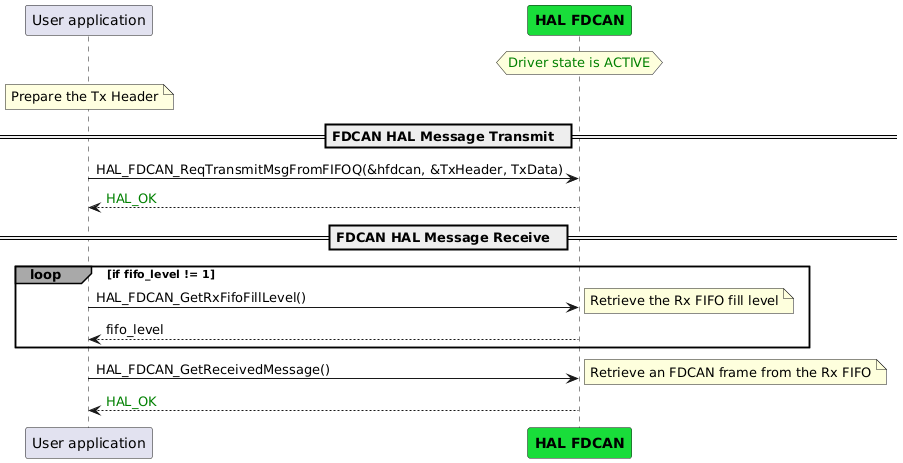
Code snippet 
|
HAL1 |
HAL2 |
|---|---|
/* Prepare FDCAN transmit message header */
TxHeader.Identifier          = 0x111;
TxHeader.IdType              = FDCAN_STANDARD_ID;
TxHeader.TxFrameType         = FDCAN_DATA_FRAME;
TxHeader.DataLength          = FDCAN_DLC_BYTES_8;
TxHeader.ErrorStateIndicator = FDCAN_ESI_ACTIVE;
TxHeader.BitRateSwitch       = FDCAN_BRS_ON;
TxHeader.FDFormat            = FDCAN_FD_CAN;
TxHeader.TxEventFifoControl  = FDCAN_NO_TX_EVENTS;
TxHeader.MessageMarker       = 0;

HAL_FDCAN_AddMessageToTxFifoQ(&hfdcan, &TxHeader, &TxData[0]);

while(HAL_FDCAN_GetRxFifoFillLevel(&hfdcan, FDCAN_RX_FIFO0) < 1);

HAL_FDCAN_GetRxMessage(&hfdcan, FDCAN_RX_FIFO0, &RxHeader, RxData);
|
/* Prepare FDCAN transmit message header */
tx_element_header.b.identifier            = 0x111,
tx_element_header.b.identifier_type       = HAL_FDCAN_ID_STANDARD,
tx_element_header.b.frame_type            = HAL_FDCAN_FRAME_DATA,
tx_element_header.b.data_length           = HAL_FDCAN_DATA_LEN_CAN_FDCAN_8_BYTE,
tx_element_header.b.error_state_indicator = HAL_FDCAN_ERROR_STATE_IND_ACTIVE,
tx_element_header.b.bit_rate_switch       = HAL_FDCAN_BIT_RATE_SWITCH_ON,
tx_element_header.b.frame_format          = HAL_FDCAN_HEADER_FRAME_FORMAT_FD_CAN,
tx_element_header.b.event_fifo_control    = HAL_FDCAN_FIFO_STORE_TX_EVENTS,
tx_element_header.b.message_marker        = 0U,

HAL_FDCAN_ReqTransmitMsgFromFIFOQ(pFDCAN, &tx_element_header, pTxData);

while(HAL_FDCAN_GetRxFifoFillLevel(pFDCAN, HAL_FDCAN_RX_FIFO_0, &rx_elements) < 1);

HAL_FDCAN_GetReceivedMessage(pFDCAN, HAL_FDCAN_RX_FIFO_0, &rx_element_header, RxBuffer);
|
Key changes 
In HAL2, the transmit API is
HAL_FDCAN_ReqTransmitMsgFromFIFOQ()(instead ofHAL_FDCAN_AddMessageToTxFifoQ()).In HAL2, the receive API is
HAL_FDCAN_GetReceivedMessage()(instead ofHAL_FDCAN_GetRxMessage()).
Related examples in HAL2 
|
Example Name |
Description |
|---|---|
|
example_hal_fdcan_two_boards_com_polling_controller/example_hal_fdcan_two_boards_com_polling_responder |
How to handle an infinite number of transmit-receive transactions between two boards based on the FDCAN-bus protocol with the HAL API, in polling mode. |
Use case: Communication with buffers monitoring (polling) 
The changes between HAL1 and HAL2 are limited to naming; the overall programming model remains unchanged. For transmission, add the message to a specific TX buffer and enable the transmission request for that buffer. The transmission completion status is obtained by monitoring the TX buffer state. For reception, monitor the RX buffer for incoming messages, and once a message is available, read it from the RX buffer.
Sequence diagram 
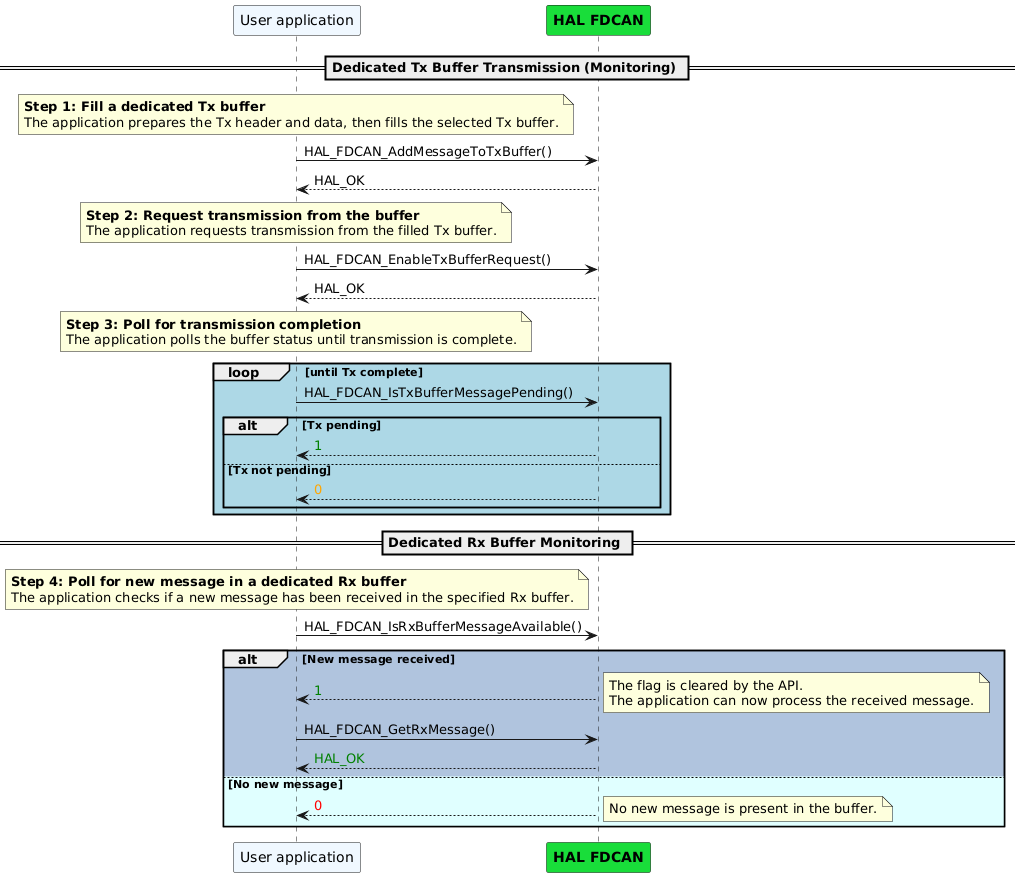
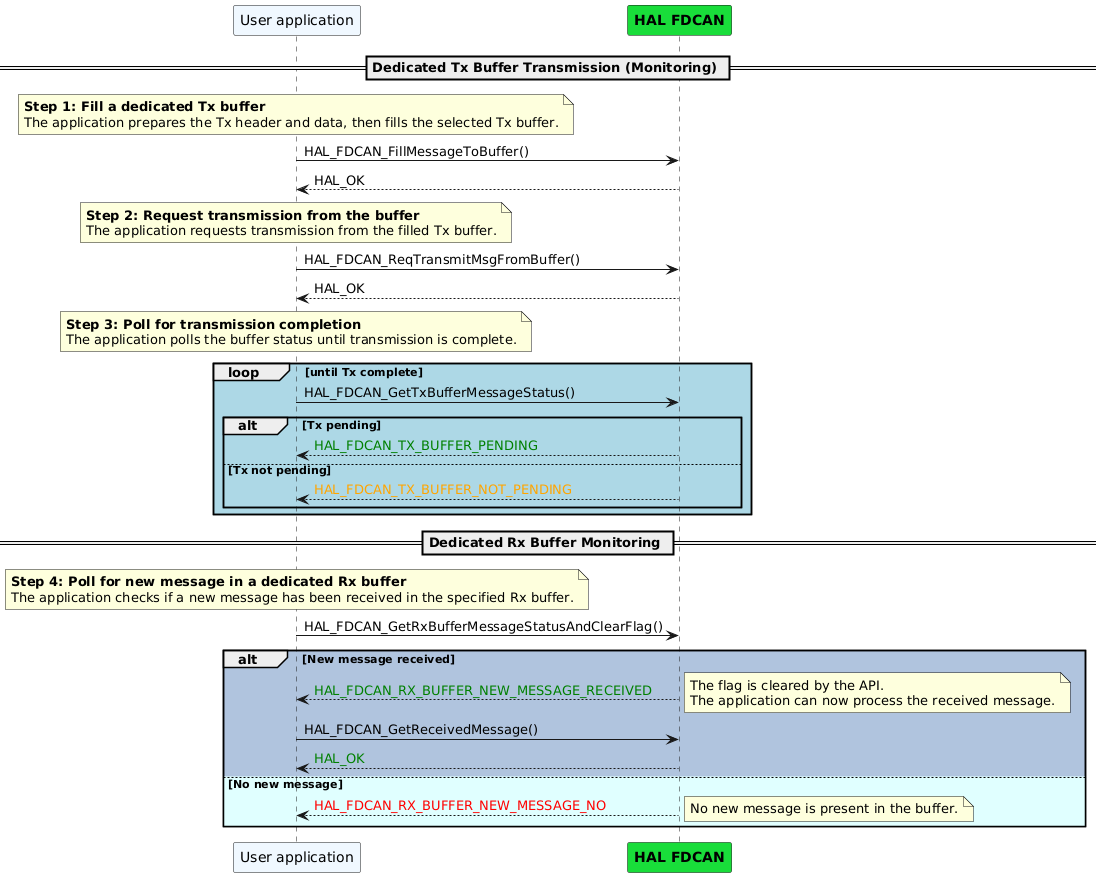
Code snippet 
|
HAL1 |
HAL2 |
|---|---|
/* Prepare FDCAN transmit message header */
TxHeader.Identifier          = 0x111;
TxHeader.IdType              = FDCAN_STANDARD_ID;
TxHeader.TxFrameType         = FDCAN_DATA_FRAME;
TxHeader.DataLength          = FDCAN_DLC_BYTES_8;
TxHeader.ErrorStateIndicator = FDCAN_ESI_ACTIVE;
TxHeader.BitRateSwitch       = FDCAN_BRS_ON;
TxHeader.FDFormat            = FDCAN_FD_CAN;
TxHeader.TxEventFifoControl  = FDCAN_NO_TX_EVENTS;
TxHeader.MessageMarker       = 0;

HAL_FDCAN_AddMessageToTxBuffer(&hfdcan, &TxHeader, TxData, FDCAN_TX_BUFFER0);

HAL_FDCAN_EnableTxBufferRequest(&hfdcan, FDCAN_TX_BUFFER0);

while(HAL_FDCAN_IsTxBufferMessagePending(&hfdcan, FDCAN_TX_BUFFER0) < 1);

while(HAL_FDCAN_IsRxBufferMessageAvailable(&hfdcan, FDCAN_RX_BUFFER1) < 1);

HAL_FDCAN_GetRxMessage(&hfdcan, FDCAN_RX_BUFFER1, &RxHeader, RxData);
|
/* Prepare FDCAN transmit message header */
tx_element_header.b.identifier            = 0x111,
tx_element_header.b.identifier_type       = HAL_FDCAN_ID_STANDARD,
tx_element_header.b.frame_type            = HAL_FDCAN_FRAME_DATA,
tx_element_header.b.data_length           = HAL_FDCAN_DATA_LEN_CAN_FDCAN_8_BYTE,
tx_element_header.b.error_state_indicator = HAL_FDCAN_ERROR_STATE_IND_ACTIVE,
tx_element_header.b.bit_rate_switch       = HAL_FDCAN_BIT_RATE_SWITCH_ON,
tx_element_header.b.frame_format          = HAL_FDCAN_HEADER_FRAME_FORMAT_FD_CAN,
tx_element_header.b.event_fifo_control    = HAL_FDCAN_FIFO_STORE_TX_EVENTS,
tx_element_header.b.message_marker        = 0U,

HAL_FDCAN_FillMessageToBuffer(&hfdcan, &TxHeader, TxData, HAL_FDCAN_TX_BUFFER_0);

HAL_FDCAN_ReqTransmitMsgFromBuffer(&hfdcan, HAL_FDCAN_TX_BUFFER_0);

while(HAL_FDCAN_IsTxBufferMessagePending(&hfdcan, HAL_FDCAN_TX_BUFFER_0) != HAL_FDCAN_TX_BUFFER_NOT_PENDING);

while(HAL_FDCAN_GetRxBufferMessageStatusAndClearFlag(&hfdcan, HAL_FDCAN_RX_BUFFER_1) != HAL_FDCAN_RX_BUFFER_NEW_MSG_RECEIVED);

HAL_FDCAN_GetReceivedMessage(&hfdcan, FDCAN_RX_BUFFER1, &RxHeader, RxData);
|
Key changes 
In HAL2, the transmit request is performed using
HAL_FDCAN_ReqTransmitMsgFromBuffer().In HAL2, the receive buffer monitoring uses
HAL_FDCAN_GetRxBufferMessageStatusAndClearFlag().
Related examples in HAL2 
No related example in HAL2.
Use case: Communication in interrupt mode 
The FDCAN interrupt management has been updated to use a more modular approach.
Interrupt to line configuration:
In HAL1, the configuration of FDCAN interrupt lines is performed using the
HAL_FDCAN_ConfigInterruptLines()function. When interrupt grouping is supported by the given STM32 device, grouped interrupt flags such asFDCAN_IT_GROUP_SMSGandFDCAN_IT_GROUP_RX_FIFO0are collectively assigned to the chosen interrupt line (line 0 and/or line 1). If interrupt grouping is not supported by the device, individual interrupt sources likeFDCAN_IT_TX_COMPLETEandFDCAN_IT_RX_FIFO0_NEW_MESSAGEare assigned directly to the chosen interrupt line (line 0 and/or line 1).In HAL2, when the interrupt grouping feature is available on the STM32 device,
HAL_FDCAN_SetInterruptGroupsToLine()is used to assign grouped interrupts (e.g.,HAL_FDCAN_IT_GROUP_STATUS_MSGandHAL_FDCAN_IT_GROUP_RX_FIFO_0) to the chosen interrupt line (line 0 and/or line 1). When interrupt grouping is not available,HAL_FDCAN_SetInterruptsToLine()is used to assign individual interrupts (e.g.,HAL_FDCAN_IT_TX_COMPLETEandHAL_FDCAN_IT_RX_FIFO_0_NEW_MSG) to the chosen interrupt line (line 0 and/or line 1).
|
Interrupt grouping feature |
HAL1 |
HAL2 |
|---|---|---|
|
Available |
Use
|
Use
|
|
Not available |
Use
|
Use
|
Interrupt activation
In HAL1, the function
HAL_FDCAN_ActivateNotification()is used to enable specific FDCAN interrupt notifications in a single call, meaning it enables both the requested interrupts and the interrupt line(s) (line 0 and/or line 1) on which the corresponding interrupts are set.In HAL2, interrupt management is designed to be more granular and modular:
HAL_FDCAN_EnableInterruptLines()is used to activate the interrupt line(s) (line 0 and/or line 1).HAL_FDCAN_EnableInterrupts()enables interrupt sources (e.g.HAL_FDCAN_IT_RX_FIFO_0_NEW_MSG).For transmit complete interrupts like
FDCAN_IT_TX_COMPLETE, the dedicated functionHAL_FDCAN_EnableTxBufferCompleteInterrupts()must also be called to enable the corresponding buffer interrupts.Similarly, for transmit abort interrupts such as
FDCAN_IT_TX_ABORT_COMPLETE, the functionHAL_FDCAN_EnableTxBufferCancellationInterrupts()must also be called.Additionally,
HAL_FDCAN_CCU_EnableInterrupts()is provided to enable clock calibration unit interrupts.
For more details see HAL FDCAN enables interrupt notifications..
Sequence diagram 
![@startuml
participant "User application" as App
participant "<font color=black><b>HAL FDCAN" as FDCAN #19DD3A
alt #LightSteelBlue Interrupt grouping available
App -> FDCAN: HAL_FDCAN_ConfigInterruptLines(&hfdcan, FDCAN_IT_GROUP_SMSG | FDCAN_IT_GROUP_RX_FIFO0, FDCAN_INTERRUPT_LINE0)
else #LightCyan else
App -> FDCAN: HAL_FDCAN_ConfigInterruptLines(&hfdcan, FDCAN_IT_TX_COMPLETE | FDCAN_IT_RX_FIFO0_NEW_MESSAGE, FDCAN_INTERRUPT_LINE0)
end
FDCAN --> App:<color green>HAL_OK
App -> FDCAN: HAL_FDCAN_ActivateNotification(&hfdcan, FDCAN_IT_TX_COMPLETE | FDCAN_IT_RX_FIFO0_NEW_MESSAGE, FDCAN_TX_BUFFER0)
FDCAN --> App:<color green>HAL_OK
App -> FDCAN: HAL_FDCAN_Start()
FDCAN --> App:<color green>HAL_OK
Note over App#lightyellow: Prepare the Tx Header
== FDCAN HAL Message Transmit ==
App-> FDCAN: HAL_FDCAN_AddMessageToTxFifoQ(&hfdcan, &TxHeader, TxData[0])
FDCAN --> App:<color green>HAL_OK
activate App #1000DA
hnote over App
<font color=blue>transmission ongoing...
end note
NVIC <- : FDCAN interrupt Tx Complete
NVIC -> FDCAN: HAL_FDCAN_IRQHandler
FDCAN -> App: HAL_FDCAN_TxBufferCompleteCallback()
Note over App#lightyellow: TransmissionCompleteFlag = 1U
App --> FDCAN:
deactivate App
FDCAN --> NVIC:
NVIC --> :
deactivate App
== FDCAN HAL Message Receive ==
NVIC <- : FDCAN interrupt Rx FIFO New Message
NVIC -> FDCAN: HAL_FDCAN_IRQHandler
FDCAN -> App: HAL_FDCAN_RxFifo0Callback()
Note over App#lightyellow: if(RxFifo0ITs = FDCAN_IT_RX_FIFO0_NEW_MESSAGE) \n Notification_flag = 1U
FDCAN <-- App
NVIC <-- FDCAN
NVIC --> :
alt Notification_flag == 1U
App -> FDCAN: HAL_FDCAN_GetRxMessage()
note right
Retrieve an FDCAN frame from the Rx FIFO
endnote
FDCAN --> App:<color green>HAL_OK
end
@enduml](../../../../../_images/plantuml-6a0905a2459043e4a4e835ba7de6bf9c3769f217.png)
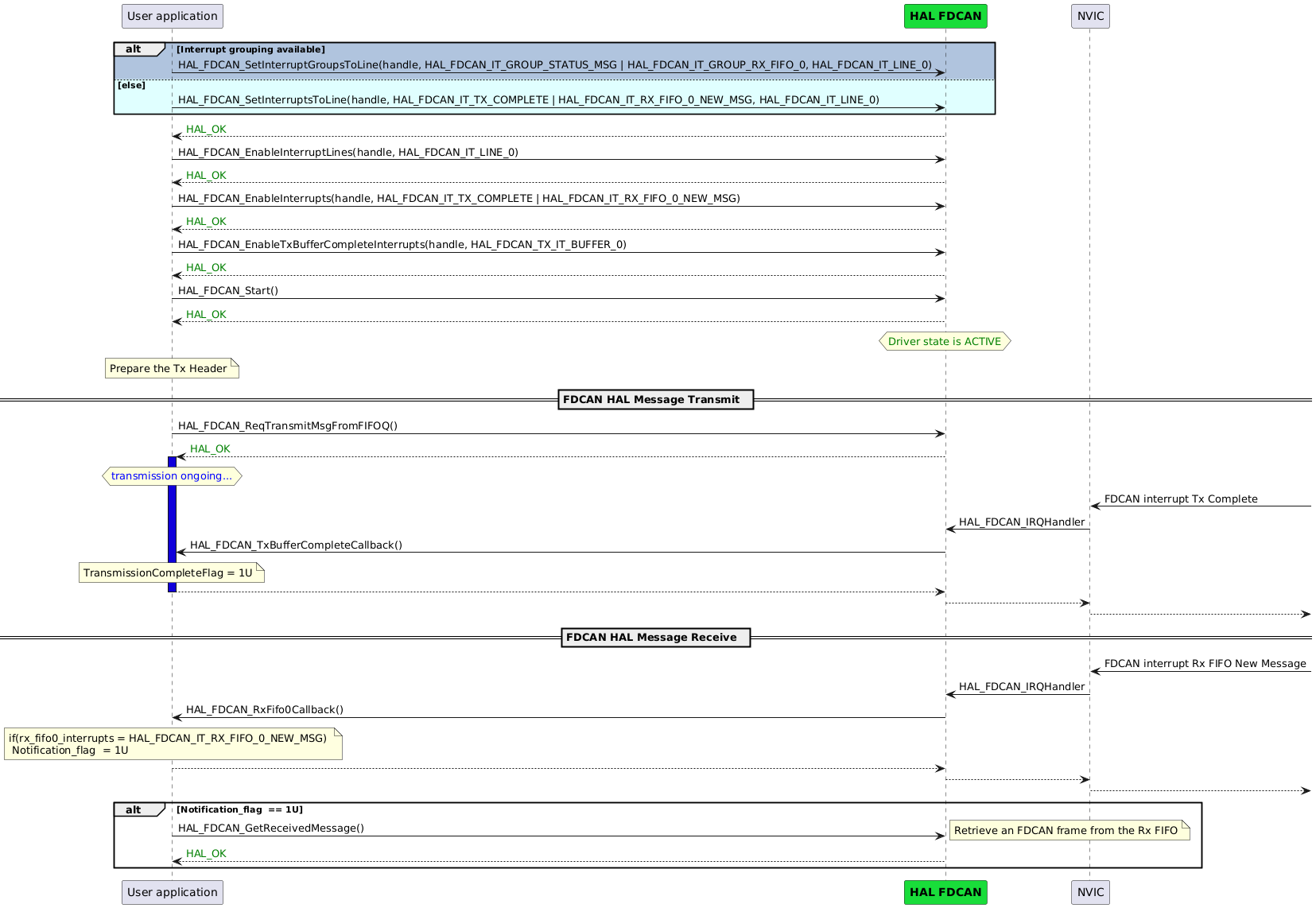
Code snippet 
|
HAL1 |
HAL2 |
|---|---|
/* if interrupt grouping available */
HAL_FDCAN_ConfigInterruptLines(&hfdcan, FDCAN_IT_GROUP_SMSG
                                      | FDCAN_IT_GROUP_RX_FIFO0,
                                        FDCAN_INTERRUPT_LINE0);
/* else */
HAL_FDCAN_ConfigInterruptLines(&hfdcan, FDCAN_IT_TX_COMPLETE
                                      | FDCAN_IT_RX_FIFO0_NEW_MESSAGE,
                                        FDCAN_INTERRUPT_LINE0);

HAL_FDCAN_ActivateNotification(&hfdcan,
                               FDCAN_IT_TX_COMPLETE |
                               FDCAN_IT_RX_FIFO0_NEW_MESSAGE,
                               FDCAN_TX_BUFFER0);


HAL_FDCAN_Start(&hfdcan);

/* Prepare FDCAN transmit message header */
TxHeader.Identifier          = 0x111;
TxHeader.IdType              = FDCAN_STANDARD_ID;
TxHeader.TxFrameType         = FDCAN_DATA_FRAME;
TxHeader.DataLength          = FDCAN_DLC_BYTES_8;
TxHeader.ErrorStateIndicator = FDCAN_ESI_ACTIVE;
TxHeader.BitRateSwitch       = FDCAN_BRS_ON;
TxHeader.FDFormat            = FDCAN_FD_CAN;
TxHeader.TxEventFifoControl  = FDCAN_NO_TX_EVENTS;
TxHeader.MessageMarker = 0;

HAL_FDCAN_AddMessageToTxFifoQ(&hfdcan, &TxHeader, &TxData[0]);
while (TransmissionCompleteFlag == 0);

if (Notification_flag == 1)
{
HAL_FDCAN_GetRxMessage(&hfdcan, FDCAN_RX_FIFO0, &RxHeader, RxData);
Notification_flag = 0;
}

void HAL_FDCAN_RxFifo0Callback(FDCAN_HandleTypeDef *hfdcan, uint32_t RxFifo0ITs)
{
  if((RxFifo0ITs & FDCAN_IT_RX_FIFO0_NEW_MESSAGE) != RESET)
  {
    Notification_flag = 1;
  }
}

void HAL_FDCAN_TxBufferCompleteCallback(FDCAN_HandleTypeDef *hfdcan, uint32_t BufferIndexes)
{
  TransmissionCompleteFlag = 1U;
}
|
/* if interrupt grouping */
HAL_FDCAN_SetInterruptGroupsToLine(&hfdcan, HAL_FDCAN_IT_GROUP_STATUS_MSG
                                          | HAL_FDCAN_IT_GROUP_RX_FIFO_0 ,
                                            HAL_FDCAN_IT_LINE_0 );
/* else */
HAL_FDCAN_SetInterruptsToLine(&hfdcan, HAL_FDCAN_IT_TX_COMPLETE
                                    | HAL_FDCAN_IT_RX_FIFO_0_NEW_MSG ,
                                      HAL_FDCAN_IT_LINE_0 );

HAL_FDCAN_EnableInterruptLines(&hfdcan, HAL_FDCAN_IT_LINE_0);

HAL_FDCAN_EnableTxBufferCompleteInterrupts(&hfdcan, HAL_FDCAN_IT_TX_CPLT_BUFFER_0);

HAL_FDCAN_EnableInterrupts(&hfdcan, HAL_FDCAN_IT_TX_COMPLETE | HAL_FDCAN_IT_RX_FIFO_0_NEW_MSG);

HAL_FDCAN_Start(&hfdcan);

/* Prepare FDCAN transmit message header */
tx_element_header.b.identifier            = 0x111,
tx_element_header.b.identifier_type       = HAL_FDCAN_ID_STANDARD,
tx_element_header.b.frame_type            = HAL_FDCAN_FRAME_DATA,
tx_element_header.b.data_length           = HAL_FDCAN_DATA_LEN_CAN_FDCAN_8_BYTE,
tx_element_header.b.error_state_indicator = HAL_FDCAN_ERROR_STATE_IND_ACTIVE,
tx_element_header.b.bit_rate_switch       = HAL_FDCAN_BIT_RATE_SWITCH_ON,
tx_element_header.b.frame_format          = HAL_FDCAN_HEADER_FRAME_FORMAT_FD_CAN,
tx_element_header.b.event_fifo_control    = HAL_FDCAN_FIFO_STORE_TX_EVENTS,
tx_element_header.b.message_marker        = 0U,

HAL_FDCAN_ReqTransmitMsgFromFIFOQ(hfdcan, &tx_element_header, pTxData);
while (TransmissionCompleteFlag == 0);

if (Notification_flag == 1)
{
  HAL_FDCAN_GetReceivedMessage(hfdcan, HAL_FDCAN_RX_FIFO_0, &rx_element_header, RxBuffer);
  ReceptionFlag = 0;
}

static void HAL_FDCAN_RxFifo0Callback(hal_fdcan_handle_t *hfdcan, uint32_t rx_fifo0_interrupts)
{
  if((rx_fifo0_interrupts & HAL_FDCAN_IT_RX_FIFO_0_NEW_MSG) != RESET)
  {
    Notification_flag = 1;
  }
}

static void HAL_FDCAN_TxBufferCompleteCallback(hal_fdcan_handle_t *hfdcan, uint32_t buffer_indexes)
{
  TransmissionCompleteFlag = 1U;
}
|
Key changes 
HAL2 splits notification configuration into separate APIs to configure interrupts and interrupt line(s).
HAL2 provides dedicated APIs for enabling Tx buffer complete interrupts.
Related examples in HAL2 
|
Example Name |
Description |
|---|---|
|
example_hal_fdcan_two_boards_com_it_controller/example_hal_fdcan_two_boards_com_it_responder |
How to handle an infinite number of transmit-receive transactions between two boards based on the FDCAN-bus protocol with the HAL API, in interrupt mode. |
Use case: Interrupt cancellation 
Sequence diagram 
![@startuml
participant "User application" as App
participant "<font color=black><b>HAL FDCAN" as FDCAN #19DD3A
alt #LightSteelBlue Interrupt grouping available
App -> FDCAN: HAL_FDCAN_ConfigInterruptLines(&hfdcan, FDCAN_IT_GROUP_SMSG, FDCAN_INTERRUPT_LINE0)
else #LightCyan Interrupt grouping not available
App -> FDCAN: HAL_FDCAN_ConfigInterruptLines(&hfdcan, FDCAN_IT_TX_ABORT_COMPLETE, FDCAN_INTERRUPT_LINE0)
end FDCAN --> App:<color green>HAL_OK
App -> FDCAN: HAL_FDCAN_ActivateNotification(&hfdcan, FDCAN_IT_TX_ABORT_COMPLETE, FDCAN_TX_BUFFER0)
FDCAN --> App:<color green>HAL_OK
App -> FDCAN: HAL_FDCAN_Start()
FDCAN --> App:<color green>HAL_OK
Note over App#lightyellow: Prepare the Tx Header
== FDCAN HAL Message Transmit ==
App-> FDCAN: HAL_FDCAN_AddMessageToTxFifoQ(&hfdcan, &TxHeader, TxData[0])
FDCAN --> App:<color green>HAL_OK
opt User want to cancel transmission
App-> FDCAN: HAL_FDCAN_AbortTxRequest()
note right
In case the user wants to abort message transmission.
end note
FDCAN --> App:<color green>HAL_OK
activate App #1000DA
hnote over App
<font color=blue>transmission ongoing...
end note
NVIC <- : FDCAN interrupt Transmission cancellation finished
NVIC -> FDCAN: HAL_FDCAN_IRQHandler
FDCAN -> App: HAL_FDCAN_TxBufferAbortCallback()
App --> FDCAN:
deactivate App
FDCAN --> NVIC:
NVIC --> :
deactivate App
end
App --> FDCAN: HAL_FDCAN_DeactivateNotification(&hfdcan, FDCAN_IT_TX_ABORT_COMPLETE)
FDCAN --> App:<color green>HAL_OK
@enduml](../../../../../_images/plantuml-42fe2c7ed3b94b43f2a17bba944358dac47f594f.png)
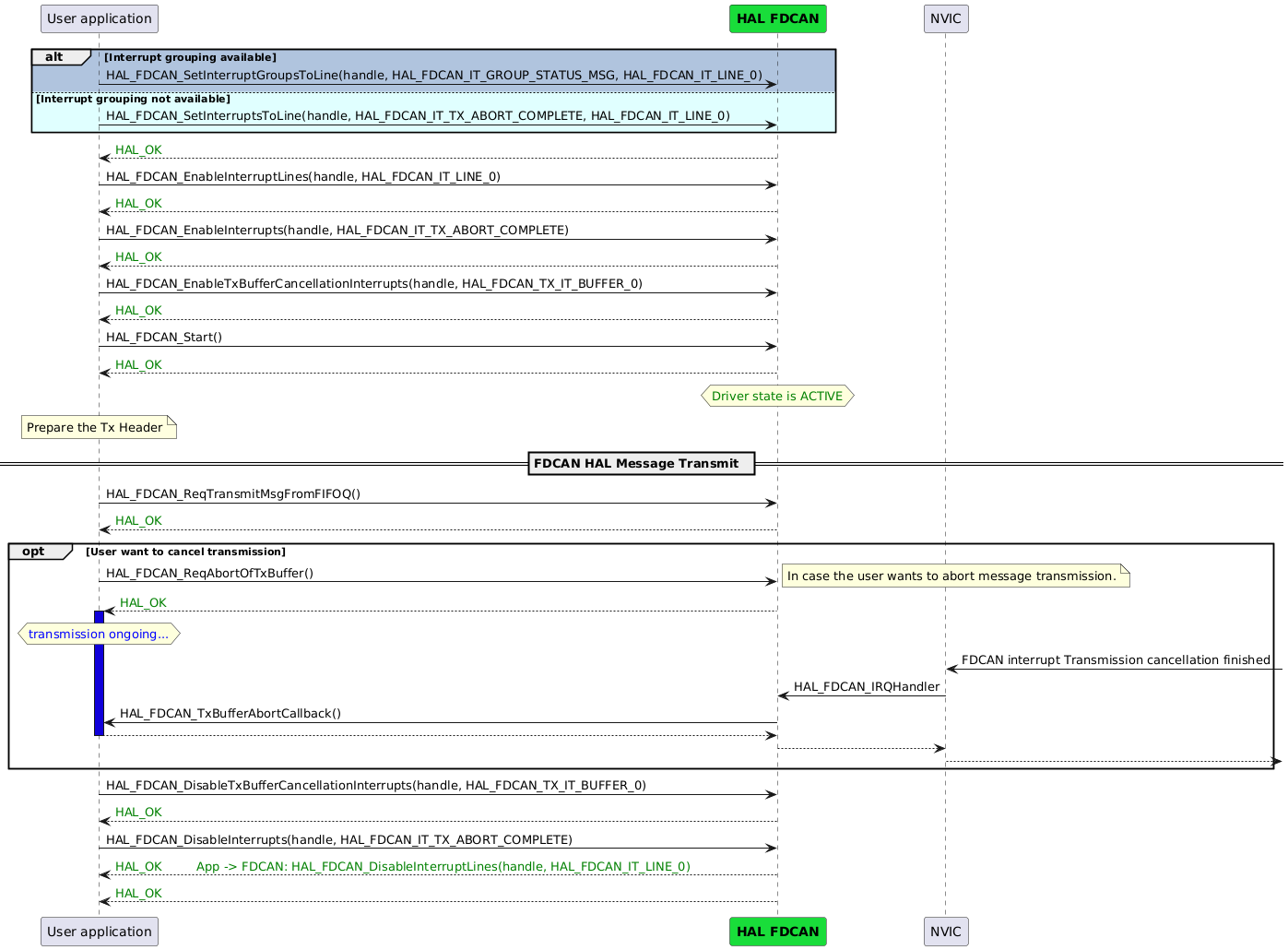
Code snippet 
|
HAL1 |
HAL2 |
|---|---|
/* if interrupt grouping available */
HAL_FDCAN_ConfigInterruptLines(&hfdcan, FDCAN_IT_GROUP_SMSG,
                                        FDCAN_INTERRUPT_LINE0);
/* else */
HAL_FDCAN_ConfigInterruptLines(&hfdcan, FDCAN_IT_TX_ABORT_COMPLETE,
                                        FDCAN_INTERRUPT_LINE0);

HAL_FDCAN_ActivateNotification(&hfdcan,
                               FDCAN_IT_TX_ABORT_COMPLETE, FDCAN_TX_BUFFER0);


HAL_FDCAN_Start(&hfdcan);


TxHeader.Identifier          = 0x111;
TxHeader.IdType              = FDCAN_STANDARD_ID;
TxHeader.TxFrameType         = FDCAN_DATA_FRAME;
TxHeader.DataLength          = FDCAN_DLC_BYTES_8;
TxHeader.ErrorStateIndicator = FDCAN_ESI_ACTIVE;
TxHeader.BitRateSwitch       = FDCAN_BRS_ON;
TxHeader.FDFormat            = FDCAN_FD_CAN;
TxHeader.TxEventFifoControl  = FDCAN_NO_TX_EVENTS;
TxHeader.MessageMarker       = 0;

HAL_FDCAN_AddMessageToTxFifoQ(&hfdcan, &TxHeader, &TxData[0]);
/* In case the user wants to abort message transmission */
HAL_FDCAN_AbortTxRequest(&hfdcan, FDCAN_TX_BUFFER0)
while (TransmissionAbortFlag == 0);

void HAL_FDCAN_TxBufferAbortCallback(FDCAN_HandleTypeDef *hfdcan, uint32_t BufferIndexes)
{
  TransmissionAbortFlag = 1U;
}
|
/* if interrupt grouping available*/
HAL_FDCAN_SetInterruptGroupsToLine(&hfdcan, HAL_FDCAN_IT_GROUP_STATUS_MSG,
                                            HAL_FDCAN_IT_LINE_0 );
/* else */
HAL_FDCAN_SetInterruptsToLine(&hfdcan, HAL_FDCAN_IT_TX_ABORT_COMPLETE,
                                      HAL_FDCAN_IT_LINE_0 );

HAL_FDCAN_EnableTxBufferCancellationInterrupts(&hfdcan, HAL_FDCAN_IT_TX_ABORT_BUFFER_0);

HAL_FDCAN_EnableInterrupts(&hfdcan,  HAL_FDCAN_IT_TX_ABORT_COMPLETE );
HAL_FDCAN_EnableInterruptLines(&hfdcan, HAL_FDCAN_IT_LINE_0);

HAL_FDCAN_Start(&hfdcan);

/* Prepare FDCAN transmit message header */
tx_element_header.b.identifier            = 0x111,
tx_element_header.b.identifier_type       = HAL_FDCAN_ID_STANDARD,
tx_element_header.b.frame_type            = HAL_FDCAN_FRAME_DATA,
tx_element_header.b.data_length           = HAL_FDCAN_DATA_LEN_CAN_FDCAN_8_BYTE,
tx_element_header.b.error_state_indicator = HAL_FDCAN_ERROR_STATE_IND_ACTIVE,
tx_element_header.b.bit_rate_switch       = HAL_FDCAN_BIT_RATE_SWITCH_ON,
tx_element_header.b.frame_format          = HAL_FDCAN_HEADER_FRAME_FORMAT_FD_CAN,
tx_element_header.b.event_fifo_control    = HAL_FDCAN_FIFO_STORE_TX_EVENTS,
tx_element_header.b.message_marker        = 0U,

HAL_FDCAN_ReqTransmitMsgFromFIFOQ(&hfdcan, &tx_element_header, pTxData);
/* In case the user wants to abort message transmission */
HAL_FDCAN_ReqAbortOfTxBuffer(&hfdcan, HAL_FDCAN_IT_TX_ABORT_BUFFER_0)
while (TransmissionAbortFlag == 0);

static void HAL_FDCAN_TxBufferAbortCallback(hal_fdcan_handle_t *hfdcan, uint32_t buffer_indexes)
{
  TransmissionAbortFlag = 1U;
}
|
Key changes 
HAL2 splits interrupt enablement into separate APIs for interrupt lines, interrupt sources, and Tx buffer cancellation interrupts.
HAL2 uses
HAL_FDCAN_ReqAbortOfTxBuffer()to request a Tx cancellation.
Related examples in HAL2 
No related example in HAL2.
Use case: Clock calibration (polling) 
The configuration and status monitoring of the FDCAN clock calibration have been significantly improved from HAL1 to HAL2:
Clock calibration configuration
In HAL1, the FDCAN clock calibration is configured using the single function
HAL_FDCAN_ConfigClockCalibration(), which accepts a configuration structure containing parameters such as time quanta per bit time, calibration field length, minimum oscillator clock periods, watchdog start value, clock calibration enable flag, and clock divider. When the clock calibration is disabled by settingClockCalibration = FDCAN_CLOCK_CALIBRATION_DISABLE, the clock divider specified in the configuration is used to adjust the FDCAN clock prescaler.In HAL2, the clock calibration configuration is modularized for greater flexibility and control. The function
HAL_FDCAN_CCU_SetClockRouting()selects the clock routing path, allowing the user to enable the clock calibration unit (e.g.,HAL_FDCAN_CCU_CLOCK_ROUTE_CALIBRATION) or bypass it (HAL_FDCAN_CCU_CLOCK_ROUTE_BYPASS). Calibration parameters are then set separately usingHAL_FDCAN_CCU_SetConfigCalibrationUnit(). When the clock calibration unit is bypassed, the FDCAN clock calibration is disabled, and the clock divider can be explicitly configured usingHAL_FDCAN_SetClockDivider()to set the clock prescaler.
Get clock calibration state
In HAL1, checking the FDCAN clock calibration status requires multiple steps: waiting for the calibration state change flag using
__HAL_FDCAN_GET_FLAG(), then retrieving the calibration state withHAL_FDCAN_GetClockCalibrationState(), followed by manually clearing the calibration state change flag using__HAL_FDCAN_CLEAR_FLAG().In HAL2, this process is streamlined into a single function,
HAL_FDCAN_CCU_GetCalibrationLevelAndClearFlag(), which reads the current calibration level and clears the calibration state change flag internally.
In both HAL1 and HAL2, when calibration is complete or the user wants to exit restricted mode, the user must call the appropriate function: in HAL1,
HAL_FDCAN_ExitRestrictedOperationMode(), and in HAL2,
HAL_FDCAN_DisableRestrictedOperationMode().
Sequence diagram 
![@startuml
participant App as "User Application"
participant "<font color=black><b>HAL FDCAN" as FDCAN #19DD3A
participant "FDCAN Hardware System" as FDCAN_HW
== FDCAN Initialization and Configuration ==
App -> FDCAN: HAL_FDCAN_Init(&hfdcan)
FDCAN --> App: <color green>HAL_OK
App -> FDCAN: HAL_FDCAN_ConfigClockCalibration(&hfdcan, &sCcuConfig)
FDCAN --> App: <color green>HAL_OK
== Configure Reception Filters ==
App -> FDCAN: HAL_FDCAN_ConfigFilter(&hfdcan, &sFilterConfig) [Calibration Filter]
note right
Configure at least one filter
with IsCalibrationMsg = 1
endnote
FDCAN --> App: <color green>HAL_OK
App-> FDCAN: HAL_FDCAN_Start()
App <-- FDCAN:<color green>HAL_OK
App -> FDCAN: HAL_FDCAN_IsRxBufferMessageAvailable(&hfdcan, FDCAN_RX_BUFFER0)
FDCAN_HW <- : FDCAN **First** Rx buffer new message
note right
First calibration Message available
endnote
FDCAN --> App: 1 (available)
loop Wait for calibration state change flag
App -> FDCAN: __HAL_FDCAN_GET_FLAG(FDCAN_FLAG_CALIB_STATE_CHANGED)
FDCAN --> App: 1 (flag set)
end
App -> FDCAN: HAL_FDCAN_GetClockCalibrationState(&hfdcan)
FDCAN_HW --> FDCAN_HW: Basic calibration done and state changed
hnote over FDCAN_HW
<font color=orange><b>BASIC_CALIBRATED</b>
end note
FDCAN --> App: <font color=orange>BASIC_CALIBRATED
App -> FDCAN: __HAL_FDCAN_CLEAR_FLAG(FDCAN_FLAG_CALIB_STATE_CHANGED)
FDCAN --> App: <color green>HAL_OK
FDCAN_HW <- : FDCAN **second** Rx buffer new message
note right
Second calibration Message available
endnote
FDCAN --> App: 1 (available)
loop Wait for calibration state change flag
App -> FDCAN: __HAL_FDCAN_GET_FLAG(FDCAN_FLAG_CALIB_STATE_CHANGED)
FDCAN --> App: 1 (flag set)
end
App -> FDCAN: HAL_FDCAN_GetClockCalibrationState(&hfdcan)
FDCAN_HW --> FDCAN_HW: Precision calibration done and state changed
hnote over FDCAN_HW
<font color=green><b>PRECISION_CALIBRATED</b>
end note
FDCAN --> App: <font color=green> PRECISION_CALIBRATED
== Exit Restricted Operation Mode ==
App -> FDCAN: HAL_FDCAN_ExitRestrictedOperationMode(&hfdcan)
hNote over FDCAN_HW: The FDCAN in <color green><b>Normal Operation Mode</b></color>
FDCAN --> App: <color green>HAL_OK
Note over App: The FDCAN is calibrated and ready to be used for communication.
@enduml](../../../../../_images/plantuml-22cb08751cb96fa1454af2fa77b12d9f9010d2be.png)
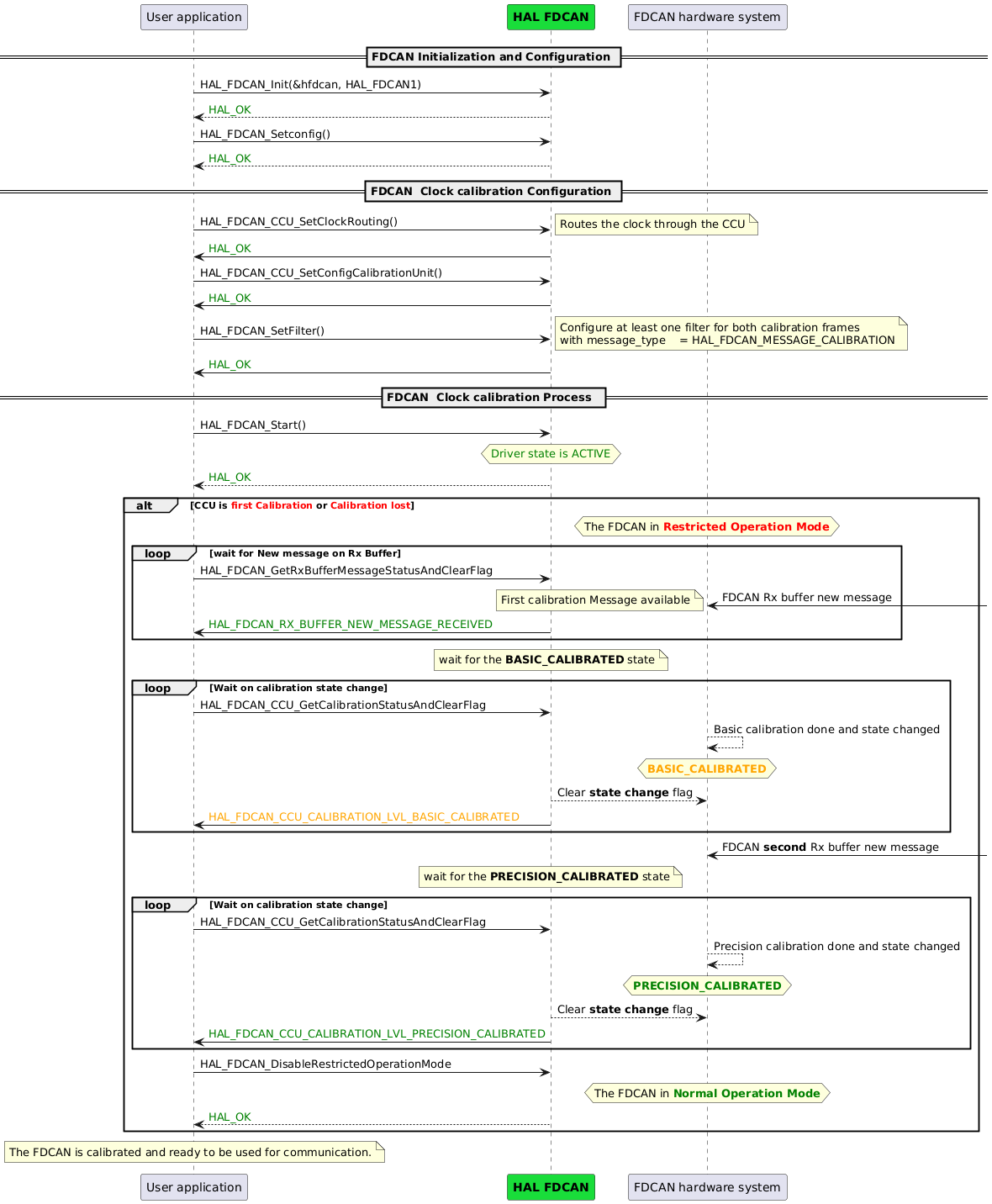
Code snippet 
|
HAL1 |
HAL2 |
|---|---|
hfdcan.Instance                = FDCAN1;
hfdcan.Init.FrameFormat        = FDCAN_FRAME_CLASSIC;
hfdcan.Init.Mode               = FDCAN_MODE_NORMAL;
hfdcan.Init.AutoRetransmission = DISABLE;
hfdcan.Init.TransmitPause      = DISABLE;
hfdcan.Init.ProtocolException  = ENABLE;


hfdcan.Init.NominalPrescaler     = 0x1;
hfdcan.Init.NominalTimeSeg1      = 0xF;
hfdcan.Init.NominalTimeSeg2      = 0x4;
hfdcan.Init.NominalSyncJumpWidth = 0x4;

hfdcan.Init.MessageRAMOffset    = 0;
hfdcan.Init.StdFiltersNbr       = 2;
hfdcan.Init.ExtFiltersNbr       = 0;
hfdcan.Init.RxFifo0ElmtsNbr     = 0;
hfdcan.Init.RxFifo1ElmtsNbr     = 0;
hfdcan.Init.RxBuffersNbr        = 2;
hfdcan.Init.RxBufferSize        = FDCAN_DATA_BYTES_8;
hfdcan.Init.TxEventsNbr         = 0;
hfdcan.Init.TxBuffersNbr        = 1;
hfdcan.Init.TxFifoQueueElmtsNbr = 0;
hfdcan.Init.TxElmtSize          = FDCAN_DATA_BYTES_8;
HAL_FDCAN_Init(&hfdcan);

sCcuConfig.ClockCalibration     = ENABLE;


sCcuConfig.MinOscClkPeriods     = 4;
sCcuConfig.CalFieldLength       = FDCAN_CALIB_FIELD_LENGTH_64;
sCcuConfig.TimeQuantaPerBitTime = 20;

HAL_FDCAN_ConfigClockCalibration(&hfdcan, &sCcuConfig);

sFilterConfig.IdType           = FDCAN_STANDARD_ID;
sFilterConfig.FilterIndex      = 0;
sFilterConfig.FilterType       = FDCAN_FILTER_DUAL;
sFilterConfig.FilterConfig     = FDCAN_FILTER_TO_RXBUFFER;
sFilterConfig.FilterID1        = 0x555;
sFilterConfig.RxBufferIndex    = 0;
sFilterConfig.IsCalibrationMsg = 1;

HAL_FDCAN_ConfigFilter(&hfdcan, &sFilterConfig);

HAL_FDCAN_Start(&hfdcan);

while(HAL_FDCAN_IsRxBufferMessageAvailable(&hfdcan, FDCAN_RX_BUFFER0) == 0);

while(__HAL_FDCAN_GET_FLAG(&hfdcan, FDCAN_FLAG_CALIB_STATE_CHANGED) == 0);
if(HAL_FDCAN_GetClockCalibrationState(&hfdcan) != FDCAN_CLOCK_BASIC_CALIBRATED)
{
  Error_Handler();
}
__HAL_FDCAN_CLEAR_FLAG(&hfdcan, FDCAN_FLAG_CALIB_STATE_CHANGED);

while(__HAL_FDCAN_GET_FLAG(&hfdcan, FDCAN_FLAG_CALIB_STATE_CHANGED) == 0);
if(HAL_FDCAN_GetClockCalibrationState(&hfdcan) != FDCAN_CLOCK_PRECISION_CALIBRATED)
{
  Error_Handler();
}

HAL_FDCAN_ExitRestrictedOperationMode(&hfdcan);
|
HAL_FDCAN_Init(&hfdcan, HAL_FDCAN1);
fdcan_config.frame_format        = HAL_FDCAN_FRAME_FORMAT_CLASSIC_CAN;
fdcan_config.mode                = HAL_FDCAN_MODE_NORMAL;
fdcan_config.auto_retransmission = HAL_FDCAN_AUTO_RETRANSMISSION_ENABLE;
fdcan_config.transmit_pause      = HAL_FDCAN_TRANSMIT_PAUSE_DISABLE;
fdcan_config.protocol_exception  = HAL_FDCAN_PROTOCOL_EXCEPTION_ENABLE;

hal_fdcan_nominal_bit_timing_t fdcan_nominal_bit_timing;
fdcan_nominal_bit_timing.nominal_prescaler  = 0x1;
fdcan_nominal_bit_timing.nominal_time_seg1  = 0xF;
fdcan_nominal_bit_timing.nominal_time_seg2  = 0x4;
fdcan_nominal_bit_timing.nominal_jump_width = 0x4;
fdcan_config.nominal_bit_timing             = fdcan_nominal_bit_timing;
fdcan_config.message_ram_offset             = 0;
fdcan_config.std_filters_nbr                = 2;
fdcan_config.ext_filters_nbr                = 0;
fdcan_config.rx_fifo0_elt_nbr               = 0;
fdcan_config.rx_fifo1_elt_nbr               = 0;
fdcan_config.rx_buffer_nbr                  = 2;
fdcan_config.rx_buffer_size                 = HAL_FDCAN_DATA_BYTES_8;
fdcan_config.tx_event_nbr                   = 0;
fdcan_config.tx_buffer_nbr                  = 1;
fdcan_config.tx_fifo_queue_elt_nbr          = 0;
fdcan_config.tx_fifo_queue_elt_size         = HAL_FDCAN_DATA_BYTES_8;
HAL_FDCAN_SetConfig(&hfdcan, &fdcan_config);

hal_fdcan_ccu_clock_route_t clock_route = HAL_FDCAN_CCU_CLOCK_ROUTE_CALIBRATION;
HAL_FDCAN_CCU_SetClockRouting(&hfdcan, clock_route);

ccu_config.min_osc_clk_periods          = 4;
ccu_config.calibration_field_length     = HAL_FDCAN_CCU_FIELD_LENGTH_64;
ccu_config.time_quanta_per_bit_time     = 20;

HAL_FDCAN_CCU_SetConfigCalibrationUnit(&hfdcan, &ccu_config);

filter_calibration.id_type         = HAL_FDCAN_ID_STANDARD,
filter_calibration.filter_index    = 0U,
filter_calibration.filter_type     = HAL_FDCAN_FILTER_TYPE_DUAL,
filter_calibration.filter_config   = HAL_FDCAN_FILTER_TO_RX_BUFFER,
filter_calibration.filter_id1      = 0x555,
filter_calibration.rx_buffer_index = HAL_FDCAN_RX_BUFFER0,
filter_calibration.message_type    = HAL_FDCAN_MESSAGE_CALIBRATION,

 HAL_FDCAN_SetFilter(&hfdcan, &filter_calibration);

HAL_FDCAN_Start(&hfdcan);

while(HAL_FDCAN_GetRxBufferMessageStatusAndClearFlag(&hfdcan, HAL_FDCAN_RX_BUFFER0) == 0);

if(HAL_FDCAN_CCU_GetCalibrationLevelAndClearFlag(&hfdcan, 10) != HAL_FDCAN_CCU_CALIBRATION_LEVEL_BASIC_CALIBRATED)
{
  Error_Handler();
}


if(HAL_FDCAN_CCU_GetCalibrationLevelAndClearFlag(&hfdcan, 10) != HAL_FDCAN_CCU_CALIBRATION_LEVEL_PRECISION_CALIBRATED)
{
  Error_Handler();
}


HAL_FDCAN_DisableRestrictedOperationMode(&hfdcan);
|
Key changes 
HAL2 modularizes clock calibration configuration with dedicated CCU routing and configuration APIs.
HAL2 streamlines calibration status monitoring with a single API that also clears the status flag.
Related examples in HAL2 
No related example in HAL2.
Use case: Clock calibration (interrupt) 
The main differences between HAL1 and HAL2 in handling FDCAN clock calibration interrupts are as follows:
Activate notifications
In HAL1, calibration interrupts are enabled using
HAL_FDCAN_ActivateNotification()with interruptsFDCAN_IT_CALIB_STATE_CHANGEDandFDCAN_IT_CALIB_WATCHDOG_EVENT.In HAL2, these interrupts are enabled using
HAL_FDCAN_CCU_EnableInterrupts(). This is enough since the clock calibration has its own dedicated interrupts line.
Interrupt handler
In HAL1, all interrupts are handled by
HAL_FDCAN_IRQHandler().In HAL2, line 0 and line 1 interrupts are handled by
HAL_FDCAN_IRQHandler(), while clock calibration interrupts are handled byHAL_FDCAN_CCU_IRQHandler().
Calibration callback
In HAL1, the
HAL_FDCAN_ClockCalibrationCallback()is triggered with specific flags (FDCAN_IT_CALIB_STATE_CHANGEDorFDCAN_IT_CALIB_WATCHDOG_EVENT) to indicate calibration state changes or watchdog events.In HAL2, two callbacks are provided:
HAL_FDCAN_CCU_CalibrationCallback()to indicate calibration state changes.HAL_FDCAN_CCU_CalibrationWatchdogCallback()to indicate that the watchdog expired before calibration completed.
Sequence diagram 
![@startuml
participant App as "User Application"
participant "<font color=black><b>HAL FDCAN" as FDCAN #19DD3A
participant "NVIC" as NVIC#AliceBlue
participant "FDCAN Hardware System" as FDCAN_HW
== FDCAN Clock calibration Configuration ==
App -> FDCAN: HAL_FDCAN_ConfigClockCalibration(&hfdcan, &sCcuConfig)
FDCAN -> FDCAN_HW: Setup Clock Calibration Unit (CCU)
FDCAN_HW --> FDCAN: CCU configured
FDCAN --> App: <color green>HAL_OK
== Configure Reception Filters and enable interrupt ==
App -> FDCAN: HAL_FDCAN_ConfigFilter(&hfdcan, &sFilterConfig) [Calibration Filter]
note right
Configure at least one filter for both calibration frames to enter the
BASIC_CALIBRATED and the PRECISION_CALIBRATED
with IsCalibrationMsg = 1
endnote
FDCAN --> App: <color green>HAL_OK
App -> FDCAN: HAL_FDCAN_ConfigInterruptLines(&hfdcan, FDCAN_IT_RX_BUFFER_NEW_MESSAGE \n , FDCAN_INTERRUPT_LINE0)
FDCAN --> App: <color green>HAL_OK
App -> FDCAN: HAL_FDCAN_ActivateNotification(&hfdcan, FDCAN_IT_RX_BUFFER_NEW_MESSAGE \n | FDCAN_IT_CALIB_STATE_CHANGED \n | FDCAN_IT_CALIB_WATCHDOG_EVENT, FDCAN_TX_BUFFER0)
FDCAN --> App: <color green>HAL_OK
== FDCAN Clock calibration Process ==
App -> FDCAN: HAL_FDCAN_Start(&hfdcan)
FDCAN --> App: <color green>HAL_OK
hNote over FDCAN_HW: The FDCAN in <color red><b>Restricted Operation Mode</b></color>
hnote over FDCAN_HW
<font color=red><b>BASIC_CALIBRATION or NOT_CALIBRATED</b>
end note
FDCAN_HW <- : FDCAN Rx buffer new calibration message
note left
The configured filter <index> accept the calibration message
end note
FDCAN_HW --> NVIC: Rx Buffer New Message interrupt \n **FDCAN_IT0_IRQ**
NVIC -> FDCAN: HAL_FDCAN_IRQHandler()
FDCAN -> App: HAL_FDCAN_RxBufferNewMessageCallback()
FDCAN <-- App:
NVIC <-- FDCAN:
FDCAN_HW <-- NVIC:
alt watchdog counter reaches zero before state changed
FDCAN_HW --> FDCAN_HW: Watchdog counter reaches zero \n before CCU state changed
FDCAN_HW-->NVIC: CCU watchdog event \n **FDCAN_CCU_IRQ**
NVIC ->FDCAN: HAL_FDCAN_IRQHandler()
hnote over FDCAN_HW
<font color=red><b>NOT_CALIBRATED</b>
end note
FDCAN -> App: HAL_FDCAN_ClockCalibrationCallback(&hfdcan, FDCAN_IT_CALIB_WATCHDOG_EVENT)
hNote over App:<font color=red><b>failed
else state changed before watchdog counter reaches zero
FDCAN_HW --> FDCAN_HW: CCU state changed before\nWatchdog counter reaches zero
FDCAN_HW-->NVIC: CCU state change event \n **FDCAN_CCU_IRQ**
NVIC ->FDCAN: HAL_FDCAN_IRQHandler()
FDCAN -> App: HAL_FDCAN_ClockCalibrationCallback(&hfdcan, FDCAN_IT_CALIB_STATE_CHANGED)
App --> FDCAN:
FDCAN --> NVIC:
hnote over FDCAN_HW
<font color=orange><b>BASIC_CALIBRATION</b>
end note
end
'Precision Calibration Process'
FDCAN_HW <- : FDCAN **second** Rx buffer new message\n(From quartz node) starts with at least "1010"
note left
The configured filter <index> accept the calibration message
end note
FDCAN_HW --> NVIC: Rx Buffer New Message interrupt \n **FDCAN_IT0_IRQ**
NVIC -> FDCAN: HAL_FDCAN_IRQHandler()
FDCAN -> App: HAL_FDCAN_RxBufferNewMessageCallback()
FDCAN <-- App:
NVIC <-- FDCAN:
FDCAN_HW <-- NVIC:
alt watchdog counter reaches zero before state changed
FDCAN_HW --> FDCAN_HW: Watchdog counter reaches zero \n before CCU state changed
FDCAN_HW-->NVIC: CCU watchdog event \n **FDCAN_CCU_IRQ**
NVIC ->FDCAN: HAL_FDCAN_IRQHandler()
hnote over FDCAN_HW
<font color=red><b>NOT_CALIBRATED</b>
end note
FDCAN -> App: HAL_FDCAN_ClockCalibrationCallback(&hfdcan, FDCAN_IT_CALIB_WATCHDOG_EVENT)
hNote over App:<font color=red><b>failed
else state changed before watchdog counter reaches zero
FDCAN_HW --> FDCAN_HW: CCU state changed before\nWatchdog counter reaches zero
FDCAN_HW-->NVIC: CCU state change event \n **FDCAN_CCU_IRQ**
NVIC ->FDCAN: HAL_FDCAN_IRQHandler()
hnote over FDCAN_HW
<font color=green><b>PRECISION_CALIBRATED</b>
end note
FDCAN -> App: HAL_FDCAN_ClockCalibrationCallback(&hfdcan, FDCAN_IT_CALIB_STATE_CHANGED)
hNote over App:<font color=green><b>Success
App -> FDCAN: HAL_FDCAN_ExitRestrictedOperationMode
hNote over FDCAN_HW: The FDCAN in <color green><b>Normal Operation Mode</b></color>
App <-- FDCAN:<color green>HAL_OK
end
Note over App: The FDCAN is calibrated and ready to be used for communication.
@enduml](../../../../../_images/plantuml-4b54292113fd2e3735740d556ae58f6893474689.png)
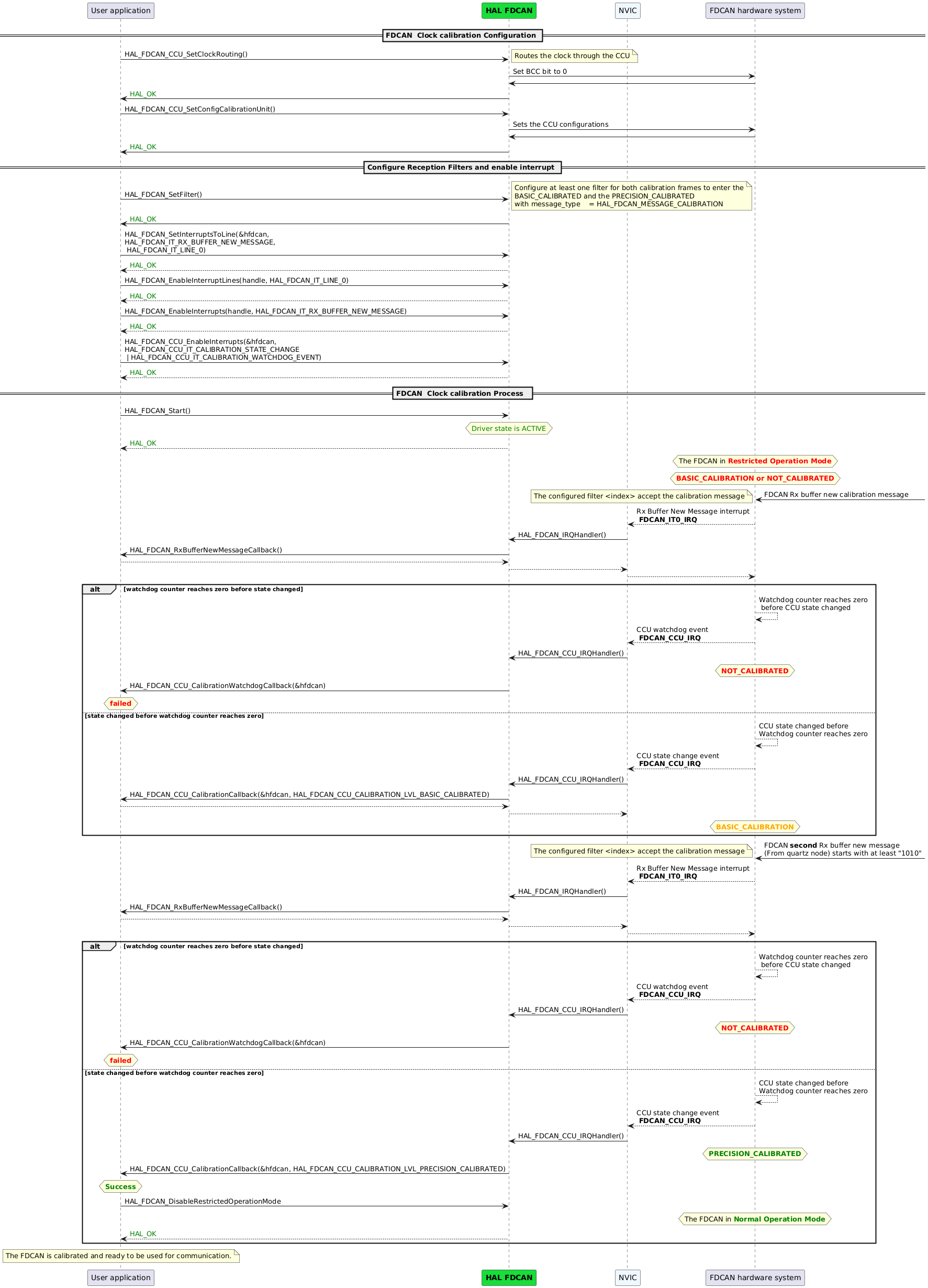
Code snippet 
|
HAL1 |
HAL2 |
|---|---|
HAL_FDCAN_Start(&hfdcan);

CcuConfig.ClockCalibration     = ENABLE;


CcuConfig.MinOscClkPeriods     = 4;
CcuConfig.CalFieldLength       = FDCAN_CALIB_FIELD_LENGTH_64;
CcuConfig.TimeQuantaPerBitTime = 20;
CcuConfig.WatchdogStartValue   = 40;

HAL_FDCAN_ConfigClockCalibration(&hfdcan, &CcuConfig);

HAL_FDCAN_ConfigInterruptLines(&hfdcan,
                               FDCAN_IT_RX_BUFFER_NEW_MESSAGE
                               FDCAN_INTERRUPT_LINE0);

HAL_FDCAN_ActivateNotification(&hfdcan,
                               FDCAN_IT_RX_BUFFER_NEW_MESSAGE
                               | FDCAN_IT_CALIB_STATE_CHANGED
                               | FDCAN_IT_CALIB_WATCHDOG_EVENT,
                                 FDCAN_TX_BUFFER0);
|
HAL_FDCAN_Start(&hfdcan);

hal_fdcan_ccu_clock_route_t clock_route = HAL_FDCAN_CCU_CLOCK_ROUTE_CALIBRATION;
HAL_FDCAN_CCU_SetClockRouting(&hfdcan, clock_route);

ccu_config.min_osc_clk_periods          = 4;
ccu_config.calibration_field_length     = HAL_FDCAN_CCU_FIELD_LENGTH_64;
ccu_config.time_quanta_per_bit_time     = 20;
ccu_config.watchdog_start_value         = 40;

HAL_FDCAN_CCU_SetConfigCalibrationUnit(&hfdcan, &ccu_config);

HAL_FDCAN_SetInterruptsToLine(&hfdcan,
               HAL_FDCAN_IT_RX_BUFFER_NEW_MESSAGE
               , HAL_FDCAN_IT_LINE_0);

HAL_FDCAN_EnableInterruptLines(&hfdcan, HAL_FDCAN_IT_LINE_0);

HAL_FDCAN_EnableInterrupts(&hfdcan,
                           HAL_FDCAN_IT_RX_BUFFER_NEW_MESSAGE
                           );
HAL_FDCAN_CCU_EnableInterrupts(&hfdcan,
                               HAL_FDCAN_CCU_IT_CALIBRATION_STATE_CHANGE
                             | HAL_FDCAN_CCU_IT_CALIBRATION_WATCHDOG_EVENT
                               );
|
Key changes 
HAL2 manages clock calibration interrupts through dedicated CCU APIs.
HAL2 introduces a dedicated IRQ handler for CCU interrupts.
Related examples in HAL2 
|
Example Name |
Description |
|---|---|
|
example_hal_fdcan_clock_calibration_controller/example_hal_fdcan_clock_calibration_responder |
This example shows how to achieve clock calibration on an FDCAN unit. |