
 HAL2 Migrator

Getting started 
The migration material 
To accelerate the HAL1-to-HAL2 migration journey for a given application, the following materials and tools are provided:
HAL1 automatic detection script (HAL1 automatic detection script):
Scan application files: the script scans the user’s application files and detects all HAL1 APIs, including define statements, types, functions, and macros.
Log and report: the script logs and reports each detected HAL1 API, providing the corresponding section in the HAL1-to-HAL2 migration documentation. This documentation explains how to migrate each API based on its usage and scenario.
HAL1-to-HAL2 migration user guide: (HAL1-to-HAL2 driver migration)
HAL2 architecture concepts: this documentation explains the architectural concepts behind the changes from HAL1 to HAL2.
Driver-specific migration rules: for each HAL and LL driver, an exhaustive list of HAL1 APIs is provided, along with the required rules for migrating them to HAL2 successfully. The documents also include a set of code snippets demonstrating how to transition from HAL1 to HAL2. Users can copy these snippets into the target application, enabling a quick and efficient migration.
Concrete applicative use cases: for each HAL or LL driver, a set of concrete application use cases is described, providing the equivalence between HAL1 and HAL2 APIs with explanations.
Migration example (Migration example):
A step-by-step example of the migration of HAL1 drivers to HAL2 drivers using a real project. The example demonstrates how to use the migration material in practice.
The example includes the necessary IDE configuration update and demonstrates the use of STM32CubeMX2 to accelerate the IDE configuration and HAL driver initialization sequence migration.
HAL migration checklist (link): allows users to track their progress and verify that all steps of the migration process are completed successfully.
Note
Using STM32CubeMX2 for initialization sequences and IDE project settings : the recommended migration journey uses STM32CubeMX2 for application code sequences related to initialization. It generates the required HAL2 initialization sequences, including the target peripherals, and the clock, NVIC, and GPIO services needed by these peripherals. STM32CubeMX2 is also used as a reference for HAL1-to-HAL2 changes made through the IDE, such as include paths and pre-processor settings.
The migration journey 
The recommended migration journey uses the various migration materials shown in the sequence below for HAL1-to-HAL2 user application migration.
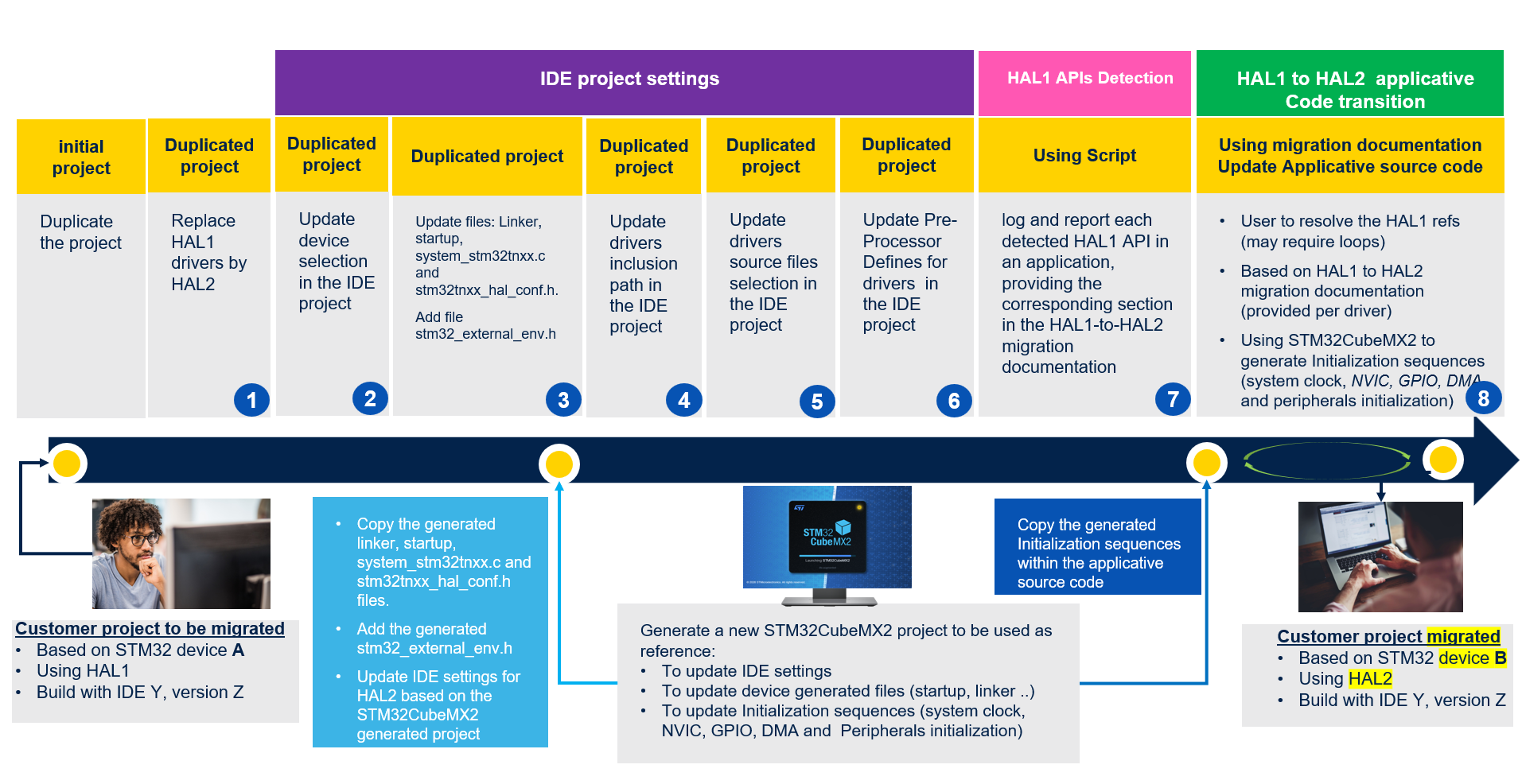
The illustration shows the following steps:
Duplicate the project and replace the HAL1 drivers with the equivalent HAL2 drivers.
In the IDE, select the target device.
Update the linker and startup files.
Update the inclusion path to accommodate the HAL2 driver location.
Update driver source file selection in the IDE to the HAL2 source files.
Update the pre-processor define statements based on the HAL2 requirements.
Use the automatic HAL1 API detection script to identify and report all HAL1 references in the application code. The script logs and reports each detected API, and provides the corresponding section in the HAL1 to HAL2 migration documentation. It also includes a stubbing feature to delimit the encountered HAL1 APIs in the application code by using a dedicated compilation define statement. This enables the application to compile without errors, enabling a smoother and more controlled migration process.
Use the script logs and the HAL1-to-HAL2 migration documentation to migrate the drivers from HAL1 to HAL2. Resolving HAL1 references may require loops. Use STM32CubeMX2 to generate initialization sequences, including that of the system clock, NVIC, and GPIO services needed by the peripherals.
To accelerate the IDE project updates and the migration of the application code related to the HAL2 initialization sequence, use STM32CubeMX2 to generate a new project with the IDE settings, linker, startup files, required HAL driver files, and initialization source code for the given peripherals. The output of this STM32CubeMX2 project can be used to update the various IDE settings, the HAL configuration header file, and the initialization source code of the project to be migrated.
Note
For more information on the STM32Cube HAL2, refer to the STM32Cube embedded software.