
 STM32CubeMX2

NVIC 
The NVIC view, illustrated in NVIC view, allows users to manage interrupts. It is accessible from the Peripherals view.
Search and filter (1): Provides search and filter options to locate specific interrupts by acronym or description.
Display options (2): Filters the view to display all interrupts, exceptions, or peripherals.
Reset all interrupts (3): Resets the NVIC configuration to its default state, discarding any changes.
Priority group selection (4): A dropdown menu for selecting the priority group.
Configuration access (5): Opens the peripheral configuration for the selected interrupt in a new tab.
Update preemption priority and subpriority (6): Modifies the preemption priority and subpriority values directly in the table.
Columns table settings (7): Customizes the columns displayed in the table view, enabling, or disabling specific columns as needed.
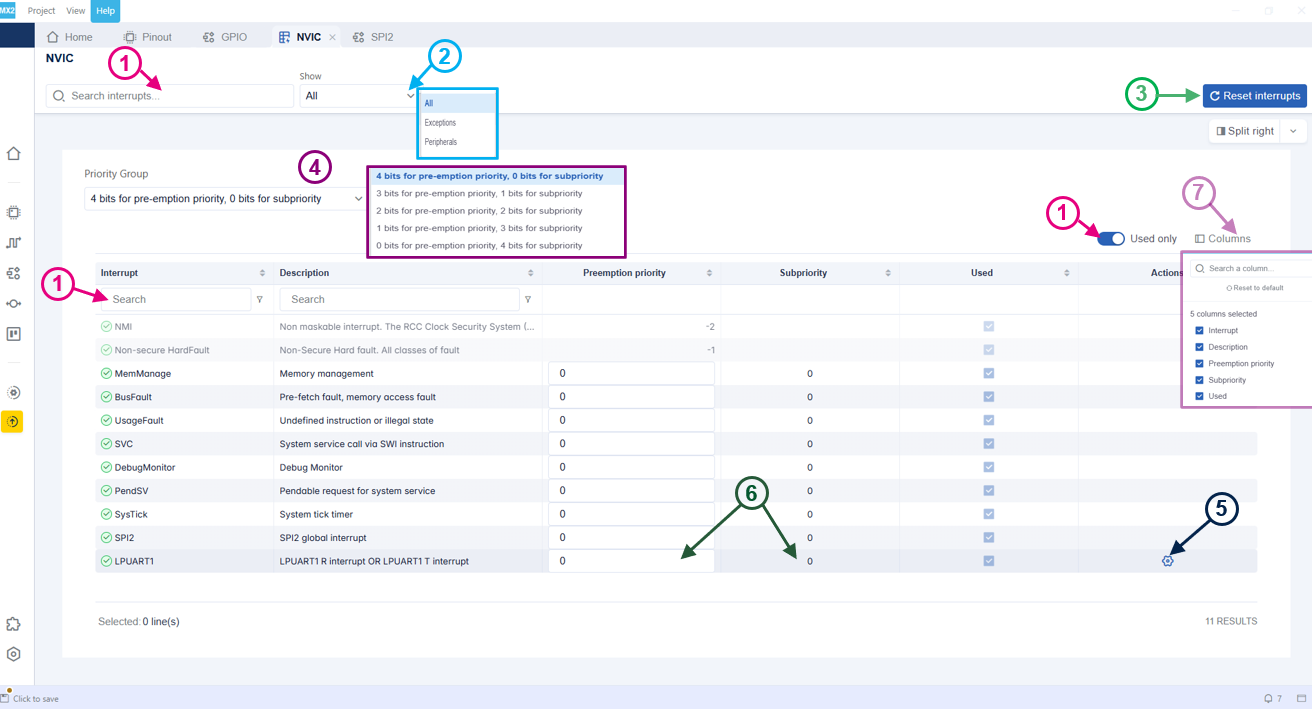
NVIC view 