
 STM32CubeMX2

Pack manager 
This panel enables users to manage software packs, which are essential for developing applications with different STM32 microcontrollers.
Pack manager access (1): Access the pack manager from the left bar to view and manage available software packs.
Search and filter (2): Use the top section of the panel to search for specific packs and filter them by various criteria.
Pack management (3.1): Use the Action column to install, update, or remove packs. The Status column indicates if a pack is Not installed, Up to date,, or To be updated.
Pack management (3.2): The Compatible column indicates if a pack is compatible with the current version of STM32CubeMX2.
Detail view toggle (4): Use the details view to display additional information about each pack, such as description, release version, and release date.
Local pack installation (5): Use this button to browse and select a software pack from local storage for installation.
Refresh button (6): Use this button to update the list of available software packs.
Columns (7): Use this button to update the list of visible columns.
Access to Licenses (8): Use this button to view all licenses from all packs before downloading them.
Split (9): Use this button to split the tab into two separate views for better visibility.
Pagination controls (10): Use pagination controls to navigate through different pages.
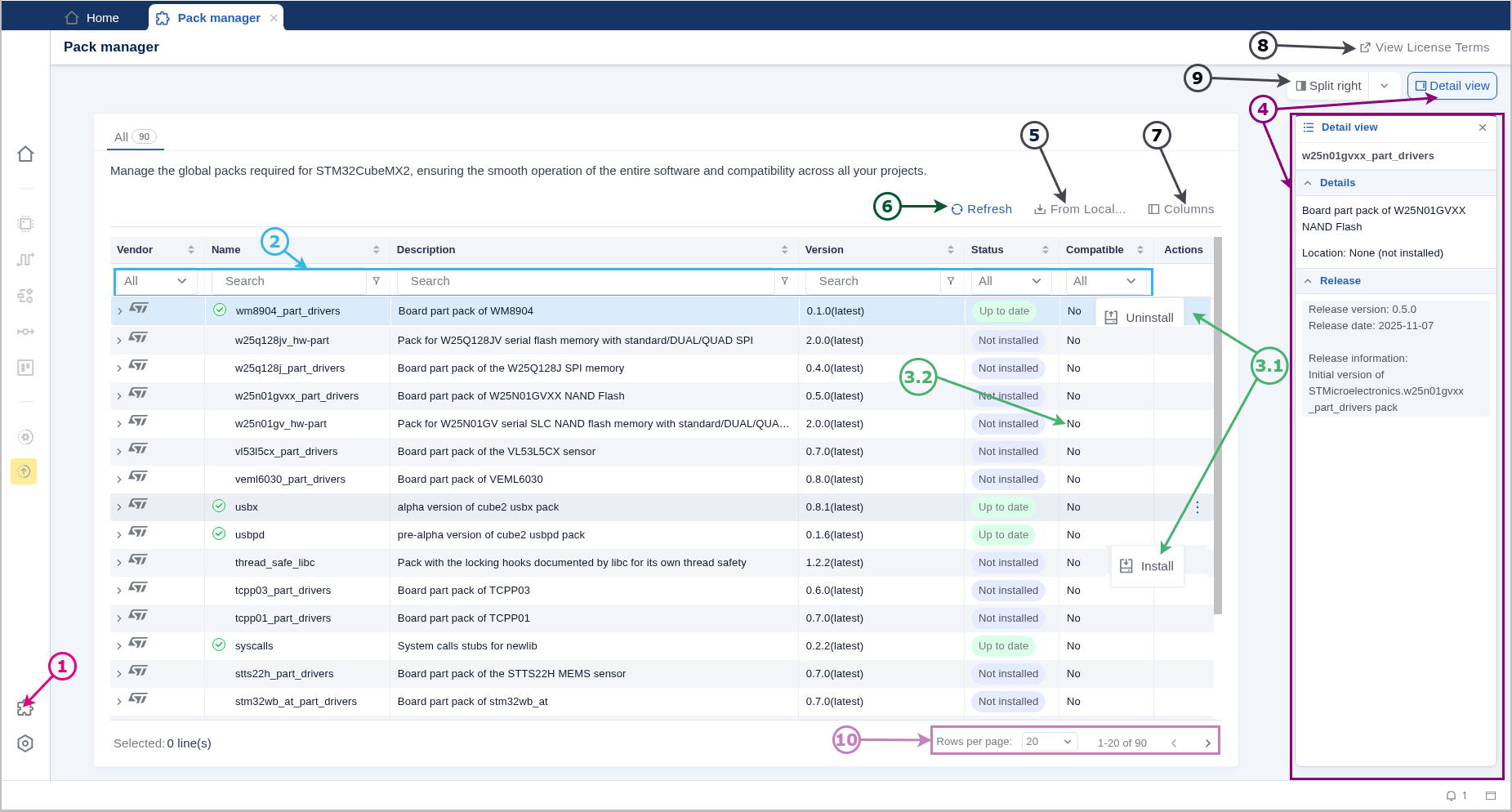
Pack manager panel 