
 STM32CubeProgrammer

I2C connection 
Target configuration panel 
This is the first panel to look at before connecting to a target. It allows the user to select the target interface, either the debug interface using an ST-LINK or J-Link debug probe, or the bootloader interface over UART, USB, SPI, CAN, or I2C.
With the refresh button, the user can check the available interfaces connected to the PC. If this button is pressed while the ST-LINK or J-Link interface is selected, the tool checks the connected ST-LINK or J-Link probes and lists them in the Serial numbers combo box. If the UART interface is selected, it checks the available communication ports of the PC and lists them in the Port combo box. If the USB interface is selected, it checks the USB devices in DFU mode connected to the PC and lists them in the Port combo box. Each interface has its own settings to configure before connection.
I2C settings 
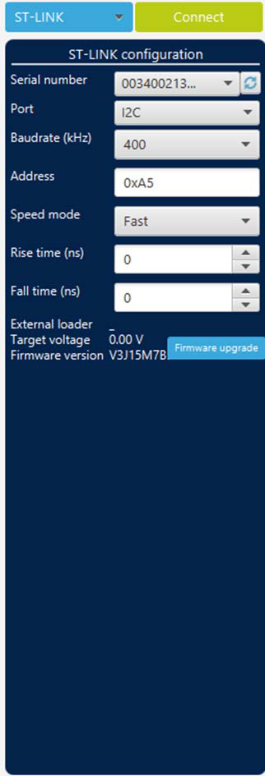
Fig. 162 I2C configuration panel 
Serial number: this field contains the serial numbers of all connected ST-LINK-V3 probes when using the I2C bootloader.
Port: selects the I2C devices connected to the PC. You can use the refresh button to recheck the available devices.
Baudrate: selects the I2C baud rate.
Address: adds the address of the slave bootloader in hexadecimal format.
Speed mode: selects the transmission speed mode, Standard or Fast.
Rise time: choose values according to the speed mode,
0-1000for Standard and0-300for Fast.Fall time: choose values according to the speed mode,
0-300for Standard and0-400for Fast.
Connect command 
-c,


            --connect
Description: Establishes the connection to the device. This command allows the host to open the chosen device port (UART/USB/JTAG/SWD/JLINK/SPI/CAN/I2C).
Syntax:
-c port=<Portname> [noinit=<noinit_bit>] [options]
port=<Portname>: Interface identifier, for exampleCOMxon Windows,/dev/ttySxon Linux,usbxfor USB interface, andSPI,I2C, orCANfor the corresponding interfaces.[noinit=<noinit_bit>]: Sets No Init bits, value in{0, 1}, default0.noinit=1can be used if a previous connection is already active.
I2C options 
[add=<ownadd>]: Slave address in hexadecimal format.
Note
The I2C address option must always be provided, otherwise the connection is not established.
Example using I2C 
STM32_Programmer_CLI -c port=I2C add=0x38 br=400 sm=fast
In the connect command:
The
addparameter changes from one device to another. Refer to AN2606 to determine the correct value. In this case, the STM32F42xxx bootloader address is0x38.The
brbaudrate parameter depends directly on thesmspeed mode parameter. For example, ifsm = standard, the baudrate does not support the value400.
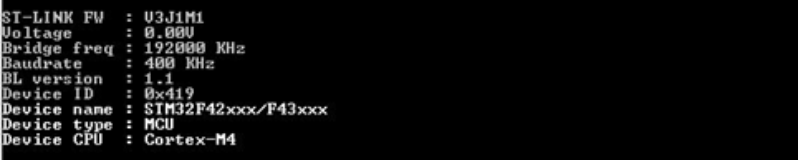
Fig. 163 Connect operation using I2C port 
Note
For each I2C connection operation, the address parameter is mandatory. Not all devices implement this feature. Make sure that the target device supports an I2C bootloader.
There are other parameters used with the I2C port connection that have default values, while some others require specific values. See the help menu of the tool for more information.