
 STM32CubeProgrammer

UART connection 
Target configuration panel 
This is the first panel to look at before connecting to a target. It allows the user to select the target interface, either the debug interface using an ST-LINK or J-Link debug probe, or the bootloader interface over UART, USB, SPI, CAN, or I2C.
With the refresh button, the user can check the available interfaces connected to the PC. If this button is pressed while the ST-LINK or J-Link interface is selected, the tool checks the connected ST-LINK or J-Link probes and lists them in the Serial numbers combo box. If the UART interface is selected, it checks the available communication ports of the PC and lists them in the Port combo box. If the USB interface is selected, it checks the USB devices in DFU mode connected to the PC and lists them in the Port combo box. Each interface has its own settings to configure before connection.
UART settings 
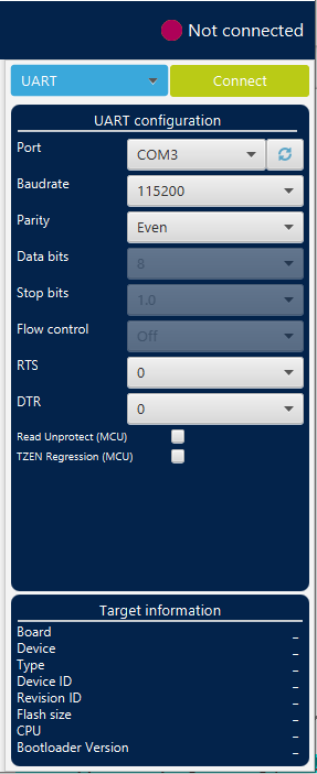
Fig. 164 UART configuration panel 
Port: selects the COM port to which the target STM32 is connected. Use the refresh button to recheck the available COM ports on the PC.
Note
The STM32 must boot in bootloader mode using boot pins and or option bits. Refer to AN2606, STM32 microcontroller system memory boot mode, available on www.st.com , for more information about the STM32 bootloader.
Baudrate: selects the UART baud rate.
Parity: selects the parity, even, odd, or none. It must be even for STM32 devices.
Data bits: must always be
8. Only 8-bit data is supported by STM32.Stop bits: must always be
1. Only 1-bit stop is supported by STM32.Flow control: must always be off.
RTS (request to send): sets the COM RTS pin to either high or low level.
DTR (data terminal ready): sets the COM DTR pin to either high or low level.
Connect command 
-c,


            --connect
Description: Establishes the connection to the device. This command allows the host to open the chosen device port (UART/USB/JTAG/SWD/JLINK/SPI/CAN/I2C).
Syntax:
-c port=<Portname> [noinit=<noinit_bit>] [options]
port=<Portname>: Interface identifier, for exampleCOMxon Windows,/dev/ttySxon Linux,usbxfor USB interface, andSPI,I2C, orCANfor the corresponding interfaces.[noinit=<noinit_bit>]: Sets No Init bits, value in{0, 1}, default0.noinit=1can be used if a previous connection is already active.
Using UART 
./STM32_Programmer.sh -c port=/dev/ttyS0 br=115200

Fig. 165 Connect operation using RS232 
STM32CubeProgrammer provides the possibility to configure RTS and DTR pins:
RTS: used as follows:
rts=lowDTR: used as follows:
dtr=high
Example:
STM32_Programmer_CLI.exe -c port=COM27 dtr=high
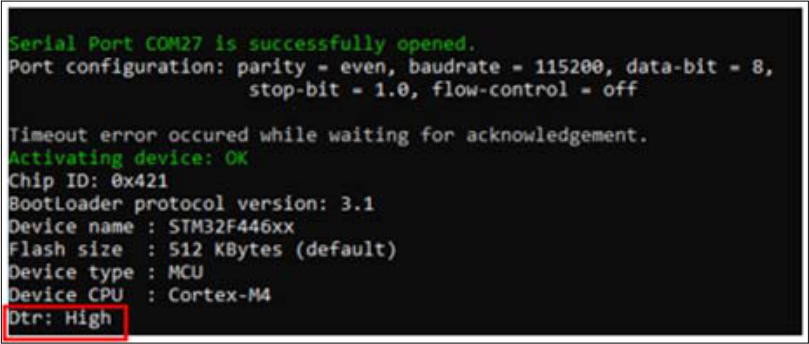
Fig. 166 Enabling COM DTR pin 