HAL DAC Use Cases

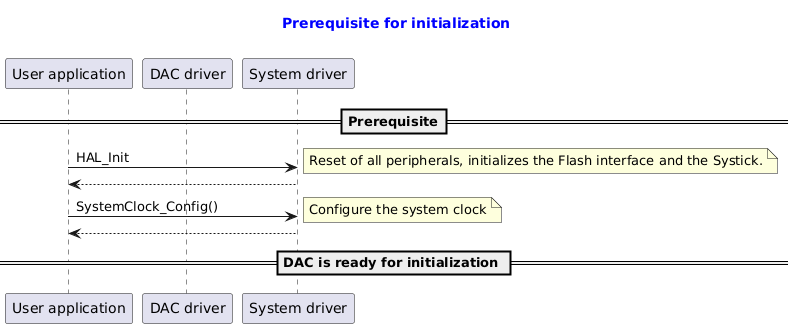
Prerequisite

@startuml

title
  <font color=blue> Prerequisite for initialization

end title

participant "User application" as user
participant "DAC driver"       as dac
participant "System driver"    as system

==Prerequisite==
user -> system : HAL_Init
note right: Reset of all peripherals, initializes the Flash interface and the Systick.
system --> user
user -> system : SystemClock_Config()
note right: Configure the system clock
system --> user
== DAC is ready for initialization ==

@enduml

DAC Initialization

@startuml

title
  <font color=blue> DAC driver initialization

end title

' Fix order of each column
participant "User application" as user
participant "DAC driver"       as dac
participant "System driver"    as system

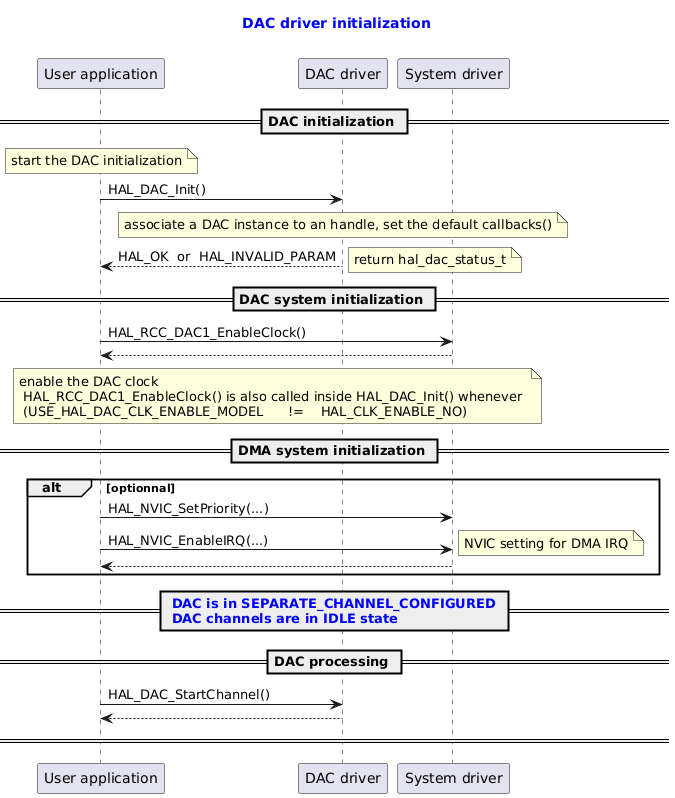
== DAC initialization ==
note  over user: start the DAC initialization
user -> dac : HAL_DAC_Init()
note over dac : associate a DAC instance to an handle, set the default callbacks()

dac --> user : HAL_OK  or  HAL_INVALID_PARAM
note right: return hal_dac_status_t

== DAC system initialization ==
user -> system : HAL_RCC_DAC1_EnableClock()
system --> user
note over user, system: enable the DAC clock\n HAL_RCC_DAC1_EnableClock() is also called inside HAL_DAC_Init() whenever \n (USE_HAL_DAC_CLK_ENABLE_MODEL \t != \t HAL_CLK_ENABLE_NO)

== DMA system initialization ==
alt optionnal
user -> system : HAL_NVIC_SetPriority(...)
user -> system : HAL_NVIC_EnableIRQ(...)
note right: NVIC setting for DMA IRQ
system --> user
end

== <font color=blue> DAC is in SEPARATE_CHANNEL_CONFIGURED \n<font color=blue> DAC channels are in IDLE state ==

== DAC processing ==
user -> dac : HAL_DAC_StartChannel()
dac --> user
== ==
@enduml

Called functions:

DAC Deinitialization Minimal Sequence

@startuml

title
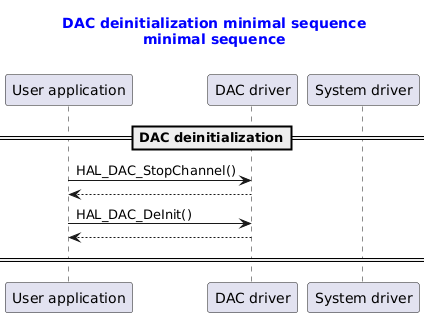
  <font color=blue> DAC deinitialization minimal sequence
  <font color=blue> minimal sequence

end title


participant "User application" as user
participant "DAC driver"       as dac
participant "System driver"    as system

==DAC deinitialization==
user -> dac : HAL_DAC_StopChannel()
dac --> user
user -> dac : HAL_DAC_DeInit()
dac --> user
== ==

@enduml

Called functions:

DAC Deinitialization Full Sequence

@startuml

title
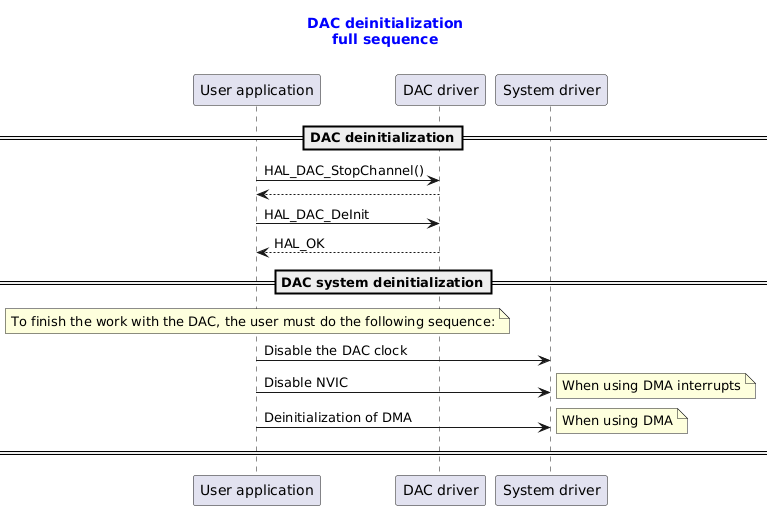
  <font color=blue> DAC deinitialization
  <font color=blue> full sequence

end title

participant "User application" as user
participant "DAC driver"       as dac
participant "System driver"    as system

==DAC deinitialization==
user -> dac : HAL_DAC_StopChannel()
dac  --> user
user -> dac : HAL_DAC_DeInit
user <-- dac : HAL_OK

==DAC system deinitialization==
note over user : To finish the work with the DAC, the user must do the following sequence:

user -> system : Disable the DAC clock
user -> system : Disable NVIC
note right : When using DMA interrupts
user -> system : Deinitialization of DMA
note right : When using DMA
== ==

@enduml

Called functions:

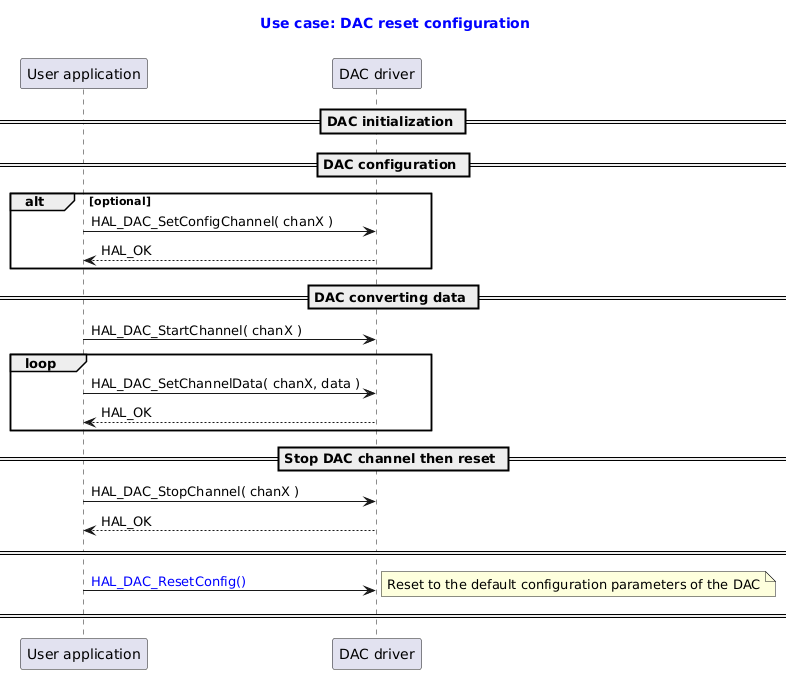
DAC Reset Configuration

@startuml

title
  <font color=blue> Use case: DAC reset configuration

end title

participant "User application" as user
participant "DAC driver" as dac


== DAC initialization ==
== DAC configuration ==
alt optional
user -> dac : HAL_DAC_SetConfigChannel( chanX )
dac --> user: HAL_OK
end
== DAC converting data ==

user -> dac : HAL_DAC_StartChannel( chanX )

loop
user -> dac : HAL_DAC_SetChannelData( chanX, data )
dac --> user : HAL_OK
end


== Stop DAC channel then reset ==
user -> dac : HAL_DAC_StopChannel( chanX )
dac --> user : HAL_OK
== ==

user -> dac : <font color=blue>HAL_DAC_ResetConfig()
note right:  Reset to the default configuration parameters of the DAC
== ==
@enduml

Called functions:

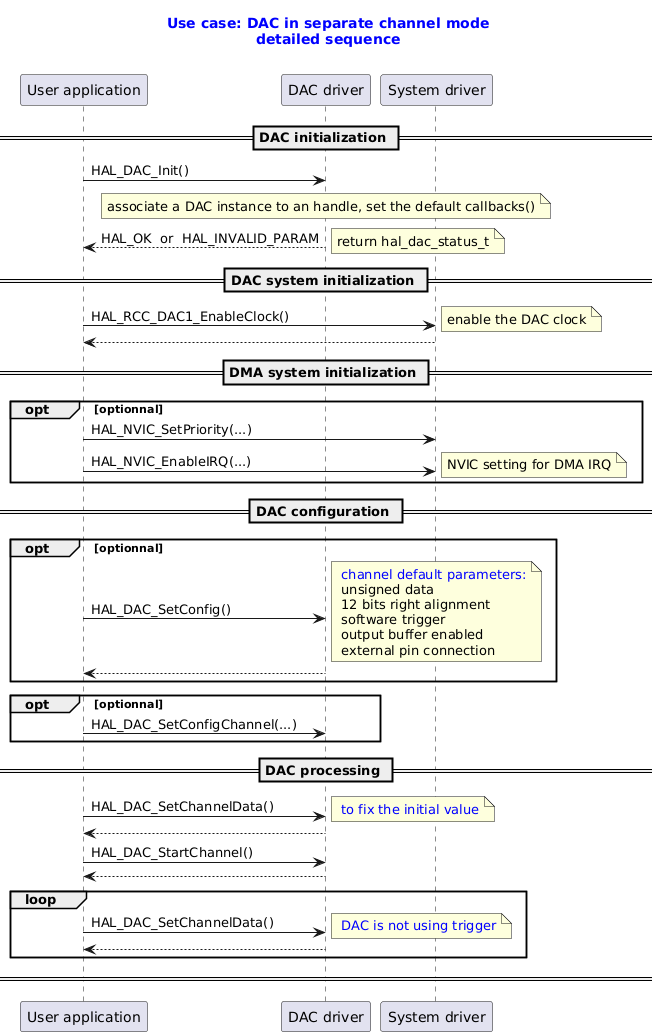
DAC Separate Channel Mode

@startuml

title
  <font color=blue> Use case: DAC in separate channel mode
  <font color=blue> detailed sequence

end title

' Fix order of each column
participant "User application" as user
participant "DAC driver"       as dac
participant "System driver"    as system

== DAC initialization ==
user -> dac : HAL_DAC_Init()
note over dac : associate a DAC instance to an handle, set the default callbacks()

dac --> user : HAL_OK  or  HAL_INVALID_PARAM
note right: return hal_dac_status_t

== DAC system initialization ==
user -> system : HAL_RCC_DAC1_EnableClock()
note right: enable the DAC clock
system --> user

== DMA system initialization ==
opt optionnal
user -> system : HAL_NVIC_SetPriority(...)
user -> system : HAL_NVIC_EnableIRQ(...)
note right: NVIC setting for DMA IRQ

end

== DAC configuration ==
opt optionnal
user -> dac : HAL_DAC_SetConfig()
note right: <font color=blue> channel default parameters:\n unsigned data \n 12 bits right alignment \n software trigger \n output buffer enabled \n external pin connection
dac --> user

end
opt optionnal
user -> dac : HAL_DAC_SetConfigChannel(...)

end

== DAC processing ==
user ->dac : HAL_DAC_SetChannelData()
note right: <font color=blue> to fix the initial value
dac --> user
user -> dac : HAL_DAC_StartChannel()
dac --> user
loop
user ->dac : HAL_DAC_SetChannelData()
note right: <font color=blue> DAC is not using trigger
dac --> user
end
== ==

@enduml

Called functions:

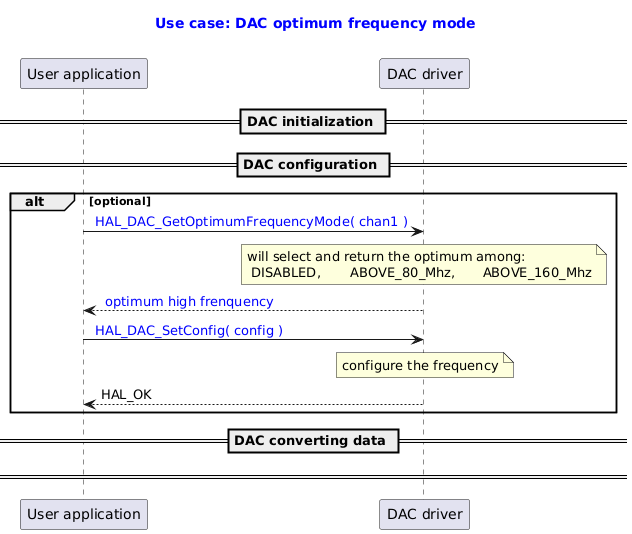
DAC Optimum Frequency Mode

@startuml

title
  <font color=blue> Use case: DAC optimum frequency mode

end title

participant "User application" as user
participant "DAC driver" as dac


== DAC initialization ==
== DAC configuration ==
alt optional
user -> dac : <font color=blue> HAL_DAC_GetOptimumFrequencyMode( chan1 )
note over dac: will select and return the optimum among: \n DISABLED, \t ABOVE_80_Mhz, \t ABOVE_160_Mhz
dac --> user: <font color=blue> optimum high frenquency

user -> dac : <font color=blue> HAL_DAC_SetConfig( config )
note over dac: configure the frequency
dac --> user : HAL_OK

end
== DAC converting data ==
== ==

@enduml

Called functions:

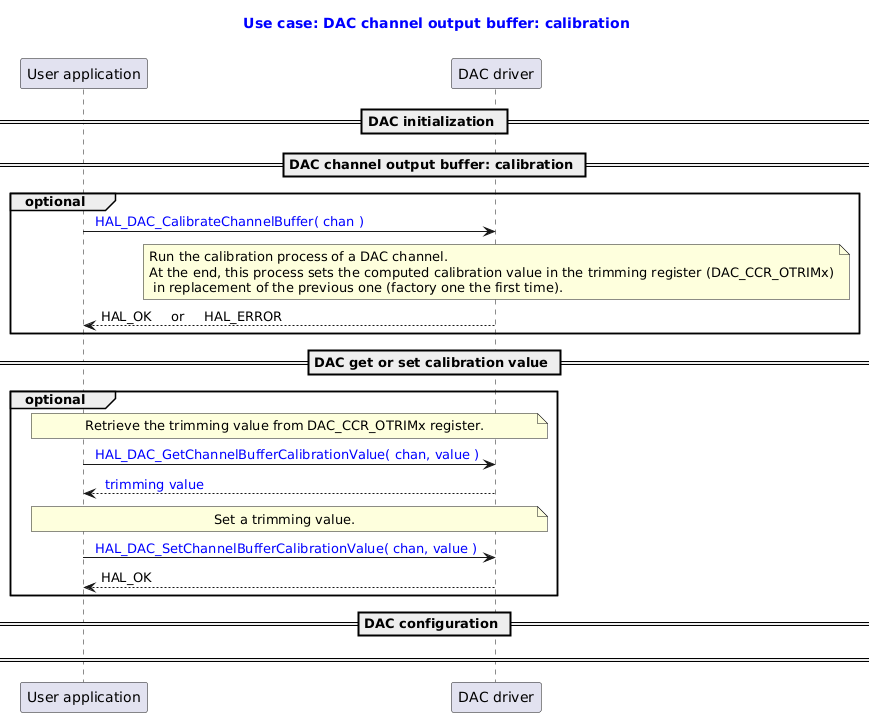
DAC Output Buffer Calibration

@startuml

title
  <font color=blue> Use case: DAC channel output buffer: calibration

end title

participant "User application" as user
participant "DAC driver" as dac


== DAC initialization ==
== DAC channel output buffer: calibration ==
group optional
user -> dac : <font color=blue> HAL_DAC_CalibrateChannelBuffer( chan )
note over dac: Run the calibration process of a DAC channel. \nAt the end, this process sets the computed calibration value in the trimming register (DAC_CCR_OTRIMx)\n in replacement of the previous one (factory one the first time).
dac --> user: HAL_OK  \t or \t HAL_ERROR
end

== DAC get or set calibration value ==

group optional
note over user, dac: Retrieve the trimming value from DAC_CCR_OTRIMx register.
user -> dac : <font color=blue> HAL_DAC_GetChannelBufferCalibrationValue( chan, value )
dac --> user : <font color=blue> trimming value

note over user, dac: Set a trimming value.

user -> dac : <font color=blue> HAL_DAC_SetChannelBufferCalibrationValue( chan, value )
dac --> user : HAL_OK
end

== DAC configuration ==
== ==

@enduml

Called functions:

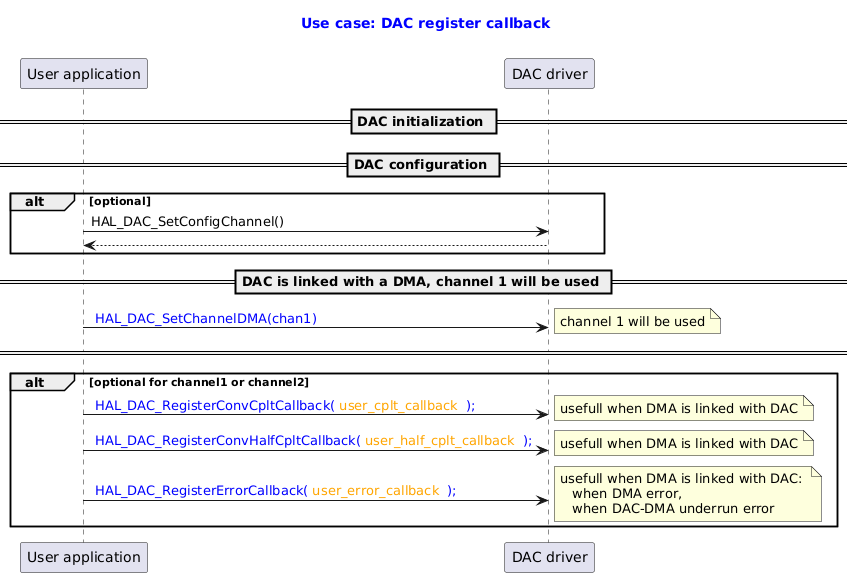
DAC Register Callback

@startuml

title
  <font color=blue> Use case: DAC register callback

end title

participant "User application" as user
participant "DAC driver" as dac


== DAC initialization ==

== DAC configuration ==
alt optional
user -> dac : HAL_DAC_SetConfigChannel()
dac --> user
end

== DAC is linked with a DMA, channel 1 will be used ==
user -> dac : <font color=blue> HAL_DAC_SetChannelDMA(chan1)
note right: channel 1 will be used

== ==

alt optional for channel1 or channel2
user -> dac : <font color=blue> HAL_DAC_RegisterConvCpltCallback(<font color=orange> user_cplt_callback <font color=blue> );
note right:  usefull when DMA is linked with DAC
user -> dac : <font color=blue> HAL_DAC_RegisterConvHalfCpltCallback(<font color=orange> user_half_cplt_callback <font color=blue> );
note right:  usefull when DMA is linked with DAC
user -> dac : <font color=blue> HAL_DAC_RegisterErrorCallback(<font color=orange> user_error_callback <font color=blue> );
note right:  usefull when DMA is linked with DAC: \n   when DMA error, \n   when DAC-DMA underrun error

end

@enduml

Called functions:

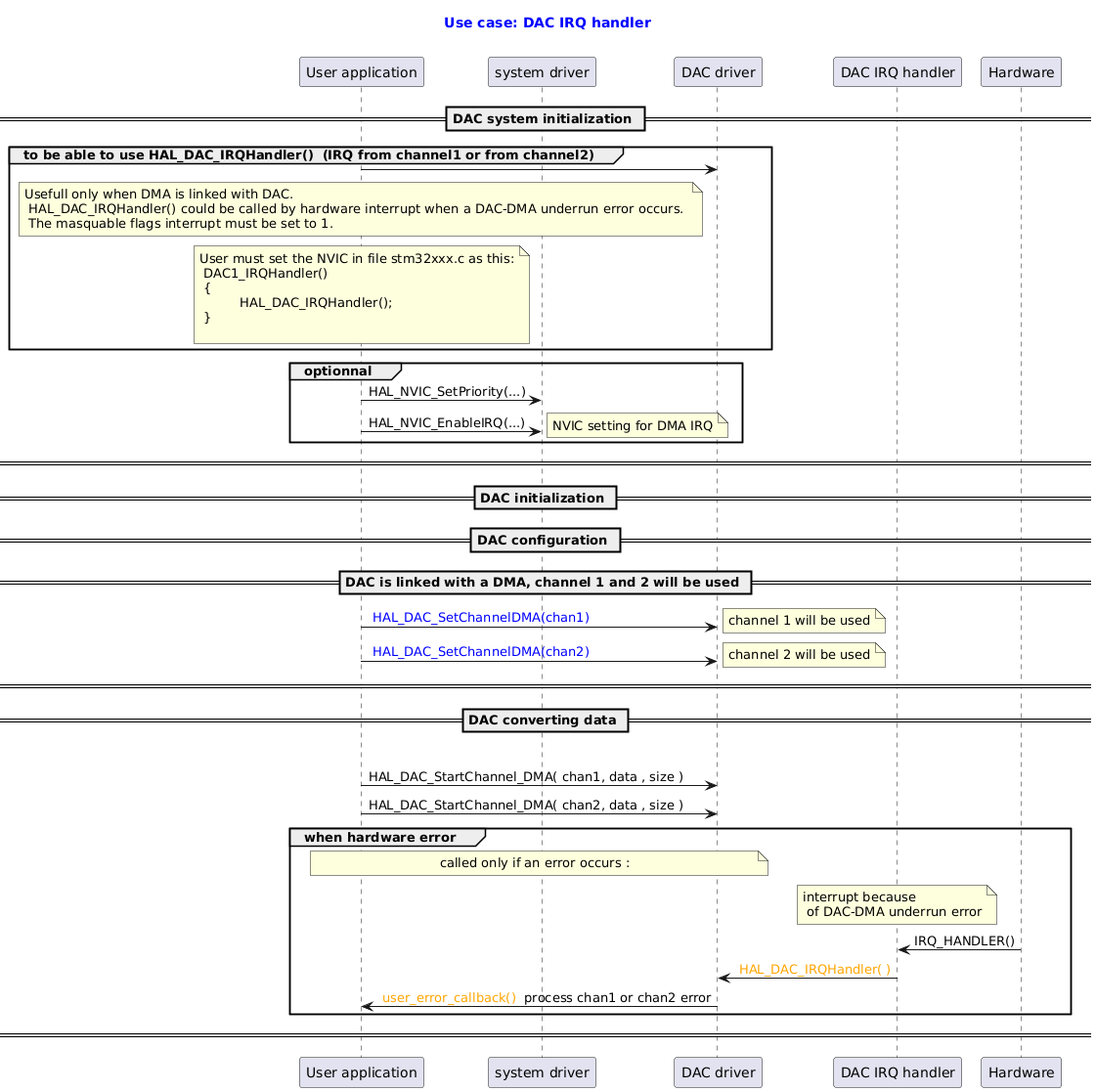
DAC IRQ Handler

@startuml

title
  <font color=blue> Use case: DAC IRQ handler

end title

participant "User application" as user
participant "system driver" as syst
participant "DAC driver" as dac
participant "DAC IRQ handler" as isr
participant "Hardware" as hrdw

== DAC system initialization ==

group  to be able to use HAL_DAC_IRQHandler()  (IRQ from channel1 or from channel2)
user -> dac

note over user:  Usefull only when DMA is linked with DAC. \n HAL_DAC_IRQHandler() could be called by hardware interrupt when a DAC-DMA underrun error occurs. \n The masquable flags interrupt must be set to 1.

note over user:  User must set the NVIC in file stm32xxx.c as this:\n DAC1_IRQHandler()\n {\n \t  HAL_DAC_IRQHandler();\n }\n

end

group optionnal
user -> syst : HAL_NVIC_SetPriority(...)
user -> syst : HAL_NVIC_EnableIRQ(...)
note right: NVIC setting for DMA IRQ

end
== ==

== DAC initialization ==

== DAC configuration ==


== DAC is linked with a DMA, channel 1 and 2 will be used ==
user -> dac : <font color=blue> HAL_DAC_SetChannelDMA(chan1)
note right: channel 1 will be used
user -> dac : <font color=blue> HAL_DAC_SetChannelDMA(chan2)
note right: channel 2 will be used
== ==


== DAC converting data ==

group convertion
user -> dac : HAL_DAC_StartChannel_DMA( chan1, data , size )
user -> dac : HAL_DAC_StartChannel_DMA( chan2, data , size )


group when hardware error
note over user, dac:  called only if an error occurs :
note over isr: interrupt because\n of DAC-DMA underrun error
hrdw -> isr : IRQ_HANDLER()
isr -> dac : <font color=orange> HAL_DAC_IRQHandler( )
dac -> user : <font color=orange> user_error_callback() </font> process chan1 or chan2 error

end

== ==

@enduml

Called functions:

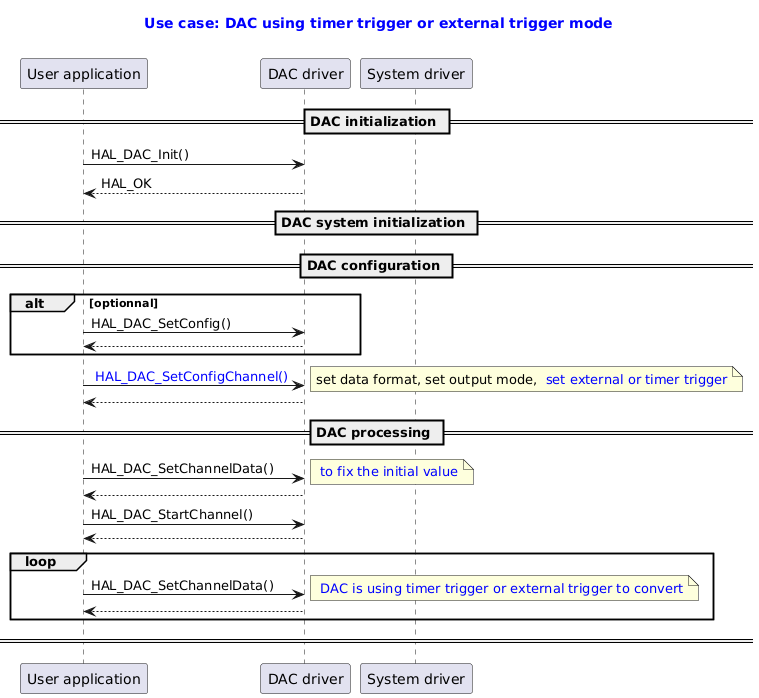
DAC Using Timer Trigger Mode

@startuml

title
  <font color=blue> Use case: DAC using timer trigger or external trigger mode

end title

' Fix order of each column
participant "User application" as user
participant "DAC driver"       as dac
participant "System driver"    as system

== DAC initialization ==
user -> dac : HAL_DAC_Init()
dac --> user : HAL_OK


== DAC system initialization ==


== DAC configuration ==
alt optionnal
user -> dac : HAL_DAC_SetConfig()
dac --> user
end

user -> dac : <font color=blue> HAL_DAC_SetConfigChannel()
note right:  set data format, set output mode, <font color=blue> set external or timer trigger
dac --> user


== DAC processing ==
user ->dac : HAL_DAC_SetChannelData()
note right: <font color=blue> to fix the initial value
dac --> user
user -> dac : HAL_DAC_StartChannel()
dac --> user
loop
user ->dac : HAL_DAC_SetChannelData()
note right: <font color=blue> DAC is using timer trigger or external trigger to convert
dac --> user
end
== ==

@enduml

Called functions:

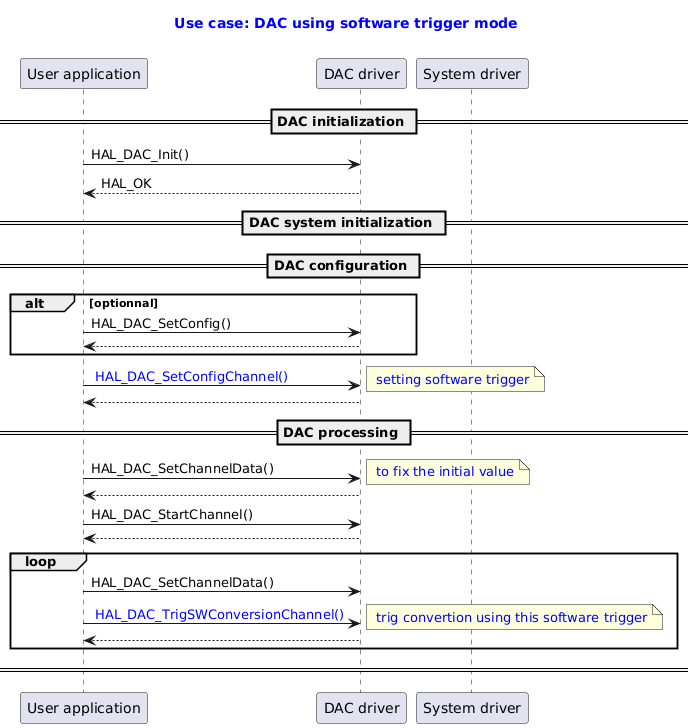
DAC Using Software Trigger Mode

@startuml

title
  <font color=blue> Use case: DAC using software trigger mode

end title

' Fix order of each column
participant "User application" as user
participant "DAC driver"       as dac
participant "System driver"    as system

== DAC initialization ==
user -> dac : HAL_DAC_Init()
dac --> user : HAL_OK

== DAC system initialization ==


== DAC configuration ==
alt optionnal
user -> dac : HAL_DAC_SetConfig()
dac --> user
end

user -> dac : <font color=blue> HAL_DAC_SetConfigChannel()
note right  : <font color=blue> setting software trigger
dac --> user


== DAC processing ==
user ->dac : HAL_DAC_SetChannelData()
note right: <font color=blue> to fix the initial value
dac --> user
user -> dac : HAL_DAC_StartChannel()
dac --> user
loop

user ->dac : HAL_DAC_SetChannelData()
user ->dac : <font color=blue> HAL_DAC_TrigSWConversionChannel()
note right : <font color=blue> trig convertion using this software trigger
dac --> user
end
== ==

@enduml

Called functions:

DAC Using DMA with Single Channel Mode Transfer

@startuml

title
  <font color=blue> Use case: DAC using DMA with single channel mode transfer
  <font color=blue> detailed sequence

end title

participant "User application" as user
participant "DAC driver" as dac
participant "DMA driver" as dma
participant "DMA IRQ handler" as isr
participant "DMA HardWare" as dmahd

== DAC initialization ==
== DMA initialization ==
== DAC configuration ==
alt optional
user -> dac : HAL_DAC_SetConfigChannel( chan1 )
end
== DAC is linked with DMA, channel 1 will be used ==
user -> dac : <font color=blue> HAL_DAC_SetChannelDMA( chan1 )
note right: channel 1 will be used
== ==
user ->dac : HAL_DAC_SetChannelData( chan1, data )
note right: <font color=blue> to fix the initial value
dac --> user
== ==
loop
user -> dac : <font color=blue> HAL_DAC_StartChannel_DMA( <font color=blue> chan1,   \n<font color=blue>                                   data_buffer, data_size )
note right: channel 1 is used\n data in buffer will be sucessively converted

dac -> dma : HAL_DMA_Start_IT()
dmahd -> isr : DMA hardware interrupt
isr -> dma : IRQ_HANDLER()
dma -> dac : DAC_DMA_ChConvHalfCplt()
dma -> dac : DAC_DMA_ChConvCplt()
note right: alias: dma_ch[ch1]->p_xfer_cplt_clbk
dac -> user : user callback over: weak HAL_DAC_ConvCpltCallback( <font color=blue>chan1 )
note right: alias: hdac->p_conv_cplt_cb()\n whole data buffer have been converted

dma -> dma : Clear IRQ
dac -> dac : Clear transfer completed

group  when DMA underrun error
dma -> dac : DAC_DMA_ChError()
end

end
== Stop DAC channel with DMA  ==
user -> dac : <font color=blue> HAL_DAC_StopChannel_DMA( <font color=blue>chan1 )
dac  -> dma : HAL_DMA_Abort_IT()
== ==
@enduml

Called functions:

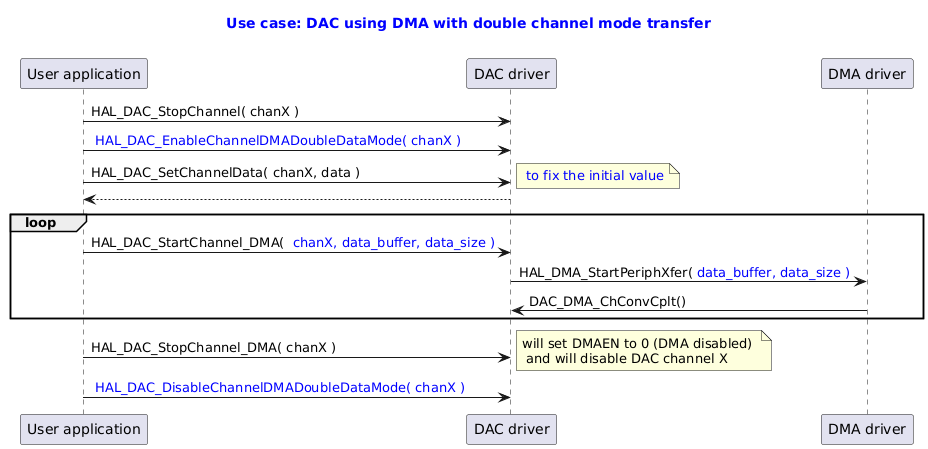
DAC Using DMA with Double Channel Mode Transfer

@startuml

title
  <font color=blue> Use case: DAC using DMA with double channel mode transfer

end title

participant "User application" as user
participant "DAC driver" as dac
participant "DMA driver" as dma


user -> dac : HAL_DAC_StopChannel( chanX )
user -> dac : <font color=blue> HAL_DAC_EnableChannelDMADoubleDataMode( chanX )
user ->dac : HAL_DAC_SetChannelData( chanX, data )
note right: <font color=blue> to fix the initial value
dac --> user

loop
user -> dac : HAL_DAC_StartChannel_DMA( <font color=blue> chanX, data_buffer, data_size )
dac  -> dma : HAL_DMA_StartPeriphXfer(<font color=blue> data_buffer, data_size )
dma -> dac : DAC_DMA_ChConvCplt()
end
user -> dac : HAL_DAC_StopChannel_DMA( chanX )
note right : will set DMAEN to 0 (DMA disabled) \n and will disable DAC channel X
user -> dac : <font color=blue> HAL_DAC_DisableChannelDMADoubleDataMode( chanX )

@enduml

Called functions:

DAC Using DMA with Single Channel, DMA Error Occurring

@startuml

title
  <font color=blue> Use case: DAC using DMA with single channel, DMA  error occuring
  <font color=blue> detailed sequence

end title

participant "User application" as user
participant "DAC driver" as dac
participant "DMA driver" as dma
participant "DMA IRQ handler" as isr


== DAC initialization ==
== DMA initialization ==
== DAC configuration ==
alt optional
user -> dac : HAL_DAC_SetConfigChannel( chan1 )
end

== DAC is linked with DMA, channel 1 will be used ==
user -> dac : <font color=blue> HAL_DAC_SetChannelDMA(chan1)
note right: channel 1 will be used
== ==
user ->dac : HAL_DAC_SetChannelData( chan1, data )
note right: <font color=blue> to fix the initial value
dac --> user
== ==

group <font color=orange> a DMA error occurs on channel 1

user -> dac : <font color=blue> HAL_DAC_StartChannel_DMA( <font color=blue> chan1,   \n<font color=blue>                                   data_buffer, data_size )
note right: channel 1 is used

isr -> dma : IRQ_HANDLER()
note right : <font color=orange> DMA error interrupt
dma -> dac : <font color=orange> DAC_DMA_ChError()

note right: alias: <font color=orange> dma_ch[ch1]->p_xfer_error_clbk
dac -> user : user over weak: <font color=orange> HAL_DAC_ErrorCallback() \n or user <font color=orange>hdac->p_error_cb(hdac)
user -> dac : <font color=orange> HAL_DAC_GetLastError()
dac -> user : <font color=orange> errors
note over user, dac: User could: \n check <font color=orange> errors </font> bit fields, \n stop the DAC and the DMA, \n change configuration of DAC or DMA, then restart.

end

== Stop DAC channel with DMA , stop DAC ==
user -> dac : <font color=blue> HAL_DAC_StopChannel_DMA( <font color=blue>chan1 )
dac  -> dma : HAL_DMA_Abort_IT()

== ==

@enduml

Called functions:

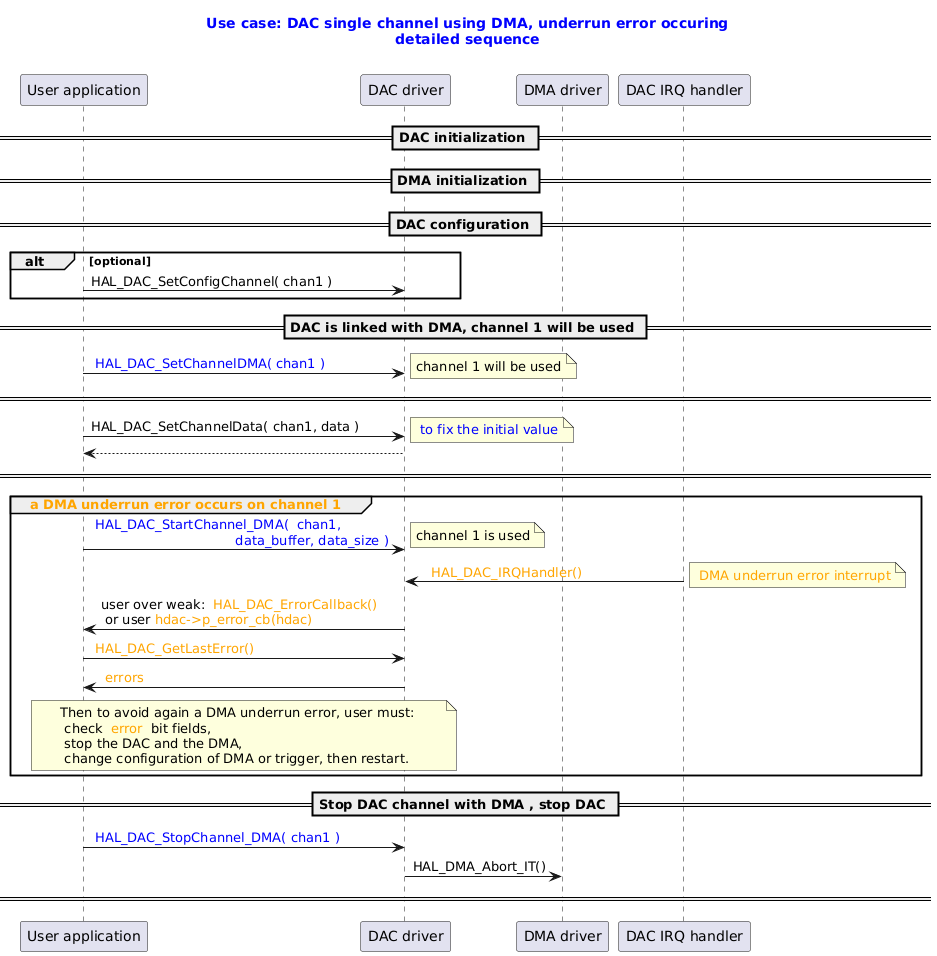
DAC Single Channel Using DMA, Underrun Error Occurring

@startuml

title
  <font color=blue> Use case: DAC single channel using DMA, underrun error occuring
  <font color=blue> detailed sequence

end title

participant "User application" as user
participant "DAC driver" as dac
participant "DMA driver" as dma
participant "DAC IRQ handler" as isr


== DAC initialization ==
== DMA initialization ==
== DAC configuration ==
alt optional
user -> dac : HAL_DAC_SetConfigChannel( chan1 )
end

== DAC is linked with DMA, channel 1 will be used ==
user -> dac : <font color=blue> HAL_DAC_SetChannelDMA( chan1 )
note right: channel 1 will be used
== ==
user ->dac : HAL_DAC_SetChannelData( chan1, data )
note right: <font color=blue> to fix the initial value
dac --> user
== ==
group <font color=orange> a DMA underrun error occurs on channel 1

user -> dac : <font color=blue> HAL_DAC_StartChannel_DMA( <font color=blue> chan1,   \n<font color=blue>                                   data_buffer, data_size )
note right: channel 1 is used


isr -> dac : <font color=orange> <font color=orange> HAL_DAC_IRQHandler()
note right : <font color=orange> DMA underrun error interrupt


dac -> user : user over weak: <font color=orange> HAL_DAC_ErrorCallback() \n or user <font color=orange>hdac->p_error_cb(hdac)
user -> dac : <font color=orange> HAL_DAC_GetLastError()
dac -> user : <font color=orange> errors
note over user, dac: Then to avoid again a DMA underrun error, user must: \n check <font color=orange> error </font> bit fields, \n stop the DAC and the DMA, \n change configuration of DMA or trigger, then restart.

end

== Stop DAC channel with DMA , stop DAC ==
user -> dac : <font color=blue> HAL_DAC_StopChannel_DMA( <font color=blue>chan1 )
dac  -> dma : HAL_DMA_Abort_IT()
== ==
@enduml

Called functions:

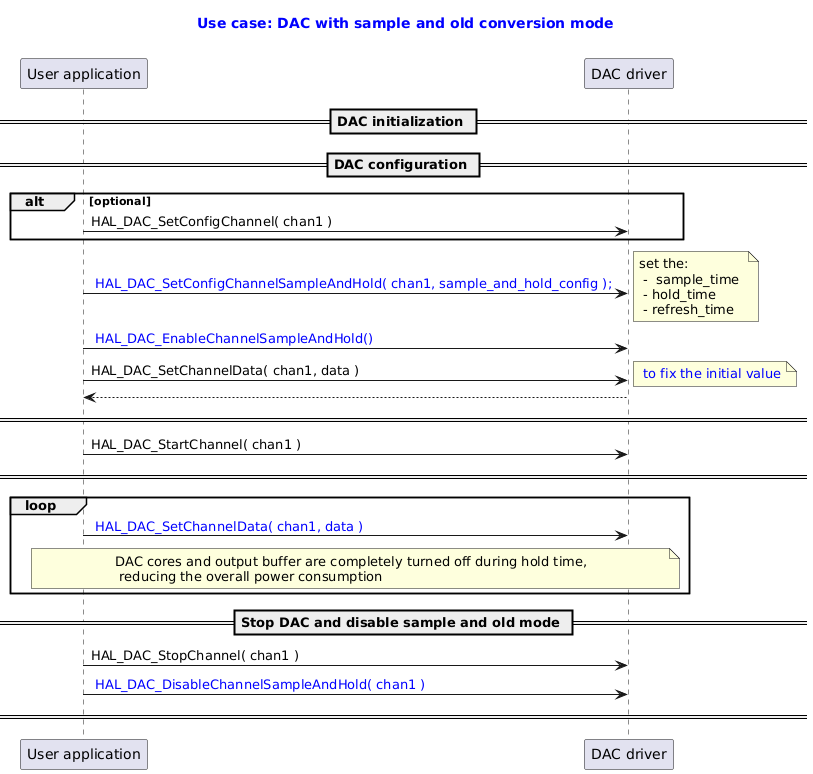
DAC with Sample and Hold Mode

@startuml

title
  <font color=blue> Use case: DAC with sample and old conversion mode

end title

participant "User application" as user
participant "DAC driver" as dac


== DAC initialization ==
== DAC configuration ==
alt optional
user -> dac : HAL_DAC_SetConfigChannel( chan1 )
end
user -> dac : <font color=blue> HAL_DAC_SetConfigChannelSampleAndHold( chan1, sample_and_hold_config );
note right:  set the:\n -  sample_time \n - hold_time \n - refresh_time


user -> dac : <font color=blue> HAL_DAC_EnableChannelSampleAndHold()
user ->dac : HAL_DAC_SetChannelData( chan1, data )
note right: <font color=blue> to fix the initial value
dac --> user
== ==
user -> dac : HAL_DAC_StartChannel( chan1 )
== ==

loop
user -> dac : <font color=blue> HAL_DAC_SetChannelData( chan1, data )
note over user,dac: DAC cores and output buffer are completely turned off during hold time,\n reducing the overall power consumption

end
== Stop DAC and disable sample and old mode ==
user -> dac : HAL_DAC_StopChannel( chan1 )
user -> dac : <font color=blue> HAL_DAC_DisableChannelSampleAndHold( chan1 )
== ==
@enduml

Called functions:

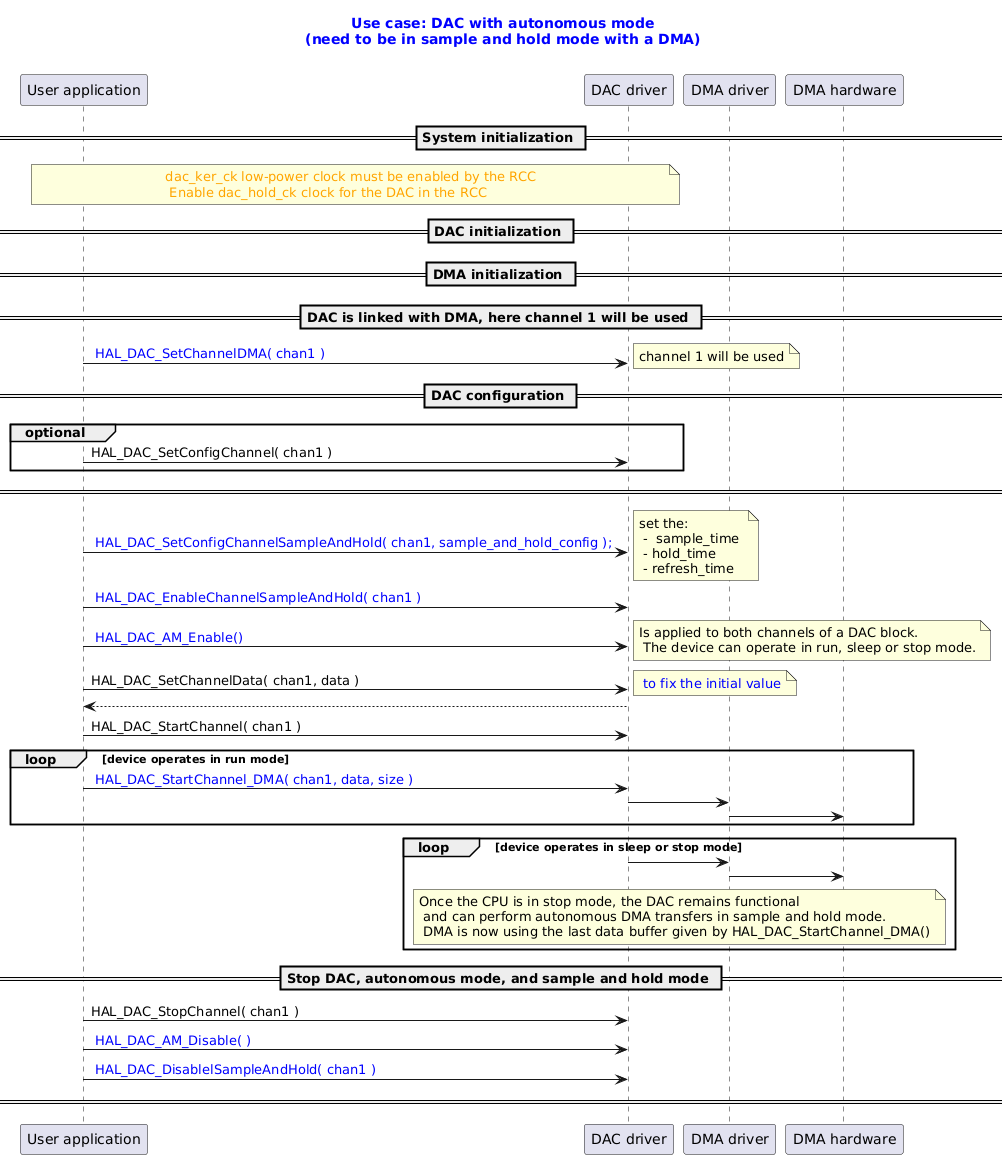
DAC with Autonomous Mode

@startuml

title
  <font color=blue> Use case: DAC with autonomous mode
  <font color=blue> (need to be in sample and hold mode with a DMA)

end title

participant "User application" as user
participant "DAC driver" as dac
participant "DMA driver" as dma
participant "DMA hardware" as dmahdwr

== System initialization ==
note over user, dac: <font color=orange> dac_ker_ck low-power clock must be enabled by the RCC \n <font color=orange> Enable dac_hold_ck clock for the DAC in the RCC

== DAC initialization ==


== DMA initialization ==

== DAC is linked with DMA, here channel 1 will be used ==
user -> dac : <font color=blue> HAL_DAC_SetChannelDMA( chan1 )
note right: channel 1 will be used

== DAC configuration ==

group optional
user -> dac : HAL_DAC_SetConfigChannel( chan1 )
end
== ==


user -> dac : <font color=blue> HAL_DAC_SetConfigChannelSampleAndHold( chan1, sample_and_hold_config );
note right:  set the:\n -  sample_time \n - hold_time \n - refresh_time


user -> dac : <font color=blue> HAL_DAC_EnableChannelSampleAndHold( chan1 )

user -> dac : <font color=blue> HAL_DAC_AM_Enable()
note right:  Is applied to both channels of a DAC block.\n The device can operate in run, sleep or stop mode.

user ->dac : HAL_DAC_SetChannelData( chan1, data )
note right: <font color=blue> to fix the initial value
dac --> user

user -> dac : HAL_DAC_StartChannel( chan1 )


loop device operates in run mode
user -> dac : <font color=blue> HAL_DAC_StartChannel_DMA( chan1, data, size )
dac -> dma
dma -> dmahdwr
end


loop device operates in sleep or stop mode
dac -> dma
dma -> dmahdwr
note over dac,dma: Once the CPU is in stop mode, the DAC remains functional \n and can perform autonomous DMA transfers in sample and hold mode.\n DMA is now using the last data buffer given by HAL_DAC_StartChannel_DMA()
end


== Stop DAC, autonomous mode, and sample and hold mode ==
user -> dac : HAL_DAC_StopChannel( chan1 )
user -> dac : <font color=blue> HAL_DAC_AM_Disable( )
user -> dac : <font color=blue> HAL_DAC_DisablelSampleAndHold( chan1 )
== ==
@enduml

Called functions:

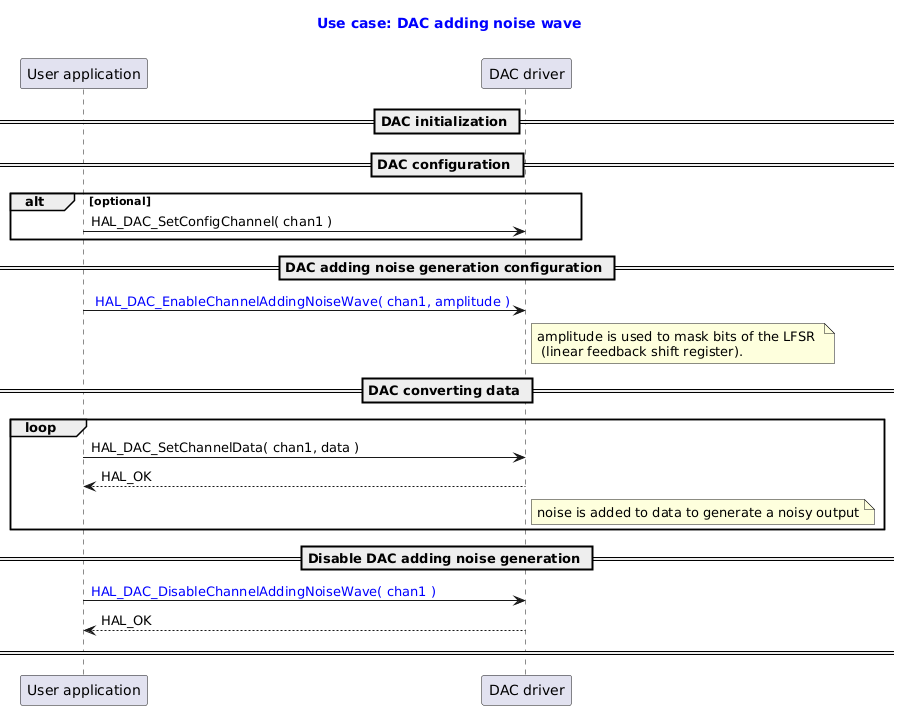
DAC Adding Noise Wave

@startuml

title
  <font color=blue> Use case: DAC adding noise wave

end title

participant "User application" as user
participant "DAC driver" as dac

== DAC initialization ==
== DAC configuration ==
alt optional
user -> dac : HAL_DAC_SetConfigChannel( chan1 )
end
== DAC adding noise generation configuration ==
user -> dac : <font color=blue> HAL_DAC_EnableChannelAddingNoiseWave( chan1, amplitude )
note right dac : amplitude is used to mask bits of the LFSR \n (linear feedback shift register).
== DAC converting data ==

loop
user -> dac : HAL_DAC_SetChannelData( chan1, data )
dac --> user : HAL_OK
note right dac : noise is added to data to generate a noisy output

end

==  Disable DAC adding noise generation ==
user -> dac : <font color=blue>HAL_DAC_DisableChannelAddingNoiseWave( chan1 )
dac --> user: HAL_OK
== ==

@enduml

Called functions:

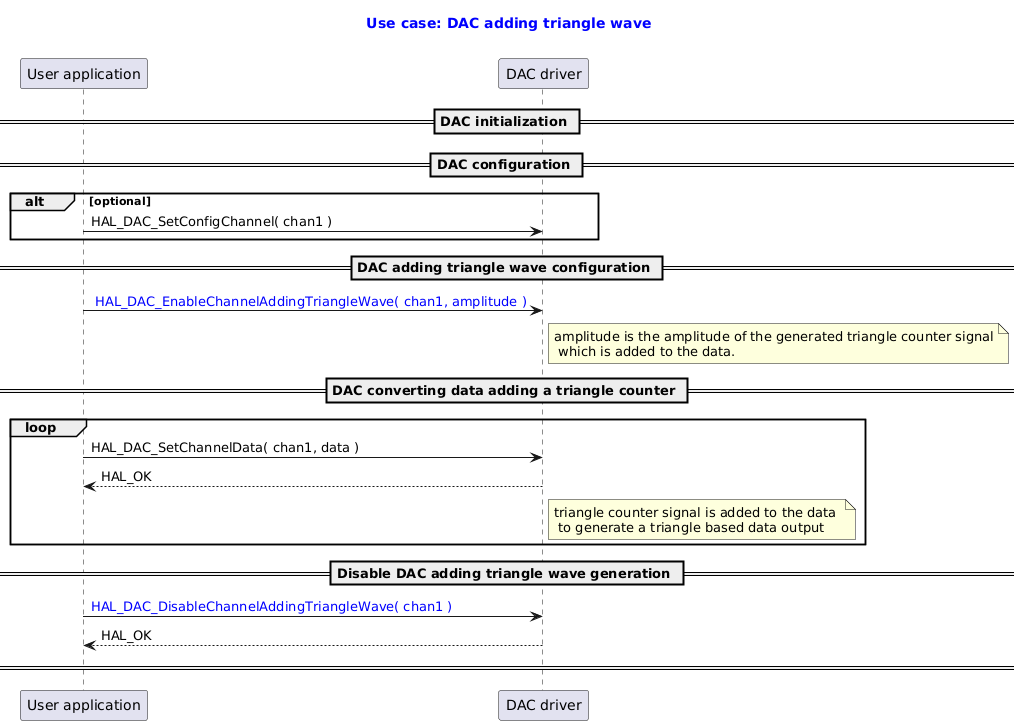
DAC Adding Triangle Wave

@startuml

title
  <font color=blue> Use case: DAC adding triangle wave

end title

participant "User application" as user
participant "DAC driver" as dac

== DAC initialization ==
== DAC configuration ==
alt optional
user -> dac : HAL_DAC_SetConfigChannel( chan1 )
end
== DAC adding triangle wave configuration ==
user -> dac : <font color=blue> HAL_DAC_EnableChannelAddingTriangleWave( chan1, amplitude )
note right dac : amplitude is the amplitude of the generated triangle counter signal\n which is added to the data.
== DAC converting data adding a triangle counter ==

loop
user -> dac : HAL_DAC_SetChannelData( chan1, data )
dac --> user : HAL_OK
note right dac : triangle counter signal is added to the data \n to generate a triangle based data output

end

==  Disable DAC adding triangle wave generation ==
user -> dac : <font color=blue>HAL_DAC_DisableChannelAddingTriangleWave( chan1 )
dac --> user: HAL_OK
== ==

@enduml

Called functions:

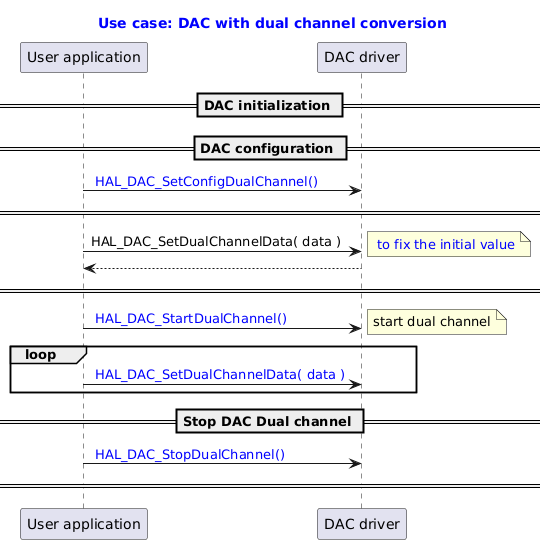
DAC with Dual Channel Conversion

@startuml

title
  <font color=blue> Use case: DAC with dual channel conversion
end title

participant "User application" as user
participant "DAC driver" as dac


== DAC initialization ==
== DAC configuration ==

user -> dac : <font color=blue> HAL_DAC_SetConfigDualChannel()

== ==
user ->dac : HAL_DAC_SetDualChannelData( data )
note right: <font color=blue> to fix the initial value
dac --> user
== ==

user -> dac : <font color=blue> HAL_DAC_StartDualChannel()
note right:  start dual channel

loop
user -> dac : <font color=blue> HAL_DAC_SetDualChannelData( <font color=blue>data )


end
== Stop DAC Dual channel ==
user -> dac : <font color=blue> HAL_DAC_StopDualChannel()
== ==
@enduml

Called functions:

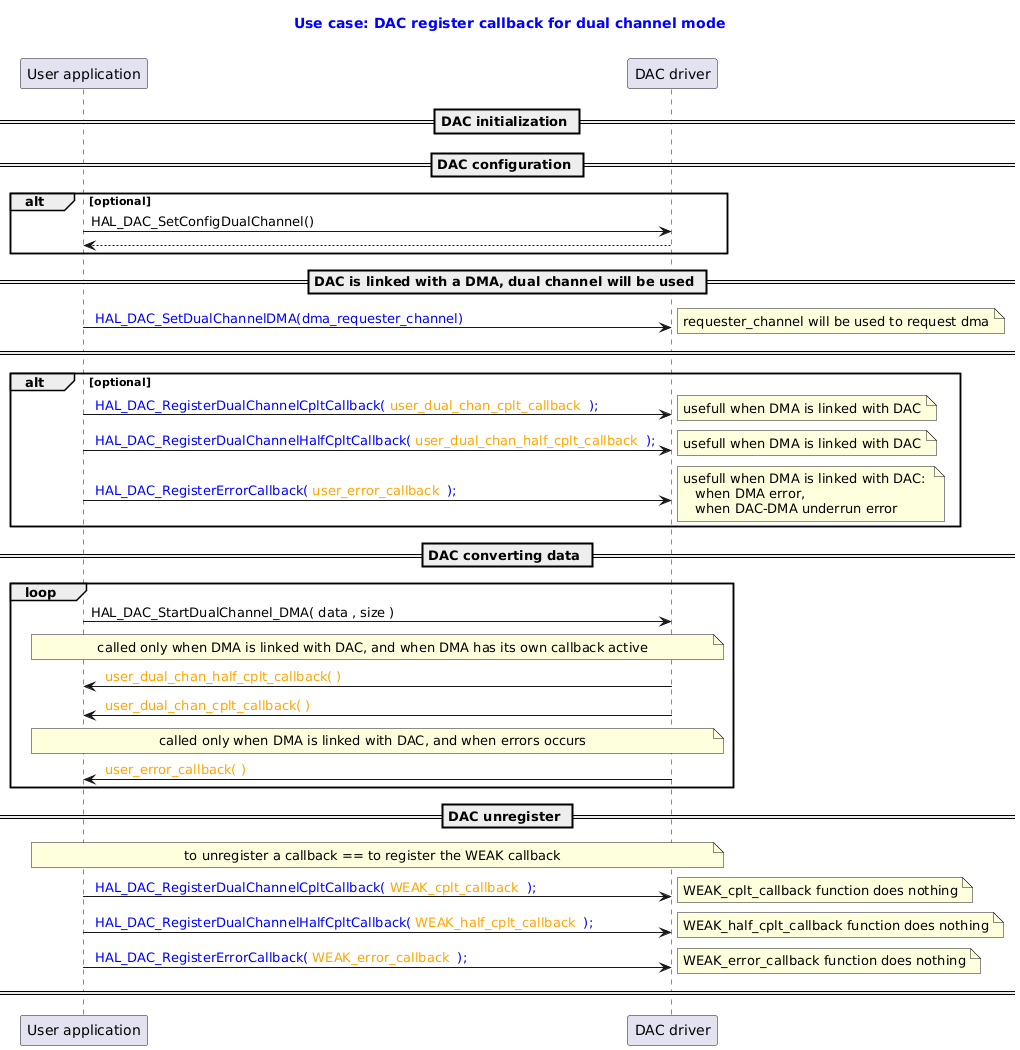
DAC Register Callback for Dual Channel Mode

@startuml

title
  <font color=blue> Use case: DAC register callback for dual channel mode

end title

participant "User application" as user
participant "DAC driver" as dac


== DAC initialization ==

== DAC configuration ==
alt optional
user -> dac : HAL_DAC_SetConfigDualChannel()
dac --> user
end

== DAC is linked with a DMA, dual channel will be used ==
user -> dac : <font color=blue> HAL_DAC_SetDualChannelDMA(dma_requester_channel)
note right: requester_channel will be used to request dma

== ==

alt optional
user -> dac : <font color=blue> HAL_DAC_RegisterDualChannelCpltCallback(<font color=orange> user_dual_chan_cplt_callback <font color=blue> );
note right:  usefull when DMA is linked with DAC
user -> dac : <font color=blue> HAL_DAC_RegisterDualChannelHalfCpltCallback(<font color=orange> user_dual_chan_half_cplt_callback <font color=blue> );
note right:  usefull when DMA is linked with DAC
user -> dac : <font color=blue> HAL_DAC_RegisterErrorCallback(<font color=orange> user_error_callback <font color=blue> );
note right:  usefull when DMA is linked with DAC: \n   when DMA error, \n   when DAC-DMA underrun error

end

== DAC converting data ==

loop
user -> dac : HAL_DAC_StartDualChannel_DMA( data , size )
note over user, dac:  called only when DMA is linked with DAC, and when DMA has its own callback active
dac -> user: <font color=orange> user_dual_chan_half_cplt_callback( )
dac -> user: <font color=orange> user_dual_chan_cplt_callback( )
note over user, dac:  called only when DMA is linked with DAC, and when errors occurs
dac -> user: <font color=orange> user_error_callback( )
end

== DAC unregister ==
note over user, dac: to unregister a callback == to register the WEAK callback
user -> dac :  <font color=blue> HAL_DAC_RegisterDualChannelCpltCallback(<font color=orange> WEAK_cplt_callback <font color=blue> );
note right:  WEAK_cplt_callback function does nothing
user -> dac :  <font color=blue> HAL_DAC_RegisterDualChannelHalfCpltCallback(<font color=orange> WEAK_half_cplt_callback <font color=blue> );
note right:  WEAK_half_cplt_callback function does nothing
user -> dac :  <font color=blue> HAL_DAC_RegisterErrorCallback(<font color=orange> WEAK_error_callback <font color=blue> );
note right:  WEAK_error_callback function does nothing
== ==

@enduml

Called functions:

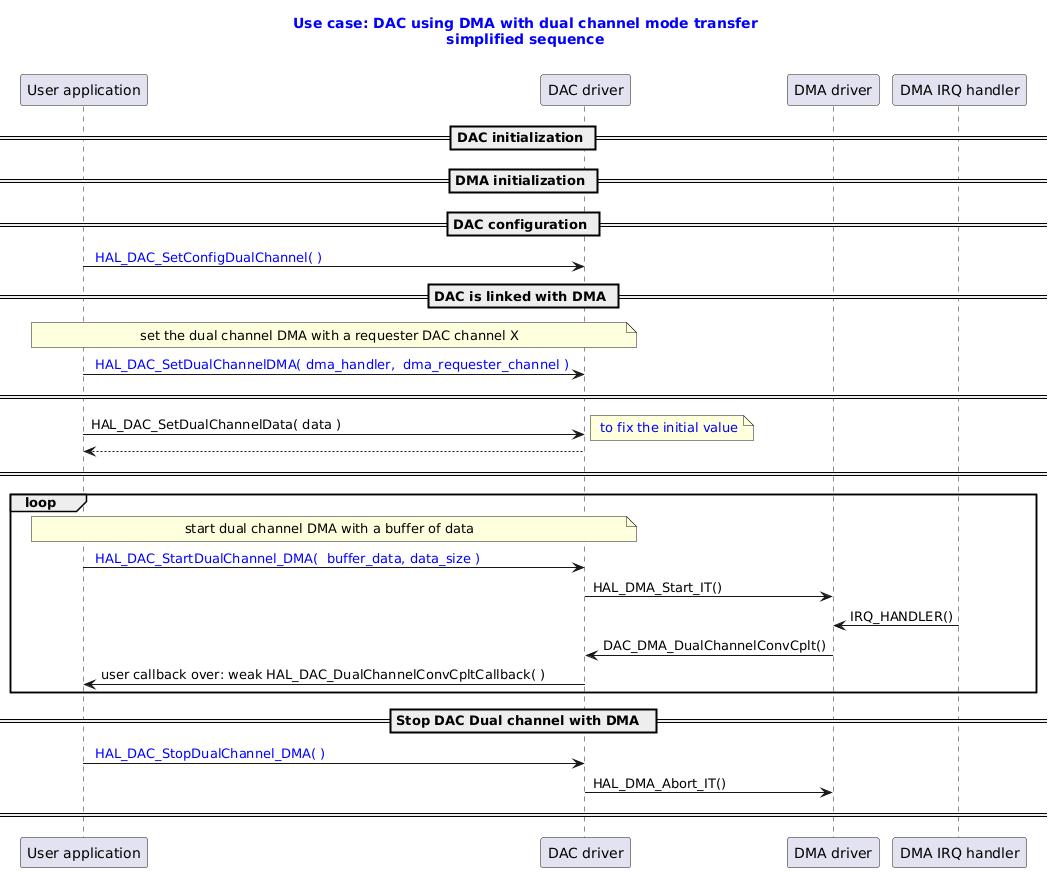
DAC Using DMA with Dual Channel Mode Transfer

@startuml

title
  <font color=blue> Use case: DAC using DMA with dual channel mode transfer
  <font color=blue> simplified sequence

end title

participant "User application" as user
participant "DAC driver" as dac
participant "DMA driver" as dma
participant "DMA IRQ handler" as isr


== DAC initialization ==
== DMA initialization ==
== DAC configuration ==

user -> dac :  <font color=blue> HAL_DAC_SetConfigDualChannel( )

== DAC is linked with DMA ==
note over user,dac:  set the dual channel DMA with a requester DAC channel X
user -> dac : <font color=blue> HAL_DAC_SetDualChannelDMA( dma_handler,  dma_requester_channel )
== ==

user ->dac : HAL_DAC_SetDualChannelData( data )
note right: <font color=blue> to fix the initial value
dac --> user
== ==

loop
note over user,dac:  start dual channel DMA with a buffer of data
user -> dac : <font color=blue> HAL_DAC_StartDualChannel_DMA( <font color=blue> buffer_data, data_size )

dac -> dma : HAL_DMA_Start_IT()
isr -> dma : IRQ_HANDLER()
dma -> dac : DAC_DMA_DualChannelConvCplt()
dac -> user : user callback over: weak HAL_DAC_DualChannelConvCpltCallback( )

end
== Stop DAC Dual channel with DMA  ==
user -> dac : <font color=blue> HAL_DAC_StopDualChannel_DMA( )
dac  -> dma : HAL_DMA_Abort_IT()
== ==
@enduml

Called functions: